

What if a single mic upgrade made your videos sound instantly professional?
Audio is the silent make-or-break factor; poor sound drives viewers away and undermines your message.
The right microphone can sharpen dialogue, tame room reflections, and boost vocal clarity so audiences stay tuned.
But the best mic for YouTube depends on your voice, your room, and how you create content.
Convenience, tonal character, and noise rejection all matter, and choices often prioritize one over the others.
Finding the right balance is the key to consistent, pleasing audio.
In this guide we compare five top microphones across honest, real-world creator setups.
We tested them on desk-based talking heads, live streaming, narrated voiceovers, and on-location clips to see what really works.
Expect practical impressions you can trust, not just spec-sheet claims.
You’ll get honest pros and cons, clear performance notes, and straightforward advice on fit.
We focus on real usability so you can pick confidently and record better audio right away, without endless tweaking.
No heavy jargon—just the essentials that truly change how your channel sounds to listeners.
Whether you’re starting a channel, upgrading your desk kit, or shooting outside, this guide points you to the right mic for your needs.
By the end you’ll know which mic style suits your content, the trade-offs to expect, and how each choice affects viewer engagement.
Ready to find the best mic for YouTube for your voice and your budget?
1. Shure SM7B Overview

Shure SM7B XLR Dynamic Microphone
Studio-grade vocal capture with warm, neutral tone and exceptional off-axis rejection for broadcasting, podcasting, and professional recording.
Check PriceThe Shure SM7B is a dynamic XLR microphone with a cardioid pattern built for studio and professional YouTube videos, podcasts, and voiceovers. As a photographer who often narrates and records on-location commentary, I appreciate how it delivers a broadcast-quality sound that sits well in mixes. Its wide frequency response gives vocals warmth and presence without sounding harsh.
One of the SM7B’s standout features is excellent noise rejection; it’s designed to keep background and electrical noise out of the recording. The built-in air-suspension shock isolation and internal pop filter cut out mechanical bumps and plosives, so you spend less time fixing clips in post. That combination makes it ideal for controlled studio environments where clarity is paramount.
Real-world feedback backs this up—top YouTubers and podcasters favor the SM7B for a clear, rich voice that minimizes room echo. Do note it works best with a quality audio interface and preamp (requires more gain), so you’ll need proper outboard gear to get it singing. That extra gear is part of why this mic leans toward a more committed setup rather than a casual plug-and-play solution.
Build quality is robust and heavy-duty, which I like because the mic stays put and feels reliable during long shoots. The trade-off is size and weight, so it’s not the most portable option if you’re mobile or travel-heavy. For studio-bound creators who want a professional, warm, radio-style tone, the SM7B is hard to beat.
- Outstanding background and electrical noise rejection
- Warm, natural, professional voice tone
- Durable, heavy-duty construction
- Internal isolation reduces mechanical noise and post-production
- Requires dedicated audio interface/preamp (not USB)
- Higher price and setup complexity
2. Blue Yeti X Overview

Blue Yeti X USB Condenser Microphone
Versatile plug-and-play USB mic with multiple pickup patterns, precise gain control, and rich, detailed sound for streaming and content creation.
Check PriceThe Blue Yeti X is a USB condenser with multiple polar patterns, designed for creators who need a versatile, plug-and-play mic for streaming, podcasts, voiceovers and small-group recordings. Its cardioid, bidirectional, stereo and omnidirectional modes make it simple to switch between solo work, interviews and ambient captures without changing hardware.
From a practical standpoint, the built-in mute button and real-time headphone monitoring with volume control are extremely useful on live streams and recording sessions. You can monitor levels instantly and cut audio when needed, which shortens setup time and reduces retakes.
Because it’s USB, the Yeti X requires no audio interface — that’s a big win for creators who want solid sound without the extra gear. The durable metal body also holds up to regular use on desktop rigs and in home studios.
Do keep in mind condenser sensitivity: the Yeti X will pick up more ambient noise than dynamic microphones, so it benefits from decent room acoustics or simple treatment. In many home setups this is manageable, but if you record in noisy environments you may hear more background hiss.
Another practical consideration is its size and weight; on small desks the mic and its desktop stand can feel cumbersome and limit monitor placement. If you have a compact workspace, plan the layout before buying.
- Four selectable pickup patterns
- USB connectivity; no audio interface required
- Real-time headphone monitoring with volume control
- Durable metal body
- Large size and weight can be cumbersome on small desks
- Picks up more background noise than dynamic mics
3. Rode NT-USB And NT-USB Mini Overview

Rode NT-USB Mini USB Condenser Microphone
Compact desktop condenser delivering clear, professional vocals, easy USB connectivity, and low-latency monitoring for podcasts and home recording.
Check PriceAs a photographer who also records voiceovers and on-camera commentary, I appreciate tools that make my workflow simple and sound great. The Rode NT‑USB and its smaller NT‑USB Mini are USB condenser mics with a cardioid pattern designed for solo creators, streaming, and voice work. They plug straight into a laptop, so you can get studio‑like clarity without an audio interface.
What stands out is the sound. Many users report the Rode gives a clearer, warmer tone than multi‑pattern USB mics in the same price bracket — specifically, better than the Blue Yeti in cardioid mode. That tighter cardioid pickup also helps limit room noise when you’re recording in a less‑than‑perfect space.
The Mini version is especially useful for small desks and on‑the‑go setups because it’s compact and lightweight. Both models give you headphone monitoring and on‑unit volume controls, so you can zero in on levels while you record. Rode’s Connect software adds real‑time signal processing, which is handy for live streams or quick edits.
There are tradeoffs to be aware of. The single cardioid pattern makes these mics less flexible for interviews or multi‑person setups. And the NT‑USB Mini doesn’t have a gain dial, so dialing in levels can feel less intuitive than larger units with physical gain controls.
Overall, if you’re a solo YouTuber, streamer, or creator prioritizing clear vocal tone and ease of use, the Rode NT‑USB/NT‑USB Mini is a solid, practical choice that balances studio sound with plug‑and‑play convenience.
- Reported better sound quality than Blue Yeti in cardioid mode
- Compact and lightweight (Mini)
- Headphone monitoring jack and volume controls
- Included software for streamers
- Single polar pattern only (cardioid)
- NT-USB Mini lacks a gain dial; levels less intuitive
4. HyperX QuadCast S Overview
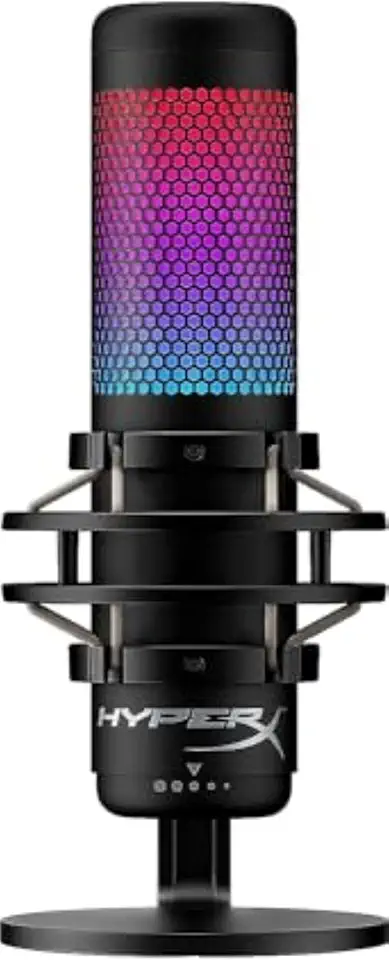
HyperX QuadCast S USB Condenser Microphone
Eye-catching RGB mic with anti-vibration mount, selectable polar patterns, and crisp, broadcast-ready audio tailored for gamers and streamers.
Check PriceAs a photographer who records behind-the-scenes commentary and tutorial videos, I appreciate a microphone that’s flexible and easy to use. The HyperX QuadCast S is a USB condenser with four selectable polar patterns — cardioid, omnidirectional, bidirectional, and stereo — so it adapts to solo narration, interviews, or ambient capture without swapping gear.
Physically it feels designed for streaming and quick setups. An integrated shock mount does a solid job of reducing desk vibrations and accidental bumps, which saves time in post-production and keeps voice tracks clean.
The QuadCast S also leans into streamer-friendly features. RGB lighting and a tap-to-mute function with a clear indicator make live recording intuitive and visual, helping you avoid accidental audio mishaps during takes.
On sound quality the mic performs well for its class. It has a relatively quiet noise floor, so you get less background hiss in recordings, and the condenser capsule captures detail that suits tutorial narration and casual voiceover work.
There are a couple of caveats. The built-in pop filter is helpful, but some users — myself included when I push plosives closer to the mic — sometimes prefer adding an external filter for very crisp vocal work. Also, while the overall build is solid for the price, a few plastic components don’t feel as premium as metal-bodied options.
- Multiple polar patterns (cardioid, omni, bidirectional, stereo)
- Built-in shock mount reduces vibrations
- Tap-to-mute with clear indicator
- Quiet noise floor; solid build for the price
- Built-in pop filter sometimes insufficient
- Some plastic parts feel less premium
5. Shure MV7 Overview

Shure MV7+ USB-C & XLR Dynamic Microphone
Hybrid USB-C and XLR mic offering studio-quality vocals, automatic voice leveling, and intuitive touch controls for podcasters and creators.
Check PriceThe Shure MV7 is a hybrid dynamic mic that gives you USB plug-and-play convenience with an XLR upgrade path when you outgrow your desktop setup. It’s cardioid, built for podcasters, streamers, and YouTubers who want a broadcast-style result without an entire studio rig.
In practice it delivers that “radio voice” quality—clear, warm, and rich—while rejecting room noise thanks to the dynamic capsule. That makes it a strong choice for creators recording in untreated rooms or less-than-ideal acoustics.
Shure built helpful onboard tools into the MV7. You get built-in digital effects like a denoiser and pop filter which reduce post-production work, plus easy USB/XLR switching when you need more professional hardware.
The touch interface is intuitive. The LED mute feedback is handy during live streams and recordings so you always know your mic state at a glance.
If you like fiddling with tone, Shure Motiv software lets you customize sound settings and tailor the mic to your voice. Do note that setup and software management add a step compared with zero-config mics.
Overall, the MV7 is mostly a win for creators who want broadcast-like sound without immediate investment in an audio interface. It’s a bit pricier than basic USB mics and requires some software setup, but its isolation, tone, and upgrade flexibility make it worth considering for serious YouTubers.
- Excellent sound isolation and broadcast-like tone
- Suited for untreated rooms (dynamic capsule)
- Intuitive touch mute with visual LED feedback
- Shure Motiv software enables sound customization
- More expensive than many beginner USB mics
- Software/setup may be complex for new users
How To Choose The Right YouTube Microphone
Choosing the right microphone for YouTube starts the same way I frame a shot: know your subject and your space. If you record in a treated room, you can afford to use a sensitive condenser for detail; if you’re in a small untreated room or on the go, a dynamic or directional mic will save you from capturing every echo and passing car.
Think about the content first. Talking-heads, podcasts, and voiceovers benefit from mics that emphasize warmth and reject background noise, while music and singing need a large-diaphragm condenser to capture nuance and range.
Pickup pattern matters more than most new creators realize. Cardioid is the safe, everyday choice for single-speaker work; bidirectional is perfect for sit-down interviews; omnidirectional is useful when you want to capture room ambience or multiple voices; shotgun and lavalier options are best for run-and-gun vlogging or outdoor work where directionality and portability count.
Decide on connectivity by your workflow. USB is plug-and-play and great for livestreams and quick setups, while XLR opens the door to better preamps, mixer control, and future upgrades. If you opt for a microphone that needs more gain, factor in an audio interface or preamp—some broadcast-style dynamics demand it to sing.
Features like onboard headphone monitoring, mute switches, built-in pop filters, and companion software aren’t just conveniences; they can save you editing time. If you stream live, real-time monitoring and easy muting are worth paying for.
Finally, don’t overlook placement and accessories. A good shock mount, pop filter, and even a few acoustic panels will often improve your sound far more than swapping mics. Test microphones in your actual recording spot before committing; the best mic is the one that works with your voice, your environment, and your workflow.
Mics For Different YouTube Content
Choosing a mic for your YouTube shoot is much like choosing a lens for a scene: match the tool to the job and the room. If I’m shooting outside or moving around, I reach for a lavalier or a compact shotgun. Lavs give hands-free freedom and consistent levels when clipped correctly, while a shotgun on a short boom keeps focus on your voice and rejects side noise; just don’t forget a windscreen outdoors.
For talking-head videos and podcasts in less-than-perfect rooms, a dynamic broadcast mic (think SM7B or MV7) is my go-to. These capsules shrug off room hiss and HVAC noise, and they give that warm, intimate “radio” tone that fills the frame the way a good portrait lens fills the image.
When music or singing is the subject, a large-diaphragm condenser is the clear choice. It captures nuance and high-frequency detail, so record in a treated space, use a pop filter and shock mount, and position the mic to suit the vocal style—close for intimacy, a little farther for air.
Interviews and multi-person setups demand flexibility: multiple lavaliers or a combination of lavs and a shotgun. Lavs isolate each voice for clean editing, while a well-placed shotgun picks up a natural room blend without cluttering your frame with stands and cables.
Voiceover and narration benefit from either a high-quality condenser in a quiet booth or a broadcast dynamic for untreated rooms. Whichever you choose, aim for consistent mic distance and a gentle off-axis angle to tame plosives.
For educational or how-to videos where you move and demonstrate, a compact shotgun mounted above the frame is ideal. It keeps audio focused on the presenter while preserving mobility and a clean visual composition.
Finally, remember practicality: USB mics are perfect for quick, portable setups and solo creators. If you want control, upgrade paths, or studio-level tone, pick XLR and invest in an interface and a quiet space—good audio is as much about the room as the mic itself.
What People Ask Most
What is the best microphone for YouTube?
There is no single best microphone for every creator; the right choice depends on your content, recording environment, and workflow preferences. Pick a mic that matches your needs for portability, noise rejection, and convenience.
What microphone do YouTubers use for clear audio?
Creators often choose dynamic or high-quality condenser microphones depending on the room and desired tone, as these can deliver clear, natural-sounding voices. Proper placement, isolation, and a decent interface or preamp also play a big role in clarity.
What is the best mic for YouTube vlogging?
Lavalier and shotgun microphones are common for vlogging because they offer directional pickup and portability for on-the-go recording. These types help reduce background noise and keep the voice consistent while moving.
What microphone is best for YouTube gaming and commentary?
USB multipattern condensers and dedicated streamer microphones are popular for gaming and live commentary because they combine ease of use with useful streaming features. Built-in shock mounts, mute controls, and reliable monitoring improve the live workflow.
Do YouTubers need a USB or XLR microphone?
USB microphones are convenient for plug-and-play setups and live streaming, while XLR microphones offer more flexibility for professional setups and future upgrades. Choose based on how much control and expandability you want versus simplicity.
What microphone is best for YouTube voiceovers and podcasts?
Broadcast-style dynamic microphones and large-diaphragm condensers are commonly used for voiceovers and podcasts because they provide a warm, consistent vocal tone. Prioritize isolation and a flat, natural response for narration work.
How do I choose the best microphone for YouTube videos?
Match the microphone type and pickup pattern to your content, room treatment, and whether you need portability or studio quality. Also consider connectivity, monitoring options, and any software features that fit your workflow.
Conclusion For Best Mic For YouTube
Choosing the right microphone comes down to matching its strengths to your content, recording environment, pickup pattern, and connectivity needs so your voice sounds as clear and natural as possible.
That means weighing plug-and-play convenience against the control and headroom that XLR setups and broadcast-style dynamics can offer, then picking the option that fits your workflow and budget.
Practical testing in your actual space—listening for background noise, monitoring latency, and checking comfort and mounting—will quickly reveal which mic performs best for your videos.
If you want to sharpen your audio and production skills, take a look through more guides and reviews on the site to learn techniques and setup tips that match your goals.
Please leave a comment with your questions or experiences below; we usually reply within a few hours and are happy to help you pick the right mic for your channel.





0 Comments