

Is your Mac Mini being held back by the wrong keyboard and mouse?
A great input pair can transform everyday computing into a smoother, faster, and more comfortable experience.
This guide helps Mac Mini owners pick the right keyboard and mouse for their needs.
We selected five standout combos that fit different styles and budgets.
They range from minimalist low-profile sets to tactile mechanical boards, ergonomic workhorses, compact travel options, and value-minded bundles.
Each choice was evaluated for how well it pairs with a Mac Mini setup.
You’ll get a clear comparison on the features that truly matter.
We evaluate typing feel, ergonomics, connectivity, battery life, and ease of pairing with a Mac Mini.
Real-world comfort and desk footprint are given equal weight.
Expect practical insight rather than specs and jargon.
We distill user feedback and hands-on impressions into readable takeaways.
You’ll learn which trade-offs are worth accepting and which to avoid.
Whether you type all day, edit photos, or casually browse, the right combo matters.
This guide helps you prioritize what matters for your workflow and desk setup.
Ready to upgrade your Mac Mini input gear? Read on for concise recommendations and no-nonsense reasoning.
1. Apple Magic Keyboard With Magic Mouse 2

Apple Magic Mouse
Sleek multi-touch wireless mouse with precise tracking, ergonomic low-profile design and seamless pairing for effortless navigation and gesture control.
Check PriceAs a photographer who spends hours culling and editing images, I appreciate tools that let me stay focused on the frame — not the peripherals. The Apple Magic Keyboard paired with the Magic Mouse 2 is designed to disappear into your workflow: sleek, minimalist, and very flat, it mirrors the feel of a MacBook and keeps my desk visually clean.
The keyboard’s low profile and quiet keys make late-night editing sessions less intrusive to others, and many users find it familiar for long typing sessions. It’s compact and lightweight, which is great if you tuck the Mac Mini into a small studio desk or travel with a portable setup.
The Magic Mouse 2’s multi-touch surface is a photographer’s small but powerful ally — swiping and scrolling gestures integrate tightly with macOS, letting me quickly navigate timelines, zoom images, and move between windows without constantly reaching for keyboard shortcuts. Pairing via Bluetooth is effortless and both devices recharge with a Lightning cable, so you’re not swapping disposables mid-project.
That said, ergonomics matter during marathon retouching days. The mouse’s low profile offers smooth tracking but can cause hand fatigue for extended use, especially if you prefer a more contoured grip. Likewise, the keyboard’s shallow key travel may feel a bit “mushy” if you want more tactile feedback for long-form writing.
Overall, if you value seamless macOS integration, a minimal footprint, and intuitive gesture control that mirrors the trackpad experience, this Apple combo is a strong, stylish choice for Mac Mini studios — just consider an ergonomic mouse if your sessions run long.
- Excellent macOS integration
- Compact, lightweight design
- Long-lasting rechargeable batteries
- Magic Mouse gestures boost productivity
- Mouse can cause hand fatigue
- Keyboard’s shallow key travel feels “mushy”
2. Logitech MX Keys/MX Master 3 For Mac

Logitech MX Keys S Combo for Mac
Premium Mac-focused wireless keyboard and mouse duo offering quiet optimized keys, smart backlighting, long battery life and cross-device flow.
Check PriceAs a photographer who spends hours culling and retouching images, the Logitech MX Keys paired with the MX Master 3 for Mac feels like a thoughtfully engineered workstation set. The MX Keys has ergonomic, well-spaced keys with satisfying travel and slight curves that guide your fingertips, making long typing sessions far less fatiguing.
The MX Master 3 is built for precision — its ergonomic shape and customizable buttons let you map common editing actions and scroll through timelines smoothly with a 4000 DPI sensor for pixel-accurate control. Together they reduce wrist strain and improve workflow speed, which is especially noticeable during extended editing marathons.
Connectivity is rock solid: excellent Bluetooth connectivity and multi-device pairing — plus Logitech Flow — make switching between your Mac Mini, laptop, or even another workstation seamless. The keyboard’s smart backlighting auto-adjusts to ambient light, so you won’t be hunting for keys in dim studios or late-night sessions.
There are trade-offs: the combo has a larger footprint and is heavier than minimalist options, so it’s not ideal if you prefer a super-compact, ultra-portable kit. But for photographers and creatives who prioritize comfort, customization, and stable wireless performance, this combo feels professional-grade and future-proof.
- Reduces wrist strain
- Highly customizable mouse for pros/creatives
- Excellent Bluetooth connectivity & multi-device pairing
- Smart backlit keyboard illumination
- Larger footprint for small desks
- Heavier, less portable than minimalist options
3. NuPhy Halo75 Mechanical Keyboard (Mac)
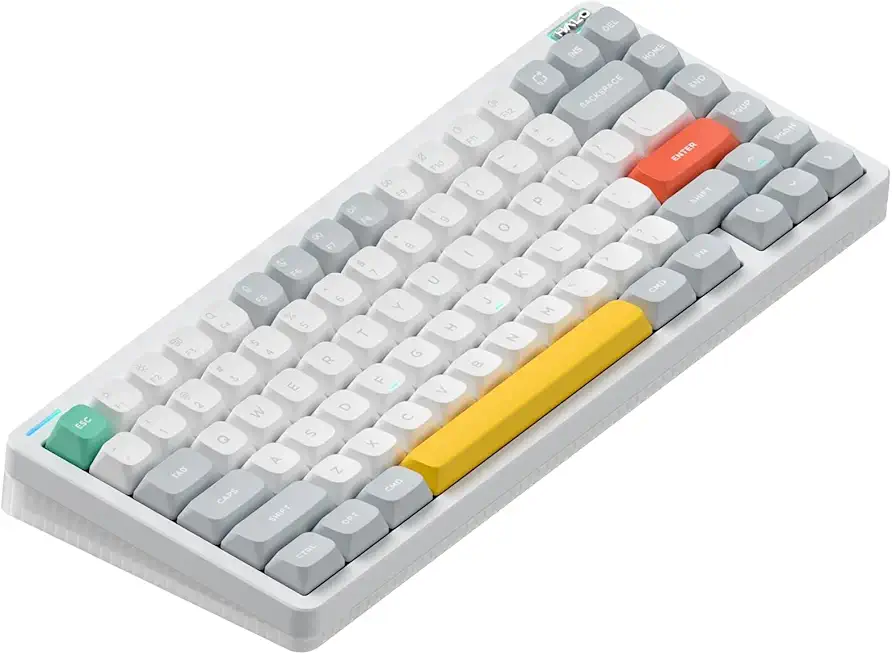
NuPhy Halo75 V2 75% Hot-Swappable Wireless Mechanical Keyboard 83-key Bluetooth/2.4GHz/USB-C
Compact 75% hot-swappable mechanical keyboard with customizable switches, wireless and wired connectivity, programmable RGB and premium aluminum build.
Check PriceAs a photographer who spends long hours tethered to a Mac Mini, I appreciate a keyboard that feels precise and deliberate — the NuPhy Halo75 delivers that mechanical clarity. It’s a tactile board with deeper key travel that often improves typing speed and accuracy for many users, and the audible feedback has a satisfying, camera-shutter-like snap that makes repetitive work less fatiguing.
The Mac version is thoughtful about platform needs: Mac-labeled function keys and an easy Mac/Windows layout switch remove the guesswork when jumping between machines. Connectivity is flexible too, offering both Bluetooth and a USB dongle so you can choose convenience or low-latency reliability depending on your workflow.
Build quality stands out: durable PBT keycaps give a pleasant textured feel under the fingers and resist shine over time. There’s a “ghost bar” silicon dampening pad under the space bar that softens the sound and feel, improving overall typing comfort during marathon editing or captioning sessions.
For typists and coders this keyboard’s tactile and auditory feedback is a clear win — it helps reduce mistakes and makes long sessions more enjoyable. That said, the taller keycaps do require an adjustment period, so expect a short transition before you reach full speed.
Also keep in mind the Halo75 is heavier and bulkier than ultra-slim boards; it’s built for a stable desktop setup rather than pocketable portability. If you value solid construction, satisfying mechanics, and Mac-friendly layout switches, this is a very good choice for a Mac Mini workstation.
- Mechanical tactile and auditory feedback
- Bluetooth and USB dongle connectivity
- Solid build quality with PBT keycaps
- Mac mode switch simplifies Mac usage
- Taller keycaps require adjustment
- Bulkier and heavier; less portable
4. Macally ACEBT Keyboard and Mouse (Mac)

Macally Bluetooth Keyboard and Mouse Combo 110-key Rechargeable
Rechargeable Bluetooth keyboard and mouse set featuring full-size 110-key layout, quiet typing, extended battery and plug-and-play convenience.
Check PriceMacally’s ACEBT keyboard and mouse combo is a value-focused, Mac-friendly package built around multi-device Bluetooth support. It pairs across Mac, iOS, PC, and Android, letting you switch between up to three devices without fuss.
The keyboard uses quiet scissor switches with decent key travel and a good range of Mac shortcuts and keys. That makes it a sensible choice if you want familiar macOS controls and a low-noise typing experience in shared spaces.
The mouse is designed to be silent and offers three DPI settings for basic sensitivity adjustments. Reviewers note long battery life and that charging cables are included, so you won’t be hunting for replacements—useful for anyone who wants low maintenance gear.
As a photographer who values a tidy, quiet studio, I appreciate how this combo minimizes desk noise and supports multiple devices—handy when switching from a Mac to an iPad or phone during shoots. If you want premium tactile feedback or an ergonomically sculpted mouse for all-day use, this kit won’t match higher-end mechanical keyboards or ergonomic mice. But for the price-conscious user who needs reliable Bluetooth switching, rechargeable power, and Mac-centric shortcuts, the Macally ACEBT is a practical, no-frills option.
- Multi-device pairing across Mac, iOS, PC, and Android (up to 3 devices)
- Rechargeable batteries with long runtime and included charging cables
- Quiet keyboard and mouse suitable for shared environments
- Useful Mac shortcuts enhance productivity
- Key feel less refined compared to premium mechanical or Apple keyboards
- Mouse shape feels generic; less ergonomic for extended use
5. Logitech MX Mechanical Mini (Mac)

Logitech MX Mechanical Mini for Mac
Low-profile compact mechanical keyboard with tactile silent switches, smart illumination, premium build and effortless multi-device switching.
Check PriceThe Logitech MX Mechanical Mini for Mac is a compact mechanical keyboard made for Mac users who want tactile feedback and portability. It supports multi-device Bluetooth pairing and includes dedicated switching keys for moving between machines.
The mechanical keys deliver a crisp, tactile response that helps with fast, accurate typing. Many users prefer it over flat keys; programmers and writers often choose it for the more satisfying key action.
Its minimal footprint is praised for freeing desk space without sacrificing comfort. The keyboard keeps a full Mac layout and media keys, so you don’t lose Mac-specific shortcuts despite the smaller size.
Wireless multi-device support and a stable Bluetooth connection make it easy to switch between a Mac Mini and other devices. That makes it practical for a photographer or creator who occasionally toggles between a desktop and a tablet for editing or reference.
There are trade-offs. It lacks a numeric keypad, so heavy number entry workflows will feel limited. Also, the mechanical switches are louder than scissor-switch keyboards, which can be disruptive in shared or quiet spaces.
- Tactile mechanical keys enhance typing speed and accuracy
- Compact size with full Mac layout and media keys
- Wireless multi-device support and stable Bluetooth connection
- Minimal footprint frees desk space
- Lacks numeric keypad—less ideal for heavy number entry
- Mechanical keys are louder—can be disruptive in shared spaces
Wireless Connectivity Essentials

As a photographer, I treat my keyboard and mouse like lenses: the right pair makes the whole shoot and edit flow smoother. Unreliable wireless is like a soft focus — it kills momentum and adds frustration during a long cull or a late-night color pass.
Bluetooth is the easiest option for a Mac Mini. It pairs cleanly with macOS, often automatically for Apple peripherals, and keeps those precious USB ports free for drives and capture cards.
But when precision matters — stroking a mask edge in Photoshop or scrubbing a tight video sequence — a USB wireless dongle usually performs better. Dongles are lower latency and more stable under load, which is why pros favor them for fast-paced retouching or gaming.
Logitech’s Unifying and Bolt receivers are common examples to look for, and many manufacturers provide macOS-compatible dongles. Just double‑check compatibility before you buy so you get full functionality on your Mac Mini.
If you can, pick gear that supports both Bluetooth and a dedicated USB receiver. That gives you portability on the road and a rock‑solid link at your desk without buying two sets of peripherals.
Small setup habits pay off. Keep macOS and device firmware updated, and position receivers with a short USB extension so they’re not hidden behind metal or jammed onto the back of the Mini.
Also be mindful of interference from other wireless gear. When I’m tethering cameras or running busy Wi‑Fi on set, I switch the keyboard to its dongle and move other transmitters away to prevent dropouts.
In practice, use Bluetooth for convenience and multi‑device switching, and rely on a dongle for mission‑critical editing sessions. That simple approach keeps your workflow steady, whether you’re culling 800 frames or finishing a client’s retouch.
Battery Life Considerations
Battery life matters more than most people expect when you’re spending all day editing RAW files or tethered to a shoot. A mouse or keyboard that dies mid-retouch breaks concentration and slows you down. As a photographer I treat reliable input devices almost like reliable lenses or storage—non-negotiable.
Most premium Mac-friendly options use built-in rechargeable batteries and charge over Lightning or USB-C. Think Apple’s Magic Keyboard, Logitech’s MX series, Satechi and Macally. For perspective, the MX Keys can last up to ten days with backlighting enabled or several months with it off.
On the opposite end, compact and budget keyboards often run on replaceable AAA cells and can last up to around 36 months in light use. That kind of longevity is invaluable when you travel or work from cafés and can’t always reach a charger. Models like the Logitech Pebble and K380-style keyboards are typical examples.
Solar-powered keyboards are a niche but useful option if your workspace is bright. Keyboards such as the Logitech K750 harvest ambient light and can stay charged for months in well-lit environments. Placing them near windows or studio lamps keeps them topped up.
Remember what shortens runtime: backlighting and RGB lighting are big power draws, and heavy daily use will naturally reduce the time between charges. Enabling sleep or low-power modes makes a noticeable difference when you step away. If you rely on constant gestures or lots of scrolling, expect to charge more often.
Small habits make a big difference. Dim or switch off backlighting when you don’t need it, charge rechargeable devices regularly to preserve battery health, and schedule top-ups around long editing sessions. These routines prevent the kind of interruptions that ruin a productive day.
Ultimately pick the power approach that suits your rhythm: studio-bound photographers often prefer the convenience of rechargeables, while remote shooters may favour the reassurance of long-lived AAAs or solar. Balance convenience against runtime and you’ll spend less time hunting for chargers and more time creating.
What People Ask Most
What is the best keyboard for Mac Mini?
The best keyboard depends on your priorities such as comfort, layout, and portability. Choose a Mac-friendly layout for full macOS key support and prioritize ergonomics or tactile feel based on your typing habits.
What is the best mouse for Mac Mini?
The best mouse depends on whether you value ergonomic comfort, precision, or programmable buttons for productivity. Pick a model that offers reliable connectivity and a shape that feels comfortable for long use.
Can any keyboard and mouse work with a Mac Mini?
Most modern USB or Bluetooth keyboards and mice will work with a Mac Mini, but special function keys or extra features may require manufacturer support. Always check macOS compatibility if you rely on software-driven customization.
Are wireless keyboards and mice compatible with Mac Mini?
Yes, many wireless devices connect via Bluetooth or USB receivers and are compatible with macOS. For advanced features or multi-device switching, confirm that the manufacturer provides macOS support and firmware updates.
How do I connect a keyboard and mouse to a Mac Mini?
For Bluetooth devices, enable pairing mode on the device and add it through macOS Bluetooth settings. If using a USB receiver, plug it into the Mac and follow any on-screen or manufacturer pairing instructions.
What features should I look for in a keyboard and mouse for Mac Mini?
Consider connectivity options, battery life, ergonomic design, and a Mac-specific key layout or labeling. Also evaluate build quality, portability, and whether programmable buttons or backlighting match your workflow.
Conclusion For Mac Mini Keyboard and Mouse
This guide wrapped up five keyboard-and-mouse combos for Mac Mini users, each chosen to suit different workflows and desk setups.
The Apple Magic Keyboard and Magic Mouse excel at seamless macOS integration and a minimalist look, the Logitech MX Keys with MX Master 3 emphasize comfort and customization, the NuPhy Halo75 delivers tactile mechanical feedback, the Macally ACEBT offers solid value and multi-device switching, and the Logitech MX Mechanical Mini balances mechanical feel with a compact footprint.
When choosing, weigh connectivity options, battery life, ergonomics, and native Mac compatibility against how much desk space and portability you need.
If you want to refine your setup and improve your workflow, explore more articles on our site for practical tips, comparisons, and setup ideas to build skills at your own pace.
Have questions or want to share your experience with a combo — leave a comment below and we’ll usually reply within a few hours.





0 Comments