
Want to know if the Apple Pencil 2nd Generation can actually speed up your retouching and mask work?
It’s pitched on low latency, responsive pressure and tilt, magnetic charging, and a double‑tap shortcut that promises faster tool switching. It’s compatible with iPad Pro (all models), iPad Air 4th gen and later, and iPad mini 6th gen — and after taking it on shoots and into the studio, I pushed it through real photo edits.
This hands‑on, photographer‑focused review will look at precision, ergonomics, workflow speed, and charging/attachment convenience, while being frank about tradeoffs like no hover preview and no onboard settings. Make sure to read the entire review as I break down how it performs in real edits — keep reading.

Apple Pencil 2nd Generation
Ultra-responsive precision tool with pressure sensitivity, tilt recognition, and near-zero latency for lifelike sketching and note-taking. Attaches magnetically for effortless pairing and wireless charging—built for creators and professionals.
Check PriceThe Numbers You Need
| Spec | Value |
|---|---|
| Compatibility | iPad Pro (all models); iPad Air (4th gen and later); iPad mini (6th gen) |
| Connection | Attaches and pairs magnetically |
| Charging | Charges via magnetic attachment to iPad |
| Battery | Rechargeable lithium-ion |
| Pressure Sensitivity | Yes |
| Tilt Sensitivity | Yes |
| Double-Tap Gesture | Adjustable shortcut on barrel |
| Latency | Extremely low (advertised as near-zero) |
| Noise | Silent during use |
| Tip Precision | Fine, replaceable tip |
| Weight | 20.7 grams |
| Length | 166 mm |
| Diameter | 8.9 mm |
| Material | Matte finish, non-slip grip |
| Hover | Not supported |
How It’s Built
In my testing the Apple Pencil 2nd Generation feels like a premium pen in hand. The matte finish is slightly velvety and not slippery, so it won’t slide around during long retouch sessions. That grit gives real confidence when making tiny brush strokes or marking up contact sheets.
The size and weight sit nicely between a ballpoint and a marker, and I found the balance very natural for extended edits. It doesn’t feel front- or back-heavy, so my wrist didn’t tire as quickly during long masking runs. Beginners will appreciate that familiar, pen-like feel right away.
The fine, replaceable tip is excellent for precision work and tracks consistently on bare glass. On some matte screen protectors there’s a touch more drag, which I noticed when doing very quick strokes. One thing I really liked was the magnetic attachment and cable-free charging; one thing that could be better is the lack of onboard settings — swapping iPads means you lose any shortcuts until you reconfigure.
Pairing and charging via magnets is dead simple and stayed secure in my bag between shoots. The battery isn’t user-replaceable, so you can’t swap cells in the field, but for everyday use that’s rarely an issue. After using it for a while, the overall build felt durable and ready for real-world photo work.
In Your Hands
In hands-on retouching the Apple Pencil 2 feels almost invisible — strokes appear under the tip with fluidity that keeps up with fast brushwork, dodging and burning. Low perceptible lag means sweeping gradients and quick edge refinements don’t trail or stutter, so there’s little need to slow down for the tool. That responsiveness makes sketching masks and painting local adjustments feel more like working with a physical brush than a digital instrument.
Pressure and tilt translate predictably into brush size and flow across mainstream photo apps, allowing nuanced micro-adjustments without hunting through menus. Subtle pressure changes give smooth transitions in opacity and stroke weight, while tilt handles natural shading and angled brush dynamics. For photographers who rely on delicate masking, this predictability reduces the number of undo steps and accelerates workflow.
The double-tap shortcut is surprisingly effective for switching between brush and eraser or other tools, cutting the awkward reach for on-screen buttons and speeding up iterative edits. Magnetic pairing and on-device charging add practical convenience on location; the Pencil reconnects reliably after sleep, keeping sessions uninterrupted.
The Pencil is silent in use, a small but welcome detail during client meetings or quiet studio hours where mechanical clicks can be distracting. The lack of hover preview is the biggest real-world compromise: precise cursor placement for tiny selections requires a steadier hand or a brief zoom, but otherwise the tool delivers consistently.
The Good and Bad
- Extremely low latency for natural, responsive strokes
- Pressure and tilt sensitivity for nuanced control
- Magnetic attachment for pairing and cable-free charging
- Adjustable double-tap shortcut improves workflow efficiency
- Hover not supported
- Limited to specific iPad models (iPad Pro all models; iPad Air 4th gen and later; iPad mini 6th gen)
Ideal Buyer
If you’re a photographer working on a compatible iPad — any iPad Pro, iPad Air (4th gen or later) or iPad mini (6th gen) — the Apple Pencil 2nd Generation is made to fit into your editing workflow. It excels at precise retouching, detailed masking and local adjustments thanks to near-zero latency and dependable pressure and tilt response. For anyone who spends hours refining tones and edges, it feels like an extension of your hand.
It’s also ideal for creators who prize seamless, pocket-free hardware. Magnetic pairing and wireless charging eliminate fiddly cables during shoots and save time between sessions. The matte, non-slip finish makes long editing stints more comfortable and reduces grip fatigue.
If you switch tools constantly, the adjustable double‑tap shortcut genuinely speeds things up when flipping between brush and eraser. The Pencil is silent in use and reliably reconnects after sleep, which is handy in quiet studios and on-location edits. Small conveniences add up in fast-paced workflows.
This isn’t the best pick if you need hover previews, onboard settings stored to the stylus, or support for older iPads. If programmable buttons, broader device compatibility or a different charging approach are must-haves, weigh alternatives first. For photographers with supported iPads who want precision, simplicity and native integration, it’s a top choice.
Better Alternatives?
We’ve gone through the Apple Pencil 2 and what makes it a strong tool for photo work — low latency, good pressure and tilt, magnetic charging and that handy double-tap. For many photographers those features speed up masking, dodging and tight retouching. But not everyone needs every Apple Pencil 2 feature, and other pens can fit different needs or budgets.
Below are three stylus alternatives I’ve used in real shoots and edits. I’ll tell you where each one shines compared to the Pencil 2, where it falls short, and what kind of photographer I’d recommend it to.
Alternative 1:

Magnetic Stylus 1st Generation
Sleek magnetic design snaps securely to compatible devices, offering a compact, travel-ready solution for quick sketches, annotations, and everyday navigation. Responsive fine tip and long battery life keep you productive.
Check PriceThe Magnetic Stylus 1st Generation is easy to carry and practical on location. It snaps to compatible tablets so you don’t lose it between shoots, the tip is fine enough for quick markups and the battery lasts a long time. In the field I used it to circle frames, jot notes on contact sheets, and do small local edits when I didn’t want to haul the full iPad rig.
Compared to the Apple Pencil 2, this one feels simpler. It’s better for travel and very low-key work because of the long battery life and compact build. It’s worse when you need delicate retouching: pressure and tilt feel muted, latency can be a touch slower, and the deeper app integration (double-tap shortcuts, system-level responsiveness) just isn’t there. Tip feel on glass is slightly different too — more drag than the Pencil 2’s matte finish.
If you mainly do quick annotations, shoot on location, or need a low-profile pen you can stick to your tablet, this makes sense. I’d recommend it for photographers who want a reliable travel stylus and don’t rely on fine pressure curves for heavy retouching.
Alternative 2:
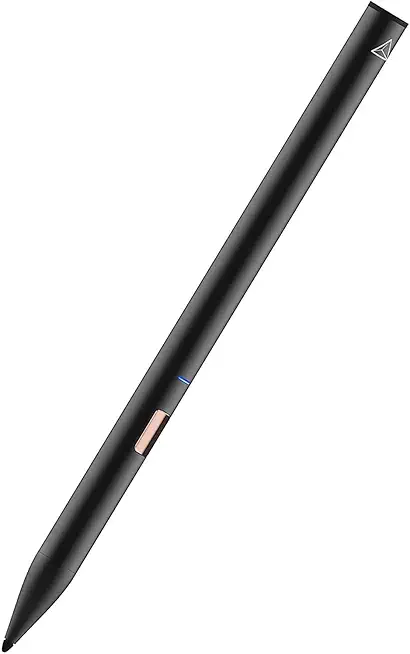
Adonit Note NC Stylus
Precision-crafted tip delivers accurate strokes and natural tilt response for detailed illustration and handwriting. Advanced palm rejection and reliable connectivity provide uninterrupted performance for creatives and note-takers on the go.
Check PriceThe Adonit Note NC is the closest of the three to a pro tool. Its tip tracks well, tilt is usable for shading and subtle strokes, and palm rejection worked reliably for me in both drawing and careful masking. In day-to-day editing it felt precise enough for detailed selections and localized brush work when I couldn’t use the Pencil 2.
Against the Apple Pencil 2 it wins on value and wider device support in some cases, and the tip feels a bit firmer which some people prefer for control. It loses on a couple of practical fronts: pairing and charging aren’t as seamless as the Pencil 2’s magnetic setup, and the pressure curve and near-zero latency on the Pencil 2 still feel a bit smoother for the very finest work. I also found that behavior can vary slightly between apps — the Pencil 2’s system-level support is just more consistent.
Pick the Adonit if you want very good precision without paying Apple’s price, or if you use apps where its pressure and tilt are fully supported. It’s my pick for photographers who sketch or mark up a lot, and for those who want near-pro control but on a tighter budget or different iPad model.
Alternative 3:

Active Stylus
Universal active input device combines pressure sensitivity, smooth tracking, and ergonomic grip for comfortable, precise drawing and writing across tablets and smartphones. Rechargeable battery and durable tip support daily creative work.
Check PriceThe Active Stylus is a true all-rounder that works across phones and tablets. I’ve used it on both iPad and Android tablets for on-the-go editing and it handled general drawing and notes well. The grip is comfortable for long sessions and the replaceable tip held up after a lot of use, which is handy if you’re rougher on gear.
Where it beats the Apple Pencil 2 is in broad compatibility and price — you can move it between devices and not worry about strict model support. Where it falls short is in pure photo-work detail: pressure feel and tilt can be less consistent, latency can be more noticeable during fast brush strokes, and there’s no magnetic charging or the double-tap shortcut that speeds up switching tools. Palm rejection and app support also vary more than with the Pencil 2.
This is a good choice if you use more than one type of device, need a tougher, cheaper daily driver, or don’t want to be limited to specific iPad models. I’d recommend it to photographers who want a dependable, cross-platform stylus for general edits and note-taking, rather than those doing fine, high-speed retouching every day.
What People Ask Most
Is the Apple Pencil 2 worth it?
Yes—if you draw, edit photos, or take lots of handwritten notes it adds precision and a natural feel, but it’s only worth it if your iPad is compatible and you’re ready to pay a premium.
What is the difference between the Apple Pencil (1st generation) and Apple Pencil (2nd generation)?
The 2nd gen has a flat side with magnetic wireless charging and pairing, a double‑tap shortcut, and a more streamlined design, while the 1st gen charges via the Lightning connector and lacks those features.
Which iPad models are compatible with Apple Pencil 2?
It works with iPad Pro models from 2018 onward (11‑inch and 12.9‑inch), iPad Air 4th gen and later, and iPad mini 6th gen—basically iPads with the flat edge and magnetic charging.
How do you charge and pair the Apple Pencil 2?
Attach it magnetically to the side of a compatible iPad; it pairs automatically and charges wirelessly while attached.
How long does the battery of the Apple Pencil 2 last?
Expect around 10–12 hours of typical use on a full charge, and a short magnetic charge gives you a quick boost in minutes.
Does the Apple Pencil 2 have noticeable latency or lag when drawing?
No—latency is minimal and feels effectively real‑time for sketching, painting, and precise retouching on supported iPads.
Conclusion
The Apple Pencil 2nd Generation is a photographer’s tool that nails the essentials for retouching, masking and local work. Its near‑instant responsiveness and nuanced pressure and tilt behavior let brushwork and fine selections feel natural and predictable in real‑world editing. Magnetic pairing, cable‑free charging, the double‑tap shortcut, a grippy matte finish, and whisper‑quiet operation make it a lean, studio‑friendly extension of the iPad for both on‑location and in‑studio sessions.
It isn’t perfect for every pro workflow. The lack of hover for pre‑stroke preview and the absence of onboard settings storage can slow tasks like precise selection placement and add friction when moving between devices. Compatibility limits further narrow the audience to photographers using supported iPads, so those constraints matter in mixed‑device environments.
If you work on a supported iPad and prioritize seamless charging, rapid tool switching, and absolute stroke fidelity, the Apple Pencil 2nd Generation is an excellent, often indispensable choice. If older device support, programmable hardware buttons, extreme ruggedness, or the lowest price are higher priorities, consider the alternatives outlined earlier. For most photographers focused on fast, accurate edits, it remains the best integrated stylus experience on iPad and a real productivity booster.
Apple Pencil 2nd Generation
Ultra-responsive precision tool with pressure sensitivity, tilt recognition, and near-zero latency for lifelike sketching and note-taking. Attaches magnetically for effortless pairing and wireless charging—built for creators and professionals.
Check Price

0 Comments