
Which Canon printer will turn your best shots into prints you’d be proud to hang or sell?
If you’re hunting for the best Canon printer for photos, this guide compares five contenders using real‑world user feedback. We look beyond glossy marketing copy to weigh print quality, ink running costs, media support, and speed.
We also consider who each machine serves best, from casual smartphone shooters and family‑photo enthusiasts to hobbyists and professional studios. We test typical workflows and paper types so you know which choices deliver the best color and detail in practice.
Expect candid impressions drawn from everyday use, covering how colors, blacks, and fine detail hold up on different papers. You’ll also get a clear view of the real costs and quirks—what gets eaten by maintenance cycles, what lasts, and where compromises are sensible.
Real owners report what speeds feel usable and what ink bills actually look like over a year. No matter your budget or ambitions, this introduction will help you frame the trade‑offs before you buy.
Whether you print for friends, galleries, or your online store, you’ll know which features matter most. Read on to see which Canon approach matches your workflow, print ambitions, and the results you actually want to see on the wall.
1. Canon imagePROGRAF PRO-310 Overview
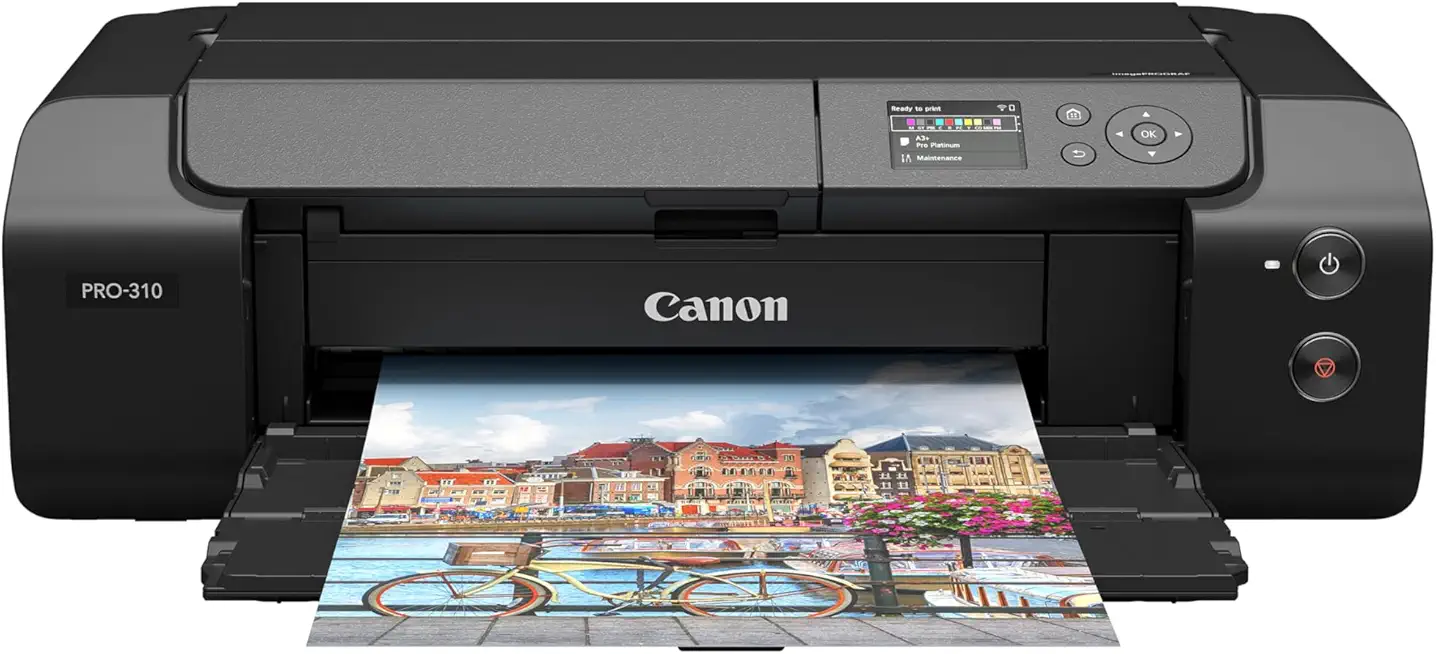
Canon imagePROGRAF PRO-310 13-inch Professional Inkjet Photo Printer
Studio-grade color accuracy and smooth gradients for gallery-quality prints with archival pigment inks and precise media handling.
Check PriceAs a working photographer I value printers that reproduce subtle tones and deliver usable gallery prints straight out of the tray. The Canon imagePROGRAF PRO-310 is repeatedly praised for outstanding color accuracy, detail and vibrancy, with very fine gradients and minimal banding. It uses Lucia PRO II pigment ink across a 10‑color ink system to achieve that fidelity.
That Lucia PRO II pigment ink is a real advantage for archival work. Pigment inks are more scratch resistant and offer better protection versus fading and bronzing than typical dye inks. The new ink formula specifically improves scratch and fade resistance, giving prints longer usable life for portfolios and exhibitions.
Media handling is another strength. The PRO-310 supports a wide range of media types and very large print sizes — up to 13″ x 70″ — which makes it excellent for panoramas and fine‑art rolls as well as standard photo sizes. Note that it is a dedicated photo printer and lacks scanning or copying, so you’ll need a separate device for those tasks.
There are trade-offs to consider. The printer runs quite slowly — prints can take over a minute each — so it isn’t ideal for high-volume casual use or fast turnaround jobs. The 10‑color ink system also means replacement costs can be high for frequent users. If you prioritize ultimate color fidelity and longevity over speed and low running costs, the PRO-310 is an excellent choice.
- Superior print quality: excellent detail and color fidelity
- Supports wide media and up to 13″ x 70″
- Pigment inks deliver long print longevity
- New ink formula offers scratch/fade resistance
- Slow print speeds (can take over a minute per print)
- High ink replacement costs for frequent users
2. Canon PIXMA PRO-200 Overview

Canon PIXMA PRO-200 Professional Inkjet Photo Printer
Vibrant, high-resolution photo prints with expanded color gamut, wireless connectivity, and fast output for photographers and fine-art reproductions.
Check PriceAs a working photographer, I appreciate the PIXMA PRO-200 for its punchy, saturated results straight out of the printer. Its 8‑color dye-based ink delivers excellent color vibrancy and a wide color gamut — reds and skin tones, in particular, look natural and lively for gallery prints and client deliveries.
It’s a compact, user-friendly unit that fits neatly into a small studio or home workflow without sacrificing quality. The PRO-200 prints faster than many higher‑end pro models, so you get quicker turnaround when you need several client proofs or a small batch of prints.
There are trade-offs: dye-based inks mean slightly less archival longevity than pigment systems, so I reserve pigment prints for museum-quality or long-term archival work. For wall displays, portfolios, and client proofs, the PRO-200’s longevity is acceptable and the color pop is often worth it.
Operationally it’s straightforward and compatible with professional-level print software, which makes color management and soft-proofing easy. Be mindful of running costs — per-print examples from testing show about $0.59 for an 8×10 on luster and $0.67 for an 8×10 on matte — and some users notice occasional inefficiencies in ink consumption during maintenance cycles.
Overall, the PIXMA PRO-200 is a very attractive choice for advanced amateurs and budding professionals who want gallery-quality color, faster throughput, and a compact footprint without the overhead of larger pigment-based pro printers.
- Excellent color vibrancy and photo quality
- Faster than higher-end professional models
- Compact and user-friendly
- Good color gamut, especially reds and skin tones
- Dye-based inks are less fade-resistant than pigment inks
- Not multifunction (no scanning/copying)
3. Canon PIXMA TR7020 (TS7451) Overview
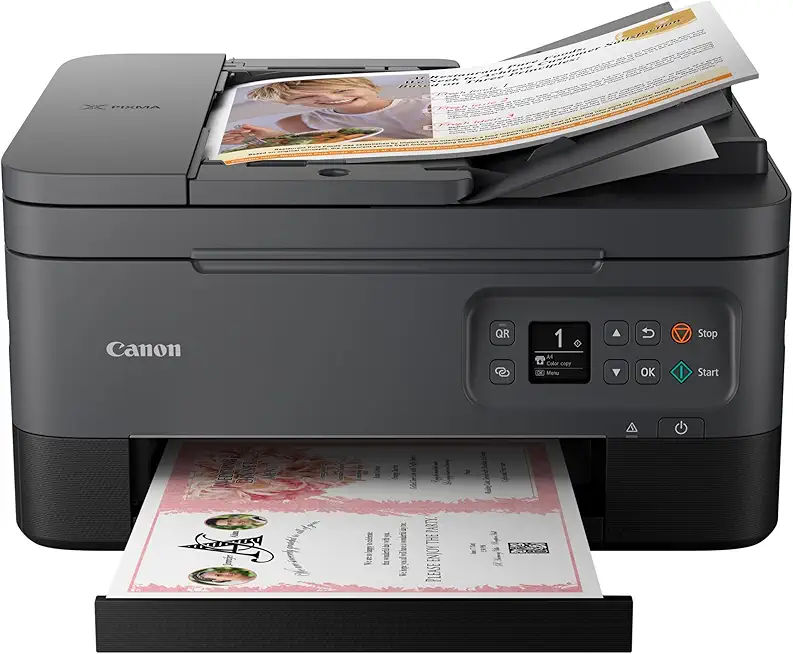
Canon PIXMA TR7020a All-in-One Inkjet Printer with ADF and Duplex
Compact all-in-one for home offices: automatic document feeder, two-sided printing, scanning and copying, plus reliable Wi‑Fi and mobile printing.
Check PriceAs a working photographer who also runs a small home studio, I appreciate when an all‑in‑one can handle casual photo tasks without fuss. The Canon PIXMA TR7020 (TS7451) is exactly that: a budget home‑office AIO that punches above its weight for everyday photo prints on glossy paper, envelopes, and cards.
Print quality is surprisingly good for a machine in this class — you’ll get high‑resolution results that look great for family prints, client proofs, or social media images. Don’t expect pro lab output, but for quick 4x6s and small displays it’s perfectly serviceable.
Practical features make it useful in a home workflow: a 35‑sheet ADF and fax capability add real convenience, and the crisp OLED display with simple controls keeps setup and navigation painless. It also offers multiple paper trays and reliable wireless connectivity, so sending images from a phone or laptop is straightforward.
The tradeoffs are worth noting. It’s slow for photos and documents at about 6 ppm color, so batch jobs will test your patience. And if you print frequently, running costs can add up — ink is relatively expensive compared with dedicated photo or MegaTank options. Overall, this is a smart pick if you need an affordable, user‑friendly AIO that can produce good casual photo prints, but not a replacement for professional photo printers.
- Good photo print quality for a budget AIO
- Includes 35‑sheet ADF and fax
- Multiple paper trays and reliable wireless connectivity
- Crisp OLED display and user‑friendly interface
- Slow printing speed — 6 ppm color
- Relatively expensive ink and high running costs
4. Canon PIXMA TS5120 (TS5150) Overview

Canon PG-240 Black Ink Cartridge
Deep, crisp black text and sharp lines with easy-install cartridge design, ensuring consistent print quality for documents and everyday use.
Check PriceAs a photographer who sometimes needs a compact, affordable printer for quick client proofs or family snapshots, the Canon PIXMA TS5120 (TS5150) is a sensible little workhorse for light photo printing. It’s positioned as an affordable inkjet all‑in‑one, so it’s built for general home use rather than gallery prints.
The TS5120 uses only two ink tanks, which is the key limitation for serious photo work. That two‑tank layout restricts color range and depth, so photo prints tend to lack richness and deep blacks compared with multi‑color models. For casual snapshots and office documents it’s perfectly fine, but it won’t satisfy fine‑art or professional color demands.
On the connectivity and convenience side it’s well equipped. You get auto duplexing and Wi‑Fi/Bluetooth/AirPrint connectivity, so printing from phones and tablets is straightforward. Operation is simple and the unit’s compact design makes it easy to keep on a desk or shelf.
In everyday use the TS5120 delivers decent text quality and a moderate print speed — about ~8.3 ppm for text — so it handles mixed home printing tasks without fuss. Overall it’s ideal for casual users who print documents and occasional photos, especially if low upfront cost and easy wireless printing are priorities.
- Simple operation
- Compact design
- Low cost
- Reliable Wi‑Fi/Bluetooth/AirPrint connectivity
- Photo quality noticeably inferior to specialized photo printers
- No ADF
5. Canon imagePROGRAF PRO-1000 Overview

Canon imagePROGRAF PRO-1100 17-inch Professional Inkjet Photo Printer
Large-format fine-art printing with museum-quality color fidelity, expansive media handling, and archival pigment inks for professional photographers and galleries.
Check PriceAs a working photographer I reach for the Canon imagePROGRAF PRO-1000 when I need gallery-grade prints that hold up. It uses a 12‑color ink system plus Canon’s Chroma Optimizer, which together deliver extremely accurate black-and-white and color gradations and very deep blacks.
The Chroma Optimizer is subtle but important: it gives a uniform glossy finish and cuts down on bronzing or uneven sheen that can ruin shadow detail. Color consistency and print longevity are standout features, so prints survive display and archival use better than dye-based alternatives.
It supports up to 17″ wide media, so you can output large portfolio pieces or limited-run fine‑art prints without stitching. That width, coupled with the wide gamut of the 12 inks, means skin tones, landscapes and monochrome separations all look natural and richly detailed.
There are trade-offs: the PRO-1000 has a sizable footprint and needs a dedicated space, and initial setup takes some patience if you’re new to pro printers. Ink costs are high and printing large, complex files is relatively slow, so it’s best suited to photographers who prioritize image fidelity and archival quality over speed or occasional quick prints.
- Outstanding professional print quality
- Long‑lasting pigment inks with scratch resistance
- Very accurate color reproduction and smooth gradients
- Supports up to 17″ wide printing
- Large physical footprint; needs dedicated space
- High ink costs and slower large‑file print times
Print Quality Overview
When I talk about print quality, I mean more than sharpness — it’s color fidelity, tonal gradation and how a print feels under different lights. Canon’s photo models use multi‑color ink sets (eight to a dozen cartridges) to reproduce subtle hues and smooth transitions that single‑ or three‑color systems simply can’t match. The payoff is photographs that look true to the scene and hold up in portfolios and galleries.
Knowing the ink chemistry matters. Pigment inks give you deeper blacks, superior scratch resistance and much better longevity for archival work. Dye inks, on the other hand, can pop more vividly on glossy media and are often lighter on the wallet; specialized tools like Canon’s Chroma Optimizer further tame bronzing and create a more even sheen on glossy prints.
Paper choice is equally important. These Canon printers support a broad range of media — glossy, luster, matte and fine‑art textured sheets — and many handle large sizes for gallery prints. Keep in mind that the highest‑end machines prioritize ultimate detail and color over speed, so expect slower print times and higher ink consumption; more economical models or MegaTank variants will give very good everyday photo results with much lower running costs, but they won’t quite match pro‑series nuance.
Practical habits make a big difference. Use the correct ICC profile for the paper, soft‑proof in your editing app, and print a small test patch before committing to a large run. Let prints rest and fully dry before framing, avoid cranking saturation to compensate for screen differences, and factor in maintenance cycles — head cleanings use ink and affect per‑print costs.
At the end of the day, match the printer to your output: choose pigment‑based, multi‑color systems for archival and fine‑art work, and lean on dye or tank‑style models for vibrant, affordable everyday prints. That balance between fidelity, longevity and running cost is what will keep your images looking their best.
Ink Running Costs Explained
Ink costs are one of those things that silently erode your budget until you actually sit down and add them up. As a photographer I always tally the true cost per print before committing to a workflow: that means ink, paper, and the inevitable maintenance cycles that eat small amounts of ink during head cleans and nozzle checks.
There are two broad trade-offs to know. Dye inks tend to be cheaper per cartridge and give punchy colors, but they fade faster. Pigment inks usually cost more per milliliter and use more cartridges, yet deliver far better longevity and scratch resistance—so a pricier 8×10 can still be the smarter buy for prints that must last.
To make the numbers concrete, real‑world examples show an 8×10 on an 8‑color dye machine can be around $0.59 on luster paper or $0.67 on matte paper. On higher‑end setups that prioritize archival quality you might see figures nearer $1.12 per 8×10. Those differences add up quickly if you print in volume.
If you’re trying to minimize running costs, there are practical moves that don’t compromise output. Proof on draft or use a cheaper paper to check color and composition, then switch to fine paper for the final print. Print in batches to avoid repeated head cleans and choose models with larger cartridges or refillable tanks if you print frequently.
Think long term when choosing a printer. A high‑end pro machine can be more economical per milliliter because of larger cartridges and reduced frequency of replacements, even if individual cartridges are pricey. Conversely, a MegaTank or refillable PIXMA is hard to beat for low‑cost everyday and casual photo prints.
Finally, always factor in total cost of ownership: per‑print ink, paper choice, and maintenance. That gives a clearer picture than sticker price alone and helps you pick the right balance between archival quality and everyday affordability.
What People Ask Most
What is the best Canon printer for photo printing?
The best Canon printer depends on your priorities such as ultimate print quality, convenience, or running costs. Choose a model that matches your needs for color fidelity, media support, and budget.
Which Canon PIXMA model is best for photos?
Within the PIXMA line, models aimed at photo enthusiasts offer more color cartridges and broader media support, while basic PIXMA all‑in‑ones suit casual photo printing. Pick a PIXMA that balances print quality and features for your intended use.
Are Canon photo printers suitable for professional photographers?
Yes, Canon makes professional photo printers designed for studio and fine‑art work that emphasize color accuracy and archival inks. Professionals should also consider media handling, workspace footprint, and running costs when selecting a model.
How do Canon PIXMA and imagePROGRAF printers compare for photo quality?
PIXMA models cover a range from casual to enthusiast photo printing, balancing convenience and color; imagePROGRAF printers are focused on large‑format and professional fine‑art output with a stronger emphasis on longevity and tonal depth. Your choice should reflect desired print size and archival expectations.
Can Canon printers print borderless photos and true-to-size prints?
Many Canon photo printers support borderless printing and can produce true‑to‑size images when the correct paper and print settings are used. Confirm the printer’s supported paper sizes and set the software options appropriately for accurate output.
Do Canon printers support fine art or heavyweight photo paper?
Several Canon photo printers accept fine art and heavyweight media when the feed path and settings accommodate thicker or textured sheets. Check the printer’s media compatibility and recommended handling methods to avoid jams and ensure optimal print quality.
Which Canon printers produce the highest color accuracy for photos?
Higher‑end Canon photo printers with expanded ink sets and specialized inks typically deliver the best color accuracy and smoother gradations. For critical color work, prioritize models designed for professional photo and fine‑art reproduction.
Conclusion on Best Canon Photo Printers
In short, the imagePROGRAF PRO‑1000 and PRO‑310 are best suited to professional and fine‑art printing, the PIXMA PRO‑200 fits advanced amateurs and budding pros, and the TR7020 and TS5120 are practical choices for casual home use.
Choose based on the trade‑offs that matter to you — ultimate print fidelity versus speed and footprint, the need for multifunction features, and ongoing ink running costs.
Real‑world user feedback shows how differences in color accuracy, media support, and ink technology affect longevity and the final look, so match the printer to whether you prioritise archival display or economical everyday prints.
If you want to sharpen your printing skills and make more confident choices, read more articles on our site for practical guidance and deeper comparisons.
Have a question or your own experience to share? Leave a comment below — we usually reply within a few hours.




0 Comments