
Want your voice to punch through the noise on YouTube?
In 2026, the right lavalier can transform a video from amateur to broadcast-ready, adding warmth, clarity, and presence to spoken words. It’s the difference between muffled background chatter and a voice that sits crisp and intimate in the mix.
This guide examines five top lav mics for YouTube creators this year, from budget workhorses to prosumer wireless systems. We put them through typical YouTube workflows — talking heads, on-the-go vlogs, interviews, quiet studios, and noisy field shoots. No jargon, no tech-speak — just practical results from real shoots.
You’ll learn who each mic suits best, from solo vloggers to multi-person interview setups. We cover key tradeoffs like mobility versus battery life, wireless reliability versus wired simplicity, and how noise reduction handles wind, traffic, and room reverb. We also summarize real-world pros and cons so you can match gear to your content, budget, and workflow.
Plus, we include placement tips, quick fixes for common problems, and buying advice so you don’t waste money or time. Whether you shoot solo tutorials, interviews, or cinematic shorts, this primer will steer you to the lav mic that fits your camera, rig, and workflow. Flip the page and let’s find the right mic for your voice.
1. SYNCO G3 Pro Overview
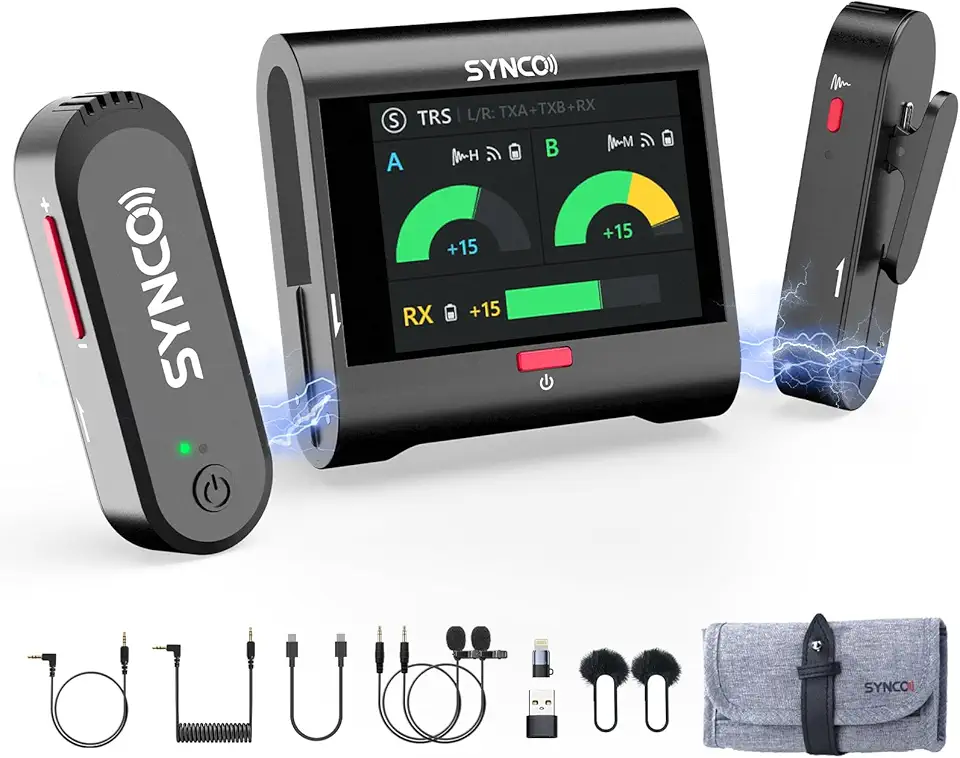
SYNCO G3 PRO Wireless 2.4G Dual Lavalier Microphone
Dual-transmitter wireless system delivering crystal-clear audio, low latency, long-range reliability for interviews, vlogs, and content creators.
Check PriceThe SYNCO G3 Pro is built for YouTubers who want premium sound and long runtime—it’s especially well suited to music videos, documentaries and ASMR work. As a photographer who often shoots dialogue-heavy pieces, I appreciate how it elevates vocal detail and spatiality without calling attention to itself.
Key performance highlights include a 250m wireless transmission range with low latency and strong anti-interference, plus a 10-hour battery life that gets you through long shooting days. That range and reliability mean fewer worries about dropouts when moving around on location or covering larger sets.
Practical on-set control is excellent: the receiver has an integrated mixer that supports two wireless audio sources simultaneously, so you can run two talent channels without extra gear. The 2-inch touchscreen gives real-time control over volume, power and sound parameters, which I’ve found invaluable for quick adjustments during takes.
Sound shaping is thoughtful—three-stage adjustable noise reduction preserves vocal details rather than over-smoothing them. Users praise its “amazing spatiality and near-silent background” for ASMR, and in practice the G3 Pro delivers audio clarity that will satisfy demanding creators aiming to up their YouTube production values.
Bottom line: choose the SYNCO G3 Pro if you need high-quality, reliable wireless audio and two-person flexibility, and you’re willing to spend time learning its many features. If you want something utterly simple or extremely cheap, this is likely more advanced and costly than entry-level options.
- Outstanding sound quality
- 250m wireless range
- Dual mic input for two-person setups
- Efficient noise cancellation preserving vocal clarity
- Complex operation; needs time to learn
- Pricier and more advanced than entry-level lavs
2. DJI Mic 2 Overview

DJI Mic 2 (1 TX + 1 RX) Wireless Microphone
Compact transmitter-and-receiver kit offering pristine dialogue capture, robust connection, and extended battery life for on-the-go shooters.
Check PriceAs a photographer who also shoots interviews and run-and-gun videos, the DJI Mic 2 stands out for combining studio-quality audio with a truly pocketable package. It records dual-channel audio, so you can capture two voices cleanly without juggling extra gear, and the sleek charging case makes it effortless to keep everything topped up between shoots. The 15-hour battery life is a real boon for long days on set or back-to-back interviews.
The 250m transmission range gives you freedom to move while staying connected, and real-world feedback praises the system for reliability and compact design. I’ve found the plug-and-play simplicity ideal for solo creators who need to set up quickly; it consistently delivers clear, detailed sound without dropouts. Real-time audio monitoring and intelligent noise cancellation help you lock in a clean take on location.
That said, DJI targets pros and serious hobbyists, so the higher price point may be a consideration if you’re a casual creator on a tight budget. There’s also a bit of a learning curve to squeezing the best results out of the noise-cancellation settings, but once dialed in the audio quality is remarkably consistent. For vloggers, podcasters, and professional YouTubers who value portability and dependable performance, this mic is mostly a strong match.
In short, if you want compact, reliable wireless lavalier performance with long runtime, dual-channel capture, and studio-grade clarity, the DJI Mic 2 is worth considering—especially for solo interviews and mobile shoots where setup speed and sound quality matter most.
- 15-hour battery life
- 250m transmission range and reliable signal
- Studio-quality sound in compact form
- Compatible with cameras, phones, laptops
- Higher price point
- Learning curve for noise-cancellation features
3. Rode Wireless Micro Overview

RØDE Wireless Micro Two Mics with Charging Case USB-C
Twin wireless mics with charging case, USB-C convenience, seamless pairing and reliable battery life for mobile interviews and streaming.
Check PriceAs a photographer who often records interviews and behind-the-scenes footage, I appreciate gear that simply works when the lights go on. The Rode Wireless Micro is favored by content creators and interviewers for exactly that reason: it’s built for on-the-go shooting and consistent results.
Physically it’s unobtrusive — a compact transmitter and receiver that won’t weigh down a rig or draw attention in a frame. The wireless link is stable and designed to avoid dropouts, so you’re less likely to chase signal glitches during a run-and-gun shoot.
It ships with a built-in mic but gives you the option to attach an external lavalier when you need more control over placement and tone. Setup is deliberately simple, and battery life is long enough to get through a full day of shoots without constant swapping or mid-shoot panic.
In real-world use the Rode Wireless Micro earns praise for reliability in noisy environments and for its plug-and-play clarity, which is why many YouTubers trust it across varied conditions. If your priority is dependable audio with minimal fuss, this mic will serve you well.
That said, it’s not a budget impulse buy — it’s more expensive than entry-level wireless lavs. And if you’re picky about mic placement or need a very specific tonal character, plan to use an external lavalier for the best control.
- Reliable wireless signal with zero dropouts in typical environments
- Easy setup suitable for beginners
- Compact and lightweight for vloggers and solo filming
- Good battery endurance for all-day shooting
- More expensive than budget wireless lav mics
- May require an external lavalier for best audio control
4. Boya BY-M1 Overview
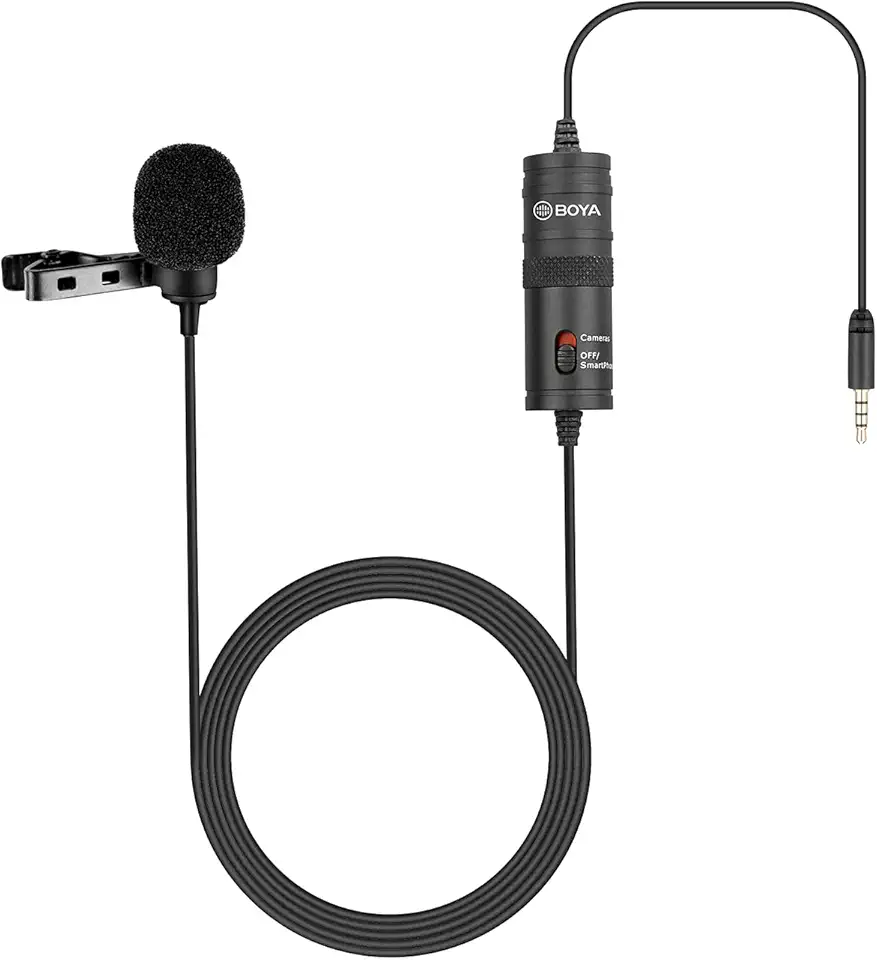
BOYA BY-M1 Lavalier Microphone
Discreet omnidirectional lapel mic delivering clear, natural vocals, easy plug-and-play setup for interviews, presentations, and vlogs.
Check PriceAs a working photographer who shoots a lot of talking-heads and tutorials, I often recommend the Boya BY-M1 to creators getting started. It’s clearly aimed at beginners, student YouTubers, and casual creators who need decent audio without breaking the bank.
The BY-M1 is a wired lavalier that delivers clear, consistent sound and plugs into cameras, smartphones, or recorders via a 3.5mm jack. There are no batteries to worry about, so setup is typically plug-and-play and reliable for indoor, static shoots.
In the field, users praise the mic for its affordability, simplicity, and sound that outperforms many built-in camera microphones. It’s especially good for static interviews, tutorials, and straightforward vlogging where mobility isn’t a priority; however, you’ll want a windscreen for windy outdoor conditions to avoid wind noise.
If your workflow is mostly seated or stationary and your priority is budget and ease, the BY-M1 is a very sensible choice. If you need freedom of movement or frequently shoot in windy/exposed outdoor locations, the wired design and susceptibility to background/wind noise are the main trade-offs to consider.
- Highly affordable for new YouTubers
- No batteries—immediate plug-and-play use
- Clear sound better than built-in camera mics
- Lightweight and unobtrusive
- Needs wind protection outdoors
- Wired design limits mobility
5. Hollyland Lark 2 Overview

Hollyland Lark M2 Wireless Lavalier Microphone USB-C
Ultra-compact wireless lavalier with USB-C charging, advanced noise reduction, and studio-quality audio for creators and professionals.
Check PriceAs a photographer who shoots run-and-gun interviews and on-location vlogs, I appreciate the Hollyland Lark 2 for balancing pro-level features with an approachable price. It’s aimed at vloggers, interviewers and creators who want professional wireless audio plus advanced noise reduction without breaking the bank.
Under the hood you get a 200m wireless transmission range and dual-channel support so two mics can feed one receiver — great for two-person interviews. The system offers intelligent, toggleable noise cancellation with adjustable strength, and it charges via USB-C for up to 8 hours of runtime per charge.
In practice the Lark 2 shines outdoors: users report the noise cancellation noticeably reduces wind and ambient noise while the wireless link stays solid with minimal dropouts. The magnetic clip is a photographer’s small luxury — secure and quick to mount — though its strength is something to be mindful of when removing the transmitter.
If you mostly shoot solo vlogs, street interviews, or run-and-gun tutorials and want clean voice capture without a steep learning curve, the Lark 2 is an excellent fit. Expect pro-grade noise control and reliable range, but plan for an ~8‑hour day or carry a charger if you routinely shoot longer sessions.
- Effective, adjustable noise cancellation
- Reliable 200m wireless range with minimal dropouts
- Comfortable, secure magnetic mic clip
- Dual-channel support; easy to use for beginners/intermediate users
- Battery life around 8 hours
- Magnet can be very strong; tricky to remove
How to Choose a Lavalier Mic
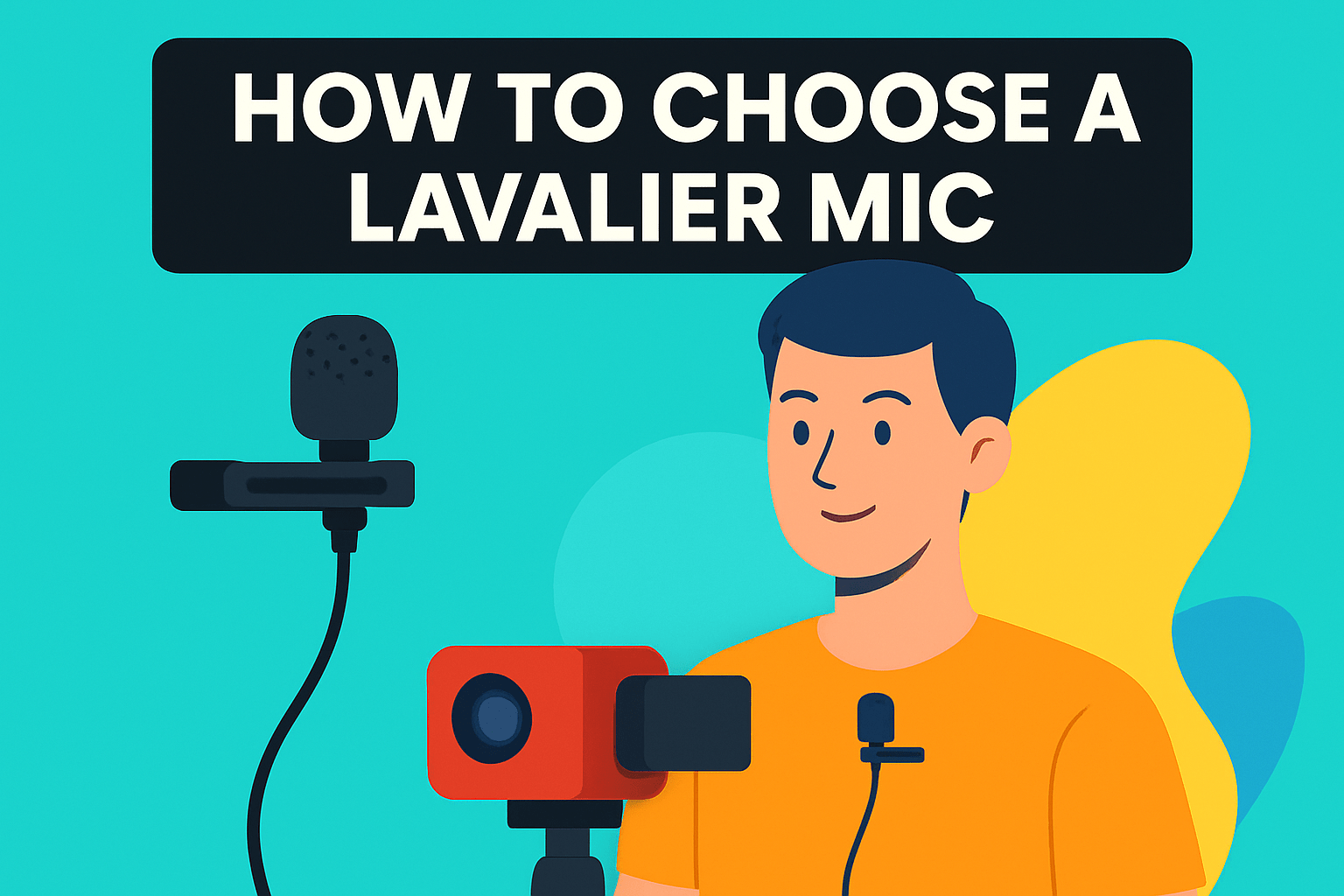
Choosing a lavalier mic comes down to matching the tool to how and where you shoot. If you spend most time in a controlled studio, prioritize clarity and a natural tonal balance—an omnidirectional lav usually sounds more open and forgiving of small placement differences. For noisy streets or windy outdoor shoots, favor a directional pattern or a system with strong noise reduction and use a proper windscreen.
Decide wired versus wireless by mobility needs. Wired lavs are simple, reliable, and budget-friendly for static interviews or tutorials. Wireless is essential for run-and-gun vlogging, multi-camera setups, or interviews where you want talent free to move, but check battery life, transmission range, and latency before you trust it on a job.
Compatibility is one thing many creators overlook. Confirm the connector type—TRS, TRRS, or USB-C—and whether you need adapters for phones, DSLRs, or audio recorders. Also look for dual-channel receivers if you frequently record two people; it saves you a lot of time and hassle on set.
Think about ergonomics and discretion. A low-profile mic with a secure clip reduces clothing rustle and keeps your subject comfortable. Magnetic clips are fast, but test them with your wardrobe to avoid awkward pulls or noise during movement.
Sound is king, so trust your ears. Always do a short test recording in the actual shooting environment and monitor with headphones when possible. That will reveal handling noise, wind issues, and placement problems you can’t fix in post.
Finally, balance budget with features. Entry-level wired lavs give impressive results for talking-heads. If you need consistent performance outdoors or require multi-person setups, invest in a wireless system with proven noise control and enough battery life to last a full shoot.
Lavalier Mic Placement Tips
Placement makes or breaks lavalier audio. I like to clip a lav about a handspan (6–8 inches) below the chin, on the chest or lapel. That distance captures clear, natural tone without picking up every breath or clothing rustle.
Where you attach matters more than the exact mic model. Collar edges, lapels and the neckline of a shirt are reliable spots for formal and casual looks alike. Avoid flat areas of fabric that can rub; secure the cable under a shirt or jacket with tape or small clips so movement doesn’t translate into noise.
Orientation depends on the pickup pattern. Omnidirectional mics are forgiving and can sit more loosely, while cardioid lavs need to be aimed slightly toward the mouth. Keep the mic pointing at the speaker’s face and maintain a consistent distance for even levels, especially when you’re recording multiple takes.
If you need the mic out of sight, hide it behind buttons, under ties, inside collars, or tucked into hair or a hat — but always keep it close to the mouth. Another discreet option is mounting near or behind the ear when clothing options are limited. When routing cables, running them down the back and around to the front reduces visible clutter and keeps the mic stable.
Outdoors, always use a foam or furry windscreen. It’s one of the simplest ways to reduce wind slap and preserve clarity. Do a quick walk-and-talk recording and monitor with headphones to catch rubbing or rustling before you roll camera.
Small habits pay big dividends: tape down slack, avoid sharp cable bends, and test placements with a short recording. If you treat placement like part of your lighting setup, your lavs will sound as good as your visuals look. Trust your ears and tweak for each outfit and environment.
What People Ask Most
What is the best lavalier microphone for YouTube videos?
There is no single best choice for everyone. Pick a mic that matches your shooting style, device compatibility, and the noise in your recording environment.
Are wireless lavalier mics better than wired ones for YouTube vlogging?
Both types have advantages depending on your needs. Wireless offers mobility and freedom of movement, while wired solutions are simpler and can be more reliable for stationary shoots.
How do I connect a lavalier mic to my smartphone for YouTube recording?
Use the correct cable or adapter for your phone’s input and select the mic as the audio source in your recording app. Always do a quick sound check to confirm levels and placement before filming.
Can lavalier mics provide broadcast-quality audio for YouTube?
Yes, many lavalier mics can capture clear, professional-sounding voice when positioned correctly and used in a controlled environment. Final audio quality also depends on recording technique and post-production.
How do I position or hide a lavalier mic for on-camera use?
Clip the mic to the lapel, collar, or chest area and point it slightly toward the speaker while securing the cable to prevent rustle. You can hide it under clothing or behind accessories as long as it remains close enough to capture the voice clearly.
Do lavalier mics work well for interviews and talking-head videos on YouTube?
Yes, lavalier mics are well suited for interviews and talking-head formats because they capture consistent, natural voice and stay discreet on camera. Choose wireless for mobile interviews and wired for controlled, stationary setups.
What are the key features to look for when choosing a lavalier mic for YouTube?
Consider sound quality and pickup pattern, device compatibility, and whether wired or wireless fits your workflow. Also look at noise reduction options, battery and range for mobile shooting, and a low-profile design for on-camera discretion.
Conclusion for YouTube Lavalier Mics
Whether you need advanced wireless performance or a simple wired lavalier, the five options covered give practical starting points for different YouTube workflows and budgets.
Remember that the right choice comes down to matching pickup style, connectivity, battery and range needs, noise reduction, and how discreet the mic must be for your environment and wardrobe.
If you want to get better results fast, explore more of our site to learn placement tips, real-world comparisons, and simple techniques that improve your on-camera sound and overall production.
Have a specific setup or question? Leave a comment below and we’ll usually reply within a few hours to help you choose or troubleshoot.



0 Comments