
Which LED light will reliably flatter skin tones, render accurate color, and still hold up on location when the call for a last-minute shoot comes?
Choosing the best led light for photography is confusing now that every manufacturer touts RGB, high CRI, and blow-away brightness. This guide strips the noise and focuses on what matters in real shoots.
You’ll find evaluations of five practical LED lights for photography, plus clear advice on placement, modifiers, and how to combine sources for depth. Recommendations are grounded in expert reviews, extensive user feedback, and hands-on observations from real shoots across studio and location work.
I weigh color accuracy, ergonomics, control options, and portability so you don’t have to wade through spec sheets to find what works. No gear fetishism here — this guide focuses on reliable tools that earn their keep on real bookings and under tight deadlines.
Whether you shoot portraits, product packs, or fast-turnaround social content, you’ll walk away with practical choices tailored to your workflow and budget. Short, tested advice and clear FAQs will help you pick, position, and combine lights so your images consistently look their best.
1. Neewer AP150C RGB LED Panel
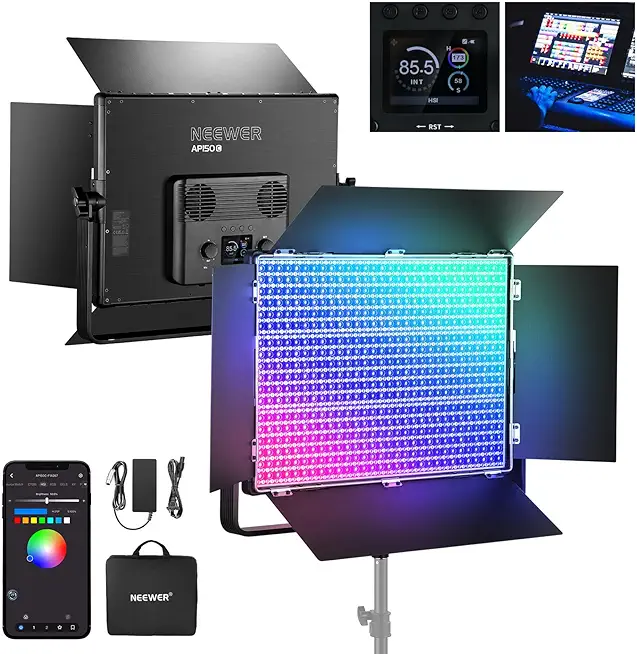
Neewer AP150C 150W RGB LED Panel Kit
High-output RGB panel delivering vibrant color, adjustable brightness and effects for studio or location shoots; lightweight, portable kit for creative lighting.
Check PriceI reach for the Neewer AP150C RGB LED Panel whenever I need a powerful, color-flexible light that behaves predictably on set. Its 150W output and 1800 LEDs give strong, even illumination that cuts through diffusion and still forms soft, usable shadows—great for product shots and interview-style portraits.
The built-in TIR lens module and advanced LED optical design aren’t just buzzwords. They improve penetration and create smooth coverage across the frame, which translates to fewer hotspots and more consistent skin tones in both video and stills.
Color control is impressive: RGBWW mixing covers roughly 90% of the Rec.2026 color space, and the 2500K–10000K range means you can match anything from warm tungsten to cool daylight. That high color fidelity makes creative gels and practical white-balance matching much easier in mixed-light scenarios.
Controls are flexible enough for studio rigs and run-and-gun setups. You can operate the panel from its physical controls, an app, 2.4G wireless, or DMX—handy when you’re integrating it into multi-light setups or remote-controlled grids.
As a practical unit, it suits both beginners and pros thanks to its strong output and quality optics. Be aware, though, it’s larger and heavier than entry-level panels, and the variety of control options can feel complex if you’re totally new to RGB fixtures.
If you need a workhorse LED with high output, reliable color, and multiple control pathways for complex setups, the AP150C is a solid choice. If you want something ultra-light or plug-and-play simple, you might find it overbuilt.
- Even, consistent output
- Multiple control methods (panel, app, 2.4G, DMX)
- Dual power options for portability and studio use
- High color fidelity (≈90% Rec.2026, 2500K–10000K)
- Larger and heavier than entry-level panels
- Setup and controls can be complex for true beginners
2. Rotolight AEOS 2 LED Panel

Rotolight AEOS 2 Pro Imagemaker Kit, AEOS 2 Pro, Softcase, 95Wh V-Lock Battery & Charger
Versatile, battery-powered LED offering cinematic soft light, adjustable color temperature, quick recycle, and rugged case—ideal for on-location filmmakers and portrait photographers.
Check PriceRotolight AEOS 2 is a compact, professional LED panel that punches well above its size. It delivers up to 11,500 lux at 3 feet, making it powerful enough for many portrait and on-location shoots.
Color control is a standout — you get 16.7 million colors plus fully variable white light temperatures. That range and high color accuracy let you dial in exact moods and skin tones without relying on gels or heavy post correction.
One feature I appreciate as a working photographer is the dual-mode operation: continuous lighting and flash with high-speed sync. That gives you the flexibility to freeze motion with the flash or shape ambient light with continuous output, all from the same fixture.
The built-in touchscreen with filters and effects makes changes fast and tactile. Rotolight redesigned the interface for intuitive control, so on-location tweaks are quick and you can focus on composition rather than menus.
Users and pros praise the AEOS 2 for being one of the best LED panels for professional use. It’s lightweight and portable, so it travels easily between studio and location, and the combination of color variety, accuracy, and touchscreen control makes it a highly versatile tool for creatives.
If you’re a pro or a serious hobbyist who needs precise color, HSS flash, and portability, AEOS 2 is worth considering. If price sensitivity or simple, occasional use is your priority, it may be more than you need.
- Superior color control
- Lightweight for location work
- Quick, intuitive touchscreen
- Continuous + flash (HSS) versatility
- High price
- Overkill for beginners
3. Neewer RGB660 Pro RGB LED Light

Neewer 660 Pro RGB LED Panel
Powerful RGB panel with tunable color, high CRI, stepless dimming, multiple effects and durable build for studio and run-and-gun shoots.
Check PriceThe Neewer RGB660 Pro is a practical workhorse — a 50W panel with 660 LEDs and constant-current control that eliminates flicker and stroboscopic artifacts. That makes it particularly reliable when you’re shooting video or mixing with cameras that are sensitive to flicker.
Its color temperature range is 3200K–5600K and the panel offers a high CRI of 97+, so skin tones look natural and predictable without heavy color correction. For portrait and interview work this translates to fewer surprises in skin rendering and easier color grading in post.
Build-wise Neewer used aluminum alloy for heat dissipation, so the light stays stable during long takes and feels solid on stands. The kit includes 4-way visors and U-shaped brackets, which give you quick control over spill and mounting orientation on set.
User feedback calls it excellent value for money, and I agree — it covers the essentials for both video and stills without unnecessary complexity. It’s well-suited for interviews and portrait setups where consistency, color accuracy, and reliability matter more than raw output or wild RGB effects.
Do note the compromises: at 50W it’s less powerful than larger fixtures, so you’ll need to position it closer or use modifiers for softer light on larger groups. Also the 3200K–5600K range isn’t as wide as full RGB panels, so if you need saturated colored effects or extreme warm/cool shifts you’ll want a dedicated RGB unit.
Overall, if your work focuses on portraits, interviews, and run-and-gun video where flicker-free, natural-looking light and solid build quality matter, the RGB660 Pro is a very sensible choice.
- Flicker-free lighting for video
- Solid build and thermal management for durability
- Natural color rendering for portraits
- Professional features at good value
- Less powerful than higher-end lights
- Narrower color temperature range than RGB lights
4. Colbor CL60R RGB LED Light

Colbor CL60R RGB COB LED Studio Light
Compact COB RGB fixture delivering punchy output, smooth color mixing, adjustable warmth, and creative effects for photographers and videographers.
Check PriceI reach for the Colbor CL60R when I need a compact, creative light for portraits and location work. It gives full RGB control with hue and saturation knobs, so I can dial exact color moods without relying on gels.
Color temperature runs 2700K–6500K and the unit scores a high CRI of 97, which means skin tones render naturally whether I’m pushing color or sticking to neutral light. The CL60R also includes 13 creative presets that speed up setups when I want a specific look quickly.
Battery flexibility is a real asset on location. This light accepts PD power banks, AC adapters, and multiple battery types, so I’m rarely forced to stop a shoot because of power. Its wireless app control is handy for tweaks from a distance, though I’ve had moments where the app required a reconnect during busy shoots.
Practically speaking, this is a portrait photographer’s toy and workhorse rolled together. It’s lightweight and compact enough to carry all day and effective both indoors and outdoors. Use it for headshots, moody color accents, rim lights, and small environmental portraits.
Be mindful of limitations: the CL60R’s output can be light for large groups or when you need to punch through strong ambient daylight without modifiers or additional lights. If you mainly shoot single-subject portraits and creative color work, it’s a great choice. If you frequently light groups or large scenes, you may need a more powerful fixture or an extra unit.
- Extensive creative color and mood control
- Lightweight and compact for on-location use
- Multiple battery options for continuous shooting
- High color accuracy (CRI 97) for portraits
- Output may be insufficient for large/group portraits
- Wireless control/app can be less intuitive or flaky
5. GVM Pro SD300B LED Video Light

GVM SD300B 300W Bi-Color LED Video Light with Bowens Mount
Heavy-duty bi-color LED delivering consistent, high-output light with Bowens compatibility, precise temperature control, and durable build for pro studio setups.
Check PriceThe GVM Pro SD300B feels like a tool built for work. Its aluminum anodized exterior with handles and a modular design gives you confidence when packing gear for shoots.
On set it’s sensible rather than flashy — the adjustable tilt and precise positioning on stands make framing and feathering light simple. Users report it’s stable, reliable, and easy to set up, which matters when time is short in small studios or on location.
Color-wise the SD300B covers 2700K–6800K, so you can dial anything from warm tungsten-like tones to cooler daylight without extra gels. It ships with reflectors and multiple power options, and because it’s designed for both video and photo use it adapts well to run-and-gun content or controlled portrait work.
If you’re a content creator or small-studio photographer who wants solid performance without fuss, this is a very practical choice. Just be mindful that its output is limited compared to larger, more expensive fixtures, and it’s heavier than ultra-portable models if you plan long handheld shoots.
- Robust construction for frequent transport
- High adjustability for precise lighting control
- Color temperature range sufficient for many environments (2700K–6800K)
- Carrying case and accessories aid quick deployment
- Limited output compared to larger, more expensive lights
- Heavier than ultra-portable models for long handheld use
Position Your Lights Strategically
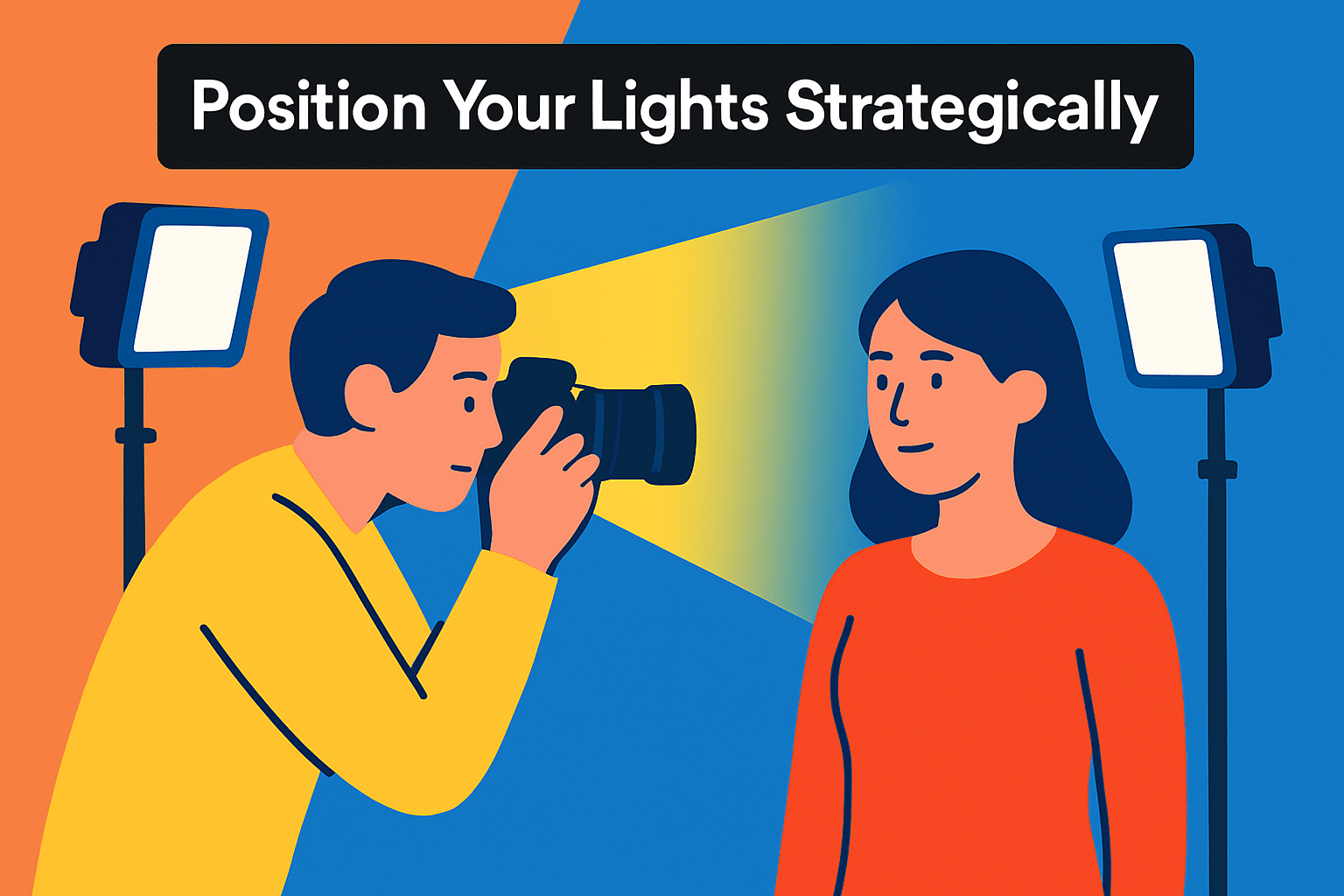
Placement matters as much as the light itself. A few inches or a few degrees can flip a portrait from flat to cinematic. Spend time dialing position before you overthink exposure or post.
Front lighting (about 0°–30°) is the easiest way to get flattering, even skin tones and crisp product detail. It minimizes shadows, so pull it in for beauty shots or clean e‑commerce images. Keep the source large and soft for the most pleasing results.
Side lighting sculpts form and texture. Put a light at roughly 90° when you want drama or to emphasize contours—great for food, jewelry, and moody portraits. Add a weak fill or reflector opposite to keep faces readable without killing depth.
Backlights give separation and atmosphere. Use them for rim light, hair highlights, or silhouettes that pop the subject from the background. If faces go dark, introduce a low‑power fill or reflector to keep necessary detail.
Overhead lighting can create a halo on products or mimic natural sun. But straight‑down light can hollow out eyes and accentuate bags, so diffuse it or angle it forward slightly to avoid unflattering shadows.
Height is subtle but powerful. Aim lights 45°–60° above eye level to mimic natural sun and flatter features. Lower placements are theatrical and useful for horror or stylized portraits—use them intentionally.
Distance changes both intensity and quality. Move a light closer for softer wrap and higher intensity; move it back for harder, directional beams. Remember the inverse square law: small distance shifts produce big exposure changes.
Modifiers let you shape emotion. Softboxes, diffusers and scrims create gentle falloff; grids, snoots and barn doors give control and contrast. Reflectors are a portable secret—bounce light into shadows without adding power.
Work methodically: set a key, observe shadow fall, tweak height, angle and distance, then lock stands. Take a quick reference photo of each setup so you can recreate a look fast. Tiny adjustments often yield the biggest creative payoff.
Combine Light Sources
Combining light sources is one of the quickest ways to add depth, separation and mood to an image. I use multiple lights to shape form, lift shadows and push the subject away from the background. A deliberate mix of warm and cool tones will change the story in an instant.
Think in roles: key, fill and accent. In a three‑point setup the key sits at roughly 45 degrees, the fill softens shadows from the opposite side, and a back or rim light outlines the subject. Keeping those roles distinct helps maintain control.
I often pair a diffused main light with a harder accent for texture. The soft key flatters skin and reveals detail, while a hard accent adds sparkle to hair, edges or products. Small, focused LEDs or grids are perfect for that pop.
When you mix natural and artificial light, match color temperature deliberately. Daylight hovers around 5600K and tungsten near 3200K, so either set your LEDs to match or use gels to blend. Let the dominant source determine your white balance.
Layer colors for creative effects but keep them separated spatially. A warm light on one side and a cool on the other makes a striking split‑light look, while a gelled accent can pull the background apart from the subject. Avoid painting two different temperatures on the same facial area unless intentional.
Control intensity with dimmers or distance rather than fighting with modifiers alone. Remember the inverse‑square law: small distance changes drastically affect falloff and shadow. Use that to tune contrast without swapping lights.
Use reflectors, flags and grids to refine where light falls. Bounce a subtle reflector for gentle fill, flag off spill that flattens the face, and grid an accent to keep it tight. These small tools keep mixed lighting tidy and cinematic.
My workflow is simple: set the key, dial in the fill, then add accents and background light. Make small moves and recheck shadows instead of only adjusting power. If you shoot repeat setups, mark positions so your lighting is reliable on the next take.
Shoot RAW and make final color balances in post when necessary. A small selective correction can preserve your creative intent while fixing slight casts. Do a quick test frame at the start and note settings so you can reproduce the look reliably.
What People Ask Most
What is the best LED light for photography?
There is no single best LED light for all photographers. Choose a light that matches your subject, workflow, and need for color accuracy and control.
How do I choose the right LED light for photography?
Consider output, color control, accuracy, size, and power options when choosing an LED. Test how the light handles modifiers and whether it integrates with your setup.
What color temperature is best for LED photography lights?
Match the light’s color temperature to the ambient light or the mood you want to create. Tunable lights or gels help you achieve natural or stylized looks.
What CRI (Color Rendering Index) should an LED light have for photography?
Choose an LED with high color rendering so colors and skin tones appear natural. Better CRI performance generally improves color accuracy and makes postproduction easier.
How bright should an LED light be for photography?
Brightness should be sufficient for your subject and camera settings while allowing for diffusion and dimming. Prefer lights that let you adjust output so you can control exposure and shadow.
Are LED lights suitable for portrait photography?
Yes, LEDs are well suited to portrait work when they offer good color accuracy and smooth output. Use softening modifiers and flattering placement to achieve pleasing skin tones.
How do I set up LED lights for product photography?
Use a main light and complementary fill to shape the subject while avoiding harsh reflections. Diffuse the light, control highlights with flags or gobos, and add a back or rim light to separate the subject from the background.
Conclusion for Best LED Lights for Photography
This guide pulled together compact reviews, practical placement advice, and mixing techniques to help you choose and use LED lighting more confidently for photo and video work.
Rather than chasing a single “best” fixture, match the light’s output and controls to your shooting needs, workflow, and the look you want to achieve.
Spend time experimenting with angle, height, distance, and modifiers to shape mood and texture, and use multiple sources to add depth without creating conflicting color or shadow areas.
If you want to build skills faster, explore more articles on the site for technique breakdowns, setup examples, and troubleshooting tips to refine your lighting approach.
Have questions or want to share a setup? Leave a comment below and we usually reply within a few hours to help you troubleshoot or improve your results.


0 Comments