
Looking for the best camera drone for your child but worried it will be too complicated or unsafe? From toy quadcopters to compact camera drones that actually take nice photos, the options keep multiplying and it’s easy to feel lost. This guide helps parents and gift buyers pick age-appropriate machines that prioritize safety, simplicity, and real-world fun.
We focus on the essentials that matter for families: safety-first design, intuitive controls, camera quality that produces shareable shots, and sensible value. You’ll learn which features genuinely help beginners and which are just marketing noise. The aim is to match a drone’s complexity to a child’s age and interest so flying stays fun rather than frustrating.
The picks range from rugged starters built to survive crashes to more capable camera-forward models for teens who want to learn aerial photography. We weigh ease of use, durability, and battery practicality against price so you can find something that grows with the kid. Above all, safety and dependable flight behavior come first.
Across five carefully chosen picks, we’ll point you toward options suited to different ages, skill levels, and budgets. Read on for clear, practical guidance—no jargon, no hype—just recommendations you can trust for worry-free flying and memorable shots.
1. DJI Flip For Kids
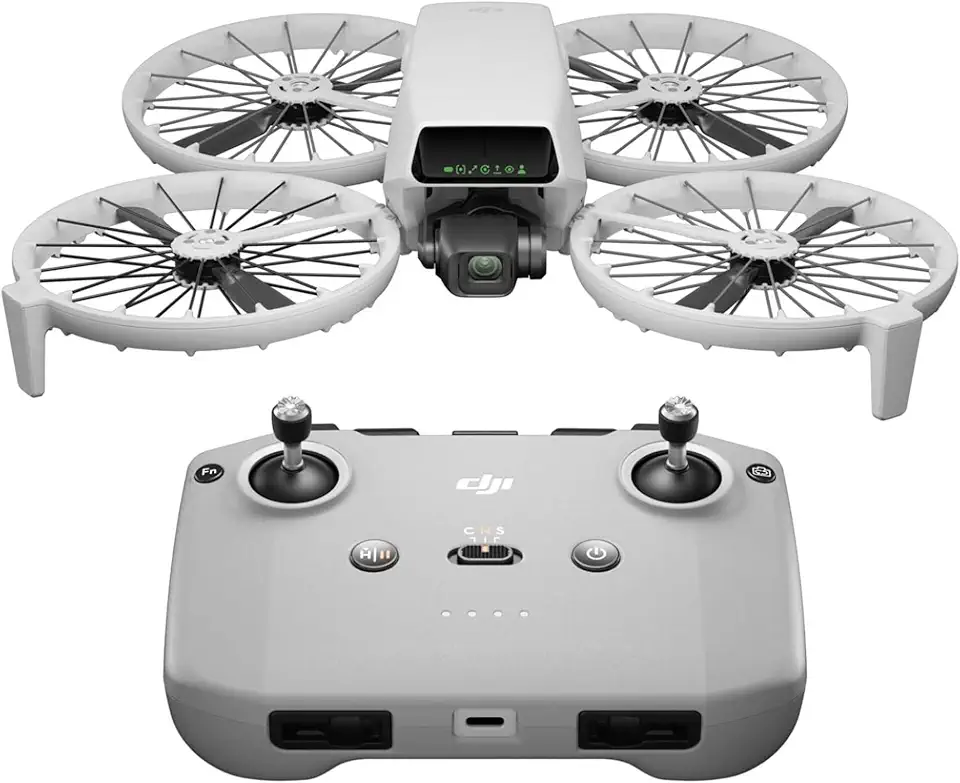
DJI Flip RC-N3 4K drone under 249 g 3-axis gimbal
Ultra-portable aerial camera delivering silky-stable footage and intelligent flight modes for effortless cinematic shots.
Check PriceAs a photographer who rigs gear for fast family outings, the DJI Flip For Kids is a rare mix of serious imaging in a kid-friendly package. It weighs less than 249 g, so it’s easy for small hands to carry and avoids extra regulatory hassle on short trips.
The camera uses a 1/1.3-inch CMOS sensor that captures 48MP stills and 4K/60fps HDR video, so kids (and parents) can shoot crisp photos and smooth footage without needing complex settings. AI Subject Tracking and six intelligent shooting modes—Dronie, Circle, Rocket, Helix, Boomerang and Spotlight—make creative compositions simple and fun, even for beginners.
Foldable propeller guards add a layer of safety for indoor flights and novice pilots, and the drone’s compact folding design makes it highly portable for travel and family outings. Its beginner-friendly controls mean less time fiddling and more time shooting memorable moments.
That said, its light weight can make it less stable in windy conditions, so I’d avoid exposed beaches or gusty parks. Also, low-light performance is limited compared with larger drones or dedicated cameras, so plan flights for daylight golden hours to get the best results.
Overall, if you want a camera drone that’s portable, easy to fly, and capable of impressive photos and 4K video for a child or beginner, the DJI Flip For Kids is a strong choice—just be mindful of wind and evening shoots.
- Beginner-friendly and easy to fly
- Highly portable; under 249 g
- Strong imaging: 48MP photos, 4K/60fps HDR
- Creative intelligent shot modes (Dronie, Circle, Rocket, Helix, Boomerang, Spotlight)
- Less stable in windy conditions
- Limited low-light performance
2. DJI Mini 4K For Kids

DJI Mini 4K drone under 249 g 3-axis gimbal
Compact powerhouse for travelers, capturing sharp high-resolution footage with rock-steady stabilization and easy automated shooting.
Check PriceAs a photographer, I appreciate how the DJI Mini 4K balances image quality and portability for younger shooters. It records 4K video and captures RAW photos, which is impressive for such a compact platform. That combination means kids can learn composition and post-processing without being weighed down by a large rig.
Its lightweight, compact design makes it genuinely pocketable and easy to carry on family outings or short hikes. For children who are curious about aerial imagery, the drone’s good video quality for its size delivers satisfying results straight out of the sky. RAW support gives more latitude when editing, so a parent or teen can teach photo workflows that go beyond basic JPEG tweaks.
On the flip side, the Mini 4K has no built-in collision sensors. That makes supervision essential around trees, fences, or crowded parks, because the drone won’t automatically avoid obstacles. Also, there’s no dedicated remote control; it requires a smartphone app, which can be less tactile for younger kids and may demand an experienced hand to keep things steady.
Overall, this is a strong choice for families where the child is ready to learn meaningful photography and video skills and can be supervised while flying. It’s an especially good fit for slightly older kids or teens who can handle a phone-based controller and benefit from RAW capture. If safety-first novice pilots are your priority, consider closer supervision or additional guards to compensate for the lack of sensors.
- Extremely lightweight and pocketable
- Good video quality for its size
- RAW support for better editing flexibility
- Simple to use; suitable for beginners
- Lacks collision sensors and advanced tracking
- No dedicated remote control; requires smartphone app
3. Potensic Atom 2 For Kids

Potensic Atom 2 4K HDR drone under 249 g 3-axis gimbal Standard Kit
Portable vivid-color imaging, intuitive controls, extended flight time, ready-to-fly kit for stunning aerial photography.
Check PriceAs a working photographer I appreciate a kid-friendly drone that actually captures usable footage, and the Potensic Atom 2 delivers that in a compact package. It sits in the sub-250 g category, which makes it easy to carry and often simpler to fly with fewer regulatory concerns.
The Atom 2 features a 3-axis mechanical gimbal that stabilizes 4K video at 30 fps, so footage looks smooth even when a beginner pilot is a bit wobbly. Built-in subject tracking and Quickshots give kids and parents easy ways to get polished, cinematic clips without wrestling with manual controls.
It’s a feature-rich little machine: beyond tracking and Quickshots you get things like an interval timer and potential color profiles, which is rarer at this price and helpful for learning how footage can be styled. That makes it a strong value for money, especially if you want a drone that can grow with a child’s interests.
The complete folding design makes it genuinely travel-friendly and beginner-oriented. Stable video and good tracking capability mean fewer frustrating, unusable clips and more moments kids will actually want to share.
Do note the caveats: some features may not be available immediately at launch, so check the current firmware and feature list before buying. Also there’s no guarantee of future feature updates, which is worth considering if you expect ongoing software improvements.
- 3-axis mechanical gimbal
- 4K video at 30 fps
- Subject tracking & Quickshots
- Sub-250 g, folding design
- Some features may not be available immediately at launch
- No guarantee of future feature updates
4. Holy Stone HS280 For Kids

Holy Stone HS280D FPV drone 1080p foldable brushless motor 2 batteries
Foldable FPV quad with brushless motors, dual-battery endurance, and live Full HD streaming for fast, thrilling flights.
Check PriceThe Holy Stone HS280 is a very approachable camera drone for kids and beginners. Its simple controls and robust controller make it easy to hand to a younger pilot and feel confident they can learn quickly without overwhelming menus.
As a photographer, I appreciate that the camera produces good photos for its price bracket — not mirrorless quality, but more than enough for family fun, learning composition and capturing outdoor play. The protective design helps absorb the inevitable bumps and makes it a forgiving platform for first flights.
It also packs a couple of playful features that kids love, like gesture recognition for photos, which encourages creativity and hands-free shots. For light outdoor use, the HS280’s faster flight modes give it better handling in windy conditions than a typical toy drone, so you can actually get steadier captures on breezy days.
Be realistic about limits: it’s less responsive than higher-end drones, so it won’t satisfy someone chasing smooth, professional footage. The plastic build can feel a bit plasticky, but that’s the trade-off for the lightweight, budget-friendly design and the forgiving crash resilience it provides.
If you want an affordable, easy-to-fly camera drone to introduce a child to aerial photography, this model is a solid pick — especially for outdoor family adventures and learning the basics of framing and flight. If you need cinematic stabilization or premium responsiveness, consider stepping up to a higher-tier model.
- Budget-friendly; good value
- Durable-feeling controller; easy to use
- Gesture recognition for photos
- Faster flight modes for windy conditions
- Less responsive than higher-end drones
- Plastic build may feel plasticky
5. DJI Neo For Kids

DJI Neo 4K mini drone 135 g built-in propeller guard controller-free
Featherlight aerial shooter with built-in safety guards, autonomous control options, and crisp imagery for worry-free flights.
Check PriceAs a photographer who often brings drones on family shoots, I appreciate the DJI Neo’s focus on safety and simple usability. Its lightweight design with safe propellers and a flexible build means it’s forgiving in crashes — great for learning indoors without the anxiety of snapped blades or brittle frames.
The Neo is explicitly positioned for kids aged 14 and above, which makes it a sensible step up from toy helicopters while still keeping things approachable. It’s suitable for both indoor and outdoor use, so you can practice hovering in the living room and then take it to the park once skills improve.
Flight characteristics are tuned for beginners: the outline calls it easy to use for beginners with supervision and designed with safety for young users in mind. That combination makes it a good choice if you want a mellow, confidence-building experience rather than high-speed thrills or pro-level features.
Be mindful that the Neo intentionally skips some advanced capabilities; the outline notes it lacks certain advanced features and reads more like a toy drone compared to higher-end models. If your teen is eager to explore photography or advanced flight modes, this might feel limiting after the initial learning phase. For parents prioritizing safety and a fun, low-stress introduction to flying, though, the DJI Neo is mostly a solid pick.
- Designed with safety for young users
- Versatile for indoor and outdoor flying
- Easy to use for beginners with supervision
- Provides a fun flying experience
- Lacks some advanced features found on other models
- Recommended age may require close supervision for younger children
Key Features For Kids’ Camera Drones
When choosing a camera drone for a child, start with safety-first features that actually change outcomes after a crash. Sturdy propeller guards, flexible frames and a forgiving build matter more than a super-sharp lens; they reduce cuts, protect motors and keep repairs cheap. Look for return-to-home and GPS stabilization so a lost or disoriented drone comes back with minimal drama.
Stability matters for decent photos. A drone with altitude hold, one-key takeoff/landing and headless mode helps a young pilot focus on framing rather than fighting controls. If you can get a 3-axis gimbal or strong electronic stabilization, your child will see far fewer blurred shots and more usable footage to be proud of.
Camera quality should be realistic: aim for at least 720p HD and a wide field of view (around 100–120°) so kids can capture landscapes and friends without obsessive aiming. RAW or higher-megapixel options are a bonus only if you plan to teach basic editing; otherwise, simple 1080p or 2.7K that records steady footage will deliver better results for a beginner.
Flight time and portability are practical constraints parents should plan for. Expect 6–15 minutes per battery on most kid-focused drones, so buy an extra battery or two for park sessions. Lightweight, foldable models under 250 g are easier to carry, less intimidating for younger flyers and often exempt from stricter local rules.
Don’t overlook fun and learning features. Quickshots, gesture photos, LED orientation lights and simple acrobatic modes keep kids engaged, while companion apps with basic coding or tracking functions turn flying into a STEM lesson. Balance novelty with usability — too many complex modes can overwhelm a new pilot.
Finally, match features to age and supervision level. Younger children benefit most from rugged builds, guards and automatic safety aids. Older kids can handle manual controls, RAW files and more advanced cameras, which grow with their skills and interest.
Budget Considerations For Kids’ Camera Drones
When shopping for a kids’ camera drone, think beyond the sticker price. As a photographer I’ve learned that image quality, safety features and ongoing running costs quickly add up, so the smartest buys balance an approachable price with durable construction and useful features rather than the cheapest hardware you can find.
Start by prioritizing safety and durability. Models with propeller guards, flexible frames and simple beginner flight modes save you money long-term because they survive more crashes and need fewer repairs. For younger kids, a sub-250 g drone with guards and altitude hold is often a better investment than a higher-resolution camera that will sit unused because it’s too hard to fly.
Budget for consumables and extras. Short flight times on lower-cost drones mean spare batteries are essential; propellers, chargers and microSD cards are recurring costs that often equal a quarter to a third of the drone’s purchase price over a season of use. If you want good photos, don’t forget that a decent gimbal or RAW capability often comes on mid-range models — worth it if your child shows interest in photography.
Match features to the child’s age and interest to avoid wasted expense. Older kids may appreciate tracking, manual controls and RAW files that let them learn editing, while a simple one-button takeoff, return-to-home and headless mode are perfect for beginners. Upgradability matters: a drone that supports a dedicated controller, spare batteries and firmware updates will grow with your child and deliver better lifetime value.
Finally, factor in the environment where you’ll fly. Lightweight drones struggle in wind, so if you’ll mostly fly outdoors consider a slightly heavier, more stable model even if it costs more. In short—spend where safety and core features matter, but plan for batteries, parts and a modest upgrade path so the drone remains useful and fun through many flights.
What People Ask Most
What features should I prioritize when buying a camera drone for a child?
Prioritize safety features like propeller guards and a durable frame, along with beginner flight modes that simplify control. Also look for stable flight assistance and a camera quality appropriate for casual photos and videos.
What age is appropriate for kids to start flying camera drones?
Appropriate age depends on the child’s maturity and ability to follow safety rules, and younger children should always fly under supervision. Simpler, toy-like drones are better for very young beginners, while older kids can handle more capable models.
Do kids’ camera drones need propeller guards or collision sensors?
Propeller guards and collision sensors add meaningful safety and can reduce the risk of injury and damage during crashes. While guards protect from contact, collision sensors can help avoid obstacles but are not present on every model.
How long do kids’ camera drones typically fly on a single battery charge?
Flight times for kids’ drones tend to be moderate, so expect relatively short sessions per battery and plan for extras if you want longer play. Bringing spare batteries or planning shorter flights helps avoid disappointment.
Are sub-250 g drones better suited for children?
Sub-250 g drones are lightweight and portable, which can make them easier for children to handle and travel with. However, lighter models may be less stable in windy conditions, so choose based on where the drone will be flown.
Should I choose a drone with a dedicated remote or a smartphone app for my child?
A dedicated remote often provides tactile controls that are easier for young children to use and can feel more like a traditional toy. Smartphone apps add convenience and extra features but may introduce complexity or distractions.
How do I decide between a toy-like drone and a more capable camera drone for a kid?
Match the drone’s complexity and features to the child’s age, interest level, and willingness to learn, prioritizing safety and durability. Consider whether the child will want simple fun features or more advanced camera capabilities over time.
Conclusion For Best Kids’ Camera Drones
Choosing a kids’ camera drone comes down to three simple priorities: safety first, easy controls for learning, and a camera and feature set that match your child’s age and interest.
Match drone capability and complexity to the child—start with durable, guarded, easy-to-fly models and upgrade as skills and responsibility grow.
When budgeting, factor in battery logistics, spare batteries or accessories, and whether the drone can grow with your child through upgrades or learning modes.
If you want to improve flying and photography skills, explore more guides and tips on our site to build confidence and creativity with each flight.
Please leave a comment with your questions or experiences—we usually reply within a few hours and are happy to help you choose the right drone for your family.




0 Comments