
Which Sony camera will finally make your livestream look cinematic and effortless?
In 2026 Sony still leads with options for every streamer.
This guide focuses on the five best Sony cameras for streaming this year.
We cut through hype to find cameras that perform in real setups.
Not every creator needs the same tool.
Different priorities shape your choice more than specs on paper.
Pro streamers often demand top low-light performance and rock-solid reliability.
They need cameras that handle long sessions and variable lighting.
Full-frame creators care about depth of field and cleaner high-ISO images.
That look can elevate talk shows, interviews, and cinematic streams.
Hybrid shooters juggle high-resolution stills with strong video capabilities.
They want a versatile body that covers both photo and stream duties.
Compact vloggers prize portability and one-person operation over raw specs.
Quick setup, reliable autofocus, and decent mics matter more on the road.
Budget APS-C options balance price with surprisingly capable autofocus and image quality.
They’re perfect for creators building a channel without breaking the bank.
Throughout this introduction we’ll map those needs to Sony’s broader choices.
Use that framework to narrow the five cameras that suit your workflow.
Whether you stream in a studio or from a kitchen table, there’s a fit.
Let’s find the Sony camera that turns your streams into something viewers remember.
1. Sony a7S III for Streaming

Sony Alpha 7S III Mirrorless Camera
Exceptional low-light sensitivity, cinematic 4K video, fast autofocus and robust body for professional filmmakers and photographers demanding unparalleled image quality.
Check PriceThe Sony a7S III is a video‑centric full‑frame camera built for serious video creators and streamers. It’s widely used on YouTube for high‑quality headshot videos and live streams because it simply performs where others struggle.
What sets it apart is practical video capability: true 4K up to 120fps, 10‑bit 4:2:2 internal recording, and no video recording time limits. Combine that with class‑leading heat management and you get reliably long recording sessions without surprise cutouts.
Low‑light performance is the headline — the a7S III excels where most cameras fall flat, producing clean, usable image at high ISOs. Autofocus in video is also excellent, so you can depend on it for single‑operator streams where keeping your face locked in frame matters.
Handling is thoughtful for streamers, but it’s not perfect for photographers. IBIS is good but not the absolute best, so if you plan a lot of handheld, cinematic moves, users often recommend a gimbal for ultra‑smooth footage. For static setups and desk streams it’s overkill in a good way.
If your priority is professional video and long, low‑light streams, the a7S III is one of the best investments you can make. If you need high‑resolution stills, be aware it trades off megapixels for superb video sensitivity — the stills are noticeably lower resolution.
- Outstanding low‑light video quality
- No video recording time limits
- 4K up to 120fps for smooth/slow‑motion
- Excellent autofocus in video
- Lower 12MP resolution for stills
- IBIS good but not best; users often recommend a gimbal for ultra‑smooth handheld footage
2. Sony ZV-E1 for Streaming

Sony ZV-E1 Mirrorless Camera (body only)
Designed for creators: compact full-frame performance, advanced AF, cinematic video features and versatile connectivity for professional streaming and content production.
Check PriceThe Sony ZV‑E1 is Sony’s first full‑frame camera built specifically for content creators and vloggers. It pairs a full‑frame sensor with AI‑assisted autofocus tracking in a compact, lightweight body aimed at solo operators.
For streaming, that combination is immediately useful: the full‑frame sensor improves low‑light performance and dynamic range compared with APS‑C alternatives, so your image looks cleaner and more cinematic under typical indoor lighting. The AI framing and excellent autofocus mean you can move naturally without losing sharp focus or needing a second operator.
Practical features that matter on a stream include IBIS for steadier handheld shots and a surprisingly capable internal microphone for quick setups. The camera also records 10‑bit 4:2:2 internally and offers rich picture profiles and multiple codecs, giving you real color grading headroom when you want a polished look for highlights or re‑uploads.
Because the body is compact and vlogger‑focused, it’s easy to rig on a desktop arm, small tripod, or a light stand without being cumbersome. That makes it a strong pick if you run single‑operator streams, product demos, or sit‑down shows where autofocus, framing, and image quality are priorities.
The main tradeoffs are cost and scope: it’s priced above APS‑C vlogging cameras, and its full‑frame capabilities may be more than casual creators need. If you want a compact, full‑frame streaming tool that simplifies solo production and elevates image quality, the ZV‑E1 is an excellent choice.
- Full‑frame sensor — better low light & dynamic range
- AI framing and excellent autofocus for solo streaming
- Compact, lightweight, vlogger‑focused design
- 10‑bit internal video with multiple codecs and picture profiles
- Premium price vs APS‑C vlogging cameras
- May be overkill for casual vloggers
3. Sony A7 IV for Streaming
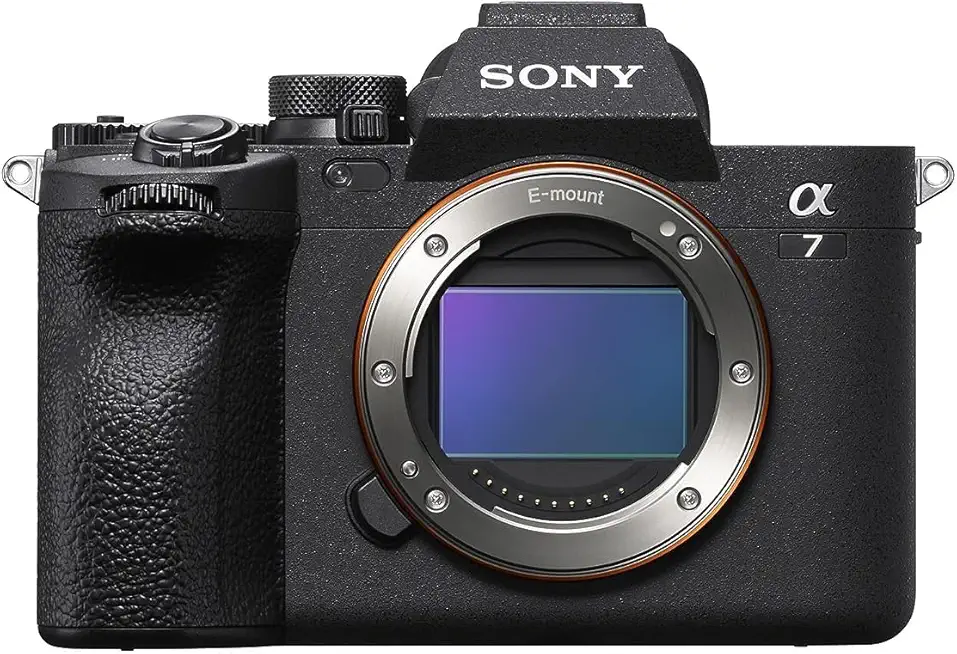
Sony Alpha 7 IV Mirrorless Camera
Versatile hybrid powerhouse delivering high-resolution stills, smooth 4K video, reliable autofocus and intuitive controls for photographers and filmmakers.
Check PriceThe Sony A7 IV is the kind of camera I recommend when you need one tool that truly does it all—high‑res stills and pro video for streaming without compromise. It pairs a 33MP full‑frame sensor with filmmaker-friendly features, so your thumbnails and stream frames both look great.
For live work you get 4K up to 60fps and 10‑bit 4:2:2 internal recording, which gives you more color latitude for grading and cleaner chroma when using overlays in a stream. The fully articulated touchscreen and reliable, fast autofocus with Real‑Time Eye AF make framing and staying sharp during live sessions effortless, especially when you move around a bit on camera.
Build and handling matter in day‑to‑day streaming: the A7 IV is robustly built, has dual card slots, solid battery life, useful ports, and weather sealing—so it survives long sessions and travel between studios. As a hybrid camera it’s a dependable workhorse for creators who switch between photos, recorded video, and live streaming without wanting to swap bodies or settle for lower image quality.
It’s not the smallest option, though, and image stabilization is good but not the class leader, so if absolute pocketability or the best in-body stabilization are your top priorities you may hesitate. For most pros and serious hobbyists wanting high resolution, pro codecs, and dependable streaming ergonomics, the A7 IV is an excellent, versatile choice.
- 33MP full‑frame sensor, strong dynamic range
- 4K up to 60fps with 10‑bit 4:2:2 internal recording
- Reliable, fast autofocus with Real‑Time Eye AF
- Articulated touchscreen, robust build, dual card slots
- Image stabilization decent but trails some competitors
- Menus can be complicated; camera slightly bulky for some setups
4. Sony ZV-1 for Streaming

Sony ZV-1 Compact Vlogging Camera
Pocket-sized vlogging solution with bright lens, fast autofocus, directional microphone and easy content-sharing features for on-the-go creators.
Check PriceIf you need a truly pocketable camera for quick solo streams and travel, the Sony ZV‑1 is built for that life. It packs a 1‑inch sensor and 4K30p video in a tiny, user‑friendly body so you can get great-looking footage without hauling heavy kit.
The ZV‑1’s Real‑time Eye AF and class‑leading face tracking make framing and focus effortless during live sessions. As a photographer I appreciate how reliably it holds focus on faces, which removes a huge distraction when you’re streaming alone.
There are handy vlogger features aimed squarely at solo creators, like product showcase modes and a flip‑out LCD that lets you monitor yourself. The built‑in ND filter helps keep exposure under control in bright conditions without fiddly external accessories.
On the downside, battery life is limited, so it’s better suited to shorter streams or on‑the‑go content rather than marathon broadcasts. Stabilization is passable but not top‑tier, so expect some motion if you’re moving a lot while filming.
Overall, the ZV‑1 is an excellent choice for beginners and creators prioritizing portability, ease of use, and reliable autofocus. If you primarily stream short sessions, travel often, or need a compact second camera, this is a very practical pick.
- Compact, lightweight and travel‑friendly
- Class‑leading autofocus with reliable face/eye tracking
- Built‑in ND filter and flip‑out screen
- User‑friendly vlogging features and good video quality (4K30p)
- Limited battery life for extended streaming
- Stabilization passable, not top‑tier
5. Sony a6400 for Streaming

Sony Alpha a6400 Mirrorless Camera with 16-50mm Lens (E-mount)
Compact APS-C system offering rapid real-time autofocus, versatile kit zoom, excellent image quality and lightweight handling for travel and everyday shooting.
Check PriceThe Sony a6400 is an APS‑C mirrorless that I often recommend to entry‑level and intermediate streamers because it balances image quality with affordability. It’s a value‑focused camera that punches above its weight for live and recorded streaming work.
For video it offers clean 4K at 24p with no crop, which gives you a wide field of view on APS‑C glass when you want that cinematic look. Be aware there is noticeable crop in some higher frame‑rate modes, so 24p is the sweet spot for uncropped 4K.
Autofocus is a major selling point — real‑time eye AF and face tracking are fast and reliable in my experience, so you can move naturally without losing focus during a stream. That makes the a6400 excellent for solo operators who need steady subject tracking without a dedicated focus puller.
The flip‑up screen is handy for self‑monitoring and framing, and the camera includes a microphone input so you can use an external mic for far better audio than the built‑in mic. Most users pair the camera with an external mic for a cleaner, more professional sound during live shows.
There are tradeoffs: internal video is 8‑bit, so you have less color depth compared with higher‑end models, and you’ll see that crop at 30fps or when active stabilization is engaged. Still, for aspiring streamers who want reliable autofocus, a usable flip screen, and clean 4K at 24p, the a6400 is a smart, practical choice.
- Excellent, fast autofocus with eye‑tracking in video
- Flip‑up screen ideal for self‑monitoring
- Clean 4K at 24p with no crop; mic input for external audio
- Compact and strong value for aspiring streamers
- Noticeable crop at 30fps and with active stabilization
- Internal video is 8‑bit (less color depth than higher‑end models)
Essential Streaming Setup Tips
Think of streaming like a photo shoot that never ends — you need a clean, reliable feed and comfortable camera operation. Start by choosing the right connection: many Sony Alphas now offer native USB streaming, which is the easiest route — set the camera to movie mode, enable USB streaming in the menu, and plug in the supplied cable. If your model lacks USB webcam support, use the micro‑HDMI output into a capture card (I often reach for an Elgato Cam Link 4K) so your camera appears as a webcam to streaming software.
Disable all on‑screen overlays so your audience sees only your image. Clean HDMI is non‑negotiable for a professional look; turn off display info in the HDMI settings and confirm the camera outputs a clean feed before going live. For most streams I choose 1080p rather than 4K — it’s kinder to bandwidth, lowers CPU load, and still looks excellent on platforms and mobile viewers.
Autofocus settings make or break a solo stream. Put the camera in continuous movie mode and enable face or eye detection so you can move naturally without hunting focus. Also turn off sleep and auto shut‑off on both camera and computer; there’s nothing worse than a camera going dark mid‑roll.
Power is one of those boring topics that saves your stream. Use a dummy battery or continuous USB power for long sessions to avoid surprise shutdowns. If you plan multiple angles, look into Sony’s multi‑camera control tools — they simplify switching and remote control over Wi‑Fi/Ethernet and keep the workflow elegant when you’re running several cameras live.
Finally, do a full technical run each time: check exposure, white balance, focus, and that the capture device or USB stream is recognized by your software. A quick pre‑stream checklist cuts stress and keeps the focus where it should be — on making a great image and connecting with your audience.
Improve Audio for Streaming
Good audio makes a stream feel polished long before your viewers notice the camera model. Built‑in mics on Sony bodies are fine for casual chats, but they pick up room noise and lack the presence a dedicated mic brings. From my shoots, swapping the camera mic for a proper USB or XLR mic is the single biggest upgrade you can make.
If you’re starting out, a plug‑and‑play USB mic (think Samson Q2U or similar) gives dramatic improvement without extra gear. For a more broadcast sound, an XLR dynamic like the Shure SM7B through an audio interface (and a clean boost like a Cloudlifter if needed) will give richer, controlled vocals. Lavalier mics work well when you plan to move or need hands‑free pickup—clip them close to the chest or collar for the best balance.
One practical tip: don’t route your primary mic through the camera unless you want your audio locked to the HDMI feed. Many Sony cameras’ USB streaming will exclude the camera mic, so it’s usually easier to capture audio on the computer via USB/interface and let your encoder (OBS, Streamlabs) handle sync and levels. Use the software’s delay settings to align audio and video if you see lip‑sync drift.
Monitor with closed‑back headphones while testing so you catch hiss, pops, and clipping. Aim for peaks around –12dB in your recorder or software to leave headroom. Pop filters, foam windscreens, and short mic distances (6–12 inches for condensers, closer for dynamics) make a world of difference.
Finally, treat your room. Soft furnishings, curtains, rugs, or a simple portable acoustic panel will reduce echo more effectively than any plugin. Record a short test clip, adjust placement and gain, and you’ll be surprised how quickly your streams sound professional.
What People Ask Most
What Sony camera is best for streaming?
It depends on your needs and budget. Choose a camera that matches priorities like low‑light performance, portability, or hybrid photo and video use.
Can I use a Sony mirrorless camera for livestreaming?
Yes. Many Sony mirrorless models can livestream using their USB streaming feature or via HDMI to a capture device.
How do I connect a Sony camera to my PC for streaming?
Use native USB streaming if your model supports it, or connect the camera’s HDMI output to a capture card to present it as a webcam. Make sure the camera is in movie mode and any on‑screen overlays are disabled.
Do Sony cameras offer clean HDMI output for streaming?
Yes. On many models you can disable menu and info overlays in the HDMI settings to get a clean feed for streaming.
Is the Sony ZV‑E10 good for streaming?
It can be a good option for vloggers and solo creators who want a compact, budget‑friendly camera. Check that it supports the streaming methods and audio options you need.
Is the Sony A6400 good for streaming?
Yes. It’s a popular APS‑C option that is valued for reliable autofocus and a flip screen, making it well suited for self‑monitoring during streams.
Can I use Sony Imaging Edge Webcam to stream without a capture card?
Yes, on supported cameras the Imaging Edge Webcam software lets you stream over USB without a capture card. Verify compatibility for your camera model and install the official software before streaming.
Conclusion for Best Sony Camera for Streaming
Whether you’re a pocketable vlogger or a pro running long, low‑light streams, this roundup helps you match a Sony body to the way you create.
Focus on the shooting priorities—low‑light capability, sensor size, portability, hybrid photo/video use, and budget—to quickly narrow the best fit for your workflow.
Remember that capture method, reliable continuous power, and clean audio often influence perceived stream quality even more than the camera itself.
To keep improving your streaming skills and setups, read more articles on our site for practical tips, gear recommendations, and workflow advice.
If you have specific questions or want feedback on your setup, leave a comment below and we usually reply within a few hours.


0 Comments