
Ever wondered which camera will actually make your first videos look professional? Choosing gear can feel overwhelming; specs and marketing spin can bury what matters most. Picking the right first camera shouldn’t hold back your creativity.
To cut through the noise, this roundup examines five beginner-friendly cameras vetted through expert reviews, hands-on testing, and real user feedback. Each pick favors practical performance, ease of use, and room to grow rather than headline specs alone. You’ll find options that suit vloggers, hybrid creators, and photography-first shooters.
Rather than a laundry list of numbers, we break down real-world uses, clear pros and cons, and the buyer profile that maps to each camera. We also include smart buying tips on audio, reliable autofocus, lens choices, and the settings you’ll actually use so you avoid common beginner pitfalls. Practical, hands-on advice is prioritized over tech-speak.
Whether you’re launching a channel, shooting social shorts, or building a reel of cinematic pieces, this guide helps match your ambitions to gear that grows with you. No matter your budget or preferred shooting style, you’ll get a clear rationale for what to prioritize. Read on to find the camera that helps your footage look and sound better from day one.
1. Sony ZV-E10 II

Sony ZV-E10 II APS-C mirrorless camera with lens
Compact vlogging camera with exceptional autofocus, detachable lens, large-sensor image quality and easy controls for content creators.
Check PriceThe Sony ZV-E10 II is a video-first interchangeable-lens camera and a clear upgrade over the original ZV-E10, packing a 26MP APS-C sensor derived from the Sony FX30 lineage. It shoots 4K at up to 60fps and offers S-Cinetone for an instant, filmic color profile that makes grading much easier straight out of camera.
In real-world use it’s versatile — great for vlogging, cinematic shots, product demos, street work, and even casual wildlife shooting thanks to its lightweight body and fully articulating screen for easy framing. The autofocus is fast and reliable with good eye-tracking, so you’ll spend less time chasing focus and more time creating.
Stabilization has been improved with electronic options that help a lot during run-and-gun work; still, adding a gimbal will noticeably improve smoothness for more cinematic moves. The camera’s strong low-light performance yields clean results in moderate lighting, so you can shoot longer into dusk without suffering terrible noise.
All told, the ZV-E10 II is aimed at beginner to intermediate videographers who want an affordable, flexible, video-first tool with excellent autofocus and a compact form factor. If you value quick setup, great straight-out-of-camera color options like S-Cinetone, and the freedom of the Sony E-mount ecosystem, this camera will serve you well.
- Fast, accurate autofocus with consistent tracking
- Excellent image quality; clean in good/moderate low light
- Interchangeable-lens flexibility (Sony E-mount + third-party)
- Lightweight, compact body with fully articulating screen
- No in-body image stabilization (IBIS)
- Can get hot during extended 8K 360° shooting modes
2. Canon EOS R50

Canon EOS R50 mirrorless camera with RF-S 18-45mm IS STM lens
Lightweight mirrorless kit offering reliable stabilization, versatile standard zoom, intuitive handling and excellent everyday photo and vlog performance.
Check PriceThe Canon EOS R50 packs a 24MP APS-C sensor and 10-bit HDR video capability into a compact, beginner-friendly body. It also offers Canon’s vibrant color science, an electronic viewfinder (EVF), and an articulating LCD, with 4K video up to 30fps.
In real-world use it’s an excellent entry point to interchangeable-lens videography. The simple menus genuinely speed up the learning curve, so you can focus on framing and storytelling instead of digging through settings.
What stands out for me as a working photographer is the HDR PQ 10-bit mode. That makes color grading easier compared with wrestling with log profiles, and the punchy, pleasing colors are ideal for social posts and casual shoots where turnaround time matters.
For handheld work the camera feels comfortable in the hand, and the EVF plus articulating screen helps with tight framing and vlogging angles. You’ll get attractive out-of-camera color rendition that minimizes time in post for most creators.
There are trade-offs to accept: there’s no headphone jack for real-time audio monitoring, and video is capped at 4K 30fps with no higher frame rates or advanced profiles. For most beginners focused on social content, the R50’s simplicity and color-first approach make it a very sensible choice.
- Intuitive, user-friendly menu system.
- Pleasing out-of-camera color rendition.
- Comfortable grip for handheld shooting.
- HDR PQ 10-bit video for improved dynamic range and color depth.
- No headphone jack for audio monitoring.
- Video limited to 4K 30fps; no higher frame rates or advanced profiles.
3. Fujifilm X-M5 Camera

Fujifilm X-M5 mirrorless camera body
Stylish, compact body delivering rich color rendition, advanced film simulations and high-speed shooting for photography enthusiasts.
Check PriceThe Fujifilm X-M5 is a compact hybrid that shines for creators who want a filmic look straight out of the camera. It offers Film Simulation modes via a retro dial and delivers good video quality while relying on electronic stabilization (no IBIS).
If you like tactile controls, this camera rewards that workflow. Many shooters favour it for instant film-like looks and direct access to controls for quick adjustments.
It’s well suited to a manual, creative approach to video aesthetics and works nicely as a photo/video hybrid. The body is compact and easy to use, making it friendly for casual filmmakers and hybrid shooters.
Be realistic about limitations: there’s no IBIS, so it’s less suitable for handheld run-and-gun without a gimbal. Some users also note that the build quality feels more basic, which reflects its price point.
As a working photographer, I’d recommend the X-M5 if your priority is style and hands-on control rather than absolute stabilization or heavy-duty weather sealing. It’s ideal for beginners who want film-style output and tactile controls without getting lost in complex post workflows.
In short, the X-M5 is a creative tool first — excellent for aesthetic-driven projects and hybrid shooters who value immediacy over ruggedness or in-body stabilization.
- Attractive Film Simulations for instant stylistic looks
- Compact, easy-to-use body for casual filmmakers
- Direct access to controls for quick adjustments
- Strong photo/video hybrid versatility
- No IBIS; less suitable for handheld run-and-gun
- Build quality perceived as more basic by some users
4. Canon EOS Rebel SL3/250D DSLR Option

Canon EOS 250D (Rebel SL3) DSLR with 18-55mm lens
Ultra-light entry DSLR with optical viewfinder, flip touchscreen, and beginner-friendly controls for clear images and easy learning.
Check PriceAs a working photographer, I appreciate the Canon EOS Rebel SL3/250D for its straightforward, dependable shooting experience. It’s a DSLR that delivers excellent image quality and an optical viewfinder that makes framing feel instant and natural.
It’s also surprisingly portable compared with many DSLRs, which makes it easy to carry on location shoots or long days of handheld shooting. The long battery life means you won’t be swapping batteries every hour when you’re out covering events or practicing your craft.
For beginners focused primarily on photography, this camera is very forgiving and lets you grow without overwhelming complexity. Canon’s wide range of affordable EF and EF‑S lenses gives you a clear upgrade path as your needs evolve.
On the video side, expect competent HD footage for casual projects and social clips, but not the advanced specs mirrorless cameras now offer. The video autofocus is slower and less accurate than modern mirrorless systems, and 4K options and advanced video profiles are limited.
If your priority is learning photography while occasionally shooting video, the SL3/250D is a practical, budget-friendly tool that emphasizes reliability and ease of use. If heavy, modern video work or fast AF tracking is central to your plans, you may find its video features restrictive.
- Long battery life
- Optical viewfinder—lag-free framing
- Large, affordable EF/EF‑S lens ecosystem
- Dependable image quality for beginners
- Video autofocus slower than mirrorless
- Limited 4K and no advanced video profiles
5. Sony α6700 Camera
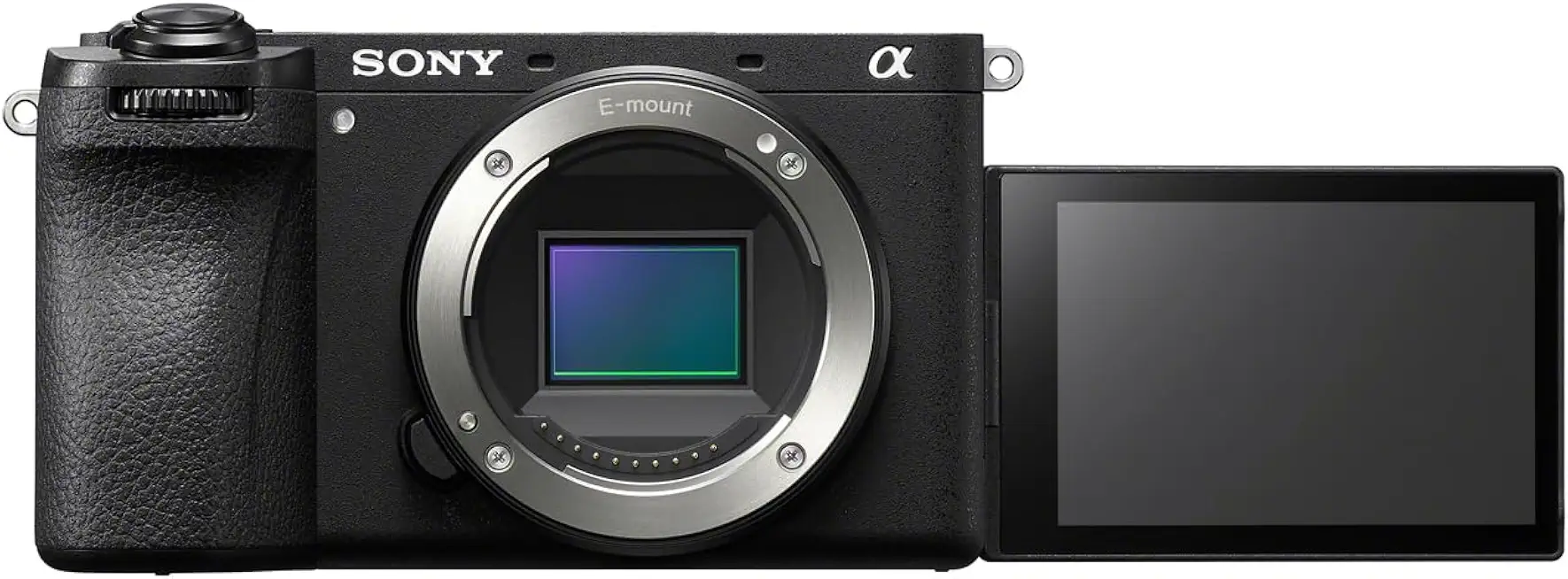
Sony Alpha 6700 APS-C mirrorless camera
Powerful compact camera with pro-grade autofocus, 4K video capabilities, fast burst shooting and versatile connectivity for hybrid creators.
Check PriceThe Sony α6700 is a high-performing APS-C mirrorless that sits between beginner gear and semi-pro rigs. It shoots 4K up to 60fps, records in 10-bit, and offers log profiles, so you have real latitude for color grading and creative looks.
Autofocus is a standout — fast, responsive subject tracking with reliable eye detection that keeps people sharp while you move. Low-light sensitivity is strong too, so you get cleaner ISO performance when dusk or indoor lighting limits you.
Its feature set is rich for filmmakers: 10-bit capture and log profiles let you push color and contrast in post without destroying detail. The body is compact and ergonomic, making long handheld days less fatiguing while still feeling capable for serious work.
There are trade-offs to consider. The camera applies a crop at 4K 60fps, which can affect your framing choices for wider shots. And because of the advanced features and grading potential, there’s a steeper learning curve for absolute beginners compared with simpler point-and-shoot options.
If you’re a serious beginner or an intermediate shooter ready to learn color workflows and advanced autofocus, the α6700 gives you room to grow without immediately needing to upgrade. It’s mostly a camera for people who want to invest time into craft and expect reliable performance across varied shooting conditions.
- Fast, responsive AF with eye-tracking
- 10-bit 4K with log profiles
- Strong low-light performance
- Compact, ergonomic design
- Crop applied at 4K 60fps
- Steeper learning curve for beginners
Choosing Cameras with External Mic Support
Good audio makes amateur video feel professional, so pick a camera that treats sound as a first-class feature. Look for a dedicated external mic input — usually a 3.5mm jack on entry-level bodies and XLR or XLR-adapter options on higher-end models. That jack opens up choices: shotgun mics for camera-mounted directionality, lavaliers for interviews, and wireless systems for run-and-gun shoots.
Manual audio level controls are worth their weight in gold. Automatic gain can pump and clip in unpredictable ways, so being able to set levels and watch a clear on-screen meter keeps your dialogue clean. If your camera lacks easy manual control, plan to record to an external recorder or choose wireless kits that let you monitor levels independently.
A headphone output is non-negotiable when you want to hear what’s actually being captured. Real-time monitoring lets you catch wind noise, handling thumps, or a loose mic cable before you ruin a take. If a body lacks a headphone jack, factor in an external mixer, recorder, or a wireless lav system with monitoring built in.
Check for built-in audio features that save time on set. Low-cut filters reduce rumble, and mic sensitivity adjustments help tame loud environments. Also consider adapter needs: many smartphone lavs use TRRS plugs, which need a TRRS-to-TRS adapter to work properly with cameras.
Think about form factor and mounting too. A compact mirrorless camera might be ideal for travel, but cable routing and hotshoe space can become fiddly with a big wireless receiver and shotgun mic attached. Plan how you’ll mount mics, run cables, and manage power so your audio setup stays reliable on location.
Finally, always test sound in the actual shoot environment before rolling. It’s the quickest way to know whether your mic choice, cabling, and camera inputs are doing the job. Great footage can be forgiven for many things — bad audio is rarely one of them.
Choosing Reliable Video Autofocus
As a working photographer who shoots a lot of run-and-gun video, reliable autofocus is one of the single biggest quality-of-life upgrades you can buy into. Look for hybrid AF systems (phase + contrast detect) because they combine speed with accuracy, and prioritize cameras that offer smooth, quiet focus transitions so your lens motors don’t end up on the audio track. Face and eye detection plus continuous tracking are especially useful — they let you concentrate on composition while the camera keeps people sharp.
Don’t just trust specs: test AF in the conditions you’ll actually shoot. Put the camera on a gimbal, walk around a crowded street, try low light and backlit scenes. Pay attention to focus breathing, hunting, and any audible motor noise; if a lens sounds like a sewing machine, it will show up in your footage unless you mic carefully.
Lens choice matters as much as body choice. Seek lenses with stepping or linear motors for silence and smooth pulls, or be ready to switch to manual focus for planned focus transitions. Many mirrorless bodies give you helpful tools like focus peaking and magnification — use those when you need absolute predictability, for example during cinematic rack-focuses.
Learn the AF controls on your camera: set AF transition speed, tracking sensitivity, and try back-button AF for quicker, more reliable locking. In low-contrast or low-light situations, AF can struggle; here I either create contrast to help it or drop into manual focus and use peaking. Remember that DSLRs often trail mirrorless in continuous video AF, so if video tracking is a priority, mirrorless systems are the safer bet.
Finally, build a short pre-shoot checklist: enable eye/face detection, pick a quiet lens, run a 30–60 second AF stress test, and listen to the audio for focus motor noise. Those small checks save you re-shoots and let you focus on telling the story — which is what really matters.
What People Ask Most
What is the best camera for beginner videography?
There is no single best camera for every beginner; the right choice depends on your shooting style, budget, and priorities. Look for a camera with reliable autofocus, good audio options, and a lens ecosystem that matches your goals.
Do I need a mirrorless camera for beginner videography?
No, you do not strictly need a mirrorless camera to start learning videography. Mirrorless models often offer advantages like compact size and advanced autofocus, but DSLRs and compact cameras can also be excellent learning tools.
Can I use a DSLR for beginner videography?
Yes, a DSLR can be a solid choice, especially if you also care about still photography. Keep in mind that some DSLRs may have fewer modern video conveniences compared with newer mirrorless cameras.
What camera features should beginners look for in videography?
Beginners should prioritize dependable autofocus, an external microphone input, and some form of stabilization or the ability to use a gimbal. An articulating screen and easy-to-use controls also make shooting and monitoring much simpler.
What lens should a beginner use for videography?
Choose a lens that matches the type of shots you want to capture; a versatile zoom is useful for general-purpose work while a standard prime is great for low-light and cinematic looks. Consider weight, focal range, and whether you want a fast aperture for shallow depth of field.
What camera settings should I use for beginner videography?
Start with simple, consistent settings that give natural-looking motion and accurate exposure, and use autofocus modes designed for video to keep subjects sharp. Monitor audio levels and set white balance to match the scene for easier postproduction.
Are compact or point-and-shoot cameras good for beginner videography?
Yes, compact cameras are a good way to learn thanks to their ease of use and portability. They may lack advanced inputs and controls, but they are often perfectly capable for vlogging and social-video creation.
Conclusion for Beginner Videography Cameras
Choosing the right beginner video camera ultimately comes down to how you plan to use it—vlogging, social clips, hybrid photo/video, or a path toward more advanced filmmaking—and picking a body that supports that vision.
Focus on dependable autofocus, clear external audio options, effective stabilization (either in-body or via gimbal), and a lens ecosystem that lets you grow without forcing an early upgrade.
Balance your current needs and budget with a little room to learn and expand, so your first camera serves you today and still feels relevant as your skills improve.
If you want practical tips and deeper comparisons to help improve your shooting and editing, read more on the site to build skills and confidence at your own pace.
Please leave a comment with your questions or the kind of shooting you do—we usually reply within a few hours and are happy to help you narrow down the best option.


0 Comments