
Ready to capture cinematic 4K footage from the sky on your first flight? From sweeping travel shots to crisp social clips, the right starter drone makes all the difference.
This guide covers five beginner-friendly 4K drones and lays out simple setup steps, shooting tips, and a short FAQ. We focus on what matters: image quality, ease of use, safety, and portability.
You’ll get clear advice for getting airborne, picking practical settings, and filming smoother footage right away. No heavy tech jargon—just usable steps for your first flights.
Ideal for first-time pilots, hobbyists, and social creators who want better aerial content without a steep learning curve. Also handy for travelers needing pocketable gear and parents buying a safe starter drone.
We judged options by setup speed, flight stability, automated modes, and real-world video quality, not just specs. That makes it easier to weigh trade-offs across budgets and use cases.
You’ll also find concise safety reminders and preflight habits to keep flights smooth and legal. These small routines quickly boost confidence and results.
Read on to discover the best 4K drone for beginners that fits your priorities—portability, image quality, or budget. With a few smart choices and practice you’ll be shooting clearer, more cinematic aerial video fast.
1. DJI Mini 4K Overview

”DJI
Ultra-light aerial camera delivers stunning 4K footage, 31-minute flight, compact under 249 g—easy to carry and shoot.
Check PriceAs a travel-ready option, the DJI Mini 4K is a delight for beginners and casual shooters. It’s a sub-250g, regulator-friendly drone that feels almost pocketable when folded, so you’ll actually take it on trips and family outings.
Image-wise it punches above its weight. The Mini 4K shoots true 4K and also supports 2.7K up to 60fps, stabilized by a 3-axis gimbal and offering a 2x digital zoom—enough flexibility for social clips, landscape pans, and simple cinematic moves.
Flight performance is reassuring for new pilots. Real-world flight time exceeds many rivals, and the build is robust for such a light craft, which means longer sessions and fewer nerves on windy days—though you still must respect its limits.
There are trade-offs to be aware of. It lacks obstacle-avoidance sensors and advanced subject-tracking, so you’ll need to fly more deliberately and keep line-of-sight. Post-production options are also limited: there’s no D‑Log or other advanced color profiles, and low-light performance is modest compared with larger-sensor models.
In short, if you want an easy-entry, highly portable 4K drone that delivers solid footage for social media, travel, and family use, the Mini 4K is a great pick. If you need pro-level tracking, obstacle sensing, or cinematic color grading headroom, you may outgrow it as your skills advance.
- Sub-250g, regulator-friendly
- Shoots 4K (supports 2.7K up to 60fps)
- 3-axis gimbal; 2x digital zoom
- Real-world flight time exceeds many rivals
- No obstacle-avoidance sensors
- No advanced color profiles (e.g., D-Log); modest low-light performance
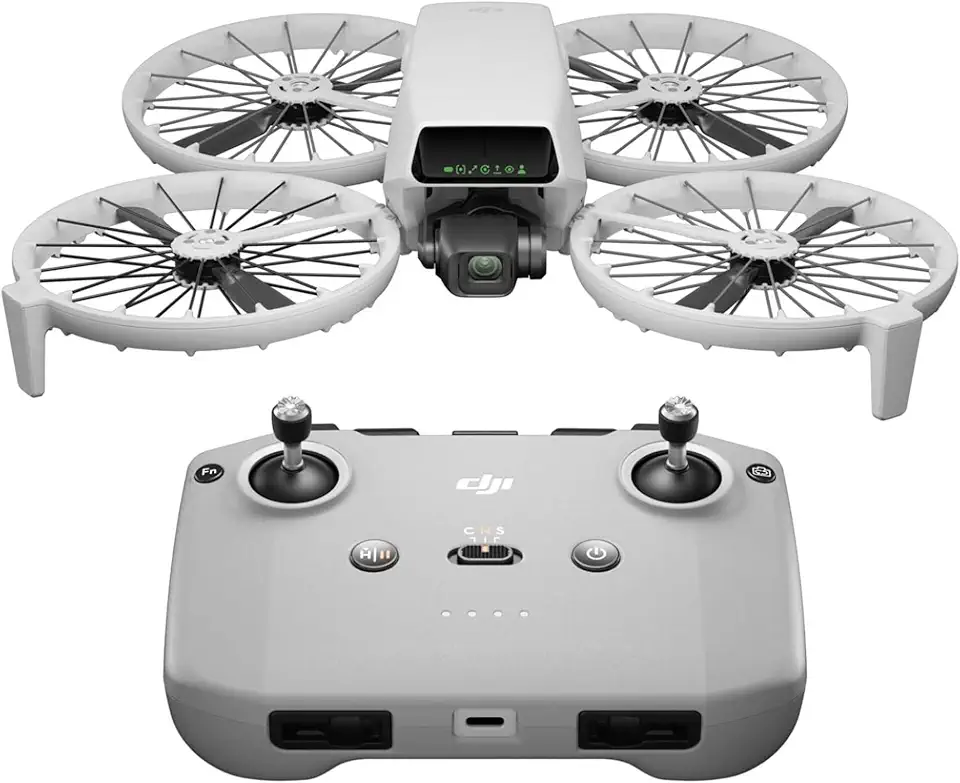
2. DJI Flip Overview
”DJI
Powerful long-range quadcopter captures crisp 4K video up to 13 km, lightweight design and precise remote-control responsiveness.
Check PriceThe DJI Flip is a 2026 release designed as a bridge from beginner to prosumer pilots. As a shooter, I appreciate how it blends approachable automation with pro-level capture tools.
Its camera is a real step up: a 1/1.3″ sensor that records 4K 60fps HDR, captures 48MP stills, and offers 10-bit D-Log plus slow motion up to 100fps. That combination gives you crisp vertical video and serious color grading headroom for social content and short films.
The Flip stays under 249g while adding folding prop guards and 3D infrared obstacle avoidance forward only. You can fly with a phone or a traditional controller, use palm launch/landing, and even say “Hey Fly” for voice control. Real-world battery life is strong too, with flight time up to 31 minutes (O4 transmission).
For social creators and vloggers this drone is a sweet spot: vertical shooting, AI-powered tracking, QuickShots and MasterShots make solo workflows fast. Just be aware the guards make it bulkier and they reduce wind stability, so it’s less ideal in breezy conditions. Some advanced features are also phone-only despite having a controller, and there’s no FPV mode.
Overall, the DJI Flip is excellent if you want near-pro image quality in a light, beginner-friendly package and you mainly fly calm-to-moderate conditions. If portability in a pocket or windy-field reliability are top priorities, consider that trade-off before buying.
- Excellent image specs: 1/1.3″ sensor, 4K60 HDR, 48MP, 10-bit D-Log
- AI tracking plus QuickShots, MasterShots, and vertical mode
- Palm launch/landing, voice control “Hey Fly”, intuitive app
- Flight time up to 31 minutes (O4 transmission)
- Less pocketable — bulkier with folding guards
- Prop guards reduce wind stability; worse in breezy conditions
3. DJI Neo Overview

DJI Neo Mini Drone (Controller-free, 4K, 135 g)
Pocket-sized, controller-free craft records 4K footage, weighing just 135 g for effortless hands-free aerial creativity.
Check PriceAs a professional photographer I judge a drone by how quickly it gets you usable shots and how forgiving it is to fly. The DJI Neo is one of DJI’s most affordable consumer drones, and it honestly earns that reputation by being simple and accessible.
It records 4K video and 12MP stills on a 1/2.3″ sensor, so you’ll get crisp social-ready clips and decent photos for the price. Don’t expect cinematic, log-grade color — the Neo does not offer RAW or D-Log — but it captures solid basic footage for learning and casual use.
The Neo supports phone flight with optional controller support and smartphone FPV, which is great for experimenting with first-person perspectives. It’s compact, lightweight, and quick to set up, with basic subject-tracking modes and the neat ability to record audio from your phone for synced narration or music.
Who should buy it? Total beginners, kids, ultra-budget flyers, and FPV experimenters will get the most from the Neo. It’s an inexpensive way to learn framing, movement, and simple automated shots without a big investment.
Where it falls short is important to acknowledge: there’s no obstacle avoidance and the build and controls feel toy-like compared with pricier models. Flight time is shorter than higher-end drones and it’s wind-sensitive, so it’s best treated as a casual, entry-level tool rather than a professional workhorse.
In short, if your priorities are affordability, smartphone FPV fun, and an easy learning curve, the DJI Neo is a sensible first drone. If you need advanced image quality, robust safety sensors, or long endurance, you’ll outgrow it as your skills progress.
- Very affordable
- Smartphone FPV
- Compact and lightweight
- Phone audio recording for synced narration
- No obstacle avoidance
- Wind-sensitive / shorter flight time
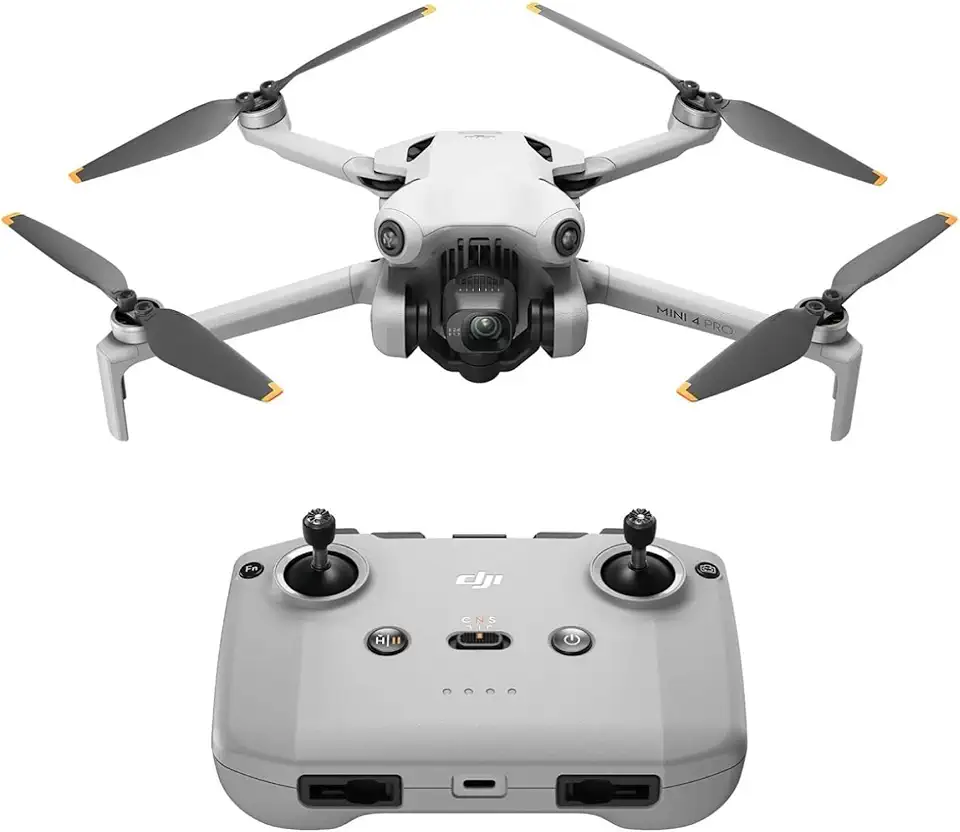
4. DJI Mini 4 Pro Overview
”DJI
Pro-grade imaging with 34-minute endurance, sub-249 g portability, intelligent flight modes for cinematic shots.
Check PriceAs a photographer I appreciate when a drone balances true portability with pro-level imaging, and the DJI Mini 4 Pro hits that sweet spot. It’s aimed at enthusiasts, vloggers, and amateur filmmakers who want advanced features without hauling a full kit.
The camera is a standout: a 1/1.3″ sensor that delivers strong image quality, 4K HDR up to 100fps, and 10-bit D-Log M for real color grading flexibility. Vertical video support makes it easy to produce social-ready clips straight out of the air.
For safety and solo shooting the Mini 4 Pro is reassuring — it has omnidirectional 360° obstacle avoidance and ActiveTrack subject tracking, which makes following a subject or filming yourself far less stressful. Those systems reduce the chance of a rookie mistake turning into a crashed frame.
Battery life is practical for real shoots: you can get up to 36 minutes with the heavier battery, though note that using that pack pushes the weight over 249g. That trade-off between flight time and regulatory weight is worth considering depending on where you fly.
In use you’ll notice it’s pocket-sized and regulator-friendly when kept under the lighter configuration, while still offering robust handling and true 4K vertical shooting. If you want pro-grade color, tracking, and safety in a tiny package, this is a very strong choice — though it can be a bit feature-rich if you’re totally new to drones.
- Omnidirectional 360° obstacle avoidance
- ActiveTrack subject tracking
- 1/1.3″ sensor + 10-bit D-Log M, 4K HDR up to 100fps
- Pocket-sized and regulator-friendly (sub-249g)
- No FPV mode (traditional camera drone)
- Higher price within the Mini lineup
5. Mini 2 SE Overview

”DJI
Reliable everyday flyer captures crisp QHD video, 31-minute battery life, compact under 249 g for travel-ready adventures.
Check PriceAs a photographer who often recommends gear to new pilots, I value simplicity and reliability — and the Mini 2 SE delivers precisely that reputation. The outline notes it as the baseline platform for the Mini 4K, which tells you this is a proven design DJI trusted enough to iterate from.
Being the basis for a rebadged 4K model means the Mini 2 SE gives you the core flight experience and handling that beginners need: predictable controls, straightforward setup, and a hardware platform DJI considered solid. The Mini 4K adds higher video resolution and 2x digital zoom, so the Mini 2 SE by contrast keeps things more basic.
For a new shooter focused on learning composition, camera movement, and safe piloting, that pared-back approach can be an asset. You won’t be chasing advanced camera specs while you’re still mastering smooth gimbal pans, tracking subjects, and managing exposure in changing light.
On the flip side, if you know you want the highest-resolution footage or the convenience of a 2x digital zoom for framing distant subjects, the Mini 4K iteration was created to meet those needs. But if your priority is an uncomplicated, proven entry platform to learn aerial photography fundamentals, the Mini 2 SE is a sensible, mostly-good choice.
- Proven platform — basis for the Mini 4K
- Simpler feature set — easier to learn
- Good for practicing composition and smooth flight
- Less complexity while mastering basics
- Lower video resolution than the Mini 4K
- No 2x digital zoom
Getting Started With Your First 4K Drone
Before you fly, get your house in order: install the drone maker’s companion app and confirm your phone or tablet is compatible and charged. Power up and pair controller and drone while following the app prompts, then let it install any firmware updates — nothing worse than fixing problems in the air.
Physically prepare the aircraft next. Remove the gimbal protector, fully charge all batteries, and place the drone on a flat, stable surface for initial power-up. When prompted, run GPS, compass and gimbal calibrations so the craft behaves predictably from the first hover.
For your first flights, engage Beginner Mode. It limits speed, altitude and range so you can focus on fundamentals instead of panic. Use small, deliberate stick inputs: left stick controls altitude and yaw, right stick controls pitch and roll. Practice hovering a few meters off the ground until the drone holds a steady position.
One-touch takeoff and landing are a blessing for beginners, but also practice manual smooth landings with gentle stick corrections. Keep flights short at first — battery management and confidence build hand in hand. Set a conservative return-to-home battery threshold, and always watch your remaining flight time.
Pick a wide, open field free of people, buildings and trees for initial practice. Check the app for GEO and restricted zones, stay below 400 feet where required, and avoid flying in rain, high wind or extreme temperatures. Safety is the single best habit for long-term enjoyment.
Think like a photographer while you learn to fly. Fly slow and smooth, vary altitude and angle, and shoot short 15–30 second clips you can review right after landing. Use ND filters in bright sun to keep shutter speed cinematic, and favor low ISO for cleaner 4K footage.
After each flight, review your footage and telemetry to spot mistakes and small wins. Every session teaches you about wind, timing, and composition. With patient practice and a focus on smooth motion, you’ll turn those shaky first clips into confident aerial storytelling.
Tips For Shooting Better 4K Video
Think like a filmmaker, not a remote pilot. Shooting in 4K gives you latitude to crop and stabilize in post, so plan shots that tell a small story — approach, reveal, and a closing frame. With that intent, every flight feels like a short production instead of casual footage.
Always record in 4K when possible and pick a frame rate for your goal: 24/25fps for cinematic motion, 30fps for general use, and 50–60fps or higher for slow motion. Keep ISO as low as you can and set shutter speed roughly double your frame rate to preserve natural motion blur. Use log or 10‑bit only if you know how to color grade; otherwise stick to a standard profile to save time.
Fly slow and smooth. Small, steady inputs produce far more usable footage than dramatic maneuvers. Prefer straight or gentle curved tracks over constant circling, and vary altitude and angle between clips to build visual interest. When possible, lean on automated modes like Follow, Waypoints or prebuilt QuickShots to repeat consistent, cinematic moves.
Composition matters as much in the sky as on the ground. Keep the sun behind you when practical to avoid blown highlights, level the horizon, and isolate a single subject or motion per clip. Use the rule of thirds and leave space for movement; shorter clips of 15–30 seconds are easier to pace and edit than long, wandering takes.
After each flight, review footage and note what worked or didn’t so you improve quickly. Set a conservative return‑to‑home battery threshold (around 30%) and avoid flying in gusty conditions. Practice in beginner mode until smooth stick control becomes second nature — that tiny bit of restraint will make your 4K footage look far more professional.
What People Ask Most
What is the best 4K drone for beginners?
There is no single best option; the right drone depends on your priorities like ease of use, portability, and safety. Choose a model with intuitive controls and beginner-friendly features to make learning easier.
Are 4K drones good for beginners?
Yes, many 4K drones are suitable for beginners because they combine clear footage with straightforward flight controls. Look for models that offer beginner modes and simple setup to reduce the learning curve.
What features should beginners look for in a 4K drone?
Prioritize intuitive apps, stable gimbals, and automated flight modes that simplify capturing steady footage. Portability, reliable support, and safety features like return-to-home can also make flying less stressful.
Which 4K drones are easiest to fly for beginners?
Entry-level models with guided setup, one-touch takeoff and landing, and stable flight performance are generally easiest to learn on. Drones that include automated tracking and simplified control schemes help new pilots focus on framing and confidence.
Do beginner 4K drones have obstacle avoidance?
Some beginner drones include obstacle sensors while others do not; it varies by model and price tier. If obstacle avoidance is important, choose a drone that explicitly lists sensors or avoidance capabilities in its features.
How long is the flight time on typical beginner 4K drones?
Flight time varies significantly between models and depends on battery size and flying conditions. Check each model’s specifications and plan flights conservatively to allow time for safe returns.
Can beginners use 4K drones for aerial photography and video?
Yes, beginners can capture high-quality aerial photos and videos with 4K-capable drones. Focusing on steady flight, simple composition, and basic editing will produce much better results quickly.
Conclusion For Best 4K Drones For Beginners
Choosing your first 4K drone comes down to balancing price, portability, safety features, and camera capabilities to match how you plan to fly and create.
If you prioritize ease-of-use and portability, pick a simple, lightweight model; if image quality or automated tracking matters more, look toward options with stronger sensors and smarter flight modes.
Follow the setup checklist and shooting tips in this guide and use the FAQ to troubleshoot common beginner questions so your early flights are safer and more productive.
If you want to keep improving your skills and gear knowledge, explore more articles on the site for deeper tips, comparisons, and real-world advice.
Have a question or want to share a first-flight clip? Leave a comment below and we usually reply within a few hours.



0 Comments