
What if your best black-and-white photographs never look as striking on paper as they do on your monitor? The culprit is often the printer. The right printer brings out subtle midtones, rich blacks, and neutral highlights.
True monochrome quality comes from smooth tonal gradations, high Dmax, and neutral grays. That requires ink chemistry built for photos and dedicated black-and-white modes that favor blacks over color mixing. Paper choice and accurate profiles are equally decisive.
Think about how you work: studio fine-art prints need different features than casual 8x10s. Media handling, archive-grade pigment inks, and printer duty cycle all influence output and long-term costs. Ease of use and reliable feeding matter when you schedule exhibitions or client deliveries.
In the pages ahead we narrow the field to printers that consistently excel with black-and-white photography for a range of budgets and workflows. You’ll get clear explanations of strengths and trade-offs, plus practical advice on paper, profiles, and ownership costs. Read on to find the machine that turns your digital vision into archival prints.
Selections were judged on tonal nuance, maximum black density, media flexibility, and real-world cost of ownership. Whether you make gallery prints, archival portfolios, or day-to-day client work, this guide will point you to printers that match your needs.
1. Canon ImagePROGRAF PRO-310 Overview
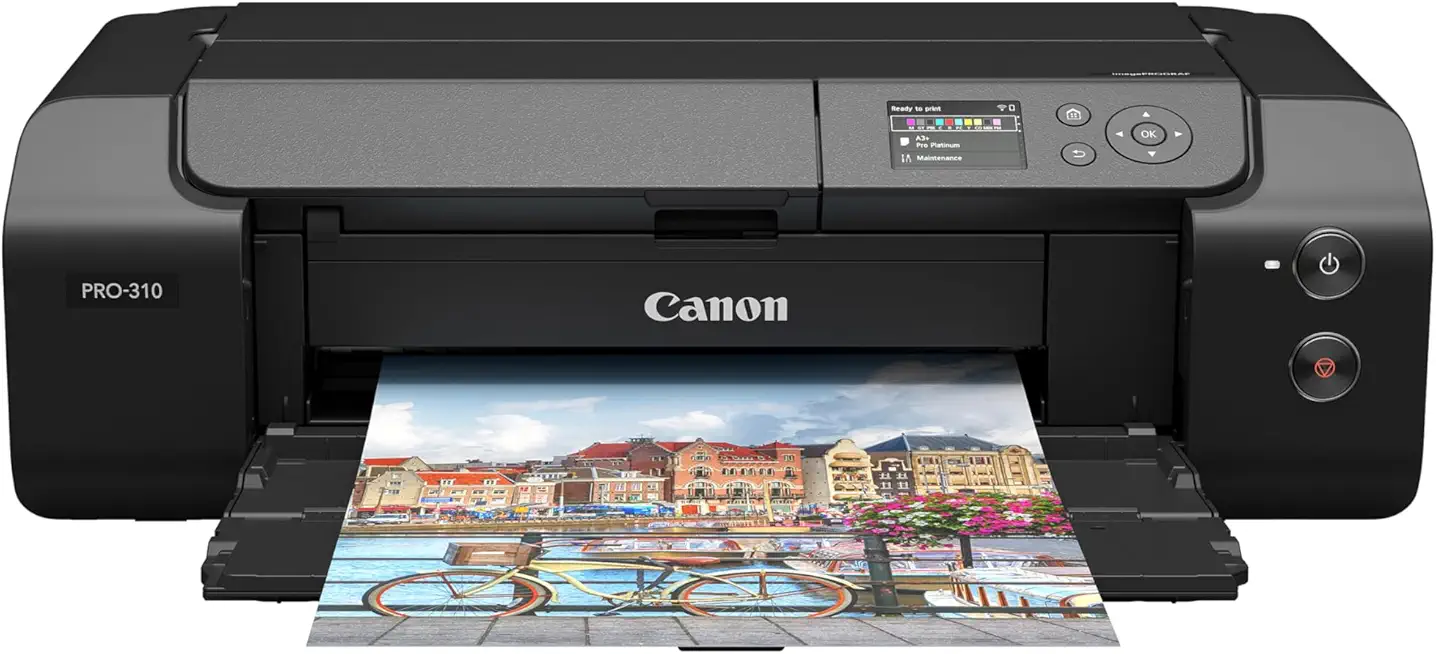
Canon imagePROGRAF PRO-310 13-inch
Professional desktop photo printer delivering vivid color accuracy, high-detail prints, and fast, quiet operation for photographers and artists.
Check PriceAs a photographer who prints fine-art black-and-white work, the Canon imagePROGRAF PRO-310 stands out for true gallery-quality results. It delivers deep, rich blacks and an exceptional tonal range that keeps shadow detail while preserving midtone nuances.
The print engine uses a 10-color pigment ink system with Chroma Optimizer. That combination reduces bronzing and helps deepen blacks, which is exactly what you want for neutral, dense monochrome prints.
Media handling is a real advantage here. The manual feeder accepts thick and specialty sheets, so matte fine-art and textured stocks feed reliably and produce consistent surface results.
Borderless printing across a wide range of media is useful when you want to output exhibition-ready pieces without matting. The PRO-310 is also described as reliable and consistent across multiple runs, so it’s suitable for long-term projects or small edition printing.
There are practical trade-offs to consider. Prints are not touch-dry immediately, so you’ll need to allow drying time or handle them carefully after printing. Also, expect higher running costs from the 10-cartridge ink system compared with simpler printers.
Overall, if your priority is archival-looking B&W prints with deep blacks, smooth tonal transitions, and the ability to use heavyweight fine-art papers, the PRO-310 is a very strong choice. If instant handling and low ink costs are your top concerns, factor those limitations into your decision.
- Outstanding B&W quality
- Smooth tonal transitions
- 10-color pigment ink system with Chroma Optimizer
- Excellent handling of thick/fine-art stocks
- Prints not touch-dry immediately
- Higher running costs from a 10-cartridge ink system
2. Epson SureColor P700 Overview

Epson SureColor P700 13-inch
Compact high-fidelity photo machine with expanded color gamut, smooth gradients, and exceptional black density for gallery-quality prints.
Check PriceAs a photographer who prints often, the Epson SureColor P700 stands out for its deep blacks and wide tonal range. It uses a 10-color pigment ink system, so prints have longevity and excellent black density. The resulting monochrome prints have punch and subtle gradation without feeling flat.
The printer is compact, which is great for small studios or home workflows. It also supports roll-paper, so you can do panoramas and larger prints without needing a separate large-format machine. That makes it a versatile choice if you want gallery-sized work from a compact footprint.
Setup is straightforward and the interface is user-friendly, so you’ll be printing quickly. Performance is reliable, which matters when you’re on a deadline or running a series of prints. Do note the P700’s color output can be slightly less accurate out of the box, but it responds well to calibration.
One practical caveat: initial ink consumption during setup is high and cartridges may be ~25% full afterward. Factor that into your first-run costs and profile-building workflow. Overall, if you want a mostly compact printer that balances high-quality B&W output, archival pigment inks, and the ability to print large or panoramic work, the P700 is an excellent, mostly hassle-free choice.
- Exceptional B&W quality with wide tonal range
- 10-color pigment ink system for longevity
- Compact design with roll-paper support
- Easy setup and reliable performance
- High initial ink consumption; cartridges may be ~25% full afterward
- Slightly less out-of-the-box color accuracy (can be calibrated)
3. Canon ImagePROGRAF PRO-1100 Overview

Canon imagePROGRAF PRO-1100 17-inch
Large-format pro lab alternative producing stunning, continuous-tone prints, wide tonal range, and durable archival output for exhibitions.
Check PriceAs a working photographer, the Canon imagePROGRAF PRO-1100 quickly became my go-to when I needed museum-quality black-and-white prints with minimal fuss. Its 12-color pigment ink system with Chroma Optimizer delivers exceptional color accuracy and, crucially for B&W work, deep blacks and a wide tonal range that preserve subtle gradations in shadows and highlights.
Paper handling is excellent — it eats glossy, matte, and fine-art stocks without batting an eye, and the output looks consistently professional across different media. I also appreciate that it remains fast and efficient even in the highest-quality modes, so it works well when you need higher volumes or larger-format prints for exhibitions or commercial jobs.
If you’re producing prints for galleries or clients who demand archival, gallery-grade results, this printer is built for that environment. The combination of deep blacks, stable tonal transitions, and reliable media handling makes it a solid investment for professionals prioritizing image quality over absolute lowest cost per print.
However, it’s not a casual consumer device — expect a larger footprint and a higher upfront price, and be prepared for higher running costs because of the 12-cartridge ink system. If your priority is compactness or minimal ink expense, this might feel like overkill. But if you need professional-grade, exhibition-ready black-and-white prints with speed and consistency, the PRO-1100 is hard to beat.
- 12-color pigment ink with Chroma Optimizer
- Outstanding B&W quality; wide tonal range
- Excellent media handling
- Fast high-quality printing
- Higher running costs from a 12-cartridge ink system.
- Larger size and higher initial investment.
4. Epson SureColor P900 Overview

Epson SureColor P900 17-inch
Ultra-wide professional printer engineered for museum-quality results, deep blacks, precise color fidelity, and long-lasting pigment stability.
Check PriceThe Epson SureColor P900 is a printer I reach for when I need museum-quality black-and-white prints with real depth. Its 10-color pigment system delivers deep blacks and a wide tonal range that keeps subtle midtones intact, which is exactly what you want for fine-art and gallery work.
Where this machine really shines is in large-format capability — it lets you make big prints without compromising shadow detail or highlight separation. The pigment inks also mean those prints are suitable for archival prints, so what you hang in a show today will still look great years from now.
In daily use the P900 feels solid and reliable; the interface is user-friendly and setup is straightforward, so you can focus on image quality rather than fiddling with menus. That said, be mindful of running costs: this model uses a 10-cartridge ink system, which raises ongoing expenses compared with simpler setups.
Also watch what paper you feed through it. Some paper-feeding issues have been reported with non-Epson papers, so if you favor third-party fine-art stocks you may need to test and adjust handling before committing to a large run.
Overall, if you’re a photographer who values large-format, archival black-and-white output and can absorb higher consumable costs, the P900 is a very strong choice. If you print sparingly or use lots of non-Epson media, consider those trade-offs first.
- Exceptional B&W quality
- 10-color pigment system
- Large-format capability
- Archival pigment inks
- Higher running costs from a 10-cartridge ink system.
- Some paper-feeding issues reported with non-Epson papers.
5. Epson SureColor P7570 Overview
Epson SureColor P700 13-inch
Desktop photo solution offering fast proofing, smooth gradations, and reliable media handling for fine-art and commercial photographers.
Check PriceAs a photographer who prints a lot of black-and-white work, I appreciate that the Epson SureColor P7570 is built around a 12-color pigment ink system that delivers exceptional B&W prints with deep blacks and a wide tonal range. That inkset gives you the subtle gradations and shadow detail that matter for fine-art prints and gallery pieces.
The P7570’s 24-inch wide-format capability is a real advantage if you want to make larger images or handle commercial and fine-art sizing without stitching. It’s designed for professionals who need bigger prints and consistent output across long runs.
In daily use the printer feels reliable and straightforward — the outline notes consistent performance and a user-friendly interface, which speeds up workflows when you’re producing series or exhibition runs. The pigment inks also provide longevity for archival prints, so your black-and-white work will stand the test of time.
Be realistic about costs: the P7570 uses a 12-cartridge system, and the outline warns of higher running costs from that setup. If you print high volumes, factor ink spend into your pricing or budgeting.
Also note there have been some paper-feeding issues reported with non-Epson papers. If you favor third-party fine-art papers, test them before committing to a large print run or stick with recommended media to avoid jams or misfeeds.
Overall, if you’re a pro or serious fine-art photographer who needs 24″ archival black-and-white prints with deep blacks and excellent tonal control, the P7570 is mostly a strong choice. If you’re budget-conscious or rely heavily on non-Epson media, be prepared to manage costs and test paper compatibility.
- 12-color pigment ink system
- Produces deep blacks and wide tonal range
- 24-inch wide-format support
- Pigment inks for archival longevity
- Higher running costs from a 12-cartridge ink system
- Paper-feeding issues with non-Epson papers
Black and White Photo Printer Guide
When you want true black‑and‑white prints, start with the right printer technology. High‑end pigment inkjet printers deliver the best tonal gradation, deepest Dmax and archival longevity. Look for models with dedicated black/gray inks or specialist B&W modes — they minimize unwanted color mixing and give smoother midtones.
Color management still matters even for monochrome work. Calibrate your monitor and use accurate printer profiles for each paper. If you want absolute control over tonal response, consider a RIP or monochrome driver like Quadtone; it allows you to fine‑tune ink curves and produce more consistent results than generic drivers.
Paper choice changes the entire character of a print. Baryta stocks give deep blacks and silky gradation, glossy papers push Dmax and micro‑detail, and matte or cotton gives a softer, tactile look. Avoid papers heavy with optical brighteners if you need neutral, warm or archival tones — OBAs can introduce a bluish cast in neutrals.
Be realistic about running costs. Multiple black inks improve quality but increase ink usage and cartridge replacement. Inkjet photo pages typically cost noticeably more per print than laser B&W pages, so budget for consumables if you plan high volumes.
Maintenance and longevity are part of the decision. Inkjets require periodic cleaning and some annual servicing; plan $60–$125 a year depending on use and service plans. Lasers are cheaper per page and need less frequent attention, but they won’t match pigment inkjet for subtle gradation and archival prints.
Before committing, make small test prints across your favorite papers and let them fully cure before judging. That quick ritual — profile, print, rest, compare — will tell you more than specs. It’s the single best habit for consistent, beautiful black‑and‑white work.
Black and White Photo Printing Costs
Printing black-and-white photos reliably means accepting that it’s not as cheap as printing web pages. If you want deep blacks and smooth tonal transitions you will often use pigment-based inkjets with multiple black/gray cartridges. Those systems cost more in ink, but they deliver the subtleties a good monochrome print needs.
Expect inkjet B&W photo pages to run roughly $0.07–$0.15 per print for typical sizes, while laser B&W pages sit closer to $0.02–$0.05. That gap narrows fast when you factor in paper. A sheet of quality baryta or fine-art paper can cost many times more than a cartridge’s share of ink for a single print.
Paper choice matters far beyond aesthetics. Baryta and archival fine-art stocks give deeper Dmax and smoother gradations, but they cost more. If you print for clients or exhibitions, those papers are often non-negotiable. For practice runs or proofs, use cheaper matte or proofing papers to save money.
Maintenance is another predictable line item. Inkjets need periodic head checks, cleaning cycles, and occasional service. Budget roughly $60–$125 a year for basic upkeep unless you buy a service plan. Laser machines are less fussy but can be more expensive when they do need repair.
You can reduce run costs without sabotaging quality. Use printer-native B&W modes or RIP software to limit color-mixing, buy high-capacity ink packs when available, batch your prints to reduce start-up waste, and soft-proof to avoid unnecessary test prints. OEM inks are safer for consistency; good third-party inks can save money but require trust and testing.
Ultimately, calculate the true cost per print: ink, paper, amortized printer cost, and maintenance. That number tells you whether a high-end 10–12 cartridge printer is a wise investment for your volume, or whether a simpler workflow and paper choices will give you the best balance of image quality and sustainable running costs.
What People Ask Most
What is the best printer for black and white photos?
The best choice depends on your priorities and workflow; look for printers that use pigment inks, offer dedicated black or gray inks, and handle the media you use most. Reliability, consistent tonal rendering, and good media support are important factors to consider.
Are inkjet printers or laser printers better for black and white photo printing?
Inkjet printers are generally better for photographic black and white work because they deliver smoother tonal gradations and finer detail. Laser printers are more suited to high-volume text or basic graphics and typically lack the subtlety needed for fine art prints.
Can monochrome printers produce high-quality photo prints?
Yes, monochrome-focused printers can produce very high-quality photo prints when paired with appropriate inks and papers. Print quality depends on the printer’s ink system, available monochrome modes, and the media selected.
What printer settings yield the best black and white photo prints?
Use the printer’s dedicated black and white or monochrome mode, select the correct paper type, and ensure color management is handled with accurate profiles. Disable automatic color conversions when using managed profiles and calibrate your workflow for consistent results.
What paper type is best for printing black and white photos?
Paper choice depends on the desired aesthetic; baryta and glossy papers tend to give deeper blacks and smoother gradations, while matte papers offer a softer, textured look. Prefer archival, acid-free papers with minimal optical brighteners for neutral tones and longevity.
How do I get deeper blacks and better tonal range in black and white photo prints?
Use papers that support higher Dmax, enable monochrome modes, and work with profiles or RIP software that emphasize black and gray channels. Proper exposure, tonal adjustments, and maintaining a calibrated workflow will also improve depth and gradation.
What resolution or DPI is needed for high-quality black and white photo printing?
Higher-resolution source files and appropriate printer settings help achieve finer detail, but the ideal resolution depends on print size and viewing distance. Start with well-resolved images and apply careful sharpening suited to the chosen output and media.
Conclusion for Best B&W Photo Printers
Choosing the right black-and-white photo printer comes down to balancing image quality, media handling, and ongoing costs to match your creative and commercial goals.
Focus on tonal range, paper choice, and a reliable color-management workflow to get the deep blacks and smooth gradations that make monochrome images sing.
Remember that running costs, maintenance needs, and archival requirements are as important as initial features when planning long-term projects or exhibitions.
If you want to sharpen your judging criteria and printing technique, explore more of our guides and reviews to build the practical know-how that improves every print.
Please leave a comment with your questions or experiences below — we usually reply within a few hours and are happy to help you refine your process.


0 Comments