
What if you could print gallery-quality photos at home without trading your budget for cartridges? Epson’s EcoTank system promises exactly that: a cartridge-free, refillable ink-tank approach that cuts running costs, holds far more ink, and reduces plastic waste.
That combination of affordability and convenience is why hobbyists and small studios are rethinking home printing. High-capacity tanks mean fewer interruptions, lower cost per print, and a cleaner, more sustainable workflow.
In this guide we compare five Epson EcoTank models — ET-8550, ET-8500, ET-18100, ET-4850 and ET-3850 — to see which handles photos best. We’ll focus on print quality, media support, useful features and the real long-term cost of ownership. No speculative claims—just hands-on impressions and practical trade-offs to help you decide.
Whether you need large-format gallery prints, crisp studio-size portraits, or a reliable family printer for occasional snapshots, the ideal EcoTank is not the same for everyone. We’ll help you match image quality, media flexibility and ink economy to your workflow and budget.
Along the way we’ll flag common caveats like size, speed and monochrome neutrality so expectations line up with results. Read on for a clear, practical look at which EcoTank is the best fit for your photos this year.
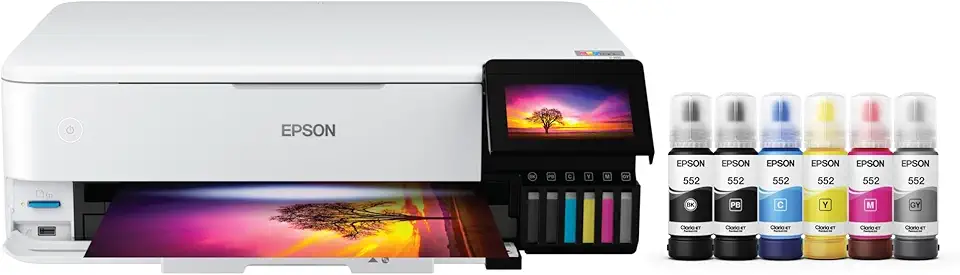
Epson EcoTank Photo ET-8550 Wide-format All-in-One Supertank Printer (Wireless, Scanner, Copier, Ethernet, Touchscreen)

Epson EcoTank ET-4850 All-in-One Supertank Printer (Wireless, Scanner, Copier, Fax, ADF, Ethernet)

Epson EcoTank ET-3850 All-in-One Supertank Printer (Wireless, Scanner, Copier, ADF, Ethernet)
1. Epson EcoTank Photo ET-8550
Epson EcoTank Photo ET-8550 Wide-format All-in-One Supertank Printer (Wireless, Scanner, Copier, Ethernet, Touchscreen)
Create gallery-quality wide-format photos with refillable ink tanks, wireless connectivity, scanner, copier and intuitive color touchscreen for effortless, high-resolution printing.
Check PriceAs a working photographer I reached for the Epson EcoTank Photo ET-8550 when I wanted large, gallery-style prints from my home studio. It handles borderless photos up to 13″ x 19″, which means I can produce portfolio pieces and client proofs without outsourcing.
The ET-8550 uses a six-color Claria dye ink set that includes gray and photo black, so tonal transitions and blacks are deep and convincing. Be aware the colors can read slightly oversaturated compared with a pro lab, but that punchy look often suits fine-art and client-ready prints.
Its refillable EcoTank system is a real game-changer for anyone printing photos regularly—users report printing hundreds of high-quality photos with minimal ink usage. Refilling is mess-free and the low cost per print lets me experiment with proofs and different papers without sticker shock.
Functionally it’s an all-in-one: print, copy, scan, with a responsive touchscreen plus AirPrint and Epson Smart Panel for easy mobile workflows. The rear straight-through feed accepts media up to 1.3mm thick, so heavier fine-art or cardstock stocks are manageable when I need them.
There are practical caveats to consider. The single-sheet photo feeder can be time-consuming if you’re batch-printing dozens of images, and some papers may require a bit of fiddling to avoid jams. Also, this is large for a home setup, so plan workspace accordingly.
All told, the ET-8550 is an excellent choice for hobbyists, creatives and small businesses who want large-format, cost-effective photo printing at home—just don’t expect it to fully replace a high-end pro lab for critical color work.
- Borderless prints up to 13″ x 19″
- Six-color Claria dye ink (includes gray & photo black)
- Extremely low cost per print with EcoTank refill tanks
- Rear straight-through feed supports up to 1.3mm thick media
- Single-sheet photo feeder is slow/awkward for batches
- Colors can be slightly oversaturated vs pro-lab fidelity
2. Epson EcoTank Photo ET-8500

Epson EcoTank Photo ET-8500 All-in-One Supertank Printer (Wireless, Scanner, Copier, Ethernet, Touchscreen)
Professional photo printing with cost-saving refillable ink tanks, wireless support, built-in scanner and copier, plus easy touchscreen controls for vibrant, long-lasting images.
Check PriceAs a photographer who prints portraits and product shots, the Epson EcoTank Photo ET-8500 feels like a studio in a compact box. It delivers studio-quality letter-size prints up to 8.5″ x 11″ using a six-dye ink set that produces smooth gradations and richly saturated hues on glossy, matte, and cardstock.
The refillable EcoTank system keeps running costs impressively low. Ink bottles last thousands of pages, so your cost per print drops dramatically compared with cartridge printers. Refilling is straightforward and mess-free, which matters when you’re producing batches for clients or Etsy orders.
On the connectivity and handling front, the ET-8500 is well-equipped. It’s an all‑in‑one with a 4.3″ touchscreen, Ethernet, dual-band Wi‑Fi, and SD/USB ports, and the rear straight-through feed can handle media up to 1.3mm thick. That gives you flexibility for heavier card stocks and specialty papers you might use for portraits or greeting cards.
For real-world use, this printer suits photographers, hobbyists, Etsy sellers and small businesses who need studio-quality letter-size output without cartridge costs. Its compact footprint is convenient in a small studio, and reviewers note it “blends studio-grade output with cartridge-free economy.”
The main limitations are practical: it’s limited to 8.5″ x 11″ max, so no larger prints, and the scanner is a flatbed only (no ADF), so multi-page scanning is manual. If you mostly print letter-size photos and want professional-looking results with low running costs, the ET-8500 is a solid, economical choice.
- Studio-quality 8.5″ x 11″ prints
- Six-dye ink for smooth gradations
- Very low running costs—ink bottles last thousands of pages
- 4.3″ touchscreen, Ethernet, dual-band Wi‑Fi
- Limited to 8.5″ x 11″ paper
- No ADF; compact size limits very thick or larger media
3. Epson EcoTank ET-18100

Epson EcoTank Photo ET-8550 Wide-format All-in-One Supertank Printer (Wireless, Scanner, Copier, Ethernet, Touchscreen)
Print stunning large-format photos at home using low-cost refillable tanks, Ethernet and Wi‑Fi connectivity, high-resolution scanner and user-friendly touchscreen.
Check PriceAs a photographer who prints for exhibitions and client portfolios, the Epson EcoTank ET-18100 stands out for large-format color work without the ongoing cartridge expense. It prints up to 13″ x 19″, so you can produce portfolio and gallery-size pieces from a home or small studio setup.
The ET-18100 uses a classic six-ink set (cyan, magenta, yellow, black, light cyan, light magenta), which delivers a wide color gamut and high color fidelity for color prints. That six-ink layout makes color images pop with good saturation and accurate hues, though it lacks a dedicated gray/photo black for absolute monochrome neutrality.
Ink economy is a major selling point: a full ink set can print over 2,000 color photos, so running costs are exceptionally low for photographers who churn out proofs, client comps, and exhibition prints. Physically the unit is simple and compact-for-class, and it handles media up to 300gsm, which covers most fine art and heavyweight photo papers you’ll want to use.
There are trade-offs to accept if you want ultimate convenience or perfect black-and-white fidelity. The ET-18100 has only a single paper tray and no rear straight feed, so switching thick media or odd sizes is less convenient than some other printers. Still, for artists, educators and photographers who prioritize affordable, reliable large-format color printing, it’s a very practical choice.
- Prints up to 13″ x 19″
- Six-ink set for wide color gamut
- Full set prints over 2,000 color photos
- Handles media up to 300gsm
- No dedicated gray/photo black — limits B&W tonal neutrality
- Single paper tray and no rear straight feed — limited media handling
4. Epson EcoTank ET-4850
Epson EcoTank ET-4850 All-in-One Supertank Printer (Wireless, Scanner, Copier, Fax, ADF, Ethernet)
Efficient home office solution with automatic document feeder, fax capability, wired and wireless networking, refillable ink tanks and fast multi-function scanning and copying.
Check PriceAs a photographer who often wears the hat of a crafter and family archivist, I appreciate printers that balance image quality with everyday utility. The ET-4850 is exactly that: an A4-focused all‑in‑one that handles photos well enough for albums, client proofs, and craft projects without breaking the bank.
On paper it produces bold, sharp, detailed photos when you match the right paper and settings. It’s best thought of as a mixed document/photo printer rather than a studio-grade photo engine, so expect bright, punchy prints rather than ultra-subtle tonal gradations.
Where this unit really shines is ink economy. The large ink bottles yield up to 14,000 black‑and‑white and 5,200 color pages, which makes it a dream for high-volume home use or small projects where running cost matters more than gallery-level color fidelity.
Feature-wise it’s robust for a home-office machine: print/copy/scan/fax, a 250‑sheet input tray, an automatic document feeder, auto duplex printing and media support up to 300gsm. That means you can run heavier cardstock for prints and papercraft without constantly babysitting the feed.
There are trade-offs. Photo quality is good but not outstanding; colors can be bright yet less nuanced than a dedicated photo printer. Best‑quality photo mode is slower and can slightly soften images, and the scanner isn’t particularly fast, with a build that feels utilitarian rather than premium.
If you need a dependable, low-cost workhorse that can also produce attractive family photos, the ET-4850 is a strong, practical choice. If your priority is exhibition-level or archival photo work, you’ll outgrow it quickly.
- Very low running costs — up to 14,000 B/W & 5,200 color pages
- All‑in‑one with ADF and fax
- 250‑sheet input tray & auto duplex
- Supports media up to 300gsm
- Colors less nuanced than dedicated photo printers
- Best‑quality photo mode is slow and can soften images
5. Epson EcoTank ET-3850
Epson EcoTank ET-3850 All-in-One Supertank Printer (Wireless, Scanner, Copier, ADF, Ethernet)
Reliable all-in-one productivity with automatic document feeder, wireless and Ethernet connectivity, refillable ink tanks and quick scanning, copying for small office workflows.
Check PriceAs a photographer who prints family photos and client contact sheets at home, I appreciate the Epson EcoTank ET-3850 for its straightforward, economical approach. It delivers bright, satisfying photos on glossy paper and prints bold, dark text—perfect for casual prints, school projects, and shared office use.
Where this printer shines is running cost and convenience. The EcoTank system uses large ink bottles that last thousands of prints, so you can run through shoots and proofs without constantly buying cartridges. It’s quiet and smooth in operation, which makes it unobtrusive in a home or small-office environment.
The ET-3850 is genuinely useful day-to-day: it’s an all‑in‑one with an automatic document feeder and auto duplex printing, plus a well-liked companion app for easy mobile printing. Those features make it a solid multi-function device for students, home users, and small offices that need occasional photos alongside documents.
That said, if you’re chasing gallery-grade output or working in a demanding photo workflow, this isn’t the machine for you. Photo output is good for snaps and casual use but not museum or client-gallery quality. The build feels slightly flimsy and it lacks several premium conveniences aimed at professional studios.
- Bright, satisfying photos on glossy paper
- Large ink bottles last thousands of prints
- Automatic document feeder + auto duplex printing
- Quiet operation and easy mobile printing app
- Slightly flimsy build
- Not gallery‑quality photo output
Ink Tank Technology

As a photographer who prints a lot, the single best practical change I’ve made is switching to EcoTank-style ink tanks. The cartridge-free, refillable system replaces disposable cartridges with high-capacity tanks, so you can print dozens or hundreds of images without worrying about swapping cartridges every few rolls of paper. That translates to dramatically lower running costs—Epson claims as much as 90% savings versus cartridge printers—which means more proof prints, more test crops, and larger client runs without sticker shock.
Epson’s EcoFit bottles and sealed tank design are small but important details. The bottles are keyed to prevent spills and color mixing during refills, and the visible ink-level windows let you plan refills before you run dry. Sealed tanks also help reduce ink drying and head clogging, so reliability and long-term lifespan improve compared with open-cartridge setups.
There are real workflow benefits too. With such low per-print cost I print more variations and portfolio pieces at home, saving time and shipping. Many EcoTank models will even keep printing with remaining colors if one tank runs low, which can be a lifesaver during a shoot turnaround—just be careful with color-critical proofing when a channel is low.
Small habits keep an EcoTank happy: use genuine Epson bottles, refill on a stable surface, cap bottles properly, and run a quick nozzle check after refills. If archival longevity matters, note that some Epson lines use pigment inks (better fade resistance) while many photo-focused EcoTanks use dye-based Claria inks for richer colors—pick the ink chemistry that fits your archival needs.
Bottom line: ink tanks remove the recurring cartridge pain and open the door to economical, high-volume photo printing at home. They’re not a magic fix for color management or paper choice, but as a cost-and-convenience upgrade they let you focus on printing more, experimenting more, and worrying less about ink costs.
Print Quality
PrecisionCore printheads give EcoTank printers the sort of fine dot placement that photographers rely on — sharp edges, smooth gradations and vibrant color transitions. In practice that means your portraits and landscapes will hold detail and appear punchy straight off the printer, though high‑quality photo modes are slower than everyday printing and worth the wait for the best results.
The ink set matters: Epson’s six‑color Claria dye configuration (including gray and photo black on certain models) delivers richer blacks and smoother monochrome tones than a simple CMYK engine. If you care about neutral greyscales and archival black‑and‑white work, pick a model with dedicated gray/photo black; otherwise the CMYK+LC+LM layout gives an excellent color gamut but can render B&W prints with a warmer, less neutral cast.
Paper choice and workflow make the biggest visible difference. Use good glossy, luster or fine‑art papers and the correct ICC profile for the paper/printer combo, let prints dry/cure before handling, and feed heavier stock through the rear straight‑through tray when available to avoid curling or jams. Expect slightly more saturated colors compared with commercial labs — compensate in your edit or through printer color settings if you want lab‑neutral results.
Small maintenance steps keep quality consistent: run regular nozzle checks, clean heads if you see banding, and use the manufacturer‑recommended media settings. If longevity matters, remember dye inks are brilliant but less fade resistant than pigment options — store prints out of direct sunlight or consider pigmented archival prints for exhibition. With a bit of attention to paper, profiles and printer care, EcoTank machines can produce very pleasing, cost‑effective photo prints at home.
What People Ask Most
Which Epson EcoTank is best for printing photos?
That depends on the print sizes and finish you need as well as how much you print. Look for a model that supports the media sizes and ink set suited to photo work and offers the media handling features you require.
Are Epson EcoTank printers good for photo printing?
Yes, many EcoTank printers can produce very good photo prints when paired with proper paper and settings. They are especially appealing for users who want low running costs and reliable color reproduction.
Do EcoTank printers produce photo-quality prints?
Many EcoTank models deliver photo-quality results suitable for home, hobby, and small-business uses. For the highest-end or archival-quality needs, specialist printers or lab services may still be preferable.
Can EcoTank printers print borderless photos?
Some EcoTank models support borderless printing for common photo sizes, but capabilities vary by model and paper type. Verify the printer’s media handling and available paper size options before printing borderless photos.
What paper should I use for photo printing on an Epson EcoTank?
Use quality photo papers such as glossy, luster, or fine art stock chosen for the finish and longevity you want. Matching the paper to the printer’s media settings and using recommended papers will yield the best results.
How can I get the best photo quality from an Epson EcoTank printer?
Use high-resolution images, select the correct media setting, and choose appropriate paper for the finish you want. Calibrating color profiles and allowing prints to dry fully will help achieve consistent, accurate results.
Do EcoTank printers support large-format or professional photo sizes?
Some EcoTank models handle larger photo sizes while others are limited to standard sheet formats. Check the printer’s maximum media dimensions and supported paper types to determine if it meets your size requirements.
Conclusion for Best Epson EcoTank Photo Printers
Across the lineup, Epson’s EcoTank approach pairs refillable, high-capacity ink tanks with precise printhead technology to deliver photo-capable prints at a dramatically lower running cost than cartridge-based machines.
The ET-8550 stands out for large-format, vibrant and detailed home photo printing thanks to its six-color Claria dye set that includes gray and photo black for stronger monochrome transitions.
The ET-8500 delivers studio-quality letter-size output in a more compact package, making it a great choice for portrait work, small orders, or creators who don’t need larger sheets.
The ET-18100 offers affordable large-format color printing with exceptional ink economy, but it’s less tailored for neutral black-and-white work due to its ink set.
The ET-4850 is a versatile A4 all‑in‑one that balances document duties with decent photo output and very low running costs for mixed-use households or small businesses.
The ET-3850 is an economical, quiet multifunction ideal for home users and shared spaces that want bright, satisfying casual photo prints without pro-level demands.
Use this comparison to match your priorities—maximum media size, whether you need photo/gray ink, and the workflow features that matter most—to the EcoTank that fits your shooting and printing habits.
If you want to sharpen your printing and workflow skills, explore more articles on the site to learn techniques and practical tips tailored to these printers.
Have questions or experiences to share? Leave a comment below and we usually reply within a few hours.





0 Comments