
Have you ever wondered how your images transform when they’re blown up on a wall—do the shadows still read, does color stay true under big light?
Projecting photographs demands a different set of priorities than printing or screen display. This guide compares five projectors selected for photographers, covering studio, gallery, and home scenarios.
The selection spans the full spectrum: a professional native 4K option at one end, laser- and lamp-based mid‑range solutions, a compact smart model for fast setups, and an accessible budget 1080p choice. That range means there’s advice here whether you need painstaking color accuracy or simple, portable projection for client previews.
Across the five units I focus on real-world performance rather than datasheet numbers. Expect hands‑on notes about black levels, tonal transitions, ambient light behavior, and practical setup tips photographers will actually use. No marketing spin—just honest, usable commentary grounded in photographer workflows.
If you’re calibrating prints for a gallery, preparing client proofs in a small studio, or building a weekend slideshow at home, this article will help narrow the field. Flip through the picks to find the projector class that best preserves your vision on a big surface.
1. Sony VPL-XW5000ES Projector Overview
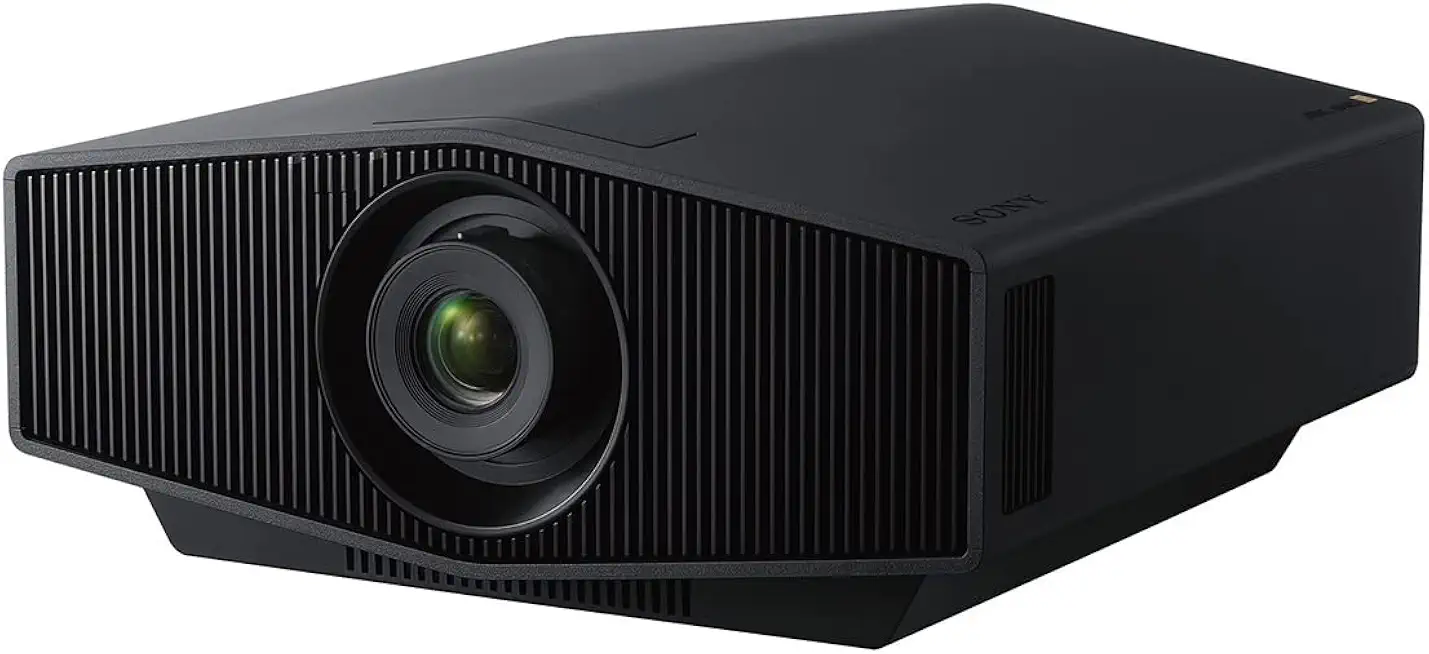
Sony VPL-XW5000ES 4K HDR Laser Projector
Cinema-grade 4K HDR brightness with laser illumination, exceptional contrast and accurate color calibration for professional-level immersive home theater.
Check PriceThe Sony VPL-XW5000ES is a true native 4K projector (3840×2160) built around three LCoS SXRD panels and Sony’s Advanced X1 Ultimate image processor, so if pixel-level detail matters in your photographic work it delivers. It uses a laser Z‑Phosphor light source rated at about 2000 lumens, giving consistent illumination without the lamp-replacement hassle common to older lamp projectors.
In practice the VPL-XW5000ES produces exceptionally deep blacks and shadow detail thanks to an infinite contrast ratio (∞:1) and the SXRD panels, which is exactly what you want when projecting fine tonal gradations or doing client reviews. The laser engine also promises long life (listed as 20,000 hours) and stable brightness over time, so color and dynamic range remain dependable across long-term studio use.
There are practical trade-offs to consider: it has a 1.60:1 zoom lens with lens shift for flexible placement, but the unit is heavy at 28 lbs and is better suited to a dedicated studio or gallery installation than a portable kit. Also, while image quality is excellent, the projector benefits from careful out‑of‑box calibration — plan for a color-proofing session or pro calibration if you need critical color accuracy.
- Native 4K (3840×2160) detail
- Stable 2000-lumen laser illumination
- Infinite contrast (∞:1) for true blacks
- Long 20,000-hour light source life
- Heavy (28 lbs), not ideal for frequent transport
- Requires careful calibration to reach peak color accuracy
2. BenQ X3100i Projector Highlights

BenQ X3100i 4K Gaming Projector
Low-latency 4K gaming performance with vivid HDR colors, built-in gaming modes and immersive speakers for console and PC play.
Check PriceAs a photographer who often shows work in small studios and at client meetings, the BenQ X3100i has become a practical go‑to for casual displays and presentations. Its 4K pixel‑shifting engine delivers pleasing detail without the bulk or setup fuss of larger native 4K systems.
The LED light source gives images strong saturation and stable color over time, and HDR10 plus wide color‑gamut support help retain highlight and color nuance in landscape and portrait shots. Out of the box the color accuracy is surprisingly good, so I rarely need lengthy calibration before a client viewing.
One thing I appreciate is the short‑throw capability — it lets me project large images in tight spaces without moving the unit far from the screen. That makes it especially useful in compact home studios or pop‑up gallery situations where distance is limited.
Smart features are also a practical bonus: built‑in streaming with Chromecast and AirPlay means I can wirelessly show images directly from a phone or tablet during client reviews. For quick client walkthroughs and informal portfolio reviews this convenience speeds the process and keeps focus on the images.
The tradeoffs are real but manageable: LED brightness can be lower than laser alternatives, so I avoid trying to use it in very bright rooms. Also, purists should note it’s not native 4K — it uses pixel‑shifting — but for many hobbyists and semi‑pro photographers the visual payoff is excellent for the tier.
Overall, if you need a flexible, user‑friendly projector for small spaces and accurate, vibrant photo display without heavy calibration, the BenQ X3100i is a strong contender.
- Excellent color accuracy and image sharpness
- Very good contrast for vivid photos
- Short‑throw design fits small spaces
- Built‑in streaming (Chromecast, AirPlay) for convenience
- LED brightness can limit use in well‑lit rooms
- Not native 4K; uses pixel‑shifting
3. Epson EH-TW7100 / 3800 Overview

Epson Home Cinema 3800 4K PRO-UHD Projector
Bright, true-to-life 4K imagery with advanced color processing, flexible lens shift and long-lasting lamp for stunning family movie nights.
Check PriceAs a working photographer I appreciate gear that delivers reliable image quality without fuss, and the Epson EH-TW7100 (Home Cinema 3800) fits that role nicely. It uses 4K Enhancement Technology (pixel‑shifting) to give you detailed images and a 3000 lumens output that performs well in ambient light. These two specs alone make it a practical choice for studios that aren’t pitch black.
Color reproduction is strong out of the box thanks to well‑balanced presets, so you can show client slideshows without hours of calibration. Black levels are surprisingly good for a lamp‑based projector, which helps retain shadow detail in prints and digital captures. Motion handling is smooth and natural, so panning through a gallery of images looks professional.
Setup is straightforward and doesn’t usually demand expert calibration, which is great when you need to get a quick proofing session going. Bluetooth audio output is a handy addition for accompanying commentary or background music at client viewings. The unit’s combination of brightness and color balance makes it versatile across small studio rooms and slightly lit gallery spaces.
The main tradeoffs are linked to its lamp‑based design. You will need lamp replacements over time, and users report that brightness and contrast decline with lamp aging. If you prioritize low maintenance and absolute long‑term brightness stability, a laser unit will outperform lamp models in that respect.
- 3000 lumens — handles ambient light
- 4K Enhancement (pixel‑shifting) — detailed images
- High color accuracy with well‑balanced presets
- Easy setup + Bluetooth audio output
- Lamp replacements required over time
- Brightness and contrast decline with lamp aging
4. JMGO N1 Ultra Projector Highlights

JmGO N1 Ultra 4K Triple Laser Projector
Ultra-sharp triple-laser projection delivering vibrant colors, wide color gamut and smart streaming for cinematic experiences in any room.
Check PriceAs a photographer who often projects work for critique and client reviews, the JMGO N1 Ultra stands out for its laser light source and advanced LSR technology that reduces specular highlights. That LSR tuning yields comfortable images with smooth textures, which makes examining fine tonal transitions and skin detail much less fatiguing than harsher lamp systems.
The N1 Ultra delivers excellent black levels and shadow detail—crucial for precise color grading and honest presentations. Its natural image rendering and praised color fidelity mean you’re less likely to be surprised by shifts between screen and print or web exports.
It also ships as a full smart projector OS with many streaming options, so sharing client galleries or running slideshows is seamless without extra gear. The compact, premium home‑theater design makes it easy to position in small studios or temporary setups where a large install would be impractical.
Keep in mind this is best used in darker environments; the laser brightness can be insufficient in very bright rooms, so if you frequently need daylight projection you may want something with higher ANSI lumens. Also, the premium feature set can require a slightly steeper setup learning curve to get the absolute best color and contrast out of it.
Overall, the JMGO N1 Ultra is mostly a good choice for photographers who prioritize deep blacks, smooth tonal rendering, and a compact smart package—especially for gallery-style presentations and color‑critical viewing in controlled lighting.
- Excellent contrast and laser‑enhanced black levels
- Natural, artifact‑free color reproduction
- Compact, premium home‑theater design
- Full smart OS with many streaming options
- Insufficient brightness in very bright rooms
- Slightly steeper setup learning curve
5. Elephas W1K Projector Overview

ELEPHAS 4K Outdoor Projector with Built-in Apps
Portable outdoor projector with built-in apps, wireless casting and bright image ideal for backyard movies and weekend presentations.
Check PriceThe Elephas W1K is a budget 1080p projector that uses an LED light source and offers user calibration modes for white balance and contrast. As a photographer, I respect its straightforward feature set and affordable price point.
Out of the box it handles both bright and dark scenes better than most budget units. You get surprisingly strong shadow detail and contrast, which helps images pop in home or casual client-viewing environments.
The LED engine gives good perceived brightness and saturation for typical rooms at home or small studios. That peak brightness, combined with decent blacks, makes photos look more lively than you might expect from a budget model.
There are some caveats though. A slight green tint appears for some users, but the projector’s user calibration modes let you adjust white balance and contrast to tame that tint manually.
Physical use is one of its strengths. The Elephas W1K is compact, portable, and quick to set up, so it’s handy for on-location previews, secondary projection in a gallery, or as a travel unit for client proofing.
Overall, this is a very practical tool if you need an inexpensive projector that delivers punchy images without fuss. It’s not for professional, color‑critical work or very bright rooms, but for budget-conscious photographers wanting portability and decent image quality, it’s a solid pick.
- Strong shadow detail and contrast for a budget projector
- Good perceived brightness and image pop in home settings
- User modes allow simple color/custom adjustments
- Very portable and lightweight
- Color tint issues require user calibration
- Not suitable for professional, color‑critical work or very bright rooms
How to Choose a Projector
When I pick a projector for photo work I start with resolution. Full HD (1920×1080) is the absolute minimum if you want to preserve detail, but if you’re showing large prints or doing client proofing, native 4K will reveal texture and fine detail that pixel‑shifting can’t always reproduce perfectly.
Contrast and black levels matter more than raw lumen numbers for images with subtle shadows. Aim for a contrast ratio around 3000:1 or higher and look for projectors known for deep blacks; that’s where shadow detail and tonal separation live.
Brightness needs to match the room. In a dark studio you can get away with lower lumens, but for spaces with ambient light plan on 1,500–3,000+ ANSI lumens. Practically speaking, 2,000–3,000 lumens hits a sweet spot for photographic presentations in rooms that aren’t pitch black.
Consider the light source tradeoffs. Laser projectors keep brightness and color consistency longer and are low-maintenance, while LEDs often give punchy saturation but lower peak brightness. Lamp‑based models can be bright and affordable, but expect lamp aging and replacements.
Optics and placement are often ignored but crucial. A quality lens, generous lens shift, and minimal keystone correction preserve geometry and edge sharpness. Short‑throw models are great for small studios; long‑throw units work better in galleries.
Connectivity and workflow should match how you work. Ensure reliable HDMI inputs for cameras and editing stations, plus USB or wireless options if you cue slides from a tablet. Built‑in smart features are nice, but image fidelity always comes first.
Remember the screen and viewing distance will change perceived brightness and contrast. Higher‑gain screens boost perceived light, while larger images dilute luminance. Balance screen size with lumen output for even, pleasing tones.
Finally, plan on calibration. Out of the box a projector may look good, but a quick color and grayscale calibration will align it with your camera files and save arguments with clients. Little adjustments go a long way toward trustworthy, repeatable results.
Projector Brightness Explained
Brightness is what most people notice first, but it’s not the whole story. Projector output is measured in lumens—ANSI lumens is the industry standard—yet how bright a picture looks depends just as much on the room and the screen as the projector spec. In a fully dark space you can get away with 800–1,000 lumens and still see great detail; once daylight or ambient lighting enters, you’re usually looking at 1,500–3,000+ lumens to keep images punchy.
Screen size matters. As you blow an image up, the same light has more surface to cover, so luminance drops. If you want a larger projection, either increase lumens, use a higher‑gain screen that reflects more light back to the viewer, or accept a dimmer look. I always check the intended screen size before choosing a projector; it’s the single biggest practical limiter.
There’s a trade‑off between sheer brightness and color fidelity. Cranking a laser or lamp to its maximum in a dark room often washes midtones and desaturates colors, and it’s uncomfortable to evaluate images that way. For color‑critical work—editing or soft proofing—use lower brightness, neutral gray screens, and a controlled ambient environment so contrast and hues remain true.
Light source type affects both peak brightness and stability over time. Laser projectors hold luminous output and consistency far longer than lamps. LEDs tend to give vivid saturation but usually lower peak lumens than lasers or strong lamp engines, so they’re great for small, dark rooms but struggle in bright spaces.
Practical rule of thumb from real shoots: aim for about 2,000–3,000 lumens for photographic presentations in rooms with some ambient light. If you’re showing in near‑darkness, 800–1,000 lumens is often sufficient. For client presentations in mixed light, prioritize a brighter unit or a high‑gain screen.
Finally, control what you can: dim windows, use neutral screens, and calibrate the projector. That combination makes a mid‑range lumen projector often outperform a technically brighter unit that’s used in an uncontrolled room.
What People Ask Most
What is the best projector for photography?
There is no single best model; the right projector depends on use case and budget. For color‑critical studio work choose a high‑resolution laser or premium LCoS unit, while hobbyists may prefer compact or smart LED and budget options for casual displays.
Do photographers need a 4K projector?
Not always; true native 4K helps preserve the finest image detail for critical editing and gallery display. Pixel‑shifting and high‑quality 1080p projectors can be perfectly adequate for casual viewing and smaller prints.
How many lumens do I need for photo projection?
It depends on ambient light and screen size; darker rooms need far fewer lumens while rooms with some ambient light require significantly more. As a practical guide, choose a brighter projector when you cannot fully control room lighting to retain punch and visibility.
Is a laser projector better for color accuracy?
Laser sources tend to deliver stable illumination and strong contrast, which supports consistent color reproduction over time. However, accurate color still depends on optics, processing, and proper calibration.
Can I use a budget projector for displaying photos?
Yes, budget projectors are fine for casual viewing, portable setups, or secondary locations and can produce pleasing images with some user adjustments. They are generally not recommended for professional, color‑critical work without careful calibration.
How important is native resolution for photography projection?
Native resolution directly affects how much fine detail is preserved when projecting high‑resolution images. Higher native resolution is more important for large projections and critical viewing, while lower resolutions can work for smaller or less detailed displays.
Do projectors require color calibration for accurate photo viewing?
Calibration is often necessary to achieve true‑to‑life colors, especially for professional workflows. Some models offer good out‑of‑box accuracy, but manual or instrument calibration will yield the best and most consistent results.
Conclusion for Best Projectors for Photography
These five projectors span the practical needs of photographers, from high‑end native 4K laser options to compact smart units and budget 1080p choices, so you can pick based on how you present and edit images.
For professional studios or gallery displays prioritize native resolution, stable light sources and the best available contrast for accurate blacks and fine detail.
Small studios and home setups benefit most from short‑throw or compact projectors with strong out‑of‑box color and smart features for convenience.
Versatile lamp‑based models are a good middle ground for rooms with some ambient light and straightforward setup, but remember lamps need periodic replacement.
Compact laser projectors deliver deep blacks and a premium feel in a smaller footprint, though they perform best in controlled lighting.
Budget 1080p units are excellent for secondary locations and casual displays; with basic calibration they can punch above their price for everyday photo viewing.
Whatever you choose, match resolution, contrast, brightness and connectivity to your shooting and presentation environment, and consider screen choice and room lighting as part of the setup.
If you want to improve your projection and presentation skills, explore more of our site’s articles to deepen your understanding and technique.
Have questions or experiences to share? Leave a comment below and we usually reply within a few hours.


0 Comments