
Which memory card will let your Sony A7 IV keep up with your creativity?
From fast action bursts to high-resolution video, this camera can push storage hard.
This guide compares five recommended cards across two formats: CFexpress Type A and UHS-II SD.
Those are the formats most A7 IV shooters reach for when speed and reliability matter.
We focus on the factors that actually change your results: speed, capacity, durability, and buffer performance.
Matching those traits to your shooting style makes all the difference.
Some cards chase ultimate write speed and buffer depth, while others balance fast performance with value.
We’ll help you pick which lane makes sense for weddings, sports, travel, or heavy video work.
Beyond specs, we’ll show how these cards perform in real shooting scenarios.
You’ll get practical tips so you don’t get surprised on a critical shoot.
By the end you should know which card fits your workflow and budget.
Read on to find the best SD card choices for your Sony A7 IV.
We also weigh practical factors like card longevity, heat tolerance, and real-world reliability.
Those details matter when you’re shooting long weddings, destination trips, or all-day events.
We’ll also explain simple workflow tips to get the most from whichever card you choose.
No jargon, no guesswork — just clear guidance so your A7 IV behaves exactly how you need it to.
1. Sony SF-G Tough UHS-II SDXC Card

Sony TOUGH-G SDXC UHS-II 128GB V90 (SF-G128T/T1)
Rugged, high-speed storage delivering sustained write speeds and rock-solid reliability for professional photographers and filmmakers working in extreme environments.
Check PriceAs a working photographer I reach for the Sony SF-G Tough when I need rock-solid speed and reliability in the field. It’s a UHS-II SDXC card with max read 300 MB/s and write 299 MB/s, and it’s V90-rated — meaning it will sustain 90 MB/s for video without hiccups. That combination makes it excellent for heavy 4K workflows and long RAW bursts.
In real-world use with the A7 IV the SF-G Tough is impressive. In-camera testing shows you can get 54 compressed RAW shots at 10 fps before the buffer fills, and the card clears in roughly 4.2 seconds. Capacities come in 64GB, 128GB, and 256GB so you can pick the size that fits your shoot without overspending on capacity you don’t need.
Durability is a standout — the “Tough” casing gives water, dust and bend resistance which matters when you’re shooting outdoors or on assignment. Users consistently praise its reliability; just be aware that some pre-2026 Sony SF‑G/SF‑M cards had A7 IV compatibility problems and were part of a replacement program. Newer SF‑G Tough cards are compatible with A7 IV modes.
If you’re a pro or serious hybrid shooter who needs fast, dependable SD performance for RAW burst and demanding 4K, this card is a top pick. It won’t match CFexpress Type A for absolute buffer elimination on uncompressed RAW, but for most stills and 4K video work the SF‑G Tough is a practical, rugged high-performance choice.
- 300 MB/s read, 299 MB/s write
- V90 sustained 90 MB/s
- Rugged “Tough” casing — water/dust/bend resistant
- Handles 54 compressed RAW shots at 10 fps; ~4.2s buffer clear
- Older pre-2026 compatibility issues
- Slightly slower buffer clearing than CFexpress Type A for uncompressed RAW
2. Lexar Professional CFexpress Type A Gold Series
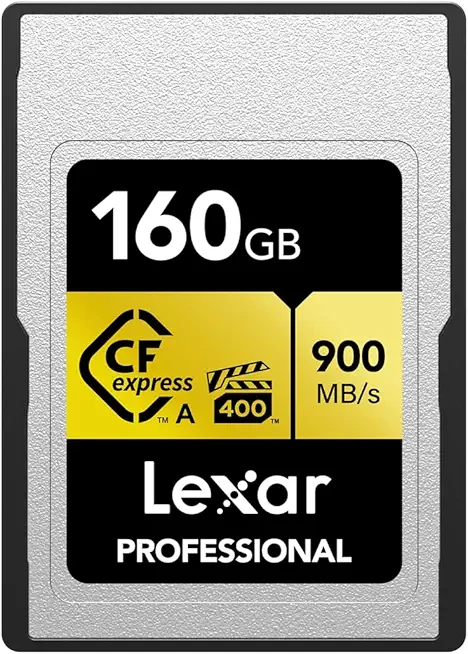
Lexar Gold CFexpress Type A 160GB VPG-400 (LCAGOLD160G-RNENG)
Ultra-fast flagship storage enabling blazing transfer speeds, cinematic capture, and rapid offloads for high-frame-rate cameras and workflows.
Check PriceLexar Professional CFexpress Type A Gold Series is the card to reach for when you need uncompromising speed in the A7 IV. It’s a CFexpress Type A card with speeds exceeding 300 MB/s — cited up to ~326 MB/s read — and comes in 160GB and 320GB capacities.
In-camera this card delivers the fastest performance available in Slot 1 of the A7 IV, giving you a near “bottomless buffer” for RAW burst shooting and worry-free high-frame-rate work. For video shooters it supports the highest-bitrate modes, including XAVC S‑I 4K, which means no dropped frames during demanding slow‑motion or high‑bitrate recording.
As a working photographer I appreciate the way this card keeps the camera responsive during long continuous bursts and heavy video takes. Users report exceptional speed and reliability in professional video workflows and 4K/slow‑motion capture, so it’s suited to event pros, sports shooters, and anyone who needs deep/unlimited buffer performance.
The tradeoffs are straightforward: it costs more and can be harder to find than SD cards, and the largest capacity tops out at around 320GB — so if you do ultra‑long backups or prefer massive single-card capacity, plan accordingly. If you prioritize maximum write speed, deepest buffer, and highest-bitrate support, this Lexar CFexpress Type A is one of the best practical choices for getting the most from an A7 IV.
- Speeds exceeding 300 MB/s (up to ~326 MB/s read)
- 160GB and 320GB capacity options
- Virtually no buffer lag for RAW bursts
- Supports highest-bitrate video (XAVC S‑I 4K)
- Higher cost and less availability than SD cards
- Max capacity only ~320GB
3. Kingston Canvas React Plus UHS-II SDXC Card

Kingston Canvas React Plus SDXC UHS-II 128GB V90 (SDR2/128GB)
Fast, dependable storage optimized for burst shooting and 4K video, ensuring quick writes and smooth continuous recording.
Check PriceI’ve used the Kingston Canvas React Plus UHS-II SDXC in real shoots and it’s a very practical card for serious shooters. It’s a UHS‑II card with a V90 rating and tests show read speeds around ~246 MB/s, which keeps file transfers snappy.
Capacities come in 64GB, 128GB, and 256GB, so you can pick the size that matches your workflow without overspending. In-camera it handles continuous shooting and 4K recording comfortably, making it a solid choice for weddings, events, and run-and-gun video work.
In a controlled test it sustained about 26 uncompressed RAW shots at 6 fps before the buffer kicked in, and the card cleared in under 4s. That means you can capture decisive moments in short bursts and be ready for the next action quickly.
Kingston bundles a UHS‑II card reader, which is a small but meaningful touch for fast offloads on location. The overall feel is reliable and well built, and its price point makes it a better value than some premium-branded UHS‑II options.
There are limits to be aware of: it’s not a replacement for CFexpress when you need the absolute maximum write speed. If you regularly shoot highest‑bitrate S&Q slow‑motion or require truly unlimited RAW bursts, you’ll need CFexpress in Slot 1 instead.
For serious hobbyists and semi‑pro pros who want V90 UHS‑II performance without paying CFexpress prices, Kingston’s Canvas React Plus is one of the most practical choices. It balances speed, price, and day‑to‑day reliability in a compact package.
- UHS-II V90 performance (~246 MB/s read)
- Capacities: 64GB, 128GB, 256GB
- Includes UHS‑II card reader for fast offloads
- Good value and reliable in real use
- Slower buffer clearing than CFexpress for long RAW bursts
- Not suitable for highest‑bitrate S&Q slow‑motion modes
4. SanDisk Extreme PRO UHS-II SDXC Card

SanDisk Extreme PRO SDXC UHS-II 256GB V60 (SDSDXEP-256G-GN4IN)
High-capacity, professional-grade card offering balanced speed and endurance for photographers and videographers needing reliable daily performance.
Check PriceThe SanDisk Extreme PRO UHS-II SDXC is a dependable UHS‑II card rated V90 with a real-world read speed around 222 MB/s. It comes in 64GB, 128GB, 256GB and 512GB capacities, so you can match capacity to your workflow.
In practice this card is a solid performer for 4K video and burst shooting. It handles 4K 60fps reliably and I’ve seen no dropped frames in extended clips. Benchmarks put it slightly behind the Kingston Canvas React Plus in raw speed, but that difference rarely impacts everyday shooting.
Thermal behavior is one of the reasons I keep these in my kit — they manage heat well during recording and only run slightly warm in long sessions, which hasn’t caused problems in the field. SanDisk’s consistency and availability make these easy cards to source and swap when you’re traveling between shoots.
If you’re an enthusiast photographer or videographer who wants UHS‑II performance without paying CFexpress premiums, this is a great choice. The V90 rating supports most A7 IV video modes and gives you confidence for higher-bitrate 4K work, but be aware it’s not the absolute top-tier speed for the most extreme slow‑motion bitrates.
- Reliable, consistent performance
- V90 supports most A7 IV video modes
- Good thermal behavior
- Widely available
- Marginally slower than Kingston in some tests
- Not CFexpress speed — limited for highest-bitrate slow‑motion
5. Nextorage NX-F2SE Series UHS-II SDXC Card

Nextorage SDXC UHS-II 512GB V60 (NX-F2SE512G/INE)
Massive-capacity solution for extended shooting and long-form recording, with consistent transfer rates for efficient workflow management.
Check PriceThe Nextorage NX-F2SE Series UHS-II SDXC is a solid, value-minded choice for Sony A7IV shooters who want plenty of capacity without paying a premium. It delivers roughly 280 MB/s read and about 170 MB/s write speeds and comes in 64GB, 128GB, 256GB, and 512GB sizes, with a V60 Video Speed Class rating. Those specs mean it’s capable of sustained 4K recording for most real-world needs.
In-camera testing shows it handles around ~20 uncompressed RAW shots at 6 fps before the buffer fills, and it tends to clear the buffer more slowly than V90 or CFexpress options. That makes the card fine for everyday shooting, travel, portraits and general video work, but less ideal if you’re pushing long high-speed bursts. It will record 4K comfortably, but it’s not recommended for the ultra-high‑bitrate S&Q slow‑motion modes.
From a working-photographer perspective the NX-F2SE feels reliable and stable during extended recording sessions, and its V60 rating gives confidence for sustained video writes. If you prioritize capacity and cost-efficiency — and you rarely shoot long uncompressed RAW bursts or the highest-bitrate video modes — this card will serve you very well. For fast-action sports or professional high-bitrate workflows, plan for a faster V90 or CFexpress option instead.
- Up to 512GB capacity
- Read ~280 MB/s, write ~170 MB/s
- V60 reliability for sustained 4K
- Stable in longer recordings
- Buffer: ~20 uncompressed RAW shots at 6 fps
- Not for ultra‑high‑bitrate S&Q slow‑motion
Sony A7 IV Card Compatibility
The A7 IV gives you flexibility, but that also means you need to match cards to the job. Slot 1 is the powerhouse: it accepts CFexpress Type A and SD (UHS‑I/UHS‑II). Slot 2 only accepts SD (UHS‑I/UHS‑II). In practice that means the highest write speeds and “unlimited” RAW bursts are only possible with a CFexpress Type A in Slot 1.
For video, be strict about bitrates. XAVC S‑I 4K (600 Mbps) can only be recorded to CFexpress Type A. Most other 4K codecs (XAVC HS, XAVC S) will happily run from a good UHS‑II card—prefer V60 or V90 for headroom. MicroSD is usable with an adapter, but expect performance to depend heavily on the adapter and the micro card.
Mixing card types is handy, but remember the camera is limited by the slower media when writing to both cards simultaneously. If you need to protect RAW files while keeping buffer performance, a common workflow is RAW to Slot 1 and JPEG copy to Slot 2. The camera will write the JPEG copy without slowing the primary RAW write, effectively avoiding buffer bottlenecks.
Durability matters in the field. “Tough” rated cards add water, dust, and bend resistance—worth it if you travel or shoot outdoors a lot. Also be aware of legacy issues: some Sony SF‑G/SF‑M UHS‑II cards made before mid‑2026 showed A7 IV compatibility problems; Sony offered replacements for affected batches.
Bottom line: sports and action shooters should prioritize CFexpress Type A in Slot 1. Most photographers and videographers will find UHS‑II V90 or V60 SD cards perfectly capable and more cost‑effective. Whatever you choose, always test the exact card/camera combo before a critical shoot so you’re not surprised on set.
Buffer Performance On The Sony A7 IV
Buffer performance on the A7 IV is where card choice really becomes a practical decision, not just specs on a box. The camera will happily shoot at up to 10 fps with compressed RAW, JPEG or HEIF, but if you switch to uncompressed RAW that top speed drops to 6 fps. Those limits change how long you can hold the shutter and whether you’ll be waiting for the camera to clear the buffer between bursts.
In simple terms, CFexpress Type A in Slot 1 removes almost all buffer anxiety. Shoot uncompressed RAW at 6 fps and you can keep going until the card fills. For action, sports or long sequence shoots, CFexpress is the only way to guarantee no interruptions.
UHS-II SD cards are no slouch and are the most cost-effective choice for most shooters. V90 cards will give you roughly 17–26 uncompressed RAW frames and somewhere around 35–67 compressed RAW frames before the camera buffers. They clear fast enough that for event work or casual wildlife you’ll rarely notice downtime.
If you want a practical compromise, use compressed RAW. It gives much deeper buffers and noticeably quicker clear times while keeping image quality high. Another handy trick: write RAW to Slot 1 and set Slot 2 to receive JPEGs. The camera won’t slow RAW writes to duplicate a JPEG, which effectively gets you a safety backup without killing burst performance.
Also remember that dual‑slot writing is only as fast as the slower card. Match speeds if you plan to record to both cards simultaneously. Always test your exact card and camera combo before any critical shoot, and keep an eye on older UHS‑II cards that may need replacement or firmware checks for full A7 IV compatibility.
Bottom line: if you need bottomless bursts and the highest video bitrates, go CFexpress Type A in Slot 1. For most photographers, a good UHS‑II V90 card and compressed RAW will deliver a smooth, responsive shooting experience with minimal fuss.
What People Ask Most
What type of memory card does the Sony A7 IV use?
The A7 IV accepts CFexpress Type A and SD cards, including UHS‑II and UHS‑I formats. CFexpress is used for the highest-speed needs while UHS‑II covers most advanced photo and video modes.
Does the Sony A7 IV support CFexpress Type A cards?
Yes, the camera supports CFexpress Type A cards in its primary slot. CFexpress delivers the fastest write speeds and is used for the camera’s top video and burst capabilities.
Do I need UHS-II cards for the Sony A7 IV?
Not always; UHS‑II is recommended for demanding burst shooting and higher-bitrate video. Casual shooters and lower-bitrate workflows can often use UHS‑I without issue.
Can the Sony A7 IV record 4K 60fps to an SD card?
Yes, many 4K 60fps formats can be recorded to SD cards when using appropriate UHS‑II or UHS‑I cards at the required speeds. For the highest-bitrate 4K mode, CFexpress Type A is required.
What V-speed rating (V30, V60, V90) is recommended for the Sony A7 IV?
V60 and V90 cards are recommended for most 4K video and faster burst shooting, with V90 preferred for the most demanding workflows. V30 can work for lower-bitrate recording and casual use.
Are SDXC cards compatible with the Sony A7 IV?
Yes, the A7 IV supports SDXC cards in both UHS‑I and UHS‑II formats. Choose capacity and speed based on your recording and burst needs.
Are UHS-I cards sufficient for continuous shooting on the Sony A7 IV?
UHS‑I cards can be sufficient for casual continuous shooting and lower-bitrate video modes. For deep RAW buffers and sustained high-speed bursts, UHS‑II or CFexpress is a better choice.
Conclusion For Best A7 IV SD Cards
Choosing the right card for the A7 IV comes down to matching speed, capacity, and buffer behavior to how you shoot; the right choice will make burst shooting and high-bitrate video feel seamless.
For users who demand absolute headroom, CFexpress Type A delivers the least-limited buffer and top write performance, while UHS‑II V90 cards hit the sweet spot for most professionals and enthusiasts, and V60-class cards offer a solid value for general use.
Remember to consider dual-slot limits, test your exact card/camera combo before any critical shoot, and balance cost versus the specific video or burst needs you have.
If you want to deepen your workflow and gear choices, explore more of our guides and reviews on the site to sharpen your skills and decision-making.
Have questions or a card experience to share? Leave a comment below and we usually reply within a few hours.




0 Comments