
What’s the fastest, most reliable way to keep your RAW files safe when you’re miles from the studio? Every shoot brings constraints—tight windows, crowded airports, limited power, and unpredictable weather that complicate transfers and spotty connectivity. A poor storage choice can cost you hours of editing time or, worse, risk losing images when drives fail.
This guide compares five portable SSDs chosen for photographers and delivers a practical buying roadmap for field and studio use. We prioritize real-world performance and workflow impact over headline benchmark numbers, misleading marketing claims, and theoretical specs. You’ll find recommendations tailored to different shooting styles and workflows so you can make confident choices that fit your budget.
Key priorities include transfer speed, capacity, physical durability, portability, and a dependable backup strategy with strong data security for client files. Fast transfers cut downtime during field offloads, speed up active edits on the go, and enable faster turnaround for clients. Meanwhile, ample capacity and smart backup routines prevent mid-project panic, keep archives organized, and make large-scale culling and cataloging easier.
We’ll walk through practical trade-offs and suggest which drive traits suit travel, studio, or archive roles based on typical photographer workflows. You’ll get actionable tips on pairing a fast working SSD with larger backup drives, archive solutions, and cloud redundancy so you can protect your shots and spend less time waiting for transfers. Let’s dive in.
1. Top-Tier Speed for Pros

SanDisk Extreme PRO Portable SSD 1TB (USB 3.2 Gen 2x2, up to 2000MB/s)
Blazing 2000MB/s transfers, compact metal design, hardware encryption, perfect for pro workflows and on-the-go backups.
Check PriceThe SanDisk Extreme Pro Portable SSD V2 is a top-tier tool for photographers who live and work around large RAW files and high-resolution video. It’s one of the fastest portable SSDs available and was built with pro workflows in mind.
It supports USB 3.2 Gen 2×2 and delivers up to 2,000 MB/s write speeds, which makes offloading a full card or a shoot’s worth of files noticeably quicker than older HDDs or slower SSDs. In practice that means less time waiting for transfers, more time culling and editing, and a smoother tethered or on-location workflow.
Photographers and frequent travelers praise its speed and reliability across varied conditions, and the drive’s robust build inspires confidence when you’re moving between shoots. The device also emphasizes thermal management and shock resistance so it holds up in backpacks and on the road during long days of shooting.
Two practical caveats: the drive can run warm under heavy, sustained use and may show thermal throttling during extremely long transfers; and it lacks a hardware encryption option for those who need built-in security. Overall, if your priority is raw transfer speed and a durable, travel-ready design for shoot days, this SSD is a strong choice.
- Extremely fast consistent read/write speeds
- Durable build for outdoor and travel use
- Broad USB-C (USB 3.2 Gen 2×2) compatibility
- Shock resistance and thermal management for extended use
- Runs warm under heavy sustained use
- No hardware encryption option
2. Ultra-Compact Speed for Travel
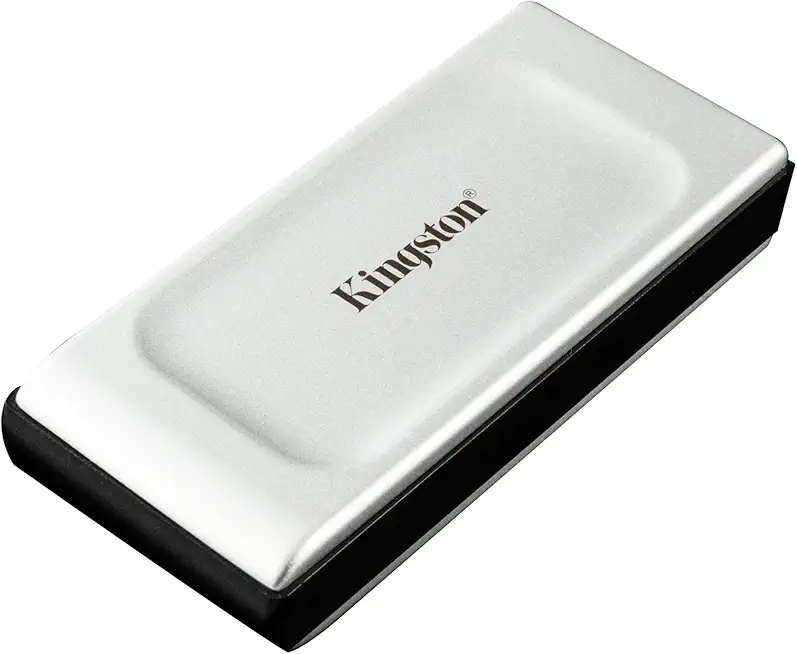
Kingston XS2000 Portable SSD 1TB (USB 3.2 Gen 2x2, up to 2000MB/s)
Ultra-fast 2000MB/s performance in a pocket-sized durable case, ideal for quick file edits and reliable mobile storage.
Check PriceAs a travel photographer, the Kingston XS2000—branded here as Ultra-Compact Speed for Travel—has become my go-to pocket drive for quick offloads between locations. It’s ultra-compact and lightweight at around 29 g, so it disappears into a camera bag or even a jacket pocket without adding bulk.
Despite its tiny size, it supports USB 3.2 Gen 2×2 and lists max write speeds up to 2,000 MB/s, which is reassuring on paper when you’re moving big RAW files. In real-world transfers you’ll typically see about 800–900+ MB/s for large photo libraries, which is fast enough to keep your shoot day moving and avoid long downtime.
The silicone protective casing is a real-world benefit: it adds a bit of drop protection and makes the drive more forgiving when tossed into a bag with gear. For travel photographers and hobbyists who prioritize portability and reliable speed for quick backups on the go, this drive hits the sweet spot between convenience and performance.
Be aware of the trade-offs: Kingston focuses on compactness, so the drive’s maximum capacity tops out at 2TB and it lacks hardware encryption/security features. If you need larger capacities or built-in encryption for sensitive client work, you’ll want to factor that into your backup plan; otherwise, this SSD is a practical, fast companion for field use.
- Very small and lightweight (around 29 g)
- Supports up to 2,000 MB/s; real-world ~800–900+ MB/s
- Silicone protective casing reduces drop damage
- Reliable performance for its size
- Lacks hardware encryption/security features
- Limited maximum capacity (up to 2TB)
3. High Capacity, Great Value

Crucial X10 Portable SSD 1TB (USB-C, up to 2100MB/s)
Lightning-fast 2100MB/s USB-C transfers, slim rugged build, plug-and-play convenience for creators and travelers.
Check PriceAs a working photographer, I look for drives that hold huge libraries without slowing my workflow. The Crucial X10 hits that mark by offering very large capacities — up to 8TB — in a compact, travel-friendly package.
It uses USB 3.2 Gen 2×2, so day-to-day transfers feel snappy and consistent for RAW and high-res files. In real-world use it delivers solid, dependable transfer speeds that let me offload and edit without constant waiting.
Just be aware it isn’t the absolute top performer. It’s slightly slower than the newest USB4/Thunderbolt portable SSDs, so if you need bleeding-edge transfer rates for nonstop multi-stream video work, this isn’t aimed at that niche.
Where it shines is value and practicality: you get large capacity and dependable performance in a small footprint. That combination makes it a smart choice if you prioritize storing and working with big photo libraries while staying mobile.
Durability and consistent real-world speeds are repeatedly praised by users, which matters when you’re on location and can’t afford surprises. If you want a compact drive with lots of room and reliable performance for most pro photo workflows, this is a very sensible pick.
- Up to 8TB capacity
- Compact, travel-friendly design
- Solid reliability and consistent real-world speeds
- Great value for capacity
- No USB4 support
- Not as fast as USB4/Thunderbolt drives
4. Rugged Performance for the Field

LaCie Rugged SSD4 1TB (USB4 40Gbps, IP54)
Military-grade protection with IP54 dust/water resistance, blazing USB4 throughput for fieldwork and heavy media projects.
Check PriceI take the LaCie Rugged SSD4 on any shoot where weather or rough handling is a real possibility. It’s marketed as the most durable SSD for photographers, and you can feel that confidence the moment you clip it into a kit bag.
In the field it shines because of its combination of ruggedness and speed. Windows speeds run roughly 4,000 MB/s reads and 3,700 MB/s writes, which makes offloading large RAW files and 4K/8K video feel almost instantaneous.
Mac users should note performance is slightly slower, but still very usable for on-location edits and backups. The drive’s shock, dust, and water resistance removes a lot of the “what if” stress when working in rain, on boats, or in rough terrain.
Another practical benefit is the included three years of data recovery service. That peace of mind matters when a shoot’s irreplaceable images are at stake and you need a safety net beyond physical protection.
If you’re an outdoor or travel photographer who needs both speed and dependability, this is mostly a no-brainer. The trade-offs are price and size: it’s more costly and a bit bulkier than ultra-portable SSDs, but for rugged assignments that’s a fair exchange.
- Excellent ruggedness (shock/dust/water resistance)
- Very fast sustained speeds (reads ~4,000 MB/s; writes ~3,700 MB/s)
- Cross-platform compatibility (Windows, Mac, Android, iOS)
- Includes three years of data recovery service
- Higher price than non-rugged SSDs with similar specs
- Bulkier and heavier than ultra-portable SSDs
5. Secure, Durable Everyday Performance

Samsung T7 Shield Portable SSD 1TB (USB 3.2 Gen2, up to 1050MB/s, IP65)
Shockproof, IP65-rated security and up to 1050MB/s speeds ensure safe, fast transfers for everyday professionals.
Check PriceAs a travel photographer, I keep a Kingston XS2000 in my camera bag for days when portability matters more than top-tier speeds. It’s ultra-compact and lightweight — around 29 g — so it disappears in a pocket but still connects over USB 3.2 Gen 2×2 when I need to offload files.
The specs claim up to 2,000 MB/s write, though in the real world I typically see transfers in the 800–900+ MB/s range when moving large photo libraries. That performance is more than enough for quick backups, tethered shooting in the field, and even light mobile editing on a laptop or tablet.
Kingston’s silicone protective casing gives me confidence when I’m bouncing between locations; it reduces damage from slips and small drops. Photographers who prioritize weight and convenience will appreciate how easily it fits alongside batteries, cards, and cables without adding bulk.
There are trade-offs: it doesn’t offer hardware encryption, so I wouldn’t rely on it alone for storing sensitive client files without additional software encryption. Capacity tops out at 2TB, which is fine for active projects and day-to-day shoots but might force pros with huge libraries to carry multiple drives or use larger archive solutions.
Overall, the XS2000 is a practical, dependable workhorse for travel and on-the-go backups. If you want something tiny, fast enough for real-world workflows, and ruggedized at the case level, this is a solid choice.
- Very small and lightweight (around 29 g)
- Good speed — up to 2,000 MB/s (real-world 800–900+ MB/s)
- Silicone protective casing reduces drop damage
- Reliable performance for its size
- No hardware encryption/security features
- Maximum capacity limited to up to 2TB
Choosing the Right Capacity
Choosing the right capacity starts with how you shoot. A 24MP RAW file will often be around 25–35MB, while a 50–60MP capture can easily push past 80–120MB each. Multiply that by a wedding day or a multi-day shoot and you quickly see why a single 500GB stick rarely cuts it for working photographers.
For casual shooters and hobbyists who take weekends of photos and occasional trips, 1–2TB gives plenty of breathing room for current projects and short-term backups. If you edit on the same drive, err toward 2TB so you’re not constantly juggling offloads in the middle of a job.
Professionals should target at least 4TB for active work, with many photographers preferring 6–8TB so they can keep full shoots locally while they edit. Videographers or creators who mix RAW stills with 4K/8K footage should plan for 8TB+—video chews capacity far faster than stills.
I like to keep two layers: a fast SSD for active sessions and a larger, cheaper drive for archives. That way I carry a nimble 1–2TB NVMe for current work and push completed shoots to a 4–8TB archive drive or RAID when I get back to the studio.
Practical habits matter as much as raw numbers. Leave 10–20% of an SSD free to preserve performance, and avoid running a drive at 95–100% full. Consider multiple mid-sized drives over one massive stick if you travel—losing one 2TB drive hurts less than losing a single 8TB archive.
Also factor in growth: your library will expand, and new cameras push file sizes higher every few years. If budget allows, buy a little more capacity now than you think you need; it saves the hassle of migrating later.
Finally, pair capacity choices with a backup plan. Treat any portable SSD as working media, not the single copy. Regular offloads to an archive and an offsite backup will protect your work far more than picking the biggest drive alone.
Smart Backup Strategies for Photographers
Treat backups like part of the shoot, not an afterthought. On location I always copy cards to a fast portable SSD first so I can cull and edit without waiting. That drive is my working copy; it moves with the project until everything is safely duplicated.
I follow the 3-2-1 rule because it actually works: three copies, two different media, one offsite. In practice that looks like the original card or SSD, a second copy on a larger desktop HDD or archive SSD, and a cloud or offsite copy for true disaster protection. It’s simple and gives real peace of mind.
Label and rotate drives so you don’t end up guessing which disk holds which wedding or assignment. Keep active projects on fast NVMe or portable SSDs for editing speed, then migrate finished jobs to bulk HDDs for cold storage. Separate drives by purpose — active, backup, archive — and you’ll avoid accidental deletions.
Automate where you can. Scheduled backups and software that verifies file copies reduce human error and save time. Make verification a habit: check checksums or use software that reports copy integrity so you’re not relying on hope when you need files.
Don’t forget physical protection and security. Rugged cases and padded compartments protect against drops and weather, while hardware encryption or password protection keeps client work private. Modern SSDs have high TBW ratings, so write endurance is rarely a limiting factor for photographers.
Finally, test restores periodically. A backup you can’t restore is useless, so run a recovery drill once in a while to confirm your workflow. These small routines keep your business running smoothly and let you focus on making images, not chasing lost files.
What People Ask Most
What is the best SSD for photo storage?
The best SSD depends on your priorities such as speed, capacity, durability, and security. Choose a drive that matches your typical workflow and backup plan rather than chasing the single fastest model.
Is an SSD better than an HDD for photo storage?
SSDs are generally faster, more shock resistant, and more portable than HDDs, making them better for active editing and field work. HDDs remain cost-effective for high-capacity archives, so many photographers use SSDs for working files and HDDs for long‑term storage.
Are external SSDs safe for storing photos and backups?
External SSDs are safe when paired with a good backup strategy, physical protection, and optional encryption. Maintain multiple copies and an offsite backup to protect against loss or failure.
How much storage do I need for storing photos and RAW files?
Storage needs vary with camera resolution and shooting volume, so plan according to your typical projects. Hobbyists often find one to two terabytes sufficient, while professionals and video creators commonly opt for larger capacities.
What SSD capacity should photographers choose for photo storage?
For active projects, start with a roomy drive so you don’t run out of space mid‑shoot; many photographers begin with at least a couple of terabytes for current work. Use larger, cheaper drives or cloud storage for archives to keep active and backup storage separate.
How long do SSDs last for storing photos?
SSDs typically last many years under normal photography use, and their endurance is usually more than adequate for typical workloads. Regardless of lifespan, always keep redundant backups to guard against unexpected failure.
Should I choose a SATA or NVMe SSD for photo storage and editing?
NVMe drives offer higher performance and are better for heavy editing and rapid transfers, while SATA SSDs are often sufficient for general storage and less demanding workflows. Match the interface to your editing needs and budget rather than defaulting to the most advanced option.
Conclusion for Best SSDs for Photo Storage
This comparison shows how different portable SSDs serve different photographer priorities — whether you value raw speed, maximum capacity, rugged durability, compact portability, or built‑in security — and how the right choice depends on the workflow you run.
Choose a drive that matches your shooting style and pairing it with a clear backup plan — a fast SSD for active projects and separate archive or cloud copies for long‑term storage — will protect your work and keep editing efficient.
Think about real‑world needs like travel, shooting volume, and whether hardware encryption or extra ruggeding matters to you, then prioritize accordingly rather than chasing the highest headline speed.
If you want to keep sharpening your gear choices and workflow skills, explore more practical guides and reviews on the site to help you make better buying and workflow decisions.
Have questions or want recommendation details for your setup? Leave a comment below — we usually reply within a few hours and are happy to help refine your storage plan.





0 Comments