
Ever tried recording a podcast on the go and wished your audio sounded as effortless as your conversation? Choosing the right wireless microphone can feel like decoding a secret language of ranges, batteries, and connectors.
This quick guide cuts through the noise and compares five top wireless mics for podcasting. It’s designed so you can pick a practical option fast.
We cover portable, smartphone-friendly choices that stay out of the way of your workflow. We also look at interview-ready dual-channel systems for back-and-forth conversations. And we weigh professional kits against budget options so you can match features to price.
Expect straightforward, real-world perspective on usability, battery life, and connectivity. There’s no fluff or dense specs lists—just what matters when you press record. You’ll learn which tradeoffs matter most for field work versus a quiet studio.
Whether you’re a solo creator chasing mobility, a host booking on-location interviews, or a studio podcaster aiming for broadcast polish, this guide helps narrow choices. Portability, onboard backup, channel count, and device compatibility are the practical axes we use to judge each option. Think of this as a short roadmap to better-sounding episodes with less setup drama.
Flip through the picks to find the wireless mic that fits your routine and budget. By the end you’ll have a clear direction for the next mic upgrade or first purchase.

DJI Mic Mini 1 TX + 1 RX Wireless Lavalier Microphone for iPhone Camera Android

Rode Wireless PRO Wireless Microphone System with 2 Lavalier Mics and Smart Charge Case
BOYA Mini Wireless Lavalier Microphone with USB-C and Charging Case 30H Battery for Android Tablet PC
1. SYNCO P1S Review

SYNCO P1SL Wireless Lavalier Microphone with Charging Case for iPhone iPad Smartphone
Ultra-compact wireless lavalier offering crystal-clear audio, magnetic charging case, plug-and-play smartphone compatibility for effortless interviews, vlogging, and content creation.
Check PriceThe SYNCO P1S is a compact, plug-and-play wireless mic built for smartphone creators (iPhone, Android) and beginner podcasters. Its built-in condenser capsule and Syncoder™ 3.0 DSP noise cancellation aim to tame street and AC ambient noise so voices stay clear even on the move.
Setup is delightfully simple: the units auto-pair the moment you open the charging case, which is a real time-saver when you’re juggling lights, camera, and guests. The transmitter runs about 5‑hour per charge and the case extends that to roughly 15 hours of total recording time, so a full day of mobile sessions is practical without constant recharging.
Performance-wise the P1S delivers studio-level clarity for a single lavalier, and reviewers note it’s reliable as either a primary mic for solo shows or a backup lavalier in a kit. Its wireless range is rated at 150m line-of-sight, giving plenty of freedom for outdoor shoot setups or interviews where you want distance without trailing cables.
Where it isn’t ideal: it’s a single-microphone system with no dual-lavalier support, so it’s not the best choice for two-person interview formats. It also lacks onboard recording or advanced features like displays, so there’s no redundant backup if a link drops and fewer controls for power users.
- Automatic pairing—super easy setup
- Clear sound with Syncoder™ 3.0 noise reduction
- Portable, stylish design
- ~15 hours total runtime with charging case
- Single microphone only—no dual-lavalier support
- No onboard recording or advanced features (no displays)
2. Rode Wireless Pro Review
Rode Wireless PRO Wireless Microphone System with 2 Lavalier Mics and Smart Charge Case
Professional dual-lavalier system delivering pristine audio, intelligent charging case, seamless pairing, and long-range transmission ideal for multi-subject interviews and film.
Check PriceAs a photographer who records interviews and behind-the-scenes audio, I appreciate gear that just works in real environments. The Rode Wireless Pro is a premium lavalier system that ships with two transmitters and Rode Lavalier II mics, built for serious podcasters and videographers who need pro-level reliability.
What stands out is the engineering for field use. Each transmitter stores over 40 hours of audio onboard, so you get redundancy against dropouts and a safety net if a connection fails.
Range is excellent — up to 260m — which makes this kit perfect for run-and-gun shoots, outdoor interviews, or multi-room setups. It’s also broadly compatible, supporting USB, DSLR, smartphone and other connections so you can plug into almost any recorder or camera.
Sonically, the inclusion of 32‑bit float audio is a huge plus; it dramatically reduces the risk of distortion when levels spike and gives you a lot more headroom in dynamic situations. Users praise the comprehensive kit and professional sound quality, especially when recording on the move or in varied environments.
That said, the Rode Wireless Pro can be more gear than you need for a fixed-studio, single-speaker podcast. It’s also more complex and pricier than ultra-compact solo mics, and the setup is noticeably bulkier if you’re aiming for the lightest carry.
If you demand multi-channel redundancy, long range, and pro audio headroom for interviews or location work, this is a top choice. If you only record a single host in a controlled studio, it may be more than necessary.
- Two transmitters + Rode Lavalier II mics included
- Onboard recording: over 40 hours per transmitter
- Very long range — up to 260m
- 32‑bit float audio and wide device compatibility
- Higher cost and complexity
- Bulkier setup than ultra-compact mics
3. DJI Mic Mini Review
DJI Mic Mini 1 TX + 1 RX Wireless Lavalier Microphone for iPhone Camera Android
Tiny transmitter and receiver pair providing clear wireless audio, low-latency performance, fast charging, and universal mobile and camera compatibility for creators.
Check PriceAs a photographer who records interviews and podcasts on location, I appreciate the DJI Mic Mini for how unobtrusive it is. Its lightweight, compact design makes it easy to clip on talent without drawing attention, which preserves natural performances and keeps subjects relaxed.
Sound-wise it punches above its size — users report crisp, professional audio that translates well in post. That clarity, combined with simple, fast setup, means you can move from scene to scene quickly without fussing over levels for long.
Range is impressive for such a small system: up to 250m line-of-sight gives you room to wander during interviews or stage shots without losing signal. The battery runs about 5.5 hours per charge, and the charging case extends runtime, which is usually enough for a day of location work if you manage charging between sessions.
Connectivity is practical: built-in USB‑C and Lightning connectors let you plug into cameras, smartphones, and laptops without adapters, streamlining mobile workflows. That said, the transmitters do not record onboard; there’s no backup recording on the packs, and it lacks some high-end professional features you may want for complex multi-mic shoots.
Bottom line: the DJI Mic Mini is mostly a great choice if you need portable, high-quality audio with excellent range and straightforward connectivity. Choose it for run-and-gun interviews, vlogs, and mobile podcasting where compactness and sound clarity matter most. If you require onboard transmitter recording or advanced studio features, consider other options.
- Excellent range — up to 250m
- Compact, lightweight, unobtrusive form factor
- USB‑C and Lightning connectivity for cameras and phones
- Crisp, professional sound with quick setup
- Battery ~5.5 hours per charge — slightly shorter than some systems
- No onboard recording on transmitters
4. Rode Wireless Micro Review

RØDE Wireless Micro 2-Mic Compact Wireless Microphone System with Charge Case USB-C
Compact two-microphone kit with USB-C charging, reliable signal stability, studio-grade sound and simplified setup for run-and-gun recording.
Check PriceThe Rode Wireless Micro is a compact, user-friendly kit made for casual podcasters and mobile creators who prize simplicity and portability. It’s a smaller, simpler Rode option that strips away complex features and focuses on reliable, everyday performance.
Each kit includes two transmitters and a receiver, which makes on-the-go interviews easy to capture with a single setup. The system offers a wireless range up to 100m, which is ample for most street interviews, small event coverage, and typical mobile podcasting scenarios.
Battery life is very practical for field work: roughly 7 hours per transmitter, and the charging case extends that to about 21 hours total. That kind of runtime means you can run multiple sessions or a full day of interviews without scrambling for outlets.
Be aware that the transmitters do not record onboard (no backup recording), so you must monitor the receiver and ensure connections stay live to avoid lost audio. In actual use the Rode Wireless Micro is praised as reliable and easy to use, delivering loud, clear audio within its effective range. It lacks advanced, power-user features, but that’s part of its appeal for photographers and creators who want a straightforward tool that gets clean voice recordings without fuss.
If you record primarily with smartphones or DSLRs and need a lightweight, interview-ready wireless set, this is a very good fit. If you require onboard redundancy or extended range well beyond 100m, consider other options; otherwise this kit balances convenience, battery life, and sound quality very well.
- Lightweight and easy for field recording
- ~7 hours per transmitter; ~21 hours with charging case
- Loud, clear audio within 100m
- Smartphone-friendly (Lightning/USB‑C compatibility)
- No onboard recording on transmitters—risk of lost audio if connection drops
- Range limited compared to higher-end models
5. Boya Mini Review
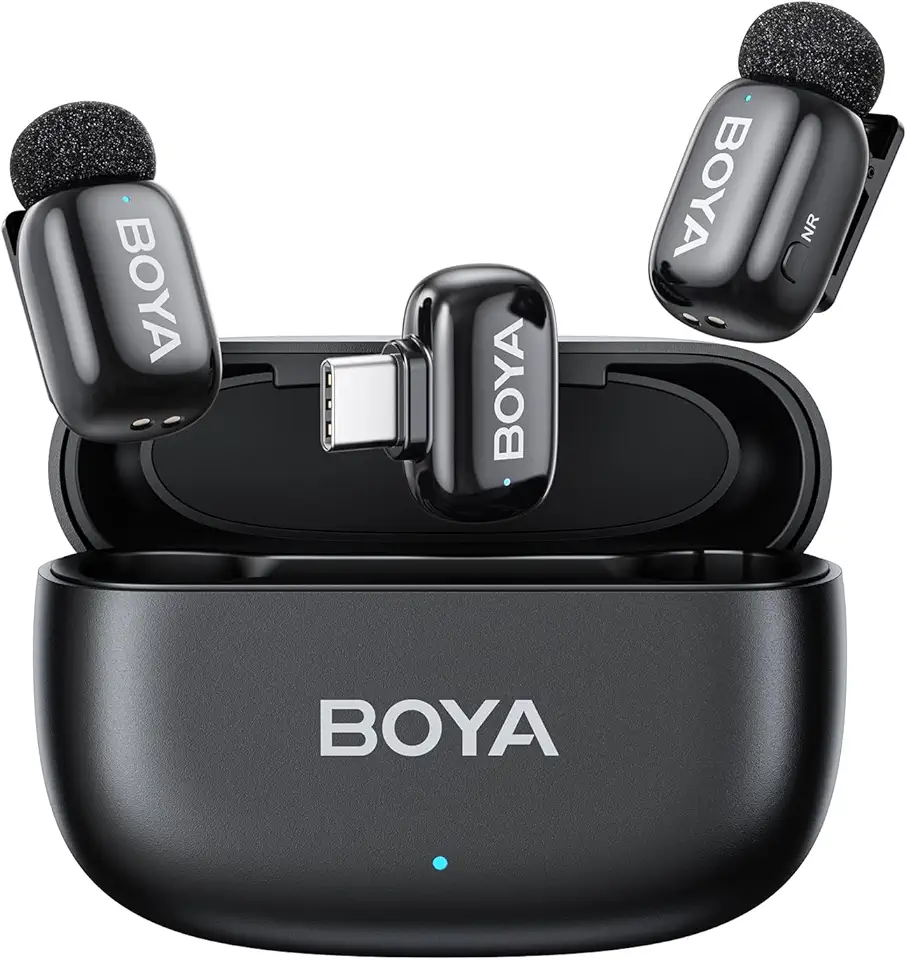
BOYA Mini Wireless Lavalier Microphone with USB-C and Charging Case 30H Battery for Android Tablet PC
Pocket-sized lavalier with USB-C charging, 30-hour battery life, dependable wireless range, perfect for lectures, streaming, and mobile content creation.
Check PriceAs a photographer who records interviews and solo sessions on the go, the Boya Mini reads like a sensible, no-frills lavalier for voice-first work. It’s an ultra-compact, budget-friendly wireless lapel system designed for beginners and ultra-light setups, so its priorities are portability and simplicity over pro features.
In practice it shines in quiet, controlled environments where a single voice needs clean capture without fuss. Users report it lacks the operational range of premium systems (typically 100m), so expect useful performance only for close-range, indoor podcasting or quick location pieces.
Sound is mono-only, which limits stereo imaging but is perfectly adequate for spoken-word podcasts where clarity and intelligibility matter most. For a podcast host or solo podcaster who prioritizes convenience and a small footprint, the Boya Mini delivers acceptable voice quality for the price.
The unit’s strengths are obvious: tiny size, straightforward setup, and the kind of portability that makes it easy to toss in a bag and forget about until you need it. It also benefits from long-lasting battery life with case charges, so you get extended session time without carrying spare batteries.
If you need multi-mic interviews, wide operating ranges, or studio-grade fidelity, this isn’t the tool for you. But if you want a reliable, inexpensive primary for quiet solo recordings or a lightweight backup/secondary mic for run-and-gun shoots, the Boya Mini is a practical, wallet-friendly choice.
- Very small and easily portable
- Simple setup with decent sound clarity for the price
- Long-lasting battery life with case charges
- Budget-friendly
- Limited wireless range (below premium ~100m)
- Mono audio only
Choosing The Right Wireless Mic For Podcasts
Think of choosing a wireless mic the way I choose lenses for a shoot: start with the job, not the gear. If you mostly record solo in a quiet room, you can prioritize compactness and noise isolation; if you’re doing interviews or run-and-gun episodes, look for multi-channel reliability and quick setup.
Interview shows benefit from dual-channel systems so every voice is captured cleanly and independently. For solo work, a single high-quality transmitter with good noise rejection and a tight pickup pattern will usually sound more natural and reduce post-production headaches.
Always buy more range than you think you need. Wireless signals suffer from walls, people, and pockets; a 25–50% safety margin on advertised line-of-sight range saves you from dropouts when you’re on location or have a guest wander a bit.
Listen for real-world features, not just spec sheets. Good noise reduction, adjustable gain, and physical solutions like windshields or shock mounts matter as much as frequency range. Pickup pattern choices—cardioid for rejection, omnidirectional for relaxed movement—directly affect how much room noise you’ll capture.
Check connectivity before you buy: ensure the system supports your phone, camera, or interface without awkward adapters. Multi-adapter kits (Lightning, USB‑C, 3.5mm) make life easier when you switch between phone interviews and a laptop edit session.
Battery life is a workflow decision. Match runtime to your longest session, prefer units with charging cases or clear battery indicators, and bring spares on long days. Lightweight systems win for travel, but heavier pro kits often give longer runtime and extra features.
Finally, favor reliability and backup options. Onboard recording or high-dynamic-range formats can save an episode if interference happens. Test shortlisted systems in your actual recording space and choose the balance of portability versus professional features that fits how—and where—you actually record.
Wireless Mic Tips For Podcasting
When I record on location I treat wireless mics like tiny, delicate assistants: set them up thoughtfully and they disappear into the background. Clip a lavalier about 6–8 inches below the chin, tucked gently under clothing if possible to hide it but not so close that it rubs. A small foam windshield or furry cover makes a huge difference outdoors and tames plosives when someone gets close to the mic.
Always monitor in real time. Plug headphones into your receiver or interface and listen for clipping, interference, or rustle. I set gain conservatively at first and have talent speak at their loudest level so I can avoid distortion; it’s far easier to boost in post than to fix flattened transients.
Signal reliability is about placement and awareness. Keep line-of-sight between transmitter and receiver whenever possible and avoid clustering the receiver near Wi‑Fi routers, phones, or other RF sources. If you interview in busy places, opt for multi-channel systems so each voice records separately, and run a quick channel test before you hit record.
Battery planning wins more sessions than any trick. Charge everything fully, carry spares, and use charging cases on longer days. If your system offers onboard recording, enable it for redundancy — that backup has rescued me from a few nasty dropouts. For transmitters without internal recorders, consider recording a local backup on a phone or field recorder.
Finally, protect the clean take in post. Use gentle high-pass filtering to remove rumble, a noise gate to eliminate low-level hum between takes, and subtle EQ to bring voices forward. Do a sync check if you’ve recorded remotely so clips line up perfectly. With these habits, wireless mics become reliable tools that let you focus on the conversation, not the gear.
What People Ask Most
What is the best wireless microphone for podcasting?
There is no single best option; the right choice depends on your podcast style, number of speakers, and recording environment. Prioritize sound quality, device compatibility, and the features you actually need.
Are wireless microphones good for podcasting?
Yes, they offer mobility and cleaner on-location audio compared with built-in mics. Choose reliable systems and monitor audio to avoid dropouts or noise.
How do wireless microphones work for podcasting?
They transmit audio from a microphone-equipped transmitter to a receiver connected to your recorder or interface using wireless signals. Proper pairing, line-of-sight, and monitoring help maintain a stable connection.
Can you use wireless lavalier microphones for podcasting?
Absolutely; lavalier mics are discreet and well suited to interviews and solo shows where mobility matters. Pay attention to placement and clothing noise for the best results.
How do I choose the right wireless microphone for podcasting?
Match the system to your needs by considering how many channels you require, typical distance between transmitter and receiver, battery life, and device compatibility. Opt for systems with noise reduction and monitoring options that fit your workflow.
Do wireless microphones introduce latency or interference in podcasting?
Some systems can exhibit latency or pick up interference, especially in congested RF environments. Selecting modern digital systems and monitoring in real time reduces these risks.
Can I use a wireless microphone with a smartphone or audio interface for podcasting?
Yes, many wireless kits offer smartphone and interface connectivity through common connectors or adapters. Always confirm compatibility and carry any necessary cables or adapters before recording.
Conclusion For Best Wireless Mic For Podcasting
Choosing the right wireless microphone really comes down to matching your podcasting style and environment with practical needs like operating range, battery life, onboard recording and device compatibility.
Before committing, test a few shortlisted systems in the space where you’ll actually record and weigh portability against pro features so your kit supports the way you work, not the other way around.
If you want to build skills and confidence with wireless audio, read more articles on the site for hands-on advice, setup tips, and real-world comparisons to help you decide.
Have a question or want to share your setup? Leave a comment below and we usually reply within a few hours.


0 Comments