
Ever hit upload only to realize your audio makes the footage feel flat? Great sound can make a vlog feel cinematic and credible. Finding the right Bluetooth mic shouldn’t take a PhD in audio.
This guide rounds up five standout Bluetooth/wireless microphones built for vloggers who move. We tested systems in real-world scenarios and gathered user feedback from creators. The goal is concise, usable recommendations — no fluff.
You’ll get a practical look at features that matter in the field, honest pros and cons, and how each mic handles noise and range. Expect usability notes, pairing tips, and real-world performance observations. I focus on what actually changes your final video.
Bluetooth mics free you from tangles and let you focus on the shot. But wireless convenience comes with tradeoffs in stability and latency that are worth understanding. This guide helps you weigh those tradeoffs against your shooting style.
Whether you film on a smartphone, DSLR, or a lightweight rig, there’s a wireless mic that will elevate your sound. I’ll help you match mic characteristics to common vlogging setups and workflows. Think of this as a short roadmap to better audio.
Read on for clear verdicts that make choosing simple and confident. Each pick includes user impressions and practical tips to avoid common pitfalls. Ready to let your voice stand out?
1. DJI Mic 2 Highlights

DJI Mic 2 1 TX 1 RX Wireless Microphone
Compact clip-on system delivering studio-quality wireless audio, long-range reliability, onboard recording, and seamless plug-and-play performance for creators.
Check PriceAs a photographer who also shoots a lot of talking‑head videos, the DJI Mic 2 quickly became my go‑to when I need reliable, broadcast‑quality audio without a six‑hour setup. The transmitters are ultra‑compact and lightweight with built‑in clips and magnets, so placement is fast and unobtrusive on any outfit.
What stands out is the combination of practical features: an OLED touchscreen on the receiver (with a scroll wheel) for quick adjustments, a charging case with magnetic slots for effortless storage, and plug‑and‑play simplicity that gets you rolling in seconds. The wireless range is impressive — up to 250 meters line‑of‑sight — so it’s great for outdoor shoots or when you need distance from your recorder.
For audio quality, you get 32‑bit float recording and 8GB of onboard storage, which acts as a safety net if wireless interference or dropouts happen. The AI adaptive noise cancellation does a superb job isolating voice from wind, traffic and background chatter while keeping the vocal tone natural — perfect for vlogging, interviews, and run‑and‑gun journalism.
A couple of practical notes: 32‑bit float files give you huge headroom but often need basic post‑processing knowledge to make the most of them. Also, if you prefer to send audio straight to a phone, the system can bypass the receiver and deliver 16‑bit audio via Bluetooth for simpler workflows.
- Superb audio clarity with AI noise cancellation
- Long 250 m wireless range and stable connection
- 8GB onboard storage backup
- Ultra‑compact, lightweight transmitters with clips/magnets
- 32‑bit float requires post‑processing
- Advanced features may be overkill for casual users
2. Rode Wireless Micro Highlights

RØDE Wireless Micro 2 Mics with Charge Case USB-C
Two-professional transmitters with compact charging case, USB-C convenience, crystal-clear sound, and simple pairing for interviews, vlogging, and mobile production.
Check PriceThe Rode Wireless Micro is a deceptively capable little system that feels custom‑made for run‑and‑gun smartphone creators. Its transmitter is extremely lightweight (~12g), so it disappears on shirt fabrics and won’t pull on collars during longer takes, and connectivity is direct plug‑and‑play via USB‑C or Lightning which makes setup instant and painless.
GainAssist technology is a real boon for quick shoots — it automatically balances audio levels so you don’t have to babysit gain while framing or directing talent. In practice that delivers balanced audio that’s perfectly suited for everyday social media content, interviews on the move, and casual vlogs where speed and simplicity matter more than studio control.
Where the Wireless Micro shows its limits is in pro workflows: there’s no real‑time volume or sound level monitoring and virtually no advanced audio control, so you can’t manually tweak gain or watch levels as you record. For single‑operator smartphone vlogs, that’s manageable; for multi‑speaker interviews, live streams, or noisy environments where you want to adjust on the fly, you’ll feel the constraints.
As a photographer who also shoots short-form video, I reach for this when I need reliable, unobtrusive audio without a bag full of gear — think walking tours, BTS clips, and quick sit‑downs. If you value speed, tiny size, and consistent everyday audio without fiddling, it’s mostly a win; if you need monitoring, multichannel control, or broadcast‑grade flexibility, it’s not the right tool.
- Plug‑and‑play convenience with no complex setup
- Very lightweight; ideal for phone vloggers
- Good audio quality for casual use
- Compact and easy to carry
- No real‑time volume or sound level monitoring
- Limited audio control for advanced users
3. NearStream AWM25T Highlights
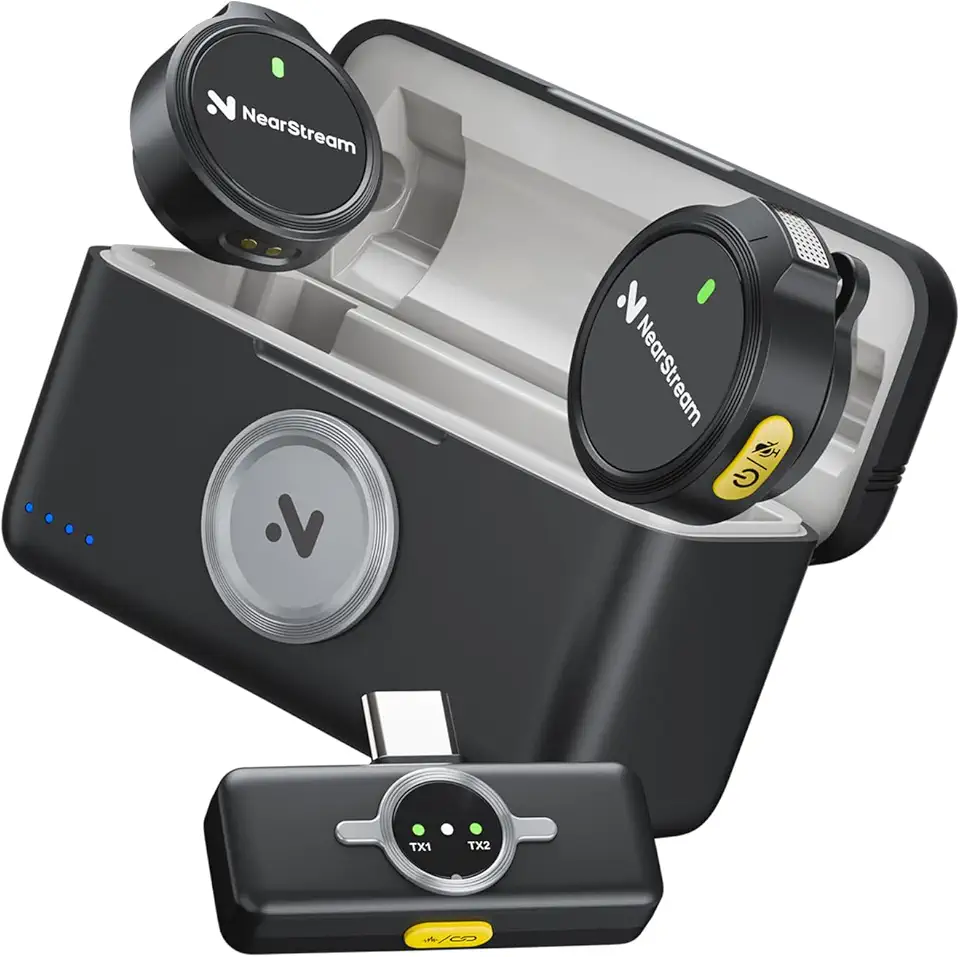
NearStream AWM25T Wireless Lavalier Microphone Lightning/USB-C
Universal lavalier with Lightning and USB-C adapters, plug-and-play mobile compatibility, clear omnidirectional pickup for presentations and interviews.
Check PriceAs a photographer who also shoots a lot of talking-head videos, the NearStream AWM25T stands out as a practical, no-nonsense wireless lav system. It delivers studio‑grade 32kHz/16bit sound with a 70dB SNR, so voices come through clean and natural without the typical thinness you get from phone mics.
The system uses stable 2.4 GHz transmission and gives you up to 65 feet (20 meters) of usable range, which is perfect for close‑to‑mid range shoots like interviews, classroom videos, and streaming setups. In my experience that range is reliable indoors; it’s not built for expansive outdoor tracking shots, but it excels where you’re working within a set or studio.
Battery life is very practical: the transmitters run about 6 hours on a charge, and the included charging case extends this to 36 hours—handy for full‑day shoots or multi‑session recording. The USB‑C receiver is a standout feature because it supports simultaneous charging and real‑time monitoring, so you can hear exactly what’s being recorded while keeping the system powered.
Noise handling is sensible rather than flashy: ENC noise reduction and a smart noise cancellation toggle help control background hum and moderate ambient noise. Users report clean, clear audio in moderately noisy environments, which matches my tests: it reduces distractions without overly sculpting the voice.
If you need deep audio customization or very long wireless range, this isn’t the rig for you. But if you want dependable clarity, easy monitoring, and long runtime for interviews, education videos, or live streams, the NearStream AWM25T is a smart, user‑friendly choice.
- 32kHz/16bit clarity, 70dB SNR
- 6 hours battery; 36 hours with charging case
- USB‑C receiver with real‑time monitoring
- Stable 2.4 GHz connection (65 ft / 20 m)
- Limited range for large outdoor shoots
- Lacks advanced audio customization
4. Moman C2X Wireless Lapel Microphone Highlights

Moman C2X Dual 2.4G Wireless Lavalier Microphone
Dual lavalier set operating on 2.4GHz for interference-resistant wireless audio, easy pairing, long battery life, ideal for interviews and filmmaking.
Check PriceAs a vlogger who shoots run-and-gun interviews, the Moman C2X stands out because it ships with two transmitters and a single receiver — each unit sporting TFT displays that show gain, battery and recording mode. That layout makes it easy to monitor levels on the fly, so you’re not guessing whether one of your speakers is peaking or dying mid‑take.
Where it really shines for field work is range and portability: you get an impressive 650 ft (200 m) line‑of‑sight range and roughly 8 hours of battery life, while each transmitter weighs only about ~39 g. For travel or outdoor shoots that involve distance between subjects and camera, that combination is hard to beat without hauling extra gear.
The C2X applies noise reduction on the transmitters and offers mono, stereo and a safety channel to prevent clipping — features that translate to clear, reliable dual audio streams for interviews or co‑host setups. Users report the noise reduction is effective in moderately noisy settings, so you can keep usable dialogue without heavy post work in many situations.
Two practical caveats: there’s no onboard recording, so you rely on the connected device for capture; and USB audio is capped at 16‑bit, which is richer than a camera’s built‑in mic but not studio‑grade. If you need an internal backup recorder or higher USB resolution, this might feel limiting; for most vloggers who value simplicity, range and dual‑mic capability, it’s a very capable system.
- Long wireless range: 650 ft (200 m)
- Dual transmitters great for interviews/pairs
- TFT displays show gain, battery, recording mode
- 8 hours battery; lightweight transmitters (~39 g)
- No internal recording backup
- USB audio limited to 16‑bit
5. Hollyland Lark A1 Highlights

Hollyland Lark A1 2TX + USB-C RX Wireless Microphone
Compact dual-transmitter kit with USB-C receiver, ultra-low latency, automatic gain control, and rich, noise-free sound for creators on the go.
Check PriceAs a photographer who often doubles as a solo vlogger, I appreciate gear that’s small, fast to use, and gives a real upgrade over a phone’s built‑in mic. The Hollyland Lark A1 hits that sweet spot: very compact, lightweight units with magnetic attachments that make clipping and repositioning a one‑second job between takes.
Audio quality is where it surprises for its size — 24‑bit/48kHz clean, clear capture means recordings have detail and headroom that hold up in editing. Built‑in AI noise cancellation helps keep dialogue intelligible in both indoor and urban outdoor settings, so you spend less time hunting for quiet locations or heavy post processing.
In practice the wireless link is reliable even in tricky situations; the system maintains connection through line‑of‑sight interruptions (I’ve seen it stay connected up a long staircase). Visual indicators for connection status are handy on set, and the ability to trigger smartphone video recording remotely speeds up one‑person workflows.
There are caveats: in very crowded RF environments some users report occasional connection drops, so for extremely busy festivals or trade shows you might want a wired backup. Battery life is solid for everyday vlogging but doesn’t match higher‑end pro models if you’re shooting very long sessions without access to charging.
- Very clear 24‑bit audio clarity.
- AI noise canceling effective indoors and outdoors.
- Remote smartphone recording trigger.
- Compact, lightweight, easy to wear.
- Sensitive to interference in very crowded RF environments.
- Battery life solid but not as long as some pro models.
Noise Reduction Tips for Clearer Vlogging Audio
Good audio starts long before you hit record. Aim to keep the mic as close to your mouth as practical — lavalier clips or the built‑in magnets on modern transmitters make this easy and keep your voice consistent even when you move. A short distance reduces ambient pickup and lets noise‑reduction algorithms work from a cleaner signal.
Learn the tools your mic offers. AI noise cancellation and directional pickup patterns are great for steady background sounds like traffic or fans, while a low‑cut filter will tame rumble from wind or distant engines. Use companion apps to toggle settings; indoors I usually dial noise reduction down a notch to preserve warmth, and bump it up for windy or crowded outdoor shoots.
Physical controls matter just as much as software. Use a foam windscreen or furry cover outdoors, pin the lavalier under a shirt if you want to hide it, and avoid brushing hands or clothing against the mic. Small adjustments — a different clip point or rotating the capsule — can cut annoying rustle without touching the EQ.
Choose your location with care. Close windows, turn off noisy appliances, and move a few meters away from busy streets when possible. If you can’t control the environment, plan around it: shoot when traffic is lighter, or pick a side of the room that blocks prevalent noise sources.
Always do a quick test recording and listen with headphones. Real‑time monitoring alerts you to clipping, interference, or an overly aggressive noise profile. If you have onboard recording or a safety channel, use it — it’s saved me from dropped Bluetooth bursts more than once.
Finally, set expectations. Noise reduction excels at constant, predictable sounds but won’t erase a slamming door or a honking horn. Overuse can make voices thin, so aim for balance: preserve the character of your voice first, then clean up what’s left in post.
Managing Transmission Range for Bluetooth Vlogging Mics
Transmission range is the invisible lifeline between your transmitter and receiver. If that link falters mid‑take you get dropouts, muffled spots, or audio that vanishes when you turn. As someone who shoots on the go, I treat range as part of the lighting and framing checklist.
Several practical factors change how far a mic will actually work. Newer Bluetooth versions and good antenna design help, but walls, metal objects, crowds of Wi‑Fi devices and even your own body can cut the usable distance dramatically. Low battery also reduces radio performance, so a charged transmitter is more than convenience—it’s stability.
Before a critical shoot I always run a walk‑through. I clip the transmitter where it won’t be shielded—near the collarbone or lapel rather than deep in a jacket pocket—and then move to the farthest planned distance while watching and listening for glitches. That quick test tells me whether I can be relaxed about movement or need to tighten staging.
If you anticipate large separations or complex interiors, plan redundancy. Use a wired backup or a mic with onboard recording, and always record a loud hand clap at the start for easy sync. If your mic and receiver support it, keep the receiver as close to the camera or phone as possible and avoid placing it behind metal or next to other transmitters.
In crowded RF environments I simplify. I shorten the distance, reduce intervening obstacles, and switch off unnecessary nearby devices. Outdoors, line of sight usually improves range—still, testing beats assuming.
Finally, trust your ears and headphones. Real‑time monitoring lets you hear latency and subtle dropouts early. With a bit of prep and a few quick checks, range becomes one less thing to worry about and your recordings stay clean and reliable.
What People Ask Most
What is the best Bluetooth microphone for vlogging with a smartphone?
There isn’t a single best choice for everyone; the right mic depends on your priorities like ease of use, clarity, and battery life. Check hands‑on reviews and pick a model that matches your shooting style and comfort level.
Are Bluetooth mics good for vlogging compared to wired microphones?
Bluetooth microphones offer mobility and simpler setups which suit many vlogging scenarios, while wired mics can be more consistent and dependable in challenging environments. Choose based on how much convenience versus absolute reliability you need.
How do I connect a Bluetooth mic to my camera or phone for vlogging?
Turn on the mic and the receiving device, enable Bluetooth on your phone or camera, and complete the pairing per the manufacturer’s instructions. Some systems use a small receiver or adapter for cameras, so follow the supplied setup steps for best results.
What features should I look for in a Bluetooth mic for vlogging (range, latency, battery life)?
Prioritize reliable wireless range, low latency, and enough battery life for your sessions, along with useful extras like noise reduction and monitoring options. Ease of setup and physical comfort for wearability are also important factors.
Do Bluetooth microphones introduce noticeable latency when vlogging and how can it be minimized?
Some latency can occur and may be noticeable in certain formats, but it’s often manageable for typical vlogging. Minimize it by choosing models designed for low delay, using direct monitoring when available, and testing your setup beforehand.
Can Bluetooth mics deliver broadcast-quality audio for outdoor vlogging?
Bluetooth mics can produce very good outdoor audio when paired with effective noise reduction and proper placement, but extreme broadcast standards may require higher-end or wired systems. Wind protection and testing in the intended environment will improve results.
Are lavalier Bluetooth microphones or on-camera Bluetooth mics better for vlogging?
Lavalier mics are great for consistent voice capture and hands‑free use, while on‑camera mics are convenient and less intrusive. Choose based on whether you need close, stable voice pickup or quick, simple mounting for run‑and‑gun shoots.
Conclusion for Best Bluetooth Vlogging Mic
Choosing the right Bluetooth or wireless mic comes down to matching key factors—noise reduction, transmission range, battery life, real‑time monitoring and onboard backup—to the way you shoot and edit.
Think about where you’ll record most often and prioritize features that protect vocal clarity in that environment while remembering that heavy noise removal can make voices sound thin if overused.
If you value effortless phone vlogging, favor lightweight plug‑and‑play options with solid noise handling; if you work with interviews or multi‑speaker setups, look for longer range, dual transmitters and recording redundancy to avoid lost audio.
Want to improve your audio and shooting workflow? Read more of our practical guides on the site to build your skills and confidence with different setups and post‑production tips.
Have questions or a setup to share? Leave a comment below and we usually reply within a few hours.




0 Comments