
Tired of muffled audio and sudden dropouts ruining your live shows? This guide compares five wireless microphones and gives clear buying and usage guidance to help you choose the right setup for streaming.
Whether you broadcast games, host interviews, vlog on the move, or produce live podcasts, great audio is nonnegotiable. This guide is written for streamers, vloggers, content creators, and interviewers who want reliable sound without a steep learning curve. Whether you’re streaming from home or on location, this guide helps you weigh portability against performance.
We weigh everyday performance more than marketing claims. Expect real-world feedback on setup, stability, battery life, and day-to-day usability. We also point out practical setup tips and common pitfalls to avoid before you go live.
We’ll highlight tradeoffs to help you match a mic to your specific workflow and budget. No jargon, no fluff—just practical advice so you can focus on content and not technical headaches. Think of this as a field guide for cleaner streams.
Keep reading for concise reviews, user-tested observations, and smart tips you can use during your next stream. By the end you’ll know which wireless mic styles suit solo creators, co-hosted shows, mobile reporters, and interview setups. Ready to upgrade your audio presence?
1. Rode Wireless Go II Overview

RØDE Wireless GO II dual-channel wireless microphone system with onboard recording
Capture pristine dual-channel audio with onboard recording, seamless wireless sync, and extended range for interviews, vlogs, and professional content creation
Check PriceAs a photographer who also streams behind the scenes, I rely on gear that’s quick to deploy and trustworthy on location. The Rode Wireless Go II shines here — it’s compact, lightweight and designed for solo creators, vloggers and podcasters who need reliable wireless performance without fuss.
The system’s dual-transmitter setup is a real advantage for two-person recording, making interviews and co-hosted streams straightforward. Built-in mics are clear for most applications, though I typically clip on external lavalier mics when I want a tighter, more broadcast-grade vocal for client work.
One feature I value is the on-board recording; it acts as a safety net if wireless dropouts occur during outdoor or remote streaming. Setup is easy with a minimal learning curve, so you can spend more time framing shots and less time wrestling with menus.
In practice, audio quality is excellent with low self-noise, which helps deliver clean voice capture even when monitoring on headphones. That said, expect some limitations in very crowded or reflective RF environments — occasional dropouts can occur with radio interference, so I always test signal beforehand.
Controls are intentionally simple, which is great for speed but limits customization for advanced users who want granular settings. If you prioritize portability, reliable everyday performance, and a built-in backup recorder, the Wireless Go II is a solid pick; if you need extended range or deep interface customization, consider that trade-off.
- Dual transmitters for two‑person recording
- On‑board recording as safety net
- Compact, lightweight, portable
- Excellent audio quality with low self‑noise
- Limited range in crowded/reflective environments
- Basic controls/interface; limited customization
2. DJI Mic 2 Overview

DJI Mic 2 1TX+1RX wireless microphone
Compact wireless mic kit offering clear transmission, reliable range, and quick pairing—ideal for creators, interviews, and on-the-go recording
Check PriceAs a photographer who also streams interviews and behind‑the‑scenes shoots, I found the DJI Mic 2 to be a sleek, feature‑rich option that handles vocal capture very well. It’s favored by content creators and journalists for its design and professional vocal clarity, so your voice will sit nicely in a live mix without sounding thin or harsh.
The touchscreen and dial are genuinely useful for on‑the‑fly adjustments during a shoot. There’s a slight learning curve, but once you get comfortable you can tweak gain and settings quickly without diving into an app.
One standout is the AI noise cancellation — it effectively reduces background noise in noisy environments like busy sets or coffee‑shop interviews. That makes the Mic 2 particularly handy for mobile streamers who don’t control the room acoustics.
Another practical advantage is the ability to record directly to a smartphone or camera. For me that meant fewer cables and a cleaner workflow when I was moving between locations or shooting run‑and‑gun interviews.
Consider, though, that the interface can feel complex at first if you’re new to wireless systems. Also, battery life drops when you run advanced features like AI cancellation, so keep spare power for long sessions or consider short breaks to swap batteries.
- AI noise cancellation reduces background noise
- Touchscreen interface and dial for quick adjustments
- High vocal clarity and professional-grade audio
- Compact and portable
- Interface can be complex for beginners
- Battery life shorter when using advanced features like AI cancellation
3. Saramonic Blink 500 B2+ Overview

Saramonic Blink500B2+ wireless lavalier microphone USB-C
Plug-and-play USB-C lavalier delivers crystal-clear audio, low latency, and easy setup for remote work, streaming, and mobile recording
Check PriceAs a photographer who streams behind the scenes, I appreciate gear that just works and survives a tumble. The Saramonic Blink 500 B2+ feels built for that life — it delivers professional‑grade audio at a budget price, and its rugged construction stands up to drops and rough handling.
Setup is refreshingly quick. The receiver connects to both cameras and smartphones, so you can switch from a mirrorless rig to a mobile stream without swapping systems. That versatility makes it a solid pick for multi‑platform creators who move between locations.
Sound is clean and reliable for most streaming scenarios. The Blink 500 B2+ includes active noise cancellation (ANC) that helps tame background noise, although it’s not as sophisticated as AI‑based systems on higher‑end units. For quiet indoor streams and run‑and‑gun interviews, it’s more than adequate.
Where it earns extra points is value and practicality. You get durable hardware and straightforward controls, which means less fiddling on‑set and more time capturing content. It’s an especially good option if you need dependable audio without blowing your kit budget.
Be mindful of two things: the finish is hard plastic and doesn’t feel premium in the hand, and the ANC won’t match the noise suppression available in pricier AI‑driven models. If you need studio‑grade noise removal, you may want to supplement it with post processing or a higher‑end system.
- Excellent value for money
- Versatile connectivity (camera and smartphone)
- Durable/sturdy build
- Simple setup and user‑friendly
- Hard plastic finish feels less premium
- ANC less advanced than AI noise cancellation
4. Shure MoveMic Overview
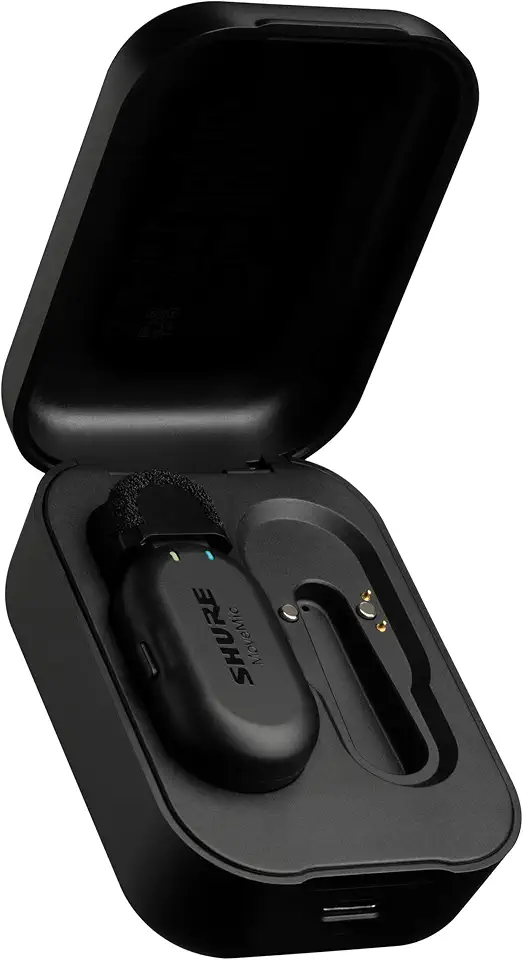
Shure MoveMic One Pro direct-to-phone wireless lavalier microphone
Professional direct-to-phone lavalier ensures broadcast-quality vocals, stable wireless connection, and app control for interviews and influential social content
Check PriceAs a photographer who also streams behind-the-scenes and interviews, I appreciate gear that captures voice with nuance and stays out of the way. The Shure MoveMic earns its keep by offering professional-grade audio quality and reliability, so your voice comes through with clarity and depth even when you’re juggling lighting and framing.
Its compact design and long battery life make it easy to clip on and forget about for extended sessions, which is invaluable when a shoot runs long or you’re streaming back-to-back segments. The built-in denoiser and digital popper stopper are real time-savers on live streams, cutting down background hiss and plosives without needing an external processor.
For live streaming, the LED color-changing touch panel is a thoughtful touch — you can mute/unmute instantly with visual confirmation, which reduces the “oops” moments when switching between takes or bringing a guest on. The overall reliability and sound quality make this a strong choice for serious streamers and broadcasters who need consistent, broadcast-ready vocals.
Be mindful, though: if you need long-range transmission for large venues, the MoveMic’s shorter range compared to some competitors could be a limitation. Also, its higher price point might give hobbyists pause, though the audio and feature set justify the cost for pros who prioritize sound quality and dependable operation.
- Professional‑grade, detailed sound
- Long battery life suitable for extended streaming
- Effective built‑in denoiser and popper stopper
- Compact and portable
- Shorter range compared to some competitors
- Higher price point
5. DJI Mic Mini Overview

DJI Mic Mini 1TX+1RX wireless lavalier microphone
Ultra-compact lavalier kit providing effortless pairing, dependable audio clarity, and long battery life for discreet vlogging and run-and-gun shooting
Check PriceAs a photographer who shoots a lot of behind‑the‑scenes footage and short interviews, I appreciate gear that disappears into the workflow. The DJI Mic Mini lives up to that idea with a lightweight, portable design that makes it easy to clip on talent or stash in a kit bag. It’s clearly aimed at vloggers, interviewers, and filmmakers who need mobility without sacrificing sound.
Where this system really shines is its wireless range. I’ve found the impressive range gives subjects freedom to move without losing audio quality, which makes it ideal for run‑and‑gun shoots or handheld interviews. Connectivity is broad too — it works with cameras, smartphones, and laptops, so you can switch platforms without buying adapters.
Audio quality is consistently described as outstanding and clear, and in practice it delivers professional‑sounding vocals that cut through ambient noise. Battery life sits at about ~5.5 hours, which is solid for most shoots but worth noting if you plan marathon streaming sessions or full‑day events. For those longer days I’d plan for power rotation or a backup solution.
There are a few tradeoffs to keep in mind. The system can be sensitive to radio interference in crowded RF environments, so always test signal beforehand and position transmitters thoughtfully. The interface and controls are basic, so if you want deep customization you may feel constrained; despite that, for most creators the convenience, range, and audio quality make it a compelling pick.
- Lightweight and highly portable
- Impressive wireless range for movement freedom
- Wide device compatibility (camera, phone, laptop)
- Outstanding, clear professional audio
- Battery life (~5.5 hours) can be short for very long sessions
- Sensitive to radio interference; occasional dropouts
Wireless Mic Features to Consider
When I scout a location for a live shoot, the mic I pick can make or break the final stream. Prioritize audio quality first: look for systems that record at least 48 kHz/24‑bit, or even 32‑bit float if you anticipate sudden loud peaks. A flat, wide frequency response will keep voices natural and avoid that “boxed” sound in post.
Noise reduction matters more when you can’t control the environment. AI or dual hardware/software denoising can be lifesavers on busy streets or in echoey rooms, but don’t rely on them to fix poor placement. It’s always better to get clean audio at the source by clipping the transmitter close to the mouth and using a windscreen outdoors.
Transmission tech and range are practical concerns for any movement-heavy stream. Digital 2.4 GHz systems are common for stable links, and encrypted channels add security; aim for at least 30 m (100 ft) of reliable range for most setups. If you run multi-camera shoots, look for timecode or ultra‑low latency (<10 ms) to keep A/V sync tight.
Battery life and on-board recording are real-world insurance. For day-long sessions I want 8–12 hours or hot-swap options, and an internal recorder that saves a local copy during dropouts. Quick‑charge features and the ability to charge while streaming are underrated conveniences.
Compatibility must match your workflow. USB‑C, Lightning, and TRS outputs provide flexibility across cameras, phones, and PCs, while dual‑channel receivers let you capture two talent sources without extra hardware. Headphone monitoring and adjustable gain let you catch problems before viewers do.
Finally, don’t forget build and accessories. Locking connectors, sturdy clips, and good windscreens keep things working when you’re hustling between locations. A rugged, weather‑resistant unit with spare mounts will save time and headaches on real shoots.
Wireless Mic Tips for Streaming
Before you hit Record, run a quick sound check in the exact space you’ll stream from. I always record a short clip, listen back with closed‑back headphones, and watch levels so peaks stay below −6 dB—this is the simplest way to avoid nasty clipping mid‑stream.
Placement matters more than brand. Clip the transmitter close to the mouth, avoid soft fabrics that rub, and angle lavaliers so the capsule faces outward; when in doubt move the mic a fingertip closer rather than turning up gain, because proximity gives clarity without raising noise.
Use onboard recording whenever your system offers it. That second, local track is a lifesaver if wireless dropouts happen, and recording at 48 kHz/24‑bit (or 32‑bit float if available) gives you headroom in post for smoothing levels and reducing distortion.
Monitoring is non‑negotiable. Plug in headphones to the receiver or camera, listen for hiss, latency, or clipping, and enable zero‑latency monitoring if the hardware supports it so you hear what viewers will hear in real time.
Minimize interference proactively. Keep transmitters away from Wi‑Fi routers, Bluetooth gadgets, and other 2.4 GHz devices, use a dedicated USB port or dongle to avoid bandwidth conflicts, and update firmware regularly—manufacturers often patch RF problems.
For outdoor work treat wind as an enemy: use windshields or furry covers and check battery and signal before going live. Secure mounts, clean windscreens, and a taped cable or magnetic clip will prevent handling noise and accidental shifts during a long take.
Finally, always plan a fallback. Have a wired microphone or backup transmitter ready, spare batteries charged, and a small pouch with clips and foam windscreens. Stream setups are predictable when you prepare for the unpredictable.
What People Ask Most
What is the best wireless microphone for streaming?
There is no single best option for everyone; the right choice depends on your recording environment and workflow. Prioritize clear audio, reliable wireless performance, and compatibility with your streaming gear.
Are wireless microphones good for streaming?
Yes, wireless microphones can provide high-quality, untethered audio and greater freedom of movement. Their reliability depends on the model and how well you manage interference and setup.
How do I choose a wireless mic for streaming?
Consider factors like audio clarity, range, battery life, and the connections your devices require. Also weigh build quality, noise‑reduction features, and whether you need onboard recording or dual-channel capability.
Do wireless microphones have latency for streaming?
Some wireless systems introduce a small delay, but many are designed to keep latency low enough for live use. Use monitoring and sync features to minimize any noticeable delay.
Can wireless microphones connect directly to a PC for streaming?
Many wireless systems can connect directly to computers via USB or with compatible adapters, though features vary by model. Check that the receiver and any required software or drivers are supported by your setup.
How do I set up a wireless mic system for live streaming?
Pair transmitters and receivers, position the transmitter near the sound source, and test audio levels with headphones before going live. Reduce interference by keeping other wireless devices away and enable backup recording or monitoring where available.
What is the difference between lavalier and handheld wireless mics for streaming?
Lavalier microphones clip to clothing for discreet, consistent voice capture, while handheld mics offer more direct control and suit active presenters or interviews. Choose based on visibility, mobility, and how you plan to handle the microphone during streams.
Conclusion for Best Wireless Mic for Streaming
This guide pulled together real‑world feedback, strengths and limitations of five popular wireless mics and the core features you should prioritize for reliable streaming performances.
Rather than a single “best” choice, the right mic depends on your workflow, whether you need long battery life, onboard recording, advanced noise reduction, or simple plug‑and‑play reliability for mobile setups.
Take time to test candidates in your usual streaming environment, check levels and monitoring, and use onboard backups or a wired spare when possible to avoid on‑air surprises.
If you want to sharpen your audio skills and make better gear choices, explore more of our site’s tutorials and gear guides to build confidence and consistency in your streams.
Have questions or want personalized advice about your setup? Leave a comment below and we usually reply within a few hours.




0 Comments