
Want to make pro-looking vlogs without breaking the bank? This guide zeroes in on the best budget camera for vlogging—five affordable picks selected for real-world performance and value.
Inside you’ll find hands-on user feedback and comparisons that matter to creators. We look at image quality, autofocus, stabilization, battery life and overheating, portability, and lens options so you can pick the right tool for your workflow.
We’ll also share practical tips to upgrade audio and stabilize handheld footage without emptying your wallet. Those small changes often make more difference than a pricier camera.
We combined controlled testing with real-user experiences to highlight strengths and trade-offs you’ll actually notice in daily use. Expect candid notes on things like low-light performance, autofocus reliability, and whether long 4K sessions trigger overheating.
No technical fluff. Just clear, practical advice that helps you shoot better video today.
Whether you’re starting a channel or upgrading from a phone, this guide will save you time and money. Read on and find the best budget camera for vlogging that actually fits your style and shooting habits.
We’ll also call out common trade-offs so you can prioritize what matters — battery endurance, stabilization, or pocketability. Plus, there’s a short FAQ to answer the questions vloggers ask most.
1. Canon PowerShot V1 for Vlogging

Canon PowerShot V1
Sleek pocket-sized 4K compact for vivid photos and stabilized video; effortless controls for quick everyday creativity.
Check PriceThe Canon PowerShot V1 is a compact, all-in-one vlogging camera that feels built for travel. Its 1.4-inch sensor gives noticeably better image quality than most compacts, especially in low light, so you’ll get cleaner footage without swapping lenses.
I love that it has a built-in fan, which lets you record for extended periods without overheating—very useful for long days of shooting. Autofocus is described as “sticky” and reliable, locking onto faces and eyes quickly, which makes run-and-gun self-recording much less stressful.
The 16–50mm zoom (17–52mm in 4K 16:9) is versatile for wide travel shots and tighter close-ups, and the camera’s effective image stabilization keeps handheld clips usable straight out of the camera. Built-in ND filters and the option to attach a wind muffler are practical touches for outdoor vlogging in bright or windy conditions.
There are trade-offs to bear in mind. 4K 60p comes with a crop, so you’ll lose some field of view at the highest frame rate. The menu system can be complex and less intuitive, so there’s a learning curve before you can change settings quickly on the fly.
- Excellent low-light image quality
- Reliable face/eye-detect autofocus
- No overheating thanks to built-in fan
- Compact and lightweight for travel
- 4K 60p video has a crop
- Menu system can be complex
2. Canon EOS R50 V for Vlogging
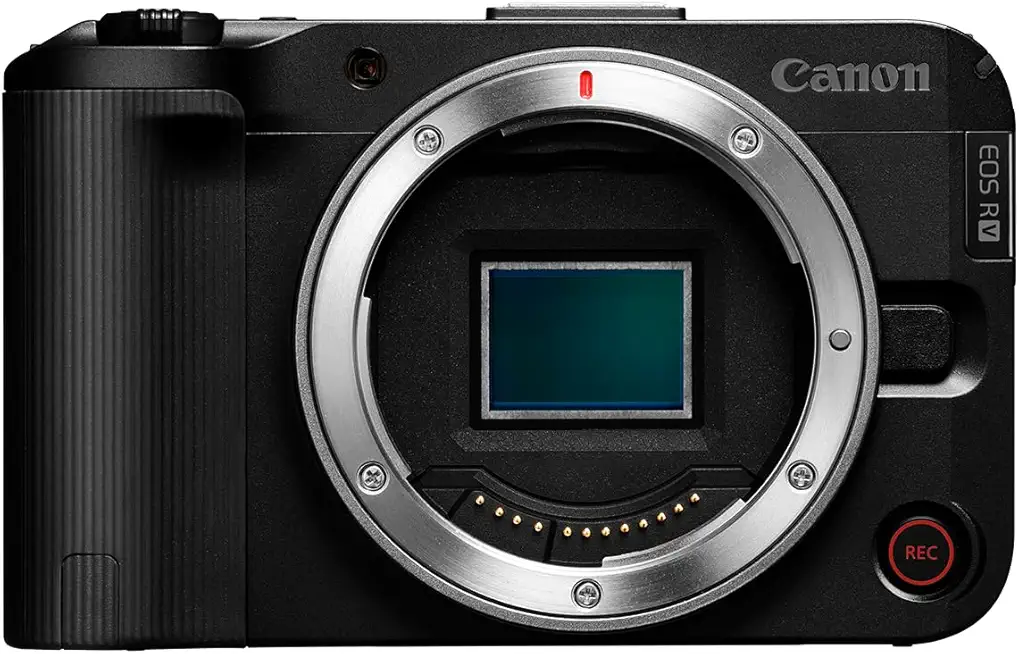
Canon EOS R50 V (Body Only)
Lightweight APS-C mirrorless body delivering high-speed autofocus, crisp image quality, and expandable lens flexibility for creators.
Check PriceAs a working photographer I appreciate what the Canon EOS R50 V brings to vlogging: a mirrorless design that delivers noticeably better image quality and far more creative control than compact point-and-shoots. It supports 4K recording and its fast, accurate autofocus is particularly strong at tracking moving subjects, which makes it ideal for dynamic, on-the-go shoots.
The camera is lightweight and compact for a mirrorless body, so it’s easy to carry all day without fatigue. The flip-out touchscreen is responsive and practical for self-recording, so framing and changing settings while facing the camera is straightforward. Battery life is solid too, allowing for extended vlogging sessions without constant recharge worries.
In real-world use the R50 V feels like a step up for creators who want better image quality and reliable subject tracking but still value portability. You get a camera that handles run-and-gun scenarios well and simplifies solo production thanks to the touchscreen and strong face/eye detection. Keep in mind two practical caveats: it can overheat during long 4K recording in warm environments, and the menu system can be confusing for beginners, so expect a small learning curve.
- Excellent face/eye-tracking autofocus
- Lightweight and compact for a mirrorless camera
- Flip-out touchscreen for easy self-recording
- Good battery life for long sessions
- Can overheat during long 4K recording
- Menu system can be confusing for beginners
3. Fujifilm X-M5 for Vlogging

Fujifilm X-M5 (Body)
Compact enthusiast mirrorless body with classic film simulations, advanced sensor performance, and intuitive controls for creative photography.
Check PriceThe Fujifilm X-M5 is a compact, retro-styled mirrorless that punches above its weight for vloggers. Its APS-C sensor delivers excellent image quality, especially in low light, so you get cleaner footage when shooting indoors or at dusk.
Autofocus is fast and accurate with reliable face and eye tracking, which makes single-operator vlogging much less stressful. The flip-out touchscreen is intuitive and well-suited for framing yourself, so getting consistent headroom and composition is easy.
It supports 4K video and generally produces footage that looks a step up from most compact cameras, and the battery life is solid enough to cover a full day of shooting without constant recharges. The camera’s compact size and stylish design also make it pleasant to carry and use on the go.
Two practical cautions: the X-M5 can overheat during long 4K recording sessions, especially in warm environments, so plan for shorter takes or cooldown breaks during extended shoots. Also, the menu system can be confusing for beginners, so expect a brief learning curve before you can fly through settings on the fly.
Overall, if you prioritize image quality, low-light performance, and dependable autofocus in a compact, attractive body, the Fujifilm X-M5 is a strong budget-friendly vlogging choice. Just be mindful of overheating in long takes and spend a little time getting familiar with the menus.
- Excellent low-light image quality.
- Reliable face/eye-tracking autofocus.
- Compact, stylish, and easy to carry.
- Flip-out screen aids self-recording.
- Can overheat during long 4K recording, especially in warm environments.
- Menu system can be confusing for beginners.
4. Sony ZV-E10 II for Vlogging

Sony ZV-E10 II (with lens)
Creator-focused vlogging kit with superb autofocus, swivel screen, and included lens for professional-looking videos and quick setup.
Check PriceThe Sony ZV-E10 II is a mirrorless body that gives you noticeably better image quality and creative control than typical compact vlog cameras, and it supports 4K recording for clean, detailed footage. In real-world use the 4K output holds up well for YouTube and social content, making it a solid step-up if you want a more cinematic look without a heavy rig.
Autofocus on the ZV-E10 II is fast and accurate, with strong subject tracking that keeps faces and movement sharp while you film. The flip-out screen is tactile and user-friendly, so framing yourself and checking exposure on the fly is straightforward — a real time-saver when shooting solo.
Physically the camera is lightweight and compact for a mirrorless system, so it’s easy to carry all day or travel with minimal fuss. Battery life is also good for extended vlogging sessions, meaning fewer interruptions for swaps or chargers during longer shoots.
From a practical vlogger’s perspective, this camera balances image quality, autofocus performance, and portability very well; it’s mostly a win if you prioritize clean 4K footage and reliable AF in a carry-friendly body. Be mindful that prolonged 4K recording can lead to overheating in warmer conditions, and the menu system may feel confusing if you’re new to Sony’s interface.
- Excellent face/eye-tracking autofocus
- Lightweight and easy to carry
- Flip-out screen for intuitive self-recording
- Good battery life for long sessions
- Can overheat during long 4K recording, particularly in warm conditions
- Menu system can be confusing for beginners
5. Panasonic Lumix G100D for Vlogging

Panasonic LUMIX G100 DC-G100DKK with 12-32mm lens
Lightweight vlog-ready outfit featuring compact zoom, clear audio capture, and stabilized footage for easy travel content creation.
Check PriceAs a working photographer who vlogs, the Panasonic Lumix G100D stands out as a genuinely practical choice for run-and-gun shooting. It’s compact and lightweight, so you’ll actually carry it everywhere instead of leaving it at home. The body feels unobtrusive on long walks and travel days.
What really helps is the excellent image stabilization. Handheld footage looks steady straight out of the camera, which saves time in editing and keeps your videos looking professional. The flip-out screen and responsive touchscreen make framing and self-recording simple, even when you’re moving around.
The G100D supports 4K and delivers image quality that’s noticeably better than most compact cameras, so your footage will look sharp and pleasing on YouTube or social platforms. Battery life is good for extended vlogging sessions, so you can shoot several segments without constantly swapping batteries.
It’s also easy to use — many users describe the menu as simple and intuitive, which is a real plus if you’re starting out. That said, be mindful of long 4K sessions in warm conditions; the camera can overheat during extended 4K recording. Still, for most creators focused on travel, daily vlogging, or run-and-gun interviews, the G100D offers a balanced mix of portability, stabilization, and image quality that’s hard to beat at this level.
- Excellent image stabilization for handheld vlogging.
- Compact and lightweight for travel.
- Flip-out screen simplifies self-recording.
- Good battery life for long shoots.
- Can overheat during long 4K recording, especially in warm environments.
- Menu system can be a bit confusing for beginners.
Improve Vlog Audio Quality
Good audio sells a vlog more than great footage ever will. I always start by choosing the right mic for the situation: a lavalier clipped 6–12 inches below the chin for talking-head work, or a shotgun on the camera or a boom for distance and directional sound. Outdoors, use a furry wind muff — it makes a dramatic difference against gusts.
Mic placement matters more than gear. Keep the lavalier out of clothing rustle and point the shotgun toward the subject, not the camera. When possible, get the mic as close to the sound source as practical; proximity improves clarity and reduces the need for heavy post noise processing.
Control the recording environment next. Choose a quiet, non-echoey room and add soft furnishings or DIY acoustic panels to tame reflections. Always record at least 30 seconds of room tone at the start or end of a take; it’s a lifesaver when you need to smooth edits or gate out noise.
Monitor audio live with closed-back headphones while you shoot. Set your input gain so peaks sit well below clipping — I aim for 6–12 dB of headroom — and watch levels when the subject moves or raises their voice. If possible, run a backup recorder on a separate track for redundancy.
Record in uncompressed formats such as WAV to preserve detail for editing. In post, use gentle EQ, noise reduction, and compression to polish dialogue, and employ modern AI tools for wind removal or stubborn background hums. Noise gates can help but use them sparingly so natural room sound remains intact.
Finally, listen on multiple devices before you publish. If it sounds thin on a phone, fix it now. Clean, consistent audio will make your vlogs feel professional even if you’re shooting on a budget camera.
Stable Handheld Vlogging Tips
Steady handheld footage makes a vlog feel professional even when you’re on the move. Shaky clips distract viewers and hide the content you worked to capture, so stability should be one of the first habits you build as a vlogger.
Use a two‑handed grip and keep the camera close to your chest. Tuck your elbows in and press the camera against your sternum to form a natural tripod. Adding a third point of contact—bracing the camera strap against your neck or pressing a forearm to your torso—really tightens things up.
Stand with your feet shoulder‑width apart and keep your knees soft. Engage your core and take slow, deliberate steps; this reduces the up‑and‑down bounce that ruins mid‑shot framing. For walking shots, practice the “ninja walk” — heel to toe, small steps, level shoulders — and you’ll instantly smooth the motion.
Keep camera moves simple and purposeful. Gentle arcs and slow reveals look far better than fast pivots or jerky pans, and using your hips to turn instead of just your arms creates a more cinematic result. Think about where the viewer’s eye should go and move the camera to lead them, not to show off movement.
Take advantage of any in‑camera stabilization, whether optical, in‑body, or electronic. Turn stabilization on for handheld work and be mindful of mode conflicts if you’re using a gimbal. Small adjustments to shutter speed and framing also help stabilization systems perform more predictably.
When you need extra polish, a compact gimbal or a short monopod can save a lot of headaches for dynamic shots. In editing, software stabilization can clean up the last 10–20% of shake, but it’s no replacement for good technique. Practice these habits on short walks or quick test shoots, and you’ll notice your footage look steadier and more confident within a few sessions.
What People Ask Most
What is the best budget camera for vlogging?
There is no single best budget camera; the right choice depends on your priorities such as portability, autofocus, and audio options. Consider models that balance image quality, stabilization, and ease of use for the type of vlogging you do.
What features should a budget vlogging camera have?
Look for reliable autofocus, effective stabilization, a flip-out screen, and a microphone input to simplify self-recording and sound capture. Good battery life and compact ergonomics also make long sessions and travel easier.
Are mirrorless cameras better than DSLRs for vlogging?
Mirrorless cameras are often more compact and include modern video features that benefit vloggers, while DSLRs remain capable and familiar to many users. Choose the body that fits your workflow and lens options rather than assuming one format is always better.
Is in-body stabilization or electronic stabilization better for vlogging?
In-body stabilization tends to give steadier footage in camera, while electronic stabilization can help refine clips in camera or in post. Using either with good technique or an external stabilizer produces the smoothest results.
Can a budget camera record good low-light video for vlogging?
Many budget cameras can handle low-light scenes better than older compacts, but performance depends on sensor size, lens options, and processing. Good lighting and careful exposure will improve results more reliably than relying on any single camera.
Do I need interchangeable lenses on a vlogging camera?
Interchangeable lenses add flexibility for different focal lengths and low-light performance, but fixed-lens models are simpler and more portable. Pick the system that matches your shooting style and willingness to carry extra gear.
Is a smartphone better than a budget camera for vlogging?
Smartphones are extremely convenient and can deliver polished videos for casual vlogging thanks to easy sharing and built-in stabilization. Dedicated cameras usually offer better image quality, more control, and proper audio inputs for more ambitious projects.
Conclusion for Budget Vlogging Cameras
Choosing the right budget vlogging camera comes down to balancing image quality, reliable autofocus, effective stabilization, battery and overheating behavior, portability, and the lenses you can realistically use for your style.
Remember that the camera is just one part of the equation—pair any solid camera choice with good audio technique and steady shooting methods to make your vlogs feel professional and engaging.
If you want to sharpen your skills, explore more articles on our site for practical tips and real-world advice that build on these comparisons and help you get better results faster.
Have questions or want to share your experience with one of these cameras? Leave a comment below and we usually reply within a few hours.




0 Comments