
Want lab-quality prints without leaving your living room? Or tired of sending files to an online lab and waiting days to get them back?
Choosing the best photo printer for home can feel overwhelming. Options vary widely in price, performance, and long-term value.
This roundup compares five top home photo printers and shows what each setup really delivers. We focus on the real-world differences that make prints sing and keep your wallet sane.
You’ll read about image fidelity and color accuracy so portraits and landscapes reproduce faithfully. We also break down ink and running costs, since a cheap printer can be costly over time.
Paper handling and maximum print size get careful attention, because albums, frames, and art reproductions demand different gear. Speed and portability matter too, whether you’re printing party shots or studio proofs.
Expect practical guidance, not tech jargon, so you can pick a model that fits your habits and budget. By the end you’ll know which trade-offs to accept and which to avoid when buying a photo printer for home.
We looked at real prints and user feedback to highlight the strengths and weaknesses you’ll notice at home. Think of this as a short, smart shopping guide that helps you choose the right printer for how you actually print.
1. Epson EcoTank ET-8550 (L8180)

Epson EcoTank Photo ET-8550 All-in-One Printer
High-capacity ink tanks deliver low-cost, borderless A3+ photos, plus scanning, copying, and wireless connectivity for home studios and busy creatives.
Check PriceThe Epson EcoTank ET-8550 (L8180) is a refillable-tank photo printer aimed at photographers who want studio-like prints at home. It uses six individual inks and can handle prints up to A3+, so you can produce large, detailed images without outsourcing.
Where it shines is color and detail. Expect excellent, vibrant, sharply detailed photos on glossy paper, and the six-ink set gives smooth gradations and rich color depth. The printer also supports thicker matte art papers up to A3+, so it’s versatile for both display prints and fine-art projects.
Practical ownership perks are significant. The EcoTank refillable bottles deliver roughly ~2,300 photos from the initial ink set, which cuts per-print cost dramatically for moderate-to-high use. The large tilting touchscreen makes setup and operation straightforward, and connectivity is solid; some variants include a scanner as well.
There are trade-offs to accept. Print speed is deliberately modest — quality is prioritized over throughput — so it’s not ideal for fast commercial batches. The initial price is higher, but most users find ink costs recouped over time if they print regularly. Setup and maintenance take a bit of patience at first, and refillable bottles reduce cartridge waste once you’re up and running.
In short, if you value image quality, large-format capability, and low running costs for frequent home printing, the ET-8550 is a very good choice. If you need rapid output or a low upfront cost for occasional snaps, you may want something else.
- Outstanding photo quality (vibrant colors, fine detail)
- Very cost-effective ink system for frequent home printing
- Supports large prints and wide media types (up to A3+)
- User-friendly large tilting touchscreen/interface
- Relatively slow photo printing speeds
- Higher initial price may deter casual users
2. Canon imagePROGRAF PRO-310
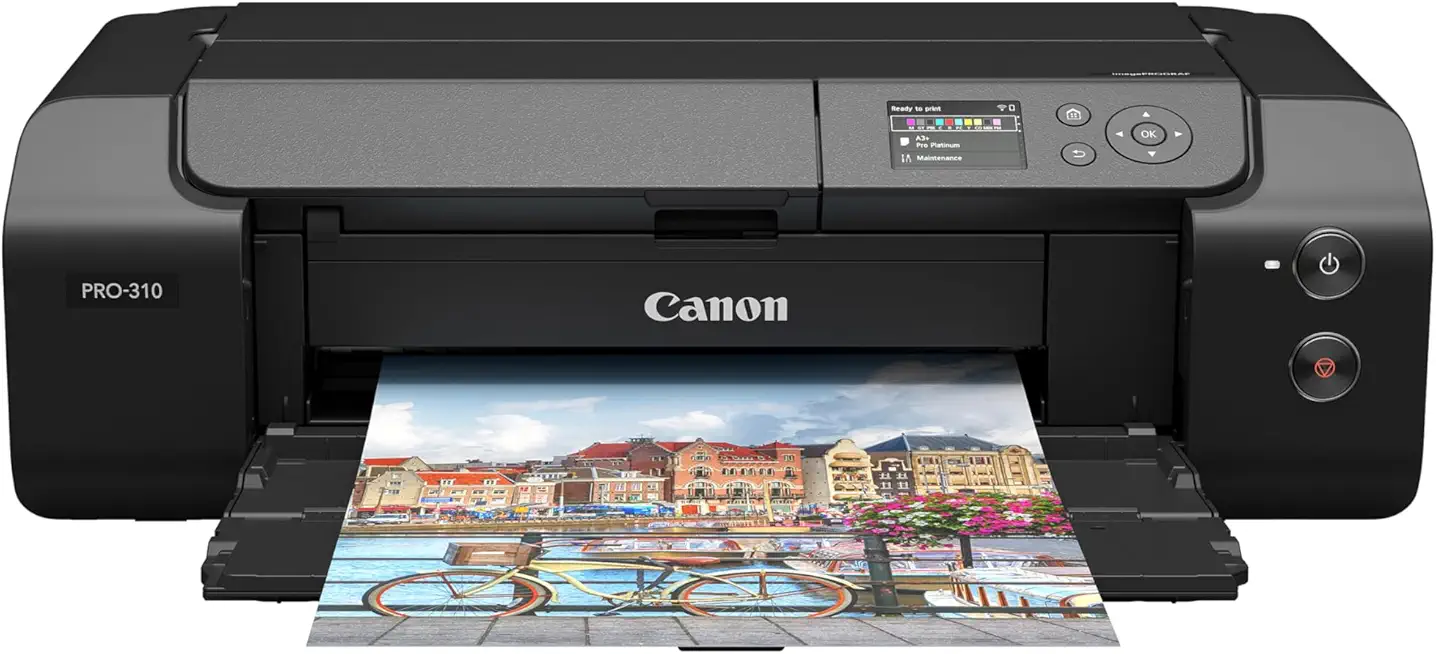
Canon imagePROGRAF PRO-310 13-inch Photo Printer
Studio-grade 13-inch output with expanded color gamut and exceptional detail for gallery-quality photographic and fine art prints.
Check PriceAs a working photographer, I reach for the Canon imagePROGRAF PRO-310 when archival quality and tonal fidelity matter most. It uses a 10-color Lucia PRO II pigment ink system that delivers exceptional color accuracy and deep, neutral blacks. The printer will handle borderless printing on matte and fine-art papers and can produce prints up to 13″ wide, making it ideal for gallery-size work and framed pieces.
Pigment inks here mean longevity and resistance to light and smudges, so your prints will stand up over time. Users and I notice museum-quality richness and superb detail, especially in shadow areas and monochrome prints. If your priority is archival permanence and true-to-file color, this machine shines.
Media handling is also strong: the PRO-310 supports thick fine-art papers that many dye-based machines struggle with. That makes it a great choice for limited editions, art reproductions, and textured cotton rag stocks. Borderless large-format output adds flexibility for presentation and framing.
There are trade-offs. Print speeds are very slow—this is a quality-over-quantity device—so it’s not suited to high-volume or quick-turn orders. It’s a pure photo printer with no scanner or multifunction features, and initial ink priming consumes significant ink before things stabilize.
Expect higher ongoing costs. Ink cartridges can be expensive and run out quickly, so good ink management is necessary. In short, pick the PRO-310 if you want archival, gallery-grade prints and can accept slower output and higher ink spend.
- Best-in-class image quality and superb blacks
- Durable pigment inks for longevity
- Large-format (up to 13″) and borderless printing
- Highly praised detail and vibrancy
- Very slow printing speed
- High ink costs and heavy cartridge consumption
3. Epson Expression Photo XP-970

Epson Expression Photo XP-970 All-in-One Printer
Compact all-in-one produces vibrant borderless photos, smart wireless printing, scanning and copying—ideal for hobbyists and home photo enthusiasts.
Check PriceThe Epson Expression Photo XP-970 is a compact, 3-in-1 inkjet that feels designed for hobbyist photographers who want serious-looking prints without a studio footprint. It prints up to A3-size and uses six ink cartridges, which gives noticeably better color shading and smooth gradations than typical four-color home printers.
In practice the six-ink set produces accurate colors and subtle tones I rely on for portraits and landscape work. The scanner is limited to A4, but it’s very high resolution and does a great job when I need accurate color copies or to digitize prints for editing.
Paper handling is sensible for a home studio: the main tray holds 100 sheets and there’s a secondary tray dedicated to photo paper, so switching between everyday printing and glossy or matte photo runs is painless. The unit’s compact, sleek design means it sits nicely on a shelf or small desk without dominating the room.
The trade-offs are real and worth considering. Ink consumption is higher because of the six-cartridge system, so running costs will be above cheaper cartridge printers. Print speeds are slower than many non-photo home printers, so it’s not the best choice if you need dozens of prints quickly or are doing bulk runs.
Overall, if you’re a hobbyist who values color accuracy, A3 capability and multifunction convenience in a compact package, the XP-970 is a very capable choice. If you prioritize ultra-low running costs or fast throughput, look elsewhere.
- Prints up to A3-size
- Six-ink system for improved color shading
- 3-in-1 print/scan/copy convenience
- Main tray holds 100 sheets; secondary tray for photo paper
- Relatively high ink costs (multiple cartridges)
- Slower print speeds; not ideal for bulk printing
4. Canon Pixma Pro-200S

Canon PIXMA PRO-200S 13-inch Photo Printer
Vivid dye-based inks yield stunning, glossy 13-inch prints with effortless color accuracy and easy mobile connectivity for professional portfolios.
Check PriceIf you want punchy, gallery-ready glossy prints at home, the Canon Pixma Pro-200S is a compelling choice. It’s a 13-inch (A3+) dye-based photo printer with an eight-ink cartridge system tuned for vibrant color, so your landscapes and portraits really pop.
Compared with many pigment machines, the Pro-200S delivers faster print speeds, which matters when you’re producing multiple prints for a shoot or client. It also supports borderless printing on glossy photo paper, so you can output clean, edge-to-edge images without post-trim work.
Be aware this model favors glossy output and color intensity above archival permanence. Users consistently report excellent, vibrant glossy prints, but the dye-based inks are less archival than pigment alternatives, so this isn’t the best pick if long-term lightfastness is your primary concern.
Running costs are noticeable — dye inks can add up — yet many photographers find the expense justified by the superior glossy results. The Pro-200S also has a lower upfront cost versus some high-end pigment units, making it an attractive middle ground between hobby and pro-level photo printers.
In short, pick the Pixma Pro-200S if you prioritize vivid color, borderless glossy output, and quicker turnaround for A3+ prints. Avoid it if you need museum-grade longevity or frequently print on matte/fine-art substrates.
- Strong color vibrancy, especially on glossy media
- Faster than many pigment-based photo printers
- Cost-effective for high-quality color prints
- Borderless output on standard sizes
- Not ideal for matte or fine-art papers
- Dye inks are less archival; prints may fade faster
5. Canon Selphy CP1500 Portable Photo Printer

Canon SELPHY CP1500 Compact Photo Printer
Pocketable, fast dye-sublimation prints produce durable 4x6 photos with wireless and optional battery operation for parties and travel memories.
Check PriceThe Canon Selphy CP1500 is a compact dye-sublimation printer built specifically for 4×6 prints, and as a working photographer I see it as a fantastic companion for casual, on-the-spot printing. Its dye-sub technology delivers vivid colors and smooth gradations, and the prints come out instantly dry and smudge-proof—perfect when you need a finished photo you can hand to someone right away.
It’s designed for wireless printing from smartphones and tablets, so guests at a party or clients at a shoot can send files directly without fuss. People praise its ease of use and portability; I’ve found it genuinely convenient for social gatherings, events, or quick home slices of my portfolio where large format isn’t required.
Don’t expect the same sharpness or vibrancy you get from larger inkjet photo printers aimed at archival or gallery work. The Selphy’s output is good for casual photos and instant keepsakes, but if you need large prints, museum-quality detail, or archival permanence, this isn’t the tool for that job.
One practical trade-off is cost: ink and paper are supplied together in a cassette, which is convenient but raises the cost per print. For photographers who value portability and effortless instant prints for clients or friends, the CP1500 is mostly a win—just plan on higher per-photo costs and stick to small-format uses.
- Very easy to use and portable
- Instant-dry, smudge-proof prints
- Vivid colors and smooth gradations
- Wireless printing from smartphones/tablets
- Only prints small photos; not suitable for large projects
- Relatively high cost per photo due to proprietary cassette system
Print Cost Per Photo
When I advise clients about home photo printing I always start with the same question: how many prints will you actually make? The sticker price of a printer tells you almost nothing about the long-term bill. Your real cost lives in the ink and paper you buy month after month.
Cartridge-based machines tend to be the most expensive per print. Expect roughly $0.30–$0.45 for a high-quality 4×6 or comparable color photo from a cartridge model. Tank or EcoTank systems flip that equation: with refillable bottles you can see per-photo costs drop to the neighborhood of $0.07, especially once the initial ink set has been used.
Remember ink coverage matters. A bright, high-coverage landscape or a dense black-and-white print uses far more ink than a light portrait or a contact-sheet test. Dye versus pigment chemistry also plays a role—pigment inks used for archival prints are pricier but give longevity and resistance to fading, so a higher per-print cost can buy you prints that last decades.
There are also hidden drains on your budget. Printhead maintenance, priming cycles and nozzle checks can consume significant ink, especially during setup or long idle periods. If you print sporadically, that maintenance waste can push your effective cost per print much higher, so regular small runs and using the printer’s maintenance settings wisely will save you money.
If you print casually for family photos or parties, a compact cartridge-based or dye-sub unit is convenient despite higher per-photo prices. If you print frequently, for show or sale, prioritize refillable tanks or high-capacity cartridges and factor in archival ink if permanence matters. Finally, buy good paper in bulk and keep a simple spreadsheet: divide total ink and paper costs by prints made and you’ll know the true cost per image—knowledge every photographer should have before committing to a workflow.
Photo Printing Paper Types
Paper choice matters as much as the printer. The same file can look punchy or flat depending on the sheet you pick, so think of paper as your final creative decision rather than a neutral substrate.
Glossy gives the richest colors, deepest blacks and the illusion of sharpness — perfect for display prints and vibrant landscapes. Its downside is glare and fingerprints, so reserve it for framed work or pieces you won’t handle constantly. Matte is the quiet opposite: non-reflective, soft and flattering for portraits, monochrome work and gallery-style prints where contrast isn’t meant to shout.
Semi-gloss, luster or satin sits between the two and is the most versatile. It keeps color vibrancy while cutting glare and fingerprints, which is why wedding photographers and album-makers favor it. Silk or soft-gloss offers a finer hand and a subtle sheen that feels luxurious for portraiture.
For creative impact, metallic papers add a three-dimensional shimmer that makes landscapes and fashion images pop. Fine-art and textured papers — cotton rag, watercolor and washi — bring tactile character and are the right choice for museum-quality reproductions, but they often require printers and inks rated for thicker media.
Weight and archival quality matter too. Heavier stock (200gsm and up) reads premium for display and framing; lighter 180–200gsm is fine for albums or casual prints. If longevity matters, choose archival, acid-free papers to minimize fading and yellowing over time.
Practical tip: match paper to subject and use — glossy for punchy images, matte for gallery-style, luster for portraits — and always run a few test prints. Buy a sample pack, try different finishes and set your printer driver to the correct paper type. That small investment will save frustration and make your best images truly sing.
What People Ask Most
What is the best photo printer for home use?
The best option depends on your priorities like image quality, running cost, and media handling. Choose a model that balances the features you value most with ongoing convenience and cost.
Are inkjet or dye-sublimation printers better for home photo printing?
Both types have strengths: one is versatile with a wide range of papers and sizes, while the other excels at quick, portable small prints. Match the technology to the sizes and finishes you plan to use most.
Can I print lab-quality photos at home?
Many users can achieve very high-quality results with the right printer, paper, and color management workflow. Expect a learning curve and a need for higher-end supplies if you want the closest match to professional lab output.
Do I need special photo paper for home photo printers?
Yes, using paper designed for photo printing improves color, finish, and longevity compared with plain paper. Select the paper finish that suits your subject and the look you want to achieve.
Are all-in-one printers good for printing photos at home?
All-in-one machines offer convenience with scanning and copying in addition to printing, making them useful for general home use. For the absolute best photo quality, dedicated photo printers typically deliver superior results.
How do I choose a home photo printer for accurate color and detail?
Look for printers that support good color management, multiple ink colors, and papers compatible with your workflow. Also consider sample prints and reviews to evaluate real-world color and sharpness.
What photo sizes can home photo printers typically print?
Home photo printers range from compact models that handle small, casual prints to larger units that accept wide-format sheets for bigger photos. Choose a printer that supports the maximum size you expect to print regularly.
Conclusion for Best Home Photo Printers
Choosing a home photo printer is ultimately about balancing image quality, speed, ink and running costs, media support, print size and portability to match your personal workflow and budget.
For archival permanence consider the imagePROGRAF PRO-310, for low running cost and high-volume home printing the Epson EcoTank ET-8550 is compelling, for multifunction convenience the Epson XP-970 fits well, for punchy glossy output and faster turns the Canon Pixma Pro-200S shines, and for instant small prints the Canon Selphy CP1500 is ideal.
Keep your typical subjects and intended uses in mind—matching paper choice and ink system to your priorities will save money and produce better results over time.
If you want to improve your printing technique, color workflows, or paper selection, explore more articles on our site to sharpen those skills and get more consistent, pleasing prints.
Have a question or a printing experience to share? Leave a comment below and we usually reply within a few hours.



0 Comments