

Want to know if the Canon PowerShot G10 Camera can still improve your photos today?
I’ve field-tested it in real shoots to see how it holds up. It’s aimed at photographers who prefer manual dials, RAW files, and a hot shoe instead of fast AF or 4K video.
You’ll appreciate its tactile controls, solid stills rendering, and optical stabilization for steady shots. I’ll cover handling, base-ISO image quality, low-light limits, and whether it’s worth considering now — keep reading.

Canon PowerShot G10 Camera
Rugged enthusiast compact offering intuitive manual controls, versatile zoom and high-quality optics for detailed photos and creative shooting. Ideal for photographers wanting DSLR-like handling in a pocketable body.
Check PriceThe Numbers You Need
| Spec | Value |
|---|---|
| Sensor | 14.7 MP |
| Lens | 28–140mm f/2.8–4.5 |
| ISO Range | 80–1600 |
| Image Stabilization | Optical |
| Video Resolution | 640×480 |
| Screen Size | 3″ |
| LCD Type | Vari-angle LCD |
| RAW Shooting | Yes |
| Manual Focus | Yes |
| Manual Controls | Yes |
| Flash | Built-in pop-up |
| External Flash | Yes |
| Storage | SD / SDHC / MMC |
| Battery Life | Approx. 400 shots |
| Weight | Approximately 355 grams |
How It’s Built
In my testing the Canon PowerShot G10 Camera feels chunky and solid, the kind of compact that wants to be held. It wears its enthusiast roots on its sleeve with real dials and tactile buttons that invite you to shoot manually. That extra heft gives you steadier handheld shots, though it’s less pocket-friendly than slimmer compacts.
It uses a small optical viewfinder alongside a fixed LCD, so you get a classic, no-frills shooting experience without a tilting screen or touch controls. I found the non-touch layout quicker for tuning exposure on the fly, since the main settings are right on the body. For beginners that means less menu digging and more learning by doing.
The built-in pop-up flash is handy for fill, but the hot shoe is the practical standout — I clipped on an external flash for indoor portraits and the difference was immediate. Storage via standard SD cards keeps things simple, and the battery lasted me through a full day of casual shooting, which is great when you’re out exploring. Those practical bits make it easy to keep working without fuss.
Grip and button placement are sensible; the thumb pad and top dials let you lock in settings without breaking your stance. What I really liked was how confident the controls feel under your fingers — turning a dial is satisfying and fast. One thing that could be better is the small finder and fixed screen feeling a bit dated; a bigger viewfinder or a tilting display would help with low and high angle shots.
In Your Hands
The Canon PowerShot G10’s autofocus and overall responsiveness remind you this is a camera from a previous era — it settles on static subjects confidently but won’t keep up with frantic action or rapid tracking. In bright conditions the AF is quick enough for street strolls and posed portraits, but in dim light you’ll notice more hunting and a slower cadence between frames. Treat it as a deliberate, single-subject tool rather than a sports or wildlife workhorse.
Optical stabilization is a genuine asset, especially when you’re zoomed in or hand-holding in lower light; it meaningfully raises the keeper rate for slower shutter moments and frames at the tele end. The zoom covers everything from wide environmental shots to medium teleisms for headshots and details, making it an excellent travel and street companion when you prioritize framing versatility over extreme reach. For low-light handheld shooting, favor the wider end and braced positions to get the best out of the lens and IS combo.
Video capabilities are modest and feel restrictive next to modern hybrids, so this camera excels as a stills-first machine rather than a run-and-gun multimedia tool. Where it really shines is in manual operation: RAW capture, full manual exposure and manual focus reward photographers who enjoy crafting images in-camera and shaping them later. That tactile workflow is satisfying for deliberate shooters who value control over automation.
Battery stamina comfortably supports a day of casual shooting, and RAW files give you room to recover color and exposure in post, though they demand a bit more file management. In practice I’d walk a city for hours, lean on the hot shoe for bounced flash in dim restaurants, and accept that moving subjects sometimes need anticipation and slower shutter techniques to render cleanly. It’s a dependable companion for thoughtful shooting, not a fast-action solution.
The Good and Bad
- RAW support, manual focus, full manual controls
- Optical image stabilization
- Hot shoe for external flash
- Versatile 28–140mm equivalent zoom range
- Limited video (640×480) by modern standards
- ISO tops at 1600 with noticeable high-ISO noise and reduced dynamic range
Ideal Buyer
If you still prefer knobs and dials to menus, the Canon PowerShot G10 Camera is built for you. Enthusiast shooters who prize tactile, manual-oriented operation will feel right at home with its chunky grip and straightforward controls.
Stills-first photographers who work at low ISO and love RAW latitude will get the most from this camera. The CCD-era rendering rewards careful exposure, and the roughly 400-shot battery life keeps you shooting all day. Add the hot shoe and optical IS and you have a compact that handles practical flash work and steadier tele shooting.
Travelers and street photographers who value a 28–140mm range without lugging a kit will appreciate the G10’s reach and solid handling. Its heft and ergonomics make deliberate framing and manual focus feel natural rather than fussy.
This is not the camera for hybrid shooters who demand clean high-ISO performance, fast AF tracking, or modern video features. If your work depends on 4K, relentless speed, or low-light noise control, a modern compact will serve you better. Choose the G10 when tactile control and stills quality beat hybrid versatility.
Better Alternatives?
We’ve gone through the Canon PowerShot G10 and what makes it special: the chunky controls, the hot shoe, the honest CCD look, and that useful 28–140mm range. For many of us who still shoot with a G10, those traits feel familiar and reliable, especially for stills and flash work.
But if you’re reading on, you probably want to know what else is out there now. Below I’ll walk through three modern compact options I’ve actually used, saying plainly what they do better and where they give ground to the G10. Think of this as a practical comparison for real shooting, not a spec showdown.
Alternative 1:
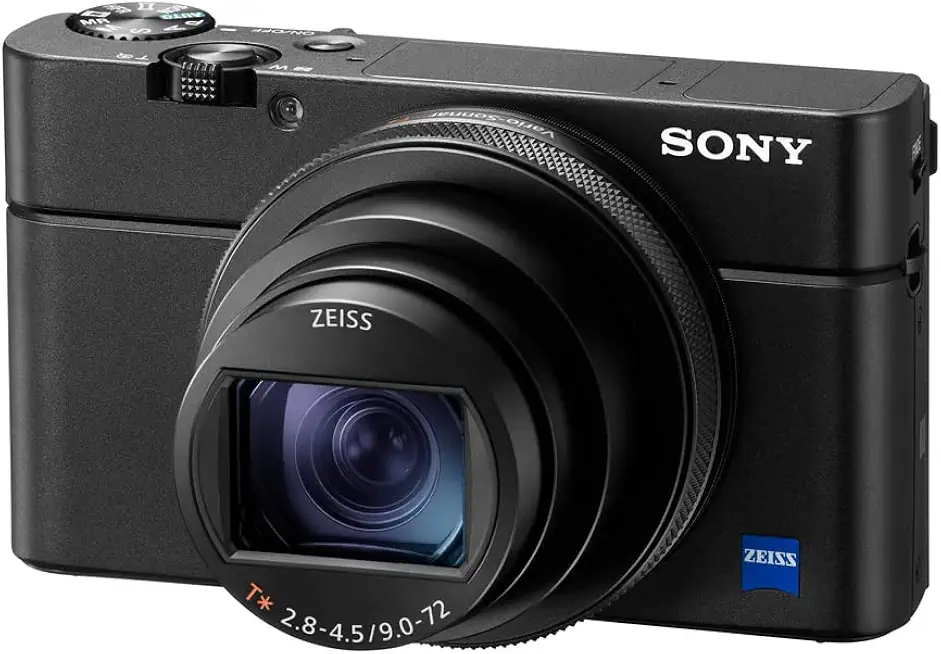
Sony RX100 VII Camera
Ultra-compact powerhouse with lightning-fast autofocus, broad zoom range, and 1-inch sensor performance for sharp images and smooth 4K video. Perfect for travel, street photography, and on-the-go content creators.
Check PriceThe Sony RX100 VII is a speed demon compared with the G10. In real shooting I noticed its autofocus locks on faces and eyes almost instantly, it keeps up with moving subjects, and the burst mode is useful for sequences. The zoom reaches farther than the G10’s lens, which makes it handy when you can’t get closer. Low-light shooting is much cleaner too—shooting at higher ISO feels usable in places where I’d avoid pushing the G10.
That said, the RX100 VII gives up some of the tactile comforts the G10 has. The grip is tiny and the controls are small; I often wished for the G10’s chunky dials and hot shoe for off-camera flash. Battery life is shorter and there’s no hot shoe or easy flash mounting, so if you rely on external flashes the G10 still has the edge. In short: you trade handling and flash flexibility for speed, AF and modern video.
If you want a fast, do-everything pocket camera for travel, street work, and hybrid shooting, the RX100 VII is a great pick. Choose it if you value autofocus, reach, and clean high-ISO shots over the G10’s manual feel and hot shoe. If you’re a flash-centric shooter who loves physical controls, stick with the G10 instead.
Alternative 2:

Canon PowerShot G5 X Camera
Sleek pocket camera with a built-in electronic viewfinder, fast bright lens, and impressive low-light capability. Combines premium handling and image quality in a minimalist, travel-friendly design.
Check PriceThe Canon G5 X brings a more modern Canon rendering to the table compared with the G10. In real use its 1-inch sensor and brighter lens give you cleaner files in low light and nicer subject separation at wide angles. The built-in EVF is handy for tight light situations—something the G10’s small optical finder can’t match. Shooting handheld in dim cafes, I could push exposure with less worry than on the G10.
Where the G5 X loses out is in the things that made the G10 feel like a little studio: there’s no hot shoe for easy flash work, and it’s slimmer with smaller physical controls. The zoom doesn’t reach as far as the G10’s tele end, so you’ll trade some reach for low-light strength. I found its menus and touchscreen convenient, but you won’t get the same rugged, dial-focused handling the G10 offers.
Pick the G5 X if you want a modern, pocket-sized Canon with good low-light performance and an EVF, and you care about JPEGs and color straight out of camera. It’s ideal for travelers and street shooters who want better high-ISO files than the G10, but it’s not the choice if you need a hot shoe or that old-school tactile grip for flash work.
Alternative 3:

Canon PowerShot G7 X Mark III Camera
Compact vlogging-focused shooter featuring a flip-up touchscreen, excellent low-light performance, and vertical video plus live-streaming support. Delivers punchy colors and smooth video for creators on the move.
Check PriceThe G7 X Mark III is built for creators. Compared with the G10, it’s heads-and-shoulders better for video, with clean 4K and a flip-up screen that makes framing selfies and vlogs effortless. In hand-held low-light stills, its modern sensor gives more usable ISO range than the G10, so I got better night shots without reaching for flash. Color and output are punchy and ready for quick sharing.
It does give up the G10’s strengths though. There’s no hot shoe for strobes, and the small body means fewer direct controls—so if you like turning dials while composing, you’ll miss the G10. The zoom is shorter and less versatile for tele work, so it’s not as good for longer-range shooting. I found it excellent for on-the-go video and quick stills, but less flexible for flash-heavy or studio-style shoots.
Choose the G7 X Mark III if you’re a vlogger or social creator who needs great video, a selfie screen, and good low-light stills in a tiny package. If your work leans more toward deliberate, manual stills with off-camera flash, the G10 still wins for that old-school control and hot shoe convenience.
What People Ask Most
Is the Canon PowerShot G10 a good camera?
It was an excellent enthusiast compact when new, with full manual controls and RAW support. Today it’s still useful for learning and casual shooting but falls behind modern cameras in sensor performance and features.
How is the image quality of the Canon G10?
Image quality is very good for its era with sharp JPEGs and usable RAW files, but dynamic range and high-ISO performance are limited compared to newer compacts.
Canon G10 vs G11 — what are the differences?
The G11 improved image processing, noise control, battery life and the LCD, giving better low-light performance and small usability upgrades over the G10.
How does the Canon G10 perform in low light?
It handles low light okay at low ISOs but gets noisy quickly above ISO 200–400, so use a tripod, slow shutter, or flash for better results.
Is the Canon G10 good for beginners or travel photography?
Yes — it’s a solid learning camera with manual controls and a compact body, and it works well for travel if you don’t need modern low-light or video features.
Is the Canon G10 still worth buying?
It’s worth buying used if you want a cheap, well-built manual compact and mostly shoot in good light; skip it if you need modern autofocus, video, or high-ISO performance.
Conclusion
The Canon PowerShot G10 Camera remains a stills‑first compact that rewards thoughtful shooters. Its tactile controls, RAW support, hot shoe, manual focus and steady optical stabilization make composing, metering and lighting feel purposeful and satisfying. The overall handling is chunky and reassuring, with a grip and dial layout that encourages deliberate framing rather than rapid point‑and‑shoot fiddling, plus a durable feel that lasts beyond a single trip.
That said, it plainly shows its age where modern compacts have raced ahead in speed and sensitivity. Video capability, high‑ISO performance, autofocus tracking and dynamic range are noticeably behind contemporary models, so you’ll trade low‑light latitude and burst responsiveness for charm. If your routine requires fast action, clean high‑ISO files, or hybrid video, the G10 will feel like a deliberate compromise.
For photographers who prize hands‑on exposure control, hot‑shoe flash flexibility, and the nuanced look of a CCD‑era sensor at base ISO, the G10 still offers distinct character and usable files. Buy it as a purposeful stills tool that rewards technique, not as a one‑camera‑fits‑all hybrid. If you want modern autofocus, better high‑ISO behavior, or advanced video, choose a contemporary compact instead for confidence across mixed shooting scenarios.
Canon PowerShot G10 Camera
Rugged enthusiast compact offering intuitive manual controls, versatile zoom and high-quality optics for detailed photos and creative shooting. Ideal for photographers wanting DSLR-like handling in a pocketable body.
Check Price


0 Comments