
Which camera will finally give your stop‑motion work the polished, flicker‑free look you see in festival shorts? Choosing the right tool can feel overwhelming, especially when every frame matters. Small changes in focus or exposure can break an entire scene.
This guide cuts through the noise with a hands‑on comparison of five camera approaches, from studio‑grade bodies to plug‑and‑play beginner kits. I evaluate how each performs in real setups and where they save time or introduce headaches. You’ll walk away knowing which options suit cinematic shorts, classroom projects, or multi‑camera tabletop scenes.
Along the way I highlight practical strengths and the downsides that only show up during long shoots. You’ll get clear, usable advice on picking lenses, managing consistent frames, and stabilizing shots to avoid drift and flicker. The aim is to help you spend more time animating and less time reshooting.
Whether you’re upgrading from a phone or building a small studio, this guide matches cameras to budgets and workflows. Expect honest, real‑world pros and cons, plus straightforward tips for tethering and on‑set stability. Ready to find the best camera for stop motion for your next project? Let’s dive in.
I tested these approaches across varied budgets, lighting setups, and studio sizes to give honest, hands‑on comparisons. Turn the page to discover which camera will let you focus on creativity instead of technical headaches.
1. Canon EOS R6 Mark II Mirrorless Full-Frame
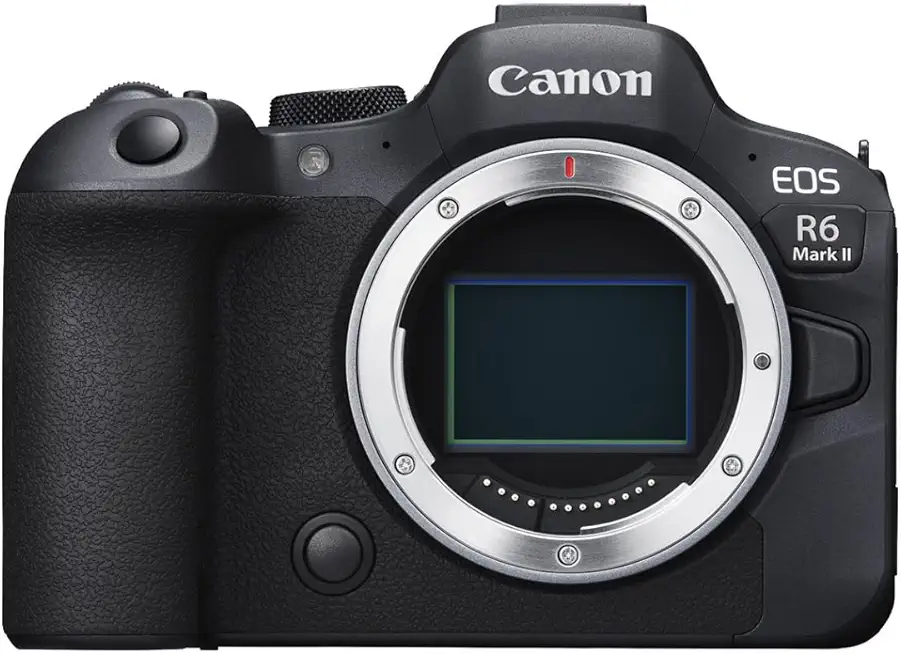
Canon EOS R6 Mark II Mirrorless Camera (Body Only)
High performance full frame hybrid delivering fast autofocus, impressive low light sensitivity, and smooth 4K video for professionals and enthusiasts.
Check PriceThe Canon EOS R6 Mark II is a workhorse for stop‑motion shooters who need clean, full‑frame image quality and dependable performance. Its full‑frame sensor delivers excellent image quality and dynamic range, which helps maintain detail across highlights and shadows for each frame.
Canon’s stop‑motion firmware support is a standout here. It enhances Live View to 1920×1280 and adds USB manual focus peaking, aperture lock to reduce flicker, and focus‑position memory—features that directly solve the small, repetitive problems that kill a shoot.
In practice the Live View is fast and clear, which makes tiny adjustments between frames far less frustrating. The R6 Mark II also plays nicely with Dragonframe through USB camera control, so you can integrate it smoothly into a professional tethered workflow.
Build and ergonomics are solid, which matters on long shoots where you handle the camera for hours. Be aware the firmware upgrade is a separate purchase and may need some technical setup, and battery life can be limited during extended sessions—both things to plan for when scheduling long animation days.
- Exceptional Live View clarity with stop‑motion firmware
- Reliable focus peaking and aperture lock to reduce errors/flicker
- Tight Dragonframe integration for workflow control
- Solid build and ergonomics for longer shoots
- Firmware upgrade is a separate purchase and may require technical setup
- Battery life can be limited during extended sessions
2. Sony A7R III/IIIa Mirrorless Full-Frame

Sony a7R III Mirrorless Camera (Body Only)
Ultra high resolution full frame sensor with exceptional dynamic range and robust build for landscape and studio photographers.
Check PriceThe Sony A7R III/IIIa is a stop‑motion-friendly studio camera if your priority is image detail and finishing flexibility. Its 42.4MP sensor delivers extremely fine detail, which is excellent when you need large prints or plan heavy post‑crop or stabilization in post.
The Mark IIIa refresh adds improvements to screen usability that make tweaking composition and focus a little easier between frames. Autofocus and burst speed are slower, but that matters little for frame‑by‑frame work and actually pushes you toward careful manual control—exactly what stop‑motion benefits from.
Live View on the A7R III/IIIa is good, though not purpose‑built for animation; most stop‑motion shooters pair it with external software for tethered capture and fine control. Sony’s color science and overall image quality are praised, so your frames will look consistently pleasing across varied lighting setups.
Another practical advantage is the wide Sony E‑mount lens ecosystem, which gives you many options for scaling, macro work, and different looks without changing camera systems. The camera also holds solid used‑market value, which makes it an appealing choice for serious hobbyists building a toolkit on a budget.
Overall, if you want the highest resolution and excellent image quality and are comfortable using third‑party tethering tools, the A7R III/IIIa is a very strong contender. If you need dedicated stop‑motion firmware features or a Live View tailored specifically to frame‑by‑frame capture out of the box, you may need to adapt your workflow.
- 42.4MP for very high detail
- Wide Sony E‑mount lens choices
- Excellent image quality/color in varied lighting
- Good used‑market value
- No dedicated stop‑motion firmware—needs third‑party workflows
- Live View not as optimized for stop‑motion as Canon R models
3. Olympus OM-D E-M5 Mark III MFT

Olympus OM-D E-M10 Mark III Micro Four Thirds Camera
Compact, lightweight system offering stabilization, intuitive controls, and vibrant image quality, perfect for travel and everyday shooting.
Check PriceAs a working photographer who shoots a lot of tabletop animation, I appreciate how the Olympus OM‑D E‑M5 Mark III packs a 20.4MP Micro Four Thirds sensor into a compact, lightweight body. It’s easy to position and reposition without a crew, which speeds setup and keeps shoots nimble.
The Vari‑angle touchscreen is a small but meaningful advantage when you need odd camera angles or to preview tricky compositions without dragging out an external monitor. Its Live View has higher resolution for the class, so fine framing and subtle focus checks feel noticeably better than many other compact bodies.
Its improved dynamic range at higher ISO gives you more latitude when lighting is less than ideal, which is handy on multi‑scene shoots where you can’t perfectly control every corner. Image quality is solid for the file sizes you’ll work with in most stop‑motion projects.
Practically, the E‑M5 Mark III is portable and cost‑effective for multi‑camera tabletop setups; you can afford several bodies to cover different angles. The broad MFT lens availability means you can build a flexible kit without breaking the bank.
The camera’s AF system is good for general use, but for stop motion I still prefer manual focus for pixel‑level precision and repeatable pulls. Be aware the smaller sensor makes depth‑of‑field control different from full‑frame cameras, so you’ll need to plan your staging accordingly.
In short, this Olympus is a very capable, budget‑friendly choice for stop‑motion artists who value portability, solid Live View, and good image quality across varied lighting. If you want a lightweight, multi‑camera workflow that won’t cost a fortune, it’s an excellent option.
- Compact, easy to handle
- High Live View resolution for its class
- Good image quality and dynamic range
- Budget‑friendly for multi‑camera setups
- Smaller sensor limits DOF control vs full‑frame
- No specialized stop‑motion firmware features
4. Canon EOS R Stop-Motion Firmware Upgrade

Canon EOS R5 Mirrorless Camera (Body Only)
Flagship mirrorless delivering stunning stills and pro grade 8K/4K video, advanced autofocus, and durable weather sealed construction.
Check PriceIf you already own a Canon EOS R and want to push it into true stop‑motion territory, the Canon stop‑motion firmware upgrade is a game changer. The firmware doubles Live View resolution to 1920×1280 and adds focus peaking, aperture lock, and a focus‑position memory — all features that matter when you need frame‑by‑frame precision.
In practice this means far fewer surprises between frames: the aperture lock and focus memory help reduce exposure and focus flicker, while focus peaking makes tiny shifts visible on the screen. The firmware also smooths focus shifts, so ramping focus over a sequence looks more deliberate and repeatable.
For tethered workflows the EOS R with this firmware integrates cleanly with Dragonframe, offering the level of manual control animators expect. That combination gives you reliable remote control, precise single‑frame grabs, and a Live View you can trust when composing micro‑adjustments.
This upgrade transformed many users’ workflows who were frustrated by the original low‑res Live View — it turns a capable stills camera into a focused stop‑motion tool without swapping bodies. If you value accurate framing, consistent exposure, and smooth focus ramps, this is a very practical and mostly cost‑effective way to level up an EOS R for animation work.
- Firmware turns EOS R into a specialized stop‑motion tool
- Live View increased to 1920×1280 for better frame‑by‑frame accuracy
- Focus peaking, aperture lock, and focus memory reduce flicker/errors
- Strong, smooth Dragonframe integration for precise control
- Upgrade process can be technical for some users
- Original EOS R lacks sensor advances of newer Canon models
5. HUE Animation Studio Pro Stop-Motion Kit

HUE Animation Studio Complete Stop Motion Kit (Camera, Software, Book, Carry Case)
All in one stop motion kit with camera, software, guidebook, and case, ideal for educators and aspiring animators.
Check PriceAs a working photographer who’s helped teach stop‑motion workshops, I recommend the HUE Animation Studio Pro when you want a true beginner’s kit that just works. It’s a USB‑powered HD camera (1920×1080) bundled with Stop Motion Studio for HUE, so you can plug in and start animating right away.
The kit includes LED lights, a manual focus wheel, and step‑by‑step tutorials, which makes it ideal for classrooms and family projects. The wide‑angle lens is especially useful on tabletop sets because it captures a larger area without needing complex rigging.
What I like most practically is the manual focus wheel — it gives more control than a basic webcam and helps you make precise frame‑by‑frame adjustments. The included software is cross‑platform (Windows/macOS/Linux), so it’s easy to fit into school labs or mixed OS homes.
It’s praised for ease of setup and affordability, which lowers the barrier to entry for students and hobbyists. If you’re teaching, learning, or just experimenting with short clips and character animation, this kit covers the essentials and keeps things simple.
That said, keep expectations realistic: the image quality is limited compared to DSLR or mirrorless cameras, so you won’t get high‑resolution stills for large prints. It’s not a professional camera — if your goal is commercial, cinema‑grade stop‑motion or very high‑res output, this isn’t the tool for that stage.
In short, choose the HUE Animation Studio Pro if you want an affordable, all‑in‑one, education‑focused kit that gets students animating fast. If you need pro‑level resolution and flexibility, plan to step up later.
- Extremely user‑friendly for beginners
- All‑in‑one kit: camera, lights, software, tutorials
- Manual focus wheel for better frame accuracy
- Cross‑platform software (Windows/macOS/Linux)
- Image quality limited vs DSLR/mirrorless
- Not suitable for high‑resolution professional work
How to Choose a Stop-Motion Camera
Choosing a stop‑motion camera is less about chasing specs and more about matching tools to your workflow. If you plan to print large or crop heavily, prioritize higher megapixels; for long shoots under limited light, a larger sensor (full‑frame or APS‑C) will save you headaches with noise. If you mostly post online or run multi‑camera tabletop setups, a smaller sensor camera or Micro Four Thirds can be smarter — lighter, cheaper, and easier to sync.
Live View quality is one of the single biggest game changers. A crisp, high‑resolution Live View with focus peaking makes tiny puppet tweaks visible and keeps your framing consistent. Cameras or firmware that boost Live View resolution and add manual focus aids (think Canon’s stop‑motion firmware or solid Dragonframe tethering) will speed every session and reduce reshoots.
Locking controls is non‑negotiable. You want to set ISO, white balance, shutter speed and aperture once and never have them fluctuate between frames. Aperture lock and reliable manual‑focus tools prevent flicker and drifting focus, which are far harder to fix in post than to avoid on set.
Lenses matter as much as bodies. Primes and dedicated macro optics give you cleaner backgrounds, sharper details and controlled depth‑of‑field. Also consider the lens ecosystem: a camera with plentiful lens choices makes experimentation cheaper and faster as your projects evolve.
Think about connectivity and endurance. USB tethering, clean HDMI, and the ability to run from continuous power keep long shoots manageable. A robust body and good tripod compatibility reduce drift, and easy integration with stop‑motion software keeps your hands off the camera during captures.
In short, prioritize Live View usability and the ability to lock settings, then choose sensor size and resolution based on your output needs. Match lens availability and software compatibility to your budget and studio setup, and you’ll spend more time animating and less time troubleshooting.
Tips to Stabilize Your Stop-Motion Camera
Stability in stop‑motion isn’t glamorous, but it’s everything. A solid tripod or dedicated support will save you hours of frustrating fixes later, so invest in something rigid — I often reach for a studio tripod with modular arms (think Manfrotto 055 style) when I need true immobility.
Place the tripod on a hard, level surface and don’t skimp on the basics: use small blocks or books to level feet, and hang a weight or sandbag from the center column to kill micro‑vibrations. For tabletop rigs, clamp the mount to the table edge or use C‑clamps; a shifted base equals a shifted shot down the line.
Avoid touching the camera during the shoot. Use a remote shutter, tethered capture (Dragonframe or similar), or the camera’s timer so adjustments happen digitally rather than by hand.
Lock every axis. Ball heads are convenient but can creep over long sessions; for critical work switch to a geared head or securely tighten pan and tilt locks and then double‑check them after a block of frames. Mark your camera’s position with tape or a small measuring mark on the rig so you can quickly confirm there’s no drift.
If you plan camera moves, use motion‑control sliders or repeatable rigs; they give smooth, programmable steps that are impossible to reproduce reliably by hand. For multi‑camera setups, match height and angle with templates or jigs so frames align across cameras.
Finally, check your frames periodically for drift and always lock exposure, white balance, and aperture to prevent visual jumps. Software stabilization is handy for tiny errors, but treat it as a last resort — prevention with good hardware and workflow is far less painful than fixing wonky footage in post.
What People Ask Most
What is the best camera for stop motion animation?
There is no single best camera; the right choice depends on your budget and project goals. Prioritize clear Live View, reliable manual controls, and good compatibility with stop‑motion software or firmware.
Can I use a DSLR for stop motion?
Yes, a DSLR can work very well for stop motion and offers strong image quality and lens options. Make sure you can lock exposure and focus and use tethering or remote capture for consistent frames.
Is a mirrorless camera good for stop motion?
Mirrorless cameras are a good choice because of their bright Live View and compact bodies. Look for models with precise manual controls and stable tethering for frame‑by‑frame work.
Do I need a special camera to shoot stop motion?
No, you don’t need a dedicated stop‑motion camera to get started; many standard cameras are suitable. Specialized firmware or kits can improve workflow but are not required to create quality animation.
Can you use a smartphone for stop motion?
Smartphones are a convenient option for beginners and educational projects due to easy setup and portability. They typically have more limited manual controls and image quality compared with interchangeable‑lens cameras.
What features should I look for in a stop motion camera?
Look for a clear, high‑quality Live View, the ability to lock exposure and white balance, reliable manual focus control, and good tethering or software support. A stable body and access to suitable lenses will also make shoots easier and more consistent.
How many megapixels do I need for stop motion?
Higher resolution can help if you plan large prints or heavy cropping, but it isn’t the only factor that matters. Prioritize consistent framing, good low‑light performance, and lens quality over raw megapixel counts.
Conclusion for Best Stop-Motion Cameras
These five options span the full range from pro full‑frame workhorses to ultra‑high‑resolution bodies, a compact Micro Four Thirds choice, a firmware‑upgraded Canon, and an approachable educational kit for beginners.
The right camera depends less on a single spec and more on how well Live View quality and firmware, sensor size and resolution, lens ecosystem, and stable mounting fit your project and workflow.
In practice, prioritizing reliable high‑resolution Live View, consistent exposure/focus control, and smooth tethering or control software will often improve your stop‑motion results more than any single megapixel count.
If you want to build skills and confidence, explore more articles on the site for hands‑on tips, setup advice, and workflow refinements to help you get the most from whichever camera you choose.
Have a question or want feedback on your setup? Leave a comment below — we usually reply within a few hours and are happy to help.




0 Comments