
Want your first short to look like a movie rather than a smartphone clip? This guide walks you through the top beginner-friendly cinema cameras and explains why the right camera matters for storytelling, workflow, and postproduction. Choosing wisely speeds up learning and keeps costs manageable.
We narrow the field to five accessible options: a pocketable vlogger-centric hybrid, a versatile mid-sized mirrorless, a stabilized compact system for smooth handheld work, a cinema-grade body made for RAW and heavy grading, and a compact pro-minded shooter with advanced audio options. Each pick balances image quality, usability, and price so beginners can focus on making films instead of wrestling gear. I’ll explain which kit fits run-and-gun creators, hybrid shooters, and grading-minded storytellers.
We evaluate ease of use, autofocus, stabilization, codecs and bit-depth, lens ecosystem, audio, and budget – the practical features that matter on set. Rather than chasing flagship specs, this guide highlights which tradeoffs are smart for newcomers and which features deserve investment. You’ll get clear guidance on tradeoffs so you can shoot more and stress less.
Whether you’re into run-and-gun vlogging, graded narrative shorts, or travel documentaries, you’ll find a camera that suits your creative goals and wallet. Read on to cut through marketing noise and pick a starter camera that helps you make better images from day one.
1. Canon EOS R50 Overview

Canon EOS R50 with RF-S 18-45mm f/4.5-6.3 IS STM kit
Compact mirrorless kit delivering sharp 4K video, fast autofocus, and versatile everyday zoom for travel, vlogging, and photography.
Check PriceAs a working photographer who shoots a lot of run‑and‑gun video, the Canon EOS R50 immediately feels like a camera built for beginners who care about image quality without a steep learning curve. Its 24MP APS‑C sensor delivers 4K up to 30fps and Full HD at 120fps, while the rare-for-this-class 10‑bit HDR video gives you richer images and more leeway for gentle grading later on.
Canon’s color science is as pleasing as ever — skin tones and colors look filmic straight out of camera, which saves time in post when you want natural-looking footage fast. The body is compact with a comfortable grip, an EVF, and a fully articulating touchscreen, and the menu system is intuitive enough that you’ll be shooting confidently within minutes.
There are practical tradeoffs to be aware of. The R50 lacks in‑body image stabilization (IBIS), so handheld work benefits from gimbals, lenses with stabilization, or careful technique to avoid shake. You’ll also encounter noticeable rolling shutter in fast pans or action, so plan your moves accordingly.
Lens choices are somewhat limited natively on RF‑S, although EF‑S glass can be adapted if you already have it. For audio, the absence of a headphone jack means you can’t monitor audio on the fly — fine for casual vlogging, less ideal for interviews or content where sound accuracy matters.
Overall, the Canon EOS R50 is a very strong entry‑level cinema option: lightweight, user‑friendly, and giving you attractive, gradeable 10‑bit footage. It’s a great pick for vloggers and beginner filmmakers who prioritize color, ergonomics, and easy operation, but less suited to those who need internal stabilization or professional audio monitoring.
- Easy, intuitive menus
- Filmic Canon color science
- 10‑bit HDR video capability
- Compact and comfortable
- No in‑body image stabilization (IBIS)
- No headphone jack
2. Sony ZV-E10 II Overview

Sony ZV-E10 II with kit lens
Lightweight content creator camera with advanced autofocus, clear microphone support, and user-friendly controls for effortless streaming and social videos.
Check PriceRecommended for video‑first creators, the Sony ZV‑E10 II is a compact, interchangeable‑lens camera built around a 24MP APS‑C sensor. It feels lightweight in the hand and is aimed squarely at vloggers and solo content creators who need dependable results without a steep learning curve.
On the capture side it offers 4K internal (8‑bit) recording and includes digital image stabilization (DIS) to help smooth handheld shots. The 8‑bit ceiling means heavy color grading is limited, but for many web and social projects the internal files are more than sufficient.
What really sells the ZV‑E10 II is the S‑Cinetone picture profile and the camera’s fast, reliable autofocus with strong subject tracking. Those two features together give you film‑like color straight out of camera and confidence when shooting moving subjects or talking to the lens.
There are some tradeoffs: the body has no IBIS and can show pronounced rolling shutter in fast pans or action. It also lacks 4K60p, so if you need high‑frame‑rate 4K or deep grading flexibility, this isn’t the ideal choice.
In short, if your priority is portability, autofocus performance, and a wide E‑mount lens ecosystem that lets you adapt as you grow, the ZV‑E10 II is a very practical first cinema‑style camera. If you plan heavy post‑production grading, fast action work, or long continuous 360° shoots (it can run warm), consider whether those limits matter for your workflow.
- Fast, reliable autofocus
- Compact and lightweight
- Wide E‑mount lens ecosystem
- Film‑like S‑Cinetone profile
- 8‑bit internal video only
- No IBIS
3. Panasonic Lumix GH7 Overview

Panasonic LUMIX GH7 (DC-GH7) body
Robust cinema-style mirrorless body offering high-resolution video performance, professional codecs, and reliable stabilization for demanding hybrid shooters.
Check PriceThe Panasonic Lumix GH7 is a travel‑friendly cinema camera that puts stabilization and practicality first. Its industry‑leading IBIS — roughly 7.5 stops — makes handheld shooting feel almost gimbal‑free, which is a massive advantage for run‑and‑gun work.
You also get 6K video, which gives you plenty of room to crop and reframe in post without losing detail. Combined with unlimited recording and solid codec options, the GH7 is very forgiving on long interviews and documentary days.
The Micro Four Thirds (MFT) lens system is a major plus for weight‑conscious shooters. Lenses are compact and affordable, so you can build a capable kit that stays portable and reliable in the field.
Image quality is praised for its dynamic range and color science, so your footage holds up when you push grades. The build is robust and portable, which is exactly what you want when you’re moving between locations or shooting in less predictable conditions.
That said, the smaller MFT sensor does come with tradeoffs. You won’t get the same shallow depth‑of‑field or low‑light latitude as a full‑frame body, so if you prioritize creamy bokeh or extreme low‑light performance the GH7 might not be your first choice.
Overall, this camera is ideal for travel, documentary, and indie filmmakers who need strong stabilization, reliable codecs, and a compact kit. If you value portability and practical video features over ultra‑shallow DOF, the GH7 is a very strong pick.
- Very effective IBIS (7.5 stops)
- 6K recording options
- Compact, affordable MFT lenses
- Durable build quality
- Smaller sensor limits bokeh and low‑light capability
- Less “cinematic” shallow DOF compared to full‑frame
4. Blackmagic Pocket Cinema Camera 6K G2 Overview

Blackmagic Pocket Cinema Camera 6K G2
Professional 6K filmmaking powerhouse with cinematic color science, RAW recording, and flexible connectivity for indie filmmakers and high-end productions.
Check PriceThe Blackmagic Pocket Cinema Camera 6K G2 is aimed squarely at filmmakers who prioritize image quality and post workflow. Its 6K Super‑35 sensor and 13 stops of dynamic range deliver a cinematic base for colorists and directors who want headroom for heavy grading.
It stands out with professional codecs — ProRes and Blackmagic RAW — plus log profiles that make aggressive color work practical without fighting the footage. The menu is straightforward and the body is deliberately modular, so it rigs well into a more complex workflow or small studio setup.
There are trade‑offs to accept. The G2 lacks advanced autofocus, so you’re often working manual focus or relying on an assistant for focus pulls; that’s fine if you plan shots deliberately, less ideal for fast, solo run‑and‑gun scenarios. The camera is also bulkier and less portable than many mirrorless hybrids and shows a rolling shutter in faster motion.
Operationally, expect to bring extras: there are no internal ND filters, battery life is average, and Blackmagic recommends professional media for reliable recording. That means higher ongoing costs for cards and power, and a bit more kit to carry and manage on set.
If you’re a beginner who aspires to make graded, cinematic work and you don’t need fast autofocus or minimal carry weight, the 6K G2 is a very strong, budget‑friendly cinema tool. If you need compactness, AF and quick solo shooting, look elsewhere.
- 6K Super‑35 image; 13 stops dynamic range
- ProRes and Blackmagic RAW support
- Modular, rig‑friendly design
- Log profiles for heavy grading
- Little to no advanced autofocus (manual focus centric)
- No internal NDs; average battery life
5. Sony FX3 Overview
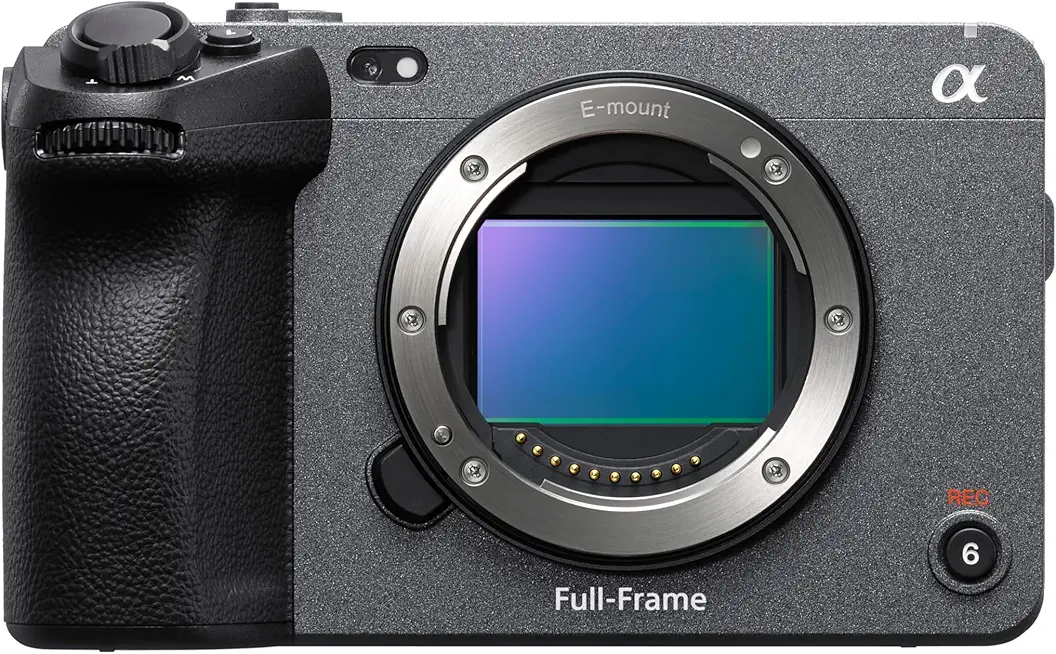
Sony FX3 (ILME-FX3A)
Compact full-frame cinema camera designed for run-and-gun filming, exceptional low-light sensitivity, and cinematic motion picture workflows.
Check PriceAs a working photographer who shoots a lot of run‑and‑gun and low‑light projects, the Sony FX3 feels like a purpose‑built video tool in a compact body. It uses a full‑frame sensor that delivers excellent low‑light performance and roughly 15 stops of dynamic range, so you get usable shadow and highlight detail straight away.
Frame rates are practical for storytelling: 4K up to 60fps and 120fps in Full HD for smooth slow‑motion. Autofocus is fast and dependable, which is a big relief when you’re shooting solo or directing talent and can’t babysit focus all the time.
The FX3 is weather‑sealed and gimbal‑friendly, so it balances well on stabilizers and travels light on a kit that needs to move. Sony’s touchscreen interface makes menu navigation intuitive, and the body includes dual XLR inputs so you can capture broadcast‑quality audio without extra adapters.
It’s also Netflix‑approved, which says a lot about its professional workflow compatibility if you’re aiming at higher‑end delivery. That said, there are tradeoffs to consider: there are no built‑in ND filters, so you’ll need external NDs for controlled aperture and motion blur outdoors.
Another practical note: the FX3’s 12MP sensor is clearly optimized for video rather than stills, so if you want high‑resolution photography it’s not the best match. Menus can take time to master, and full‑frame lenses, while beautiful, can increase overall kit cost.
- Outstanding low‑light and ~15 stops DR
- Fast, dependable autofocus
- Compact, durable, gimbal‑balanced body
- Dual XLR audio inputs
- No internal ND filters
- Full‑frame lens costs add up
Budgeting Your First Cinema Camera
Think of your first cinema camera purchase as buying a toolkit, not just a camera body. The body is the anchor, but lenses, microphones, batteries, and media cards quickly match or exceed that price. If you only budget for the camera, you’ll end up short the first time you walk onto a real shoot.
Start by choosing a camera that covers the basics: 4K recording, manual controls, interchangeable lenses, and at least one usable audio input. Affordable beginner options like the Canon R50, Sony ZV‑E10 II, Panasonic Lumix G85, or Blackmagic Pocket Cinema Camera 4K give you those essentials without forcing pro-level spending. Prioritize stabilization (IBIS or good lens OIS), solid autofocus, and flexible codecs over flashy high frame rates or the biggest sensor on paper.
When allocating funds, remember accessories matter. A dependable lens and a decent shotgun or lav mic will improve your image and sound more than a marginally better camera body. Spare batteries, fast SD/CFexpress cards, and a small rig or tripod are the unsung items that keep shoots moving and prevent buyer’s remorse.
Don’t be afraid to buy used or last‑generation gear to stretch your dollar. You can often get a higher‑end body or lens for the same money as a new entry model, and that extra capability pays off in the long run. Renting pricier lenses or cameras for specific projects is another smart way to access pro features without the full cost.
Finally, plan for growth. Buy gear that fits your current needs but won’t box you in as you learn. Investing in a good lens or microphone now saves money and frustration later, and will make your footage look and sound like you know what you’re doing even when you’re just getting started.
Autofocus Basics For Beginner Filmmakers
Autofocus is one of those features that can make or break a beginner shoot. It keeps your subject sharp so you can concentrate on composition, audio and directing. But it’s not magic — understanding how it works and when to override it separates usable footage from frustrating out‑of‑focus clips.
There are two main systems you’ll run into. Contrast‑detect AF is accurate but can hunt in low light. Phase‑detect AF is faster and much better at tracking moving subjects, which is why hybrid mirrorless bodies like the Canon EOS R50 and Sony ZV‑E10 II feel so confident for run‑and‑gun work.
Use single‑shot AF (AF‑S) for static interviews and continuous AF (AF‑C) for moving subjects. Face and eye detection are fantastic for vlogs and interviews — I use eye AF to lock a subject’s gaze and then let the camera do the heavy lifting. For unpredictable movement, set a tracking area or zone rather than wide AF to avoid the camera grabbing the background.
That said, AF struggles in low contrast, low light, or when subjects are behind glass or moving fast. When you need intentional focus pulls or a cinematic shallow depth of field, switch to manual. A quick workflow I recommend: use AF to acquire focus, then switch to manual to lock it, or use AF‑override features to nudge focus while tracking.
Practical tweaks matter. Back‑button focus separates focusing from the shutter and gives you immediate control. Enable focus peaking or magnification when doing manual work. Also remember lenses play a big role — fast, modern AF lenses will track better and breathe less than older glass.
Finally, practice. Spend an afternoon testing AF modes, area selections, and eye‑AF with the lenses you own. You’ll quickly learn your camera’s strengths and its limits, and that confidence will save you hours in post chasing soft footage.
What People Ask Most
What is the best cinema camera for beginners?
There is no single best camera for everyone; choose one that matches your priorities such as ease of use, autofocus, stabilization, lens options, audio, and budget. Try handling cameras in person and consider used or previous‑generation bodies to get more value.
Which cinema camera is easiest for new filmmakers to learn?
Cameras with intuitive menus, reliable autofocus, and comfortable ergonomics are generally the easiest to learn. Look for models praised for user‑friendly interfaces and straightforward controls.
What features should beginners look for in a cinema camera?
Prioritize reliable autofocus, effective stabilization, usable audio inputs, and flexible recording options that suit your workflow. Also consider lens ecosystem, battery life, and the ongoing cost of accessories.
Can mirrorless or DSLR cameras be used as beginner cinema cameras?
Yes, mirrorless and DSLR‑style hybrids are commonly used by beginners because they offer interchangeable lenses, compact bodies, and useful video features. With the right lenses and accessories they can achieve cinematic results.
Do I need a dedicated cinema camera to shoot cinematic videos as a beginner?
No, many hybrid mirrorless cameras can produce cinematic footage when combined with good lenses, stabilization, and sound. Dedicated cinema bodies offer advanced codecs and grading flexibility but are not required for learning and making great videos.
What lenses and accessories are essential for a beginner using a cinema camera?
Start with a versatile lens or two that cover common focal ranges, a good microphone, spare batteries, and reliable storage media. Adding a tripod or stabilizer and basic lighting will greatly improve your footage.
How do sensor size and codec affect a beginner’s choice of cinema camera?
Sensor size influences depth‑of‑field and low‑light performance, while codecs determine how much flexibility you have in post‑production and grading. Choose a balance that fits your shooting style and editing workflow.
Conclusion For Beginner Cinema Cameras
This roundup was meant to help you narrow a crowded field into five beginner‑friendly cinema cameras that suit different priorities—ease of use, stabilization, codecs and grading flexibility, or low‑light performance—so you can pick what matters most to your projects.
Rather than chasing headline specs, focus on feature fit and a whole‑kit budget that includes lenses, audio, power and storage so your camera choice works in real shoots, not just on paper.
Spend time practicing both autofocus workflows for run‑and‑gun shooting and manual focus techniques for creative control; getting comfortable with focus and exposure will improve footage more than any single new feature.
If cost is a concern, consider well‑maintained used or previous‑generation bodies to stretch your budget while keeping access to useful codecs and workflows.
If you want to keep improving, explore more guides and gear walkthroughs on the site to build practical skills and confident decision‑making.
Have questions about your shooting style or which setup to start with? Leave a comment below and we usually reply within a few hours.


0 Comments