
Ever wondered how pros get dramatic aerial shots without years of piloting experience or a huge price tag?
In this guide we compare five of the best camera drones for beginners and give straightforward advice to help you pick the right one.
We strip away hype and focus on what matters to new pilots: ease of use, image quality, safety, portability, and overall value.
Think practical trade-offs rather than endless specs so you can choose a model that fits where and how you plan to fly.
Some buyers prize compact travel-ready drones; others want stability for smooth video or strong low-light performance.
We explain those differences plainly and point out which kinds of users will benefit most from each approach.
You won’t need to decode confusing jargon or memorized checklists to understand our picks.
Instead, expect down-to-earth commentary based on real-world ease of use, image results, and how forgiving each drone is for newcomers.
By the end you’ll know which beginner camera drone is the best fit for your priorities and budget.
Flip through the options with confidence and find a beginner drone that helps your photography grow.
1. DJI Flip for Beginners
”DJI
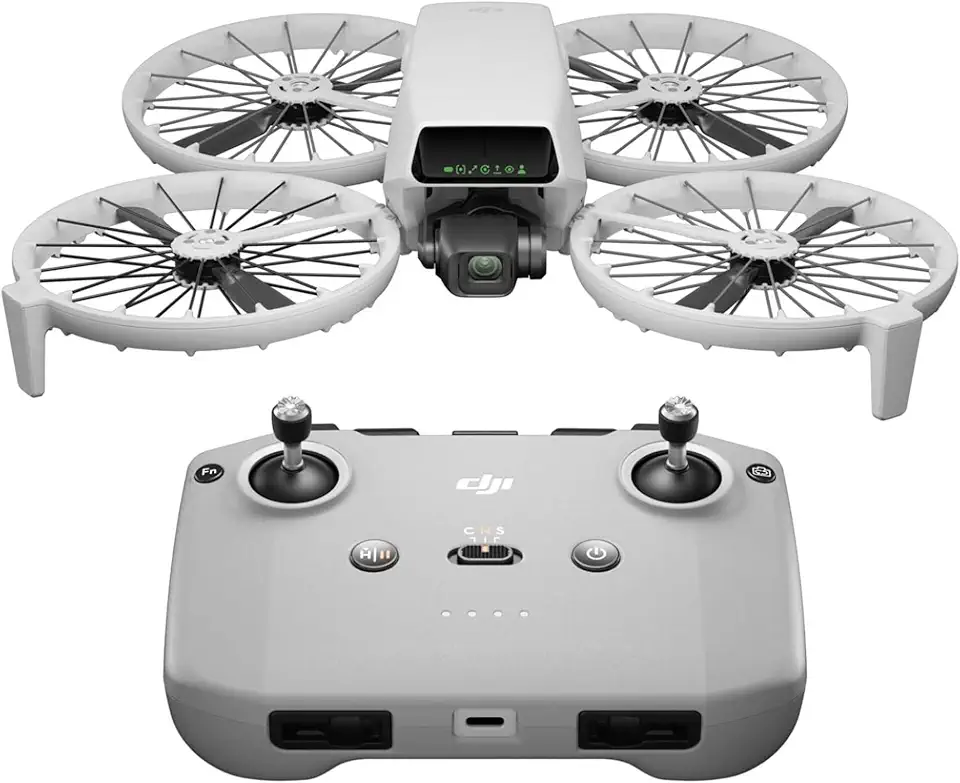
Ultra-light aerial camera capturing crisp 4K footage with a 3-axis gimbal and compact, travel-friendly design.
Check PriceAs a photographer who travels light, the DJI Flip immediately stands out for its foldable design and full-coverage propeller guards. Weighing under 249 g, it’s genuinely travel-friendly and slips into a daypack without fuss.
The camera is surprisingly capable for such a small craft: a 1/1.3-inch CMOS sensor that captures 48MP stills and records 4K/60fps HDR video. That combo lets you get crisp detail and smooth footage straight out of the camera, which is great for quick travel edits.
On the flight side it’s very approachable — AI Subject Tracking and six intelligent shooting modes mean you can focus on composition while the drone handles the hard parts. For new pilots this removes a lot of the learning curve and helps you get consistently usable shots.
There are trade-offs. It’s less stable in windy conditions, so pick calm days for the best footage. Also, while the propeller guards enhance safety, there’s no true obstacle avoidance — the guards won’t prevent all crashes — and low-light performance is limited compared with larger-sensor drones.
Overall, the DJI Flip is an excellent pick if you’re a traveler or novice photographer who wants high-quality images and convenient portability without a heavy setup. If you need rock-solid wind performance or full obstacle avoidance, you may find its limitations important to weigh before buying.
- Extremely lightweight and compact (travel-friendly)
- Propeller guards enhance safety
- Beginner-friendly AI tracking and intelligent modes
- Impressive camera performance for size (48MP, 4K/60fps HDR)
- Less stable in windy conditions
- No obstacle avoidance (guards don’t prevent crashes)
2. DJI Mini 4 Pro for Beginners

”DJI
Complete kit with extra batteries and controller, offering extended flight time and professional 4K imaging.
Check PriceThe DJI Mini 4 Pro is a superb choice if you want pro-looking photos and video without a steep learning curve. It packs a 1/1.3-inch sensor that delivers 48MP photos and 4K/60fps video, so your stills and clips have real detail and motion fidelity for editing and sharing.
What makes it especially beginner-friendly is the full omnidirectional binocular vision obstacle avoidance. That system greatly reduces the risk of accidental collisions and gives you the confidence to focus on framing and composition rather than constant evasive flying.
Weighing under <249 g>, the Mini 4 Pro is genuinely portable and easy to carry on shoots. Multiple intelligent flight modes and intuitive controls mean you can get creative shots quickly—ideal when you’re learning to choreograph movement and light.
From a photographer’s perspective, the image quality and stable platform are the headline benefits. The one caveat is low-light performance; this drone isn’t the best choice for night or very dim conditions, so plan golden hour and daytime shoots to get the most out of it.
If you value safety, crisp 48MP stills and smooth 4K/60fps video, and you’re willing to pay a bit more for those features, the Mini 4 Pro is a top beginner pick. It’s tailored to novices who want reliable results and room to grow into more advanced shooting techniques.
- Excellent stability and obstacle-avoidance safety
- High-quality 48MP photos and 4K/60fps video
- Lightweight and compact (<249 g)
- Beginner-friendly, intuitive controls and intelligent modes
- Not ideal for low-light conditions
- Generally more expensive than some beginner options
3. Autel Evo Nano+ for Beginners

”DJI
Portable 4K aerial shooter with stabilized 3-axis gimbal, ideal for quick flights and easy one-battery use.
Check PriceAs a photographer, the Autel Evo Nano+ stands out as a surprisingly capable beginner camera drone focused on image quality. It features a 50MP sensor with strong low-light performance and quick phase-detection autofocus, so you’ll capture detailed stills and reliable focus even as light falls.
It’s also very portable — Weight: <249 g — which makes it simple to carry on trips and easier to get up in the air for practice sessions. The compact size doesn’t force you to compromise on image fidelity; that 50MP sensor delivers high-resolution photos that hold up well in editing.
On the flying side, Advanced flight modes paired with obstacle avoidance give beginners an extra layer of confidence. The obstacle avoidance reduces crash risk and the intelligent modes help you frame creative shots without needing pro piloting skills, so you can focus more on composition and light.
Overall, the Evo Nano+ is an excellent non-DJI option for shooters who prioritize low-light capability and image quality in a beginner-friendly package. Be aware, though, that Limited availability compared to DJI models and Less brand recognition than DJI (may affect support) are real considerations if you value easy access to hands-on service or wide retail presence.
- Excellent low-light image performance (50MP)
- Obstacle avoidance reduces crash risk
- High-resolution photos (50MP)
- Fast, reliable phase-detection autofocus
- Limited availability compared to DJI models
- Less brand recognition than DJI (may affect support)
4. DJI Neo for Beginners

DJI Neo Mini Drone 4K 135 g
Featherlight 135 g quad for effortless portability, delivering sharp 4K videos and intuitive controls.
Check PriceThe DJI Neo is exactly what it says on the tin: an affordable, entry-level camera drone built for people who want to learn quickly and have fun while doing it. Its simple operation and minimal setup mean you can get airborne in minutes, which is ideal when you’re focusing more on composition and movement than on fiddly menus.
Automatic tracking modes are a standout for me as a photographer. They let you nail follow shots and subject framing without constant stick inputs, so you can concentrate on getting creative angles. The FPV support adds an immersive element that’s great for practicing spatial awareness and creating dynamic footage.
Don’t expect pro-level image quality from the Neo; the outline is clear that the camera isn’t ideal for high-quality video or photos. That said, for social posts, practice flights, and learning aerial composition it does the job well. If you’re starting out and prioritizing learning over pixel-perfect footage, this is a very sensible choice.
Because it’s very budget-friendly, you can afford to be less precious about crashes while you build confidence. The drone’s intuitive controls and automatic features reduce the learning curve, so you’ll progress faster and spend more time shooting than troubleshooting.
In short: buy the DJI Neo if you’re a beginner on a tight budget who wants a straightforward, enjoyable flying experience with useful automated tools. Skip it if your goal is professional-grade imagery or advanced cinematic features—those require higher-end models.
- Very budget-friendly
- Easy, intuitive controls
- Good automatic tracking for shots
- Fun FPV experience
- Camera quality not ideal for high-quality video/photos
- Basic functionality vs. higher-end models
5. Potensic Atom 2 for Beginners

”Potensic
Compact HDR-capable flyer with 3-axis stabilization, rich color capture and balanced performance in a starter kit.
Check PriceAs a photographer I look for stability and intelligent framing first, and the Potensic Atom 2 delivers on both. It has a 3-axis gimbal-mounted camera for stabilized 4K video, which means footage is smooth and usable straight out of the card. That level of stabilization makes flying less stressful and editing far easier.
The Atom 2’s sticky subject tracking follows your subject reliably, so you can concentrate on composition rather than constant manual piloting. It also offers DJI-style Quickshots for creative, automated moves that give footage a cinematic feel with almost no setup. For beginners those modes shorten the learning curve and help you produce attractive clips quickly.
Value is where this drone really stands out. The outline calls it an attractive feature set for the price, and in practice you get stabilized 4K, smart tracking, and easy creative modes without a high cost. If you’re a beginner who wants features-first and doesn’t want to overspend, this model is a compelling pick.
There are a couple of real limitations to consider before buying. RAW support is limited — high-res stills are only in JPEG — so if you’re a photographer who needs RAW files for heavy post-processing, that’s a downside. Also, some promised features are not yet available and rely on future updates, so expect occasional software-dependent gaps.
- Strong value for money
- Excellent subject-tracking performance
- Stabilized video for smooth footage
- Beginner-friendly, intuitive flight modes
- Limited RAW support (high-res stills only in JPEG)
- Some promised features not yet available (future updates)
Drone Photography Tips for Beginners
Before you even think about framing a perfect shot, spend time flying. Practice in an open, safe space until the controls feel second nature and you understand how long a battery really lasts in different conditions. These early flights teach you how the drone reacts to stick inputs and wind, and that makes every later shot easier.
When you’re ready to shoot, vary your angles deliberately. Top-down bird’s-eye views reveal patterns and scale, low-altitude passes add drama, and gentle angled shots are great for landscapes and architecture. Try several heights and directions on each battery; capturing the same subject from multiple perspectives saves time and gives you options in editing.
Use the gimbal like an extension of your eye. Slow gimbal pitch speeds — around a setting of 10 — create silky, cinematic tilts and fly-overs. Combine those gentle tilts with a slow, steady flight to avoid jerky footage and blurred photos.
Light is everything. Plan shoots for golden hours when colors are soft and shadows long, or use midday for punchier tones when contrast is what you want. Avoid pointing straight into the sun unless you want silhouettes; backlight and side light usually deliver richer texture and depth.
Shoot RAW whenever possible. RAW files keep far more image data than JPEGs, which gives you breathing room when adjusting exposure, white balance, or recovering highlights in post. Also, compose with intention: use the rule of thirds, leading lines, or symmetry and choose a clear subject to anchor each frame.
Finally, fly slow and deliberate. Smooth movement, patience, and varied framing are the difference between a good aerial snap and a memorable photograph. Capture extra frames so you can pick the best moment later — batteries recharge, but great shots are what last.
Understand Drone Regulations Before Flying
As a photographer, the best shot starts long before takeoff — with knowing the rules that keep you and others safe. Regulations exist to protect people, property and other aircraft, so treat them like part of your gear checklist rather than optional red tape.
Start by checking national and local laws for altitude limits and line‑of‑sight requirements; for example, in the U.S. recreational flyers must generally stay below 400 feet and keep the drone within visual line of sight. Many countries also require registration for drones in certain weight ranges (in the U.S. that’s 0.55–55 lb), and commercial work usually needs a specific license or permit.
Avoid no‑fly zones around airports, military sites and sensitive infrastructure — your drone’s geofencing helps, but don’t rely on it alone. Use airspace apps and NOTAM/TFR notices to see temporary restrictions, and always yield to manned aircraft if you see one nearby.
Respect people and places: don’t fly over crowds, private property without permission, or wildlife, and be mindful of privacy concerns when shooting in urban or residential areas. Some parks and venues require permits even for recreational flights, so check local rules ahead of time to avoid fines or having your gear confiscated.
Weather and visibility matter as much as the law. Wind, rain, fog and poor light increase risk and can be illegal in some jurisdictions. If you’re unsure, postpone the shoot — a grounded drone costs less than a crashed one.
Before every flight update firmware, calibrate sensors, confirm GPS lock, and brief any assistants or bystanders on safe distances. Treat these prep steps and the legal checks as part of your creative process: they free you to focus on composition and capturing great images without surprises.
What People Ask Most
What is the best camera drone for beginners?
There is no single best drone for every beginner; the right choice depends on priorities like portability, safety features, camera quality, and budget. Look for a model that balances ease of use with features you value most.
Which camera drone is easiest to fly for beginners?
Drones with beginner flight modes, stable flight performance, and responsive controls are generally the easiest to learn on. Obstacle-avoidance and automated shooting modes can make the first flights less stressful.
What features should beginners look for in a camera drone?
Focus on safety features, flight stability, a reliable gimbal or stabilization, and intuitive automated modes for capturing shots. Good battery life and solid customer support also help the learning process.
Are camera drones hard to control for beginners?
Modern entry-level drones are designed to be approachable and include assists that reduce the learning curve. Practicing in open, safe areas will help you gain confidence quickly.
Do beginners need to register their camera drone?
Registration requirements vary by country and local authorities, so check the rules where you plan to fly. Complying with registration and local laws helps you avoid penalties and fly responsibly.
How long do beginner camera drones typically fly on a single battery?
Flight time depends on the model and flying conditions, and many beginners find it helpful to carry spare batteries for longer sessions. Plan your shots and manage power to avoid running low mid-flight.
Can beginners use camera drones for photography and videography?
Yes, many beginner drones include features like subject tracking, automated shots, and stabilized cameras that are well suited to photography and videography. Practice composition and lighting to improve your results over time.
Conclusion for Beginner Camera Drones
This roundup helps you match a beginner-friendly camera drone to your priorities—whether you want ultra-portability, advanced safety, low-light performance, tight budgets, or a feature-packed learning platform.
Consider your typical shooting conditions and goals first, then choose the style of drone that aligns with travel convenience, obstacle-avoidance confidence, nighttime capability, cost-conscious simplicity, or maximum creative tools.
Before your first flight, spend time practicing in open spaces, follow local rules and registration requirements, and always prioritize safety for people, property, and wildlife.
If you’re looking to sharpen skills or explore more buying and shooting tips, check out other articles on the site to deepen your knowledge and confidence behind the controller.
Have questions or want personalized advice? Leave a comment below and we usually reply within a few hours.


0 Comments