
What’s the best camera for capturing the messy, magical chaos of childhood — without paying for features you’ll never use? This is a quick, practical guide to five cameras that span toy-grade simplicity to beginner-serious performance. We map age-appropriate picks, protective materials, essential features and the FAQs parents and teachers actually ask.
Whether you’re buying for a curious preschooler or an ambitious tween, the right camera is about fit more than flash. Expect rugged, easy-to-hold bodies for little hands, playful features that spark creativity, and compact options that grow with the user. We avoid jargon and focus on what matters: durability, ease of use, engagement and image capability that matches each age group.
This guide breaks down the key trade-offs: durability versus image quality, instant-print fun versus digital backups, zoom reach versus portability. You’ll also find clear advice on materials and protective cases so gear survives mud, playground drops and everyday bumps. Plus, practical notes on battery, storage and handling that make day trips, school events and family outings less stressful.
By the end you’ll know how to pick the best camera for child photography based on age, temperament and intended use. We’ll point you toward sensible, age-aware choices and the features that genuinely help capture candid, joyful moments. Now let’s find the camera that keeps up with your kid—without compromising fun or photo quality.
1. VTech KidiZoom Duo FX Kids Camera
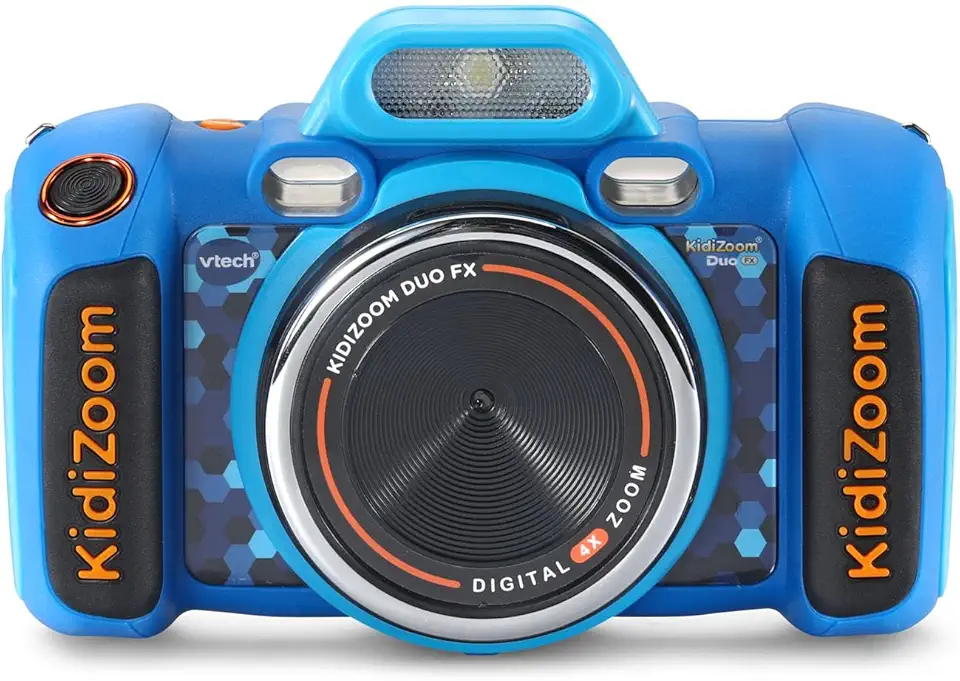
VTech KidiZoom Duo FX Kids Digital Camera
Durable, kid-friendly dual-lens camera with fun filters, games, and easy controls — perfect for budding photographers and creative play.
Check PriceThe VTech KidiZoom Duo FX is a purpose-built kids’ camera aimed at ages 3–8, clearly designed for play more than professional imaging. As a photographer, I appreciate how it prioritizes durability and simplicity so little hands can actually use it without constant supervision.
The body has double grips and a rugged casing that stands up to drops and knocks. That build makes it ideal for toddlers learning to handle a camera and for parents who want fewer breaks and repairs.
It’s packed with entertainment features that keep kids engaged: a voice recorder, on-board games and creative photo modes like panorama, slideshow and animation. These playful tools encourage experimentation and can help kids learn composition and sequencing in a low-pressure way.
Be realistic about image quality though. The camera uses a soft lens and a tiny sensor that produce grainy photos, and video is basic (640p). If you want sharp, high-resolution family portraits or detailed crops this won’t replace a proper camera.
Storage and power are straightforward: microSD expands storage so you can download and back up stills and video, but it runs on 4 AA batteries (not included) and rechargeable batteries aren’t supplied. That battery setup is convenient for quick swaps but can be annoying over time.
Overall, the KidiZoom Duo FX is mostly a “fun first camera.” It’s excellent for young kids to explore photography safely and get creative, but don’t expect professional image quality.
- Tough, rugged casing
- Great for ages 3–8
- Fun features: games, voice recorder, creative modes
- Downloadable stills/video via microSD
- Grainy images & only 640p video
- Uses 4 AA batteries (not included)
2. Fujifilm Instax Mini 12 Instant Camera

Fujifilm Instax Mini 12 Instant Film Camera
Produces pocket-sized instant prints in seconds with stylish compact design — easy point-and-shoot for parties and keepsakes.
Check PriceThe Fujifilm Instax Mini 12 is an instant camera made for kids who love hands‑on play. It delivers immediate physical photo prints, which is a huge win when you want quick rewards for curious little photographers.
Operation is deliberately simple and colorful. The vibrant look appeals to children and removes the need for technical knowledge, so even young users can snap and share without guidance.
As a photographer, I value how instant prints change behavior. Physical photos give instant gratification and motivate exploration, encouraging kids to try different angles and expressions. That makes it excellent for parties, playdates, and creative projects.
There are practical limits. Each shot requires film, so there’s an ongoing cost per print. Also, there’s no digital backup — photos exist only as physical prints unless you photograph them again with another device.
If you want a tactile, low‑stress camera that gets kids engaged, the Instax Mini 12 is mostly a great choice. It’s simple, durable, and made to spark creativity. If you need editable files or long‑term digital archives, plan for a workflow to capture or scan the prints.
- Fun for parties
- Simple to use
- Durable
- Encourages creativity
- Film expense
- No digital storage
3. Nikon Coolpix P1000 Superzoom Camera

Nikon COOLPIX P1000 Superzoom Digital Camera
Extreme long-range zoom and high-resolution imaging for wildlife and astrophotography; versatile manual controls for ambitious enthusiasts.
Check PriceThe Nikon Coolpix P1000 is a true superzoom bridge camera that stands out if your child is ready to explore serious photography and telephoto work. Its massive 125x optical zoom makes it ideal for distant wildlife, sports and nature shots where keeping distance matters.
Image quality is solid for a bridge camera thanks to a 16MP sensor, and the ability to shoot RAW and JPEG gives you real flexibility in post‑processing. RAW support means you can teach editing and recover exposure or color more easily than with toy cameras.
For handheld shooting the Dual Detect Optical Vibration Reduction helps reduce blur from shaky hands, which is a big practical plus when kids or parents are not using a tripod. The body is larger and heavier than toy cameras, so it may feel awkward for younger children to carry or operate alone.
Keep in mind the P1000’s max ISO is 6400, so low‑light performance has limits and you’ll still need decent light or a tripod for indoor/low‑light work. This camera rewards some photography knowledge and guidance, so it’s best for older kids or a parent‑child team who want to learn composition, exposure and telephoto technique. Overall, if your goal is long reach and learning real camera skills, the P1000 is an excellent, mostly practical choice—just expect size and complexity tradeoffs.
- 125x optical zoom
- 16MP sensor
- RAW support
- Dual Detect Optical Vibration Reduction
- Large/heavy
- Complex controls for beginners
4. Sony ZV-1F Vlogging Camera

Sony ZV-1F Vlog Camera
Compact vlogging camera with bright lens, clear audio and effortless autofocus—ideal for creators, livestreams, and social video.
Check PriceAs a compact, lightweight option I often recommend the Sony ZV-1F for parents and older kids who want real image quality without hauling a big camera. Its large 1‑inch sensor delivers noticeably sharper stills, and the camera records 4K video that holds up well for family montages and school performances.
The flip-out touchscreen makes framing selfies and candid moments effortless, and Product Showcase mode is a neat touch for quickly shifting focus between faces and objects — ideal when kids dart in and out of frame. Automatic face and eye tracking keeps focus on moving subjects, so you spend less time chasing sharp shots and more time capturing expression.
Image stabilization smooths handheld footage and helps reduce blur from excited, fast-moving children, which is a real advantage at playgrounds and birthday parties. Its portability makes it easy to slip into a bag for school trips and outdoor play, so you’re more likely to have it ready when a great moment happens.
Bear in mind it’s not as rugged as toy cameras, so young children will need supervision or a protective case. It’s also slightly more advanced than basic kids’ point‑and‑shoots, so expect a modest learning curve if you want to explore its full capabilities — but that extra complexity brings significantly better results.
- excellent autofocus
- great stills/video
- compact
- stabilization/tracking
- higher learning curve than toy cameras
- requires care to avoid damage
5. Kidamento Model K Kids Digital Camera

Kidamento K Meowie Kids Digital Camera & Camcorder with 32GB
Child-safe camera/camcorder combo with durable design, simple controls and generous 32GB storage for hours of photo and video fun.
Check PriceThe Kidamento Model K is a thoughtful step‑up digital camera for kids, aimed at roughly ages 5 and up. It balances playfulness with real photographic capability, so it’s a good choice when you want better images than a toy camera but still need something rugged and simple.
Physically it feels durable and accessible, with a touchscreen interface that small hands can manage. The outline says it delivers better image quality than toy cameras, which means your child’s photos will look noticeably sharper and more usable for prints or sharing.
There’s a built‑in selfie camera and uncomplicated controls to encourage creativity and independent use. Because it’s compact and easy to hold, kids can capture candid moments without the camera getting in the way — that’s excellent for natural, unposed shots.
Battery life is described as adequate for typical use, so you won’t be swapping cells every hour during a family outing. One downside is photo transfer and any bundled software: it can be less straightforward and will likely need an adult to help manage files and backups.
As a photographer, I’d recommend the Kidamento Model K for parents who want a camera their young child can genuinely use and enjoy, while still producing better results than the usual toy options. It’s not for very young toddlers, but for a 5‑year‑old and up it’s a practical, durable learning tool that yields usable photos.
- durable
- simple UI
- improved image quality
- selfie feature
- not ideal for under‑5s
- photo management may require adult assistance
Cameras for Ages 3 to 7
For three- to seven-year-olds the conversation isn’t about megapixels or RAW files — it’s about toughness, simplicity and having fun. Choose cameras with rubberized, grippy bodies and impact‑absorbing designs so tiny hands can hold them and the occasional drop won’t end the session; models like the VTech KidiZoom or the Kidamento family were built with that rough treatment in mind.
Keep controls simple. Big buttons, clear icons and a 2–2.5″ LCD for instant review help kids understand cause and effect: they press a button, a photo appears. In-camera games, silly filters and selfie modes keep engagement high and lead to more natural, candid moments than a complex menu ever will.
Don’t worry about image perfection. Expect modest sensors (roughly 2–5MP) and grainy images — that’s fine for play and for learning composition and timing. If you want better results without sacrificing child-friendliness, step up to kid-focused digital cameras with slightly improved sensors (Kidamento-style devices) that still offer durable builds and simple UIs.
Think about power and storage in practical terms. Toy cameras often use AA cells — convenient but can be a recurring cost — while some kid models use rechargeable packs. MicroSD support is handy; teach your child to pop the card into your laptop for easy backups and to avoid losing their early masterpieces.
Consider instant-print cameras for immediate gratification, especially for parties or craft projects, but remember there’s a per-shot film cost and no automatic digital backup. For everyday exploration I prefer a durable digital toy camera with a strap and a padded silicone sleeve — it keeps the camera safe and makes it easier for small hands to carry.
Above all, let them lead. Hand a sturdy, simple camera to your child and step back. You’ll get clumsy, joyful snapshots that tell real stories — and those are far more valuable than technically perfect images at this age.
Materials and Protective Cases
From years of shooting kids, I’ve learned the best protection is the kind they’ll actually use. For toddlers and early graders, look for rubberized or silicone‑sleeved bodies that absorb the shock of frequent drops and slips. Those soft bumpers and grippy textures don’t just protect—they give small hands something secure to hold, which reduces tumbles from the start.
For slightly older kids carrying more capable gear, add a slim padded case or neoprene sleeve. A lightweight shell with a soft interior prevents scratches and cushions knocks without turning the camera into a brick. Thick plastic shells add structure for big impacts, and for outdoor adventures seek models or housings rated for water, dust, and freeze protection—an action‑proof option like the Olympus Tough series is worth considering when beach or trail days are common.
Don’t forget the small but critical extras: a wrist or neck strap that’s comfortable and secure, a clear screen protector to avoid scuffs, and a lens cap or simple zip pouch for instant cameras where film borders can get dinged. Cases that cover ports and buttons help keep sand and crumbs out, especially for younger children who keep cameras in backpacks or toy bins.
One practical rule: balance protection with weight. Overly bulky cases discourage kids from carrying or using the camera. Try items in person to check fit and ease of access, and choose bright colors or fun designs when possible—kids are more likely to keep and use protection they like. Finally, teach basic care: wipe lenses, air out damp cases, and check straps regularly. A little attention and the right materials will keep memories and gear intact for many family adventures.
What People Ask Most
What is the best camera for child photography?
There is no single best camera; choose one that matches the child’s age, interests and how they will use it. Tough, simple models suit younger children while compact or more advanced cameras work better for older kids exploring serious photography.
What camera features should I look for when photographing children?
Prioritize durability and simple controls so the camera can withstand handling and be easy to operate. Also look for autofocus and tracking, image stabilization, convenient storage options and a power solution that fits how the camera will be used.
DSLR or mirrorless — which is better for photographing kids?
Neither is universally better; pick based on size, weight and ease of use rather than format alone. Lighter, more compact models are typically easier for kids to carry and handle, while larger bodies can be cumbersome and may need adult assistance.
What lens is best for child portraits and candid shots?
Choose a lens based on distance and shooting style: longer zooms are useful for photographing subjects from afar, while compact or short zooms work well for close, candid portraits. Prioritize portability and minimal intrusion to keep kids comfortable and natural.
What camera settings are best for capturing fast-moving children?
Rely on continuous autofocus or tracking modes and enable image stabilization to reduce blur when children are active. In lower light, a camera with good high‑ISO performance helps, but exact settings will depend on the camera and scene.
How do I take more natural and candid photos of kids?
Be unobtrusive by using compact cameras or letting children handle simple models to capture genuine moments. Use playful prompts, in-camera effects or instant prints to encourage spontaneous reactions and authentic expressions.
Can I use a smartphone or do I need a dedicated camera for child photography?
Smartphones can work well, but dedicated cameras can offer advantages like rugged bodies, instant physical prints, long optical zooms and kid-friendly interfaces. Choose based on the specific features, durability and image-handling you want for your needs.
Conclusion on Best Cameras for Child Photography
Choosing the right camera comes down to matching age, interests and intended use—whether you want a durable play camera to spark curiosity, instant prints for immediate fun, long reach for nature, or a compact vlogging-style option for better image quality.
For preschoolers and early elementary ages, prioritize rugged construction, simple controls and playful features that keep kids engaged, while older children benefit from larger sensors, stronger autofocus, stabilization and a balance of portability and capability.
If you enjoyed this guide and want to deepen your practical skills and decision-making, explore more articles on our site to build confidence and learn tips for photographing children and gear selection.
Have questions or want to share your kid-friendly camera experiences? Leave a comment below — we usually reply within a few hours and welcome your stories and questions.



0 Comments