
What gimbal will finally make your Nikon Z6 footage look cinematic and effortless?
In this hands-on guide we put five top gimbals through real-world tests with the Nikon Z6, from quick run-and-gun shoots to longer motion-heavy sessions. You’ll get clear recommendations alongside practical buying criteria and step-by-step balancing tips to speed your setup.
We focus on the things that actually shape your day on set. Handling and balance ease, runtime and camera integration often matter more than headline specs. Expect honest notes about ergonomics, setup time, and the kind of performance you can expect in real shooting conditions.
All testing was carried out with common Z6 kit and a representative mix of lenses to replicate realistic payloads. We evaluated setup speed, how the gimbals reacted to pans and tilts, and how forgiving they were when balance was imperfect. That practical approach highlights which designs save time and which demand more fiddling on location.
By the end you’ll know which gimbals suit lightweight travel rigs, heavier lens combos, and hybrid photo-video workflows. You’ll also be comfortable with a few simple balancing routines that cut trial-and-error. If you want cleaner motion, fewer retakes, and a smoother final edit, this guide will get you there fast.
1. DJI Ronin-S for Nikon Z6
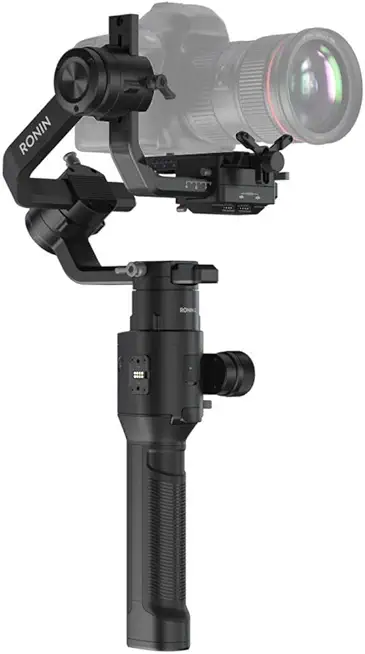
DJI Ronin-S
Single-handed 3-axis stabilizer delivering smooth cinematic footage, responsive controls, and professional-grade balance for run-and-gun shooters.
Check PriceThe DJI Ronin-S is a solid choice for Nikon Z6 shooters who need a reliable workhorse for weddings, events, and professional video. It explicitly supports Z6 setups including FTZ adaptor + 24‑70mm f/2.8, so you can run common full‑frame combos without constant motor strain.
In the field it feels versatile and intuitive. Switching between Underslung and Upright modes is quick, and Sport mode lets you capture fast-moving scenes without losing composure in the shot.
Stabilization is excellent for larger lens setups on the Z6, which translates to fewer post‑production fixes and smoother handheld moves. The Ronin App gives smooth camera-trigger and movement controls, so I can tweak responsiveness and start/stop recording without fumbling with the camera.
The Ronin-S is light and ergonomic enough for long shoots. Combined with a long battery life of ~12 hours, it’s easy to see why many run full event days on a single charge.
Be aware of two practical caveats. The payload limit can restrict very heavy lens and accessory combinations, so double-check your total rig weight before buying. Also, initial balancing can be fiddly for some users, so allow time to practice setup for fast turnarounds.
- Excellent stabilization with large lens setups on Nikon Z6
- Lightweight, ergonomic design for long usage
- Strong battery life (~12 hours)
- Intuitive controls and Ronin App integration
- Payload limit may restrict very heavy setups
- Initial balancing can be fiddly
2. DJI RS 3 for Nikon Z6

DJI RS 3 3-Axis Gimbal for DSLR and Mirrorless (3 kg payload)
Lightweight 3-axis stabilizer supporting up to 3 kg payload for precise, fluid tracking and fast balancing during demanding productions.
Check PriceThe DJI RS 3 is a tailored gimbal for mirrorless bodies like the Nikon Z6, and in practice it balances portability with serious motor strength. At 2.8 lb it’s easy to carry all day, yet it supports a 6.6 lb payload so you can comfortably run Z6 combos that include heavier zooms without pushing the motors to their limits.
Build-wise it feels premium: a full‑color OLED, a fine‑tuning knob for rapid balance tweaks, and dual quick‑release plates plus a tripod extension that speed up mounting and tripod transitions. Battery life is outstanding — up to 21 hours — which means you can shoot events or long run‑and‑gun days without hunting for chargers.
On set the integrated microphone and fill light are genuinely useful for documentary or wedding work where you don’t want to carry extra accessories. The control wheel, trigger and Bluetooth/Wi‑Fi app connectivity make in‑hand adjustments and camera control smooth, and I’ve found it handles the Z6 + 24‑70mm combo very effectively with minimal drift.
If you’re a photographer or hybrid shooter who needs a lightweight carry that still handles larger lenses, the RS 3 is a strong all‑rounder. Be aware it’s slightly heavier than ultra‑light variants and the feature set takes some time to learn, but once dialed in it’s a reliable, versatile rig for professionals.
- Supports 6.6 lb payload
- Very long battery life (up to 21 hours)
- Integrated fill light and microphone
- Dual quick‑release plates for fast mounting
- Slightly heavier than some lighter models (e.g., RS 3C)
- Feature set has a learning curve
3. DJI RSC 2 for Nikon Z6

DJI RSC 2 3-Axis Gimbal for DSLR and Mirrorless (6.6 lb payload)
Compact foldable 3-axis gimbal with strong 6.6 lb payload capacity, intuitive touchscreen, and versatile mounting for travel filmmakers.
Check PriceThe DJI RSC 2 is a compact, foldable gimbal that punches well above its weight for Nikon Z6 shooters. It supports a 6.6 lb payload, so it can handle most Z6 setups including heavier zooms while keeping a travel-friendly footprint.
Under the hood DJI’s Titan stabilization algorithm gives very steady footage, and the SuperSmooth mode specifically tames longer lenses for cleaner telephoto shots. RavenEye wireless transmission adds a clean monitoring option, and the 1″ OLED keeps critical info readable without digging into an app.
As a working photographer I appreciate how the folding design and lightweight carryability make it easy to move between locations. The app‑based motor calibration simplifies tuning on the fly, which speeds setup once you know the workflow.
There are a couple of real‑world caveats to keep in mind. Some users report that initial balancing can be a touch trickier than on other models, and the RSC 2’s battery life is slightly less than higher‑end alternatives, so plan for spare batteries or shorter sessions. Controls may feel less intuitive to operators used to different layouts.
Overall, the RSC 2 is a strong choice if you want capable stabilization, travel convenience, and telephoto performance for the Nikon Z6 without stepping up to a much bulkier rig. It’s especially attractive for run‑and‑gun shooters and travel shooters who value portability and solid stabilization for longer lenses.
- Foldable design for easy transport
- Supports 6.6 lb payload — great stabilization for heavy setups
- SuperSmooth mode improves telephoto smoothness
- RavenEye + 1″ OLED for monitoring and quick info
- Slightly less battery life than RS 3
- Controls can feel less intuitive compared with Ronin‑S
4. FeiyuTech AK2000 for Nikon Z6

FeiyuTech SCORP-C Gimbal for DSLR and Mirrorless (5.5 lb payload)
Ergonomic compact stabilizer offering smooth 3-axis performance, 5.5 lb capacity, and customizable controls for creative handheld shots.
Check PriceThe FeiyuTech AK2000 is a very practical choice if you plan to run a Nikon Z6 with heavier walk‑around lenses — it officially supports up to 6 lbs, so Z6 + 24‑70mm combos balance comfortably. It offers 3‑axis stabilization and creative modes like Sports and Inception, giving you dynamic options for run‑and‑gun or cinematic moves.
Physically the build quality feels solid for the price, and the unit is noticeably less expensive than many DJI alternatives. As a working photographer I appreciate that its payload and motor strength let me use a wider range of lenses without stressing the gimbal.
The AK2000’s app adds real functionality: remote control, motor fine‑tuning, calibration, and time‑lapse are all handled well from the phone. You also get extra creative tools such as slow motion and 360‑spin routines that can add production value without extra hardware.
On the flip side, the user interface is not as intuitive as some competitors, so there’s a learning curve if you’re used to simpler menus or plug‑and‑play setups. Camera control over USB can be hit or miss with the Nikon Z6 depending on firmware and cable compatibility, so expect occasional connection troubleshooting.
Bottom line: the AK2000 is mostly a good buy if you need higher payload and solid features on a budget, and you don’t mind spending a bit of time on setup and calibration. It suits hybrid shooters who value performance and price over ultra‑streamlined ergonomics.
- Supports up to 6 lbs payload
- Sports and Inception creative modes
- Competitive price with solid build quality
- App control for remote, tuning, and time‑lapse
- Interface less intuitive for beginners
- Camera control via cable can be unreliable with Z6
5. Zhiyun Weebill 3S Crane Series

Kastar 3-Pack Replacement 3.7V 2600mAh Batteries for Zhiyun-Tech Crane V1/Crane 2/Crane 2S/Crane 3S/Crane 3S Pro/Crane 3SE/Crane 3 LAB/Z1 Evolution
Three high-capacity 3.7V 2600mAh replacement batteries deliver extended runtime, dependable power, and quick swaps for compatible gimbal systems.
Check PriceAs a working photographer who rigs handheld gimbals all day, the Zhiyun Weebill 3S feels like a welcome relief for long runs. Its ergonomic grip and comfortable design make it easy to hold for hours, and the balance is forgiving when you’re moving between setups.
The Weebill 3S supports payloads between 3–4 kg, so typical Nikon Z6 combos sit well within its range. That said, users report motor strain if you push past roughly ~3.3 kg, so I’d avoid bolting on very heavy telephotos or tons of accessories if you want the smoothest performance.
One feature I lean on is the native portrait mode with rapid orientation switching — flipping between landscape and portrait is quick and saves time when shooting social content or vertical reels. The included mini tripod is a small but useful touch for tabletop interviews or quick rests between takes.
Battery life is solid at about ~12 hours and USB‑C fast charging gets you back in the field quickly, which is very practical for day-long shoots. The Zhiyun smartphone app for motor calibration and mode switching is handy; most photographers will appreciate the ability to tune motors from the app rather than faff with manual adjustments.
Realistically, the Weebill 3S is a strong choice for Z6 owners who value comfort, quick orientation changes, and long runtime. Just be mindful of weight limits to avoid motor strain, and note it doesn’t have some higher‑end balance indicators, so take an extra moment to dial in your setup.
- Ergonomic, comfortable design
- Fast portrait/landscape switching
- Long battery life (~12 hours) with USB‑C fast charging
- Mini tripod included
- No motor balance indicator lights
- Motor strain possible above ~3.3 kg
Choosing the Right Gimbal for Nikon Z6
Picking the right gimbal for a Nikon Z6 is less about the brand and more about how you shoot. Think of the Z6 as a solid base weight — add the lens, battery grip, and any adapter (FTZ + 24‑70/2.8 is a common heavy combo) and choose a gimbal that comfortably exceeds that total by at least 30–50%. That headroom keeps motors cool, prolongs motor life, and avoids the subtle drift you get when a gimbal is working at its limit.
Portability matters if you travel or run‑and‑gun. Compact foldable gimbals are lifesavers on long days, but they trade some motor torque. If you shoot weddings or use heavier zooms, prioritize motor strength and payload over minimal weight. For documentary or street work, a lighter, ergonomic model will keep your arm from fatiguing.
Battery life is one of those practical details that makes or breaks a shoot. Look for runtimes that match your workflow — 12 hours is great for all‑day events, while 20+ hours is overkill unless you’re doing multi‑day time lapses or heavy crewless work. Swappable batteries and fast charging are huge conveniences.
Camera control and integration are underestimated. A gimbal that reliably triggers shutter, controls focus, and communicates via USB saves you from awkward rigs and extra accessories. Be cautious with third‑party setups—some gimbals may require firmware updates or specific cables to work flawlessly with the Z6.
Lastly, ease of balancing and setup will affect how often you actually use the rig. Auto‑tuning, clear quick‑release plates, and good app support turn a tedious setup into a quick habit. In the end, choose the gimbal that matches your lenses, shooting style, and patience for setup — it’s the best way to get cinematic, reliable footage from your Z6.
Balancing Your Nikon Z6 on a Gimbal
Balancing a Nikon Z6 on a gimbal is less about guesswork and more about small adjustments that save you headaches on set. Start with the motors unlocked and the camera mounted securely on the correct quick‑release plate so the plate sits flat and snug; a loose plate is the most common culprit for drift and wobbles later.
For the tilt axis, slide the camera forward or back until it stays level when the tilt motor is unlocked. Think of the goal as getting the camera’s center of gravity directly over the tilt axis so it neither tips forward nor backward when released.
Next check the roll axis by rotating the gimbal to its side; shift the camera left or right on the plate until it stays perfectly level without rolling. A quick flip to portrait orientation will tell you if the roll is still off—portrait mode exaggerates small imbalances, making them easier to correct.
Pan balancing is the final mechanical step: hold the gimbal horizontally and make sure the camera doesn’t swing left or right when the pan motor is free. If it does, adjust the arm or reposition the whole camera assembly until it sits neutrally, then lock everything down and give it a gentle shake test.
Once mechanically balanced, power on and run the gimbal’s auto‑tuning or motor calibration—this aligns software to your specific setup and reduces motor strain. Use the gimbal or camera’s electronic level to fine‑tune; even a millimeter of shift can matter with heavier lenses like a 24‑70mm.
Don’t forget the cable: connect your Nikon Z6 with the right USB‑C cable, keep it slack, and secure it so it doesn’t tug or change balance during movement. If you see drift or odd noises after powering up, power down and rebalance; persistence here pays off with smoother pans, longer battery life, and less wear on the motors.
What People Ask Most
What gimbal is compatible with the Nikon Z6?
A gimbal made for mirrorless full‑frame cameras that can handle your camera and lens weight and offers camera control connections will be compatible. Confirm the mounting plate fits securely and that the gimbal supports Nikon camera control through its cable or app.
Which gimbals work best for full‑frame mirrorless cameras like the Nikon Z6?
Gimbals with stronger motors, higher payload capacity, and reliable app integration tend to perform best. Also favor designs that balance portability with comfortable ergonomics for long shoots.
Do I need a gimbal for shooting with the Nikon Z6?
You do not always need one, but a gimbal greatly improves handheld smoothness and enables cinematic motion shots. For static or tripod work it may be unnecessary, while for run‑and‑gun video it is often very helpful.
How do I balance my Nikon Z6 on a 3‑axis gimbal?
Start by mounting the camera on the correct quick‑release plate and unlock the motors, then adjust tilt, roll, and pan until the camera stays level with the motors off. Complete the process with electronic leveling and automatic motor tuning before powering on.
What payload capacity should a gimbal have for the Nikon Z6 with typical lenses?
Pick a gimbal that comfortably supports the combined weight of your camera and lenses with some margin to avoid motor strain. If you frequently use heavier lenses, prioritize higher capacity to preserve motor life and stability.
Can I use a gimbal with heavy zoom or telephoto lenses on the Nikon Z6?
Yes, provided the gimbal is rated for the heavier load and has sufficient motor strength, and you take care to balance the setup properly. Keep in mind that heavier configurations can require more careful setup and may affect runtime.
How do I choose the right gimbal for the Nikon Z6?
Consider compatibility, payload capacity, motor strength, battery life, ease of balancing, and how well the gimbal integrates with your camera controls. Match those factors to your typical shooting style and preferred lenses to find the best fit.
Conclusion for Best Gimbal for Nikon Z6
This guide pulls together hands‑on testing and practical setup tips to help you choose and use a gimbal with your Nikon Z6, so you can spend less time fiddling and more time shooting.
The five gimbals covered show a clear trade‑off between raw professional features and portability or price, with the DJI models leaning toward higher usability and payloads while FeiyuTech and Zhiyun present capable, budget‑friendly or ergonomic alternatives.
When deciding, prioritize payload capacity, motor strength, battery life, ease of balancing, and seamless app or camera integration to match the gimbal to your typical kit and workflow.
Spend a little time balancing and calibrating before important shoots, and pick the model that feels right for your shooting style—practice quickly pays off in smoother footage.
If you want to deepen your skills, explore more guides and reviews on the site to learn setup techniques, shooting workflows, and troubleshooting tips that suit your needs.
Have questions or experience to share? Leave a comment below and we usually reply within a few hours to help you get rolling.


0 Comments