
Want to print a poster that stops people in their tracks? Picking the right large-print printer can be the difference between shimmering, gallery-grade color and a dull, muddy print.
This guide picks the five best large-print printers for 2026 and explains how to choose between them. We compare overall image quality, media versatility, long-term costs, and everyday usability. These picks reflect current performance, user feedback, and long-term value.
Whether you’re a fine-art photographer, a graphic designer, or an architect, the wrong choice wastes time and money. We highlight what matters for studio prints, exhibition work, posters, and CAD output so you can match a printer to your workflow.
Ink technology plays an outsized role in longevity and color fidelity. We explain how different ink technologies affect archival life, handling, and display performance—without the jargon.
You’ll also get practical buying advice, including how to assess size needs, media handling, and total operating costs. A clear FAQ answers common questions about file prep, studio space, and whether tabletop printers can meet your demands.
If you want to make big, confident prints without trial and error, this primer will get you there. Let’s find the best printer for large prints that fits your budget, studio, and creative ambitions. Use this primer to skip the guesswork and print with confidence.
1. Epson SureColor P900 for Professional Photos

Epson SureColor P900 17-inch Printer
Gallery-quality prints with ultra-fine detail, deep blacks, and wide color gamut for archival photographic and fine art reproduction.
Check PriceThe Epson SureColor P900 is built for photographers who need gallery-level prints without compromise. It uses Epson UltraChrome PRO10 pigment ink to deliver exceptional color fidelity and longevity, with deep, rich blacks and vibrant colors that hold up for exhibitions.
It supports wide formats up to 17 inches and offers borderless printing, making it ideal for prints intended for framing or display. The printer reproduces fine details and smooth tonal gradations, so highlights and shadows look natural and nuanced.
Media handling is flexible: it cleanly accepts fine art papers as well as glossy media, so you can switch between exhibition prints and glossy client proofs without fuss. In studio use the P900 behaves like a workhorse—consistent color reliability and a detailed LCD interface that keeps operation straightforward.
For day-to-day workflow it runs relatively quietly and has manageable maintenance requirements, which matters when you’re producing multiple gallery-quality prints. That said, this is a pigment-based unit: in its highest quality modes it’s slower than dye-based printers, and prints may take longer to dry.
If you prioritize archival stability, color accuracy, and media versatility in a 17-inch desktop printer, the P900 is an excellent choice. If you need very fast turnaround or instant handling of freshly printed sheets, factor in the slower speeds and drying time.
- UltraChrome PRO10 pigment ink — superb color fidelity
- Supports up to 17 inches and borderless printing
- Handles fine art and glossy media cleanly
- Quiet operation with easy-to-use LCD interface
- Slower in highest-quality modes vs dye-based printers
- Pigment prints can take longer to dry and may smear if handled immediately
2. Canon imagePROGRAF PRO-310 for Fine Art Photography
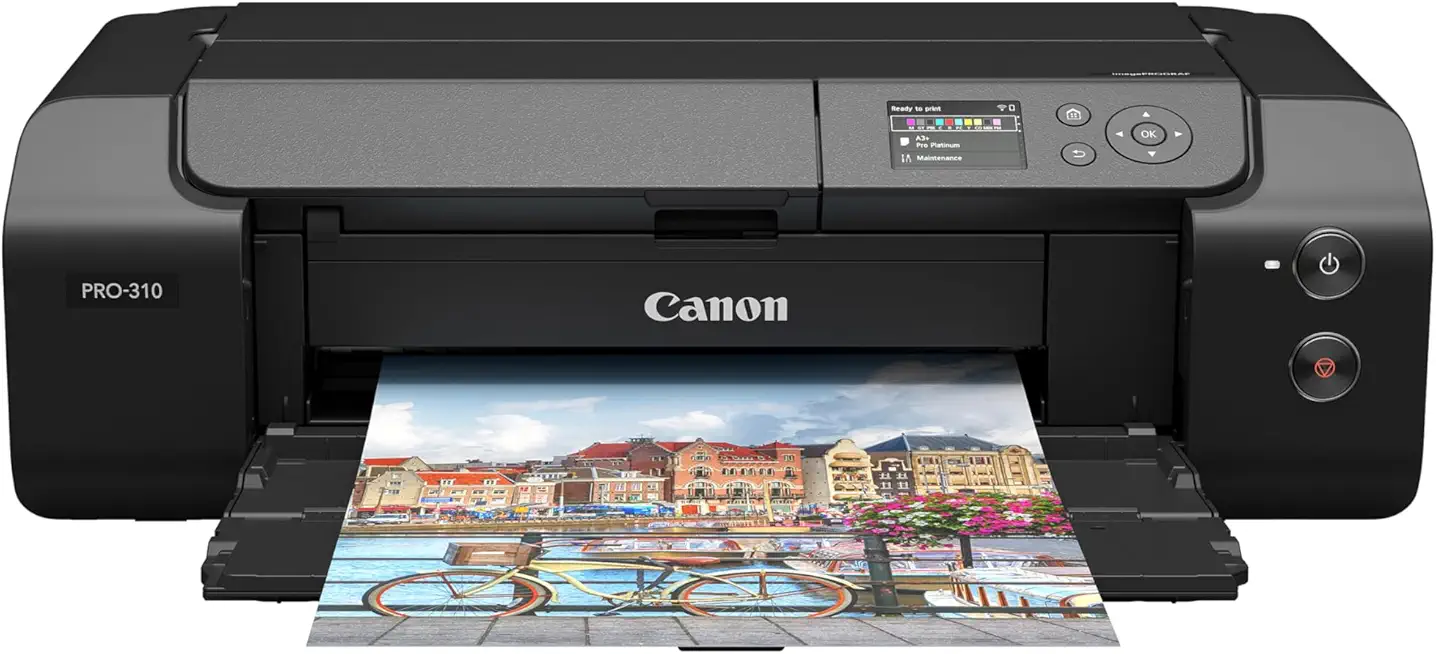
Canon imagePROGRAF PRO-310 13-inch Photo Printer
Compact studio printer delivering vibrant, accurate colors, smooth tonal gradations, and professional color management for gallery-ready photographs.
Check PriceAs a fine-art photographer I lean on printers that render accurate color and deep blacks, and the Canon imagePROGRAF PRO-310 delivers on both. It uses Canon Lucia Pro II pigment inks for a wide color gamut and superior black reproduction, which translates to vibrant, true-to-life prints and smooth tonal gradients.
The PRO-310 handles up to 13-inch wide prints and supports glossy, matte, and fine art papers. It even offers borderless printing on matte and fine art media, so my gallery prints come out clean without pesky borders.
One feature I’ve come to appreciate is the Chroma Optimizer cartridge that evens out gloss and reduces reflectivity differences across the image. Combined with the rear-mounted upright paper feed, the printer can accept thicker, rigid substrates like aluminum sheets that are uncommon at this size, which opens creative options beyond paper.
In real-world use the prints show strong scratch and fade resistance, making them suitable for limited-edition sales or exhibition work. The interface is relatively intuitive, but expect to do an initial calibration to get the absolute best color fidelity — that extra step is worth it.
This is a great choice if you want gallery-quality 13″ prints and occasional rigid-media output without stepping up to a much larger machine. Be aware though that ink cartridges are relatively small and will need replacing sooner if you print at high volumes, and it isn’t the fastest option for large or ultra-high-resolution prints.
- Canon Lucia Pro II pigment inks — wide gamut
- Supports up to 13-inch wide prints and borderless output
- Rear upright feed for thick/rigid substrates (e.g., aluminum sheets)
- Chroma Optimizer for even gloss and rich blacks
- Small ink cartridges — frequent replacement at high volumes
- Not the fastest for large/high-resolution prints
3. Canon imagePROGRAF PRO-4600 for 44-Inch Prints

Canon imagePROGRAF PRO-4600 with 24-lb coated paper
High-capacity production printing with precise color, smooth coated-paper output, and robust media handling for long-run signage and proofing.
Check PriceAs a photographer who prints for galleries and clients, the Canon imagePROGRAF PRO-4600 immediately stands out for one simple reason: scale. It handles prints up to 44 inches wide, which means full-bleed posters and large fine-art pieces without tiling or stitching.
Color and longevity are where this model earns its keep. Canon’s reformulated LUCIA PRO II inks provide high light resistance and scratch protection, delivering very rich blacks and excellent color consistency across wide formats—exactly what you want for exhibition work.
Practical workflow matters just as much as image quality. The PRO-4600’s automatic media feeding and type detection make loading rolls and sheets far less error-prone, so you spend less time fussing and more time evaluating prints.
It’s clearly aimed at professional studios and commercial print runs. Energy efficiency is another plus: the printer carries EPEAT Gold and ENERGY STAR certifications, which helps on the operating-cost and sustainability front when you’re running large jobs.
Be realistic about the trade-offs. The unit has a large physical footprint, so you need dedicated studio space, and its high ink consumption will increase operating costs—both important considerations if you print at volume.
Overall, if you need archival-quality, large-format output with hassle-reducing automation and strong color permanence, the PRO-4600 is a compelling choice. If studio space or ink budgets are tight, weigh those constraints carefully before committing.
- 44-inch maximum print width
- Reformulated LUCIA PRO II inks—high light resistance
- Automatic media feeding and type detection
- EPEAT Gold and ENERGY STAR certified
- Large physical footprint
- High ink consumption increases operating costs
4. HP DesignJet T650 for CAD and Posters

HP DesignJet T650 24-inch Large Format Plotter Printer
Reliable large-format plotting with fast, accurate line work, cloud-ready workflows, and economical operation for architects and engineers.
Check PriceAs a photographer who also prints large posters for client presentations, I see the HP DesignJet T650 as a very practical workhorse for technical and poster work. It prints up to A1 size (36-inch rolls) using a thermal inkjet with dye-based C, M, Y and pigment-based black ink, which gives exceptionally crisp line work and rapid throughput.
The printer’s automatic roll feed with horizontal cutter and compact design with integrated stand make it easy to slot into an office or studio without a dedicated large-format room. With a fast print speed—about 25 seconds per A1 page—it’s ideal when you need tight turnarounds for CAD prints, schematics, or client proof posters.
Where the T650 shines is in clarity of line art and handling complex files: its large memory handles complex CAD files easily, so detailed drawings print cleanly without stalls. That said, as someone used to photo-grade pigment printers, I’ll flag that this model is best for blueprints, line art, and posters rather than photo-quality images—color output isn’t its priority.
If your workflow centers on architects, engineers, or a small business producing technical drawings, signage, or quick posters, the DesignJet T650 is mostly a solid, efficient choice. If you’re printing gallery-level photos or long-term display pieces, consider a pigment-photo focused model instead.
- Very fast prints — about 25 seconds per A1 page
- Prints up to A1 size (36-inch rolls)
- Automatic roll feed with horizontal cutter
- Sharp, precise line reproduction; large memory for CAD files
- Not suited for photo-quality prints
- Dye inks may fade faster or smudge
5. Epson SureColor T2170 Budget Large-Format Pick

Epson SureColor T2170 24-inch Desktop CAD Plotter Printer
Space-saving desktop plotter producing crisp technical drawings, easy media handling, and fast, reliable prints for design offices.
Check PriceAs a photographer who prints a lot of client work, I appreciate a machine that delivers durable, usable prints without breaking the bank. The Epson SureColor T2170 prints up to 24 inches wide and uses UltraChrome XD2 pigment inks that resist water and smudges — a real plus when prints get handled or shipped.
Its compact footprint makes the T2170 easy to fit into small studios or home offices, yet it’s capable enough for blueprints, posters, and marketing materials. That combination is why freelancers, students, and small-business owners often choose it as their first large-format printer.
In practice the T2170 produces crisp resolution across matte and glossy papers, and the pigment inks give prints a robustness that holds up in everyday use. You won’t get the absolute top-tier fine-art tonal range of pricier photo-focused models, but the output is very good for its class and budget.
Operation is pleasantly quiet and maintenance is straightforward, which matters when you’re juggling jobs and don’t want constant fiddling. It’s reliable for moderate print volumes, though it isn’t the fastest option if you’re running heavy, back-to-back production.
If your needs are up to 24″ and you want water-resistant, easy-to-handle prints from a compact, affordable machine, the T2170 is a smart choice. If you require very large formats or the highest throughput for a commercial print shop, you’ll likely outgrow it.
- Prints up to 24 inches wide
- UltraChrome XD2 pigment inks — water and smudge resistant
- Compact footprint fits small studios/home offices
- Durable, crisp prints on matte and glossy papers
- Average speed — not the fastest
- Limited maximum print width may restrict some pros
How to Choose a Large-Format Printer
Start by asking what you actually print. If your goal is gallery-quality photos or fine art, prioritize pigment-based systems and high resolution — aim for printers that can effectively render near 1200 DPI and handle wide color gamuts. If you mostly produce posters, architectural plans, or quick client proofs, speed, roll handling and dye-based black or mixed ink systems may serve you better.
Media flexibility matters more than most people expect. Look for printers that accept the substrates you want: glossy and matte papers, canvas, heavy fine-art sheets and even rigid boards. Rear or upright feeds that let you print on thick substrates are a lifesaver when you move beyond thin photo paper.
Think about workflow and color management. Make sure the printer supports the software you use — Adobe apps, RIPs and CAD programs — and that it offers reliable color profiles and calibration options. A good RIP or printer driver, plus a consistent proofing routine, will save you hours of trial and error.
Don’t ignore operating costs and downtime. Check ink cartridge sizes, expected yield and how often you’ll need maintenance cycles. Smaller cartridges mean frequent swaps; large-format wide printers consume a lot of ink, and automated maintenance can be necessary but time-consuming.
Space and handling are practical constraints. Measure the full footprint including roll holders and room to load media. If you need borderless prints, cutters or dual-roll feeds for continuous production, factor those into your choice — they add convenience but also take space.
Finally, test before you commit. Order media sample packs and request test prints, measure dry time and scratch resistance, and compare real-world prints under gallery lighting. The best printer is the one that matches your output needs, studio space and budget while giving you consistent, predictable results.
Ink Types for Large-Format Printing
Choosing the right ink is as important as choosing the printer body. Ink defines longevity, where you can hang the print, and how colors pop. Think of it as the difference between a lab-processed photograph and a storefront poster.
Dye-based aqueous inks give the most vibrant, glossy look and excellent color saturation. They work beautifully for indoor exhibition pieces and glossy promotional prints, but they’re more vulnerable to water and UV, so keep them out of direct sunlight and humid spaces.
Pigment-based aqueous inks trade a bit of gloss for archival stability. If you’re selling fine art or printing client commissions for galleries, pigment inks give far better fade resistance and cleaner blacks on matte or fine-art paper. They can be slower to dry and sometimes look less “wet” on glossy media, but that tradeoff is worth it for permanence.
For outdoor signage and durable applications, solvent, latex, and UV-cured systems are the go-to options. Solvent inks stick to vinyl and resist weather, but expect VOCs and the need for ventilation. Latex inks are water-based with polymer curing; they’re odorless and robust for most outdoor jobs. UV inks cure instantly and handle rigid substrates, though they require curing hardware and careful handling.
Dye-sublimation deserves a special note for fabric work. It produces continuous-tone, photographic results on textiles when paired with heat-transfer equipment. For apparel, soft signage, and home décor, it’s unmatched if you have the right substrates.
On the practical side, match ink type to substrate and environment first, then worry about gamut and speed. Keep maintenance in mind: some inks need regular head cleaning or special optimizers to control gloss and scratch resistance. Running tests on your chosen paper will save money and headaches.
If you use Epson gear, their UltraChrome GS3 boosts pigment density and drying speed, while UltraChrome RS offers extra scratch resistance and a gloss optimizer—features worth considering if you need gallery quality or durable commercial output.
What People Ask Most
What is the best printer for large-format printing?
There is no single best printer; the right choice depends on the sizes you need, the media you’ll use, ink durability, and your budget. Compare models on those criteria and prioritize the features most important for your typical work.
What size qualifies as a large print or large-format print?
Large-format prints are any output significantly larger than standard desktop paper, typically intended for posters, wall art, or signage. If a device supports wider media widths or roll handling, it is usually considered a large-format printer.
Are inkjet printers suitable for large photo and fine art prints?
Yes—many professional inkjet printers are designed specifically for photographic and fine art reproduction, particularly when used with pigment inks and high-quality papers. They can produce accurate colors and long-lasting results when paired with proper color management and archival media.
What features should I look for when choosing a printer for large prints?
Look for maximum media width and supported substrate types, durable ink formulations, reliable color management, and robust media handling. Also consider connectivity options, operating costs, and maintenance features to match your workflow and print volume.
Can a standard home printer make poster-size large prints?
Standard home printers are generally limited in media width and may not support true poster sizes or thicker substrates. For larger posters you’ll need a dedicated large-format printer or to use a professional print service.
Which printers can print up to 24 x 36 inches or larger?
Printers marketed as wide-format or large-format models typically support widths at or beyond 24 by 36 inches, including many professional photo and plotter-style machines. Always verify a printer’s maximum media width and whether it handles roll or rigid substrates to ensure it meets your size requirements.
How do I prepare and set up files for printing large-format images?
Prepare files at the final print dimensions with appropriate resolution and the correct color profile, and export in a printer-friendly format. Include bleed and crop marks where needed and proof the file as a smaller test or soft proof before printing full size.
Conclusion for Large-Print Printers
To wrap up, this guide narrowed the field to five top large-format printers and focused on the key factors that matter most when choosing one: the print size you need, the media you plan to use, your budget and throughput, and the ink longevity required for your work.
Think of the purchase as matching a tool to a workflow—measure your largest print requirements, test media handling where possible, and weigh ongoing ink and maintenance costs against expected volume and desired longevity.
If you want to sharpen your printing decisions and practical skills, read more articles on the site for deeper guidance, workflow tips, and real-world comparisons to help you get the most from whatever printer you choose.
Have a question about your specific use case or want advice on settings and materials? Leave a comment below and we usually reply within a few hours.



0 Comments