
Which wireless mic will actually capture crisp dialogue when your subject moves across a windy beach, a crowded ceremony, or a noisy coffee shop? A single bad clip can sink an otherwise great video.
A stray gust, a crowded reception, or unexpected interference can ruin hours of footage. Choosing the right wireless mic is as important as choosing the lens.
In this guide we compare five wireless microphone systems, from pro-grade rigs to budget-friendly options. We tested performance in everyday shooting scenarios to see which setups actually hold up on set. Expect assessments of connectivity, range, battery behavior, and how each system pairs with common camera setups.
Our aim is to give you clear, real-world takeaways rather than pages of opaque specs. You’ll find straightforward pros and cons, compatibility notes, and advice for use cases like vlogging, weddings, documentaries, and mobile content creation. We also highlight practical trade-offs so you can choose tools that fit your budget and production needs.
Whether you shoot solo on a smartphone, run multi-camera wedding days, or film interviews for a documentary, the right wireless mic will transform your footage. Read on and you’ll be equipped to pick the best wireless mic for your camera and shooting style.
1. SYNCO G3 Pro Wireless Lavalier Mic
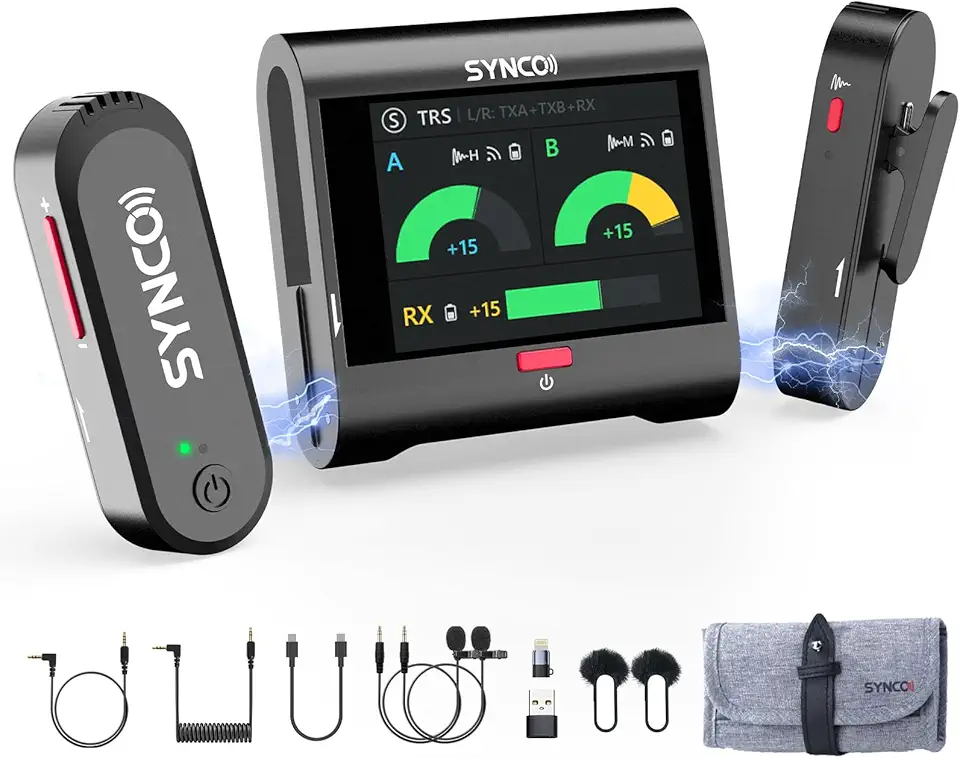
SYNCO G3 PRO Dual 2.4GHz Wireless Lavalier Microphone
Reliable dual-transmitter wireless audio with clear 2.4GHz transmission, low-latency performance, and easy pairing for interviews and on-camera recording.
Check PriceAs a working photographer and video shooter I reach for the SYNCO G3 Pro when I need reliable lavalier audio that just disappears into the background. It’s a top-tier wireless lav with an omnidirectional capsule that captures natural dialogue, making it great for vloggers, wedding videographers and documentary filmmakers shooting both indoors and outdoors.
In real-world shoots the G3 Pro delivers clear, high‑fidelity sound and impresses with noise handling — the three-stage noise cancellation lets you tailor suppression to windy or noisy surroundings without making voices sound hollow. That helps when you’re recording in bustling venues or windy outdoor locations and still need dialogue to sit cleanly in the mix.
Where this system really earns its keep is stability and range: ultra-stable wireless transmission up to 250 meters, and it will shoot through vegetation and walls with very few dropouts. It works seamlessly with Sony, Canon, and Fuji cameras, and wedding shooters consistently praise its crystal-clear dialogue, long battery life and sturdy build when they’re covering long days and unpredictable environments.
If you value reliable range and professional sound quality on location, the SYNCO G3 Pro is a smart choice — just be aware it sits above entry-level prices, and the multi-mode noise cancellation can take a little time to master. For most solo shooters and small crews who need dependable audio in challenging situations, it’s mostly a win.
- Best-in-class sound reproduction
- Stable long-range transmission (up to 250m)
- Advanced, adjustable three-stage noise reduction
- Wide compatibility with Sony, Canon, and Fuji
- Slightly higher cost vs entry-level options
- Noisy multi-mode settings can be complex at first
2. DJI Mic 2

DJI Mic 2 (1 TX + 1 RX) Wireless Microphone
Professional-grade compact kit offering studio-quality sound, long battery life, and seamless connection for creators, vlogging, and field recording.
Check PriceI rely on the DJI Mic 2 a lot when I’m shooting run-and-gun interviews or solo vlogs because it balances simplicity with pro-level features. It’s clearly built for solo creators, vloggers and small production teams who want clean vocal-focused audio without fuss.
The system’s adaptive intelligent noise cancellation does a great job isolating vocals in noisy environments, and the 250m wireless transmission gives you real freedom of movement on set. Each transmitter records internally in 32-bit float, and with 8GB of storage on the transmitters you get a local backup in case the receiver drops or you need a safety take.
The receiver’s OLED touchscreen is a small detail that makes setup and monitoring noticeably faster; users report minimal setup time, a reliable connection, good battery life and very intuitive onboard controls. Compatibility is broad — cameras, smartphones and action cameras are supported, and it even handles Bluetooth audio capture when needed, which adds flexibility for mixed-device shoots.
From a photographer’s perspective this is mostly a “set it and forget it” tool with professional-level safety nets for audio. The 32-bit float files give you nice headroom and clipping protection, but remember they need conversion in post. If you rarely record dialogue or prioritize ultra-simple mobile-only workflows, this might feel like overkill. For those who shoot interviews, weddings or vocal-heavy content, though, it’s a compact, reliable choice.
- Excellent vocal clarity with AI noise reduction
- Internal 32-bit float recording for flexible post-processing
- Long battery life and 250m range
- Includes multiple transmitters and a charging case
- 32-bit files require post-production conversion
- Overkill if you rarely record vocals/dialogue
3. RØDE Wireless Pro

Rode Wireless PRO Compact System with 2 Lavalier Mics and Charge Case
Compact charge-case system delivering pristine dual-mic audio, fast recharge, and hassle-free setup for interviews, podcasts, and mobile production.
Check PriceWhen I need dependable, broadcast-grade audio on a shoot, the RØDE Wireless Pro is my go-to. It’s a premium system that ships with two Rode Lavalier II microphones, so it’s ready for interviews and multi-speaker setups straight out of the case.
In the field the system delivers clear sound and impressive range — up to 260 meters — which gives me freedom to position subjects without worrying about dropouts. I also rely on the transmitters’ 32-bit float recording to protect against clipping and to save takes that might otherwise be ruined by unexpected peaks.
Setup is fast: the transmitters clip magnetically to clothing, making mic placement quick and unobtrusive. The receiver is Bluetooth-compatible, so I can connect to smartphones, computers, and DSLRs with minimal adapters — handy when switching between run-and-gun mobile work and more structured DSLR shoots.
Two features that consistently make my shoots smoother are intelligent gain assist for consistent levels and the included charging case. The charging case extends shooting time and gives a real battery-life advantage on all-day jobs, so swapping batteries mid-scene becomes less of a headache.
If you’re a professional who values flexibility and high-fidelity audio — especially for interviews or multi-speaker recordings — this system is an excellent investment. If budget or ultra-compact size is your priority, you may want to weigh those trade-offs first.
- 32-bit float recording
- Range up to 260 meters
- Bluetooth-compatible receiver
- Onboard transmitter recording
- Higher investment
- Bulkier than smaller systems
4. Moman C2 Wireless Mic

Moman C2 Solo Wireless Lavalier System (1 TX + 1 RX)
Single-transmitter solution providing reliable low-noise transmission, easy clip-on operation, and robust range for solo creators and presenters.
Check PriceAs a working photographer and occasional videographer, I value compact gear that simply works, and the Moman C2 fits that brief. It’s a mini lavalier wireless system aimed at content creators, educators, live streamers, and vloggers, built for DSLR or smartphone use with straightforward, reliable audio.
Performance-wise it uses 2.4 GHz digital transmission with up to 150 meters line-of-sight range. That gives you solid freedom for most indoor and many outdoor scenarios without the complexity of pro rigs.
Latency is low at roughly 58 ms, which means your audio stays in sync with video and saves time in post. A one-button mute and an optional low-cut filter let you clean up voice recordings on the fly, which is especially handy in classroom or interview settings.
The TFT screen is a small but practical touch — it shows battery and connection status so you can monitor levels at a glance during a run-and-gun shoot. Battery life of about 7–8 hours continuous is very usable; you can usually get through a full day of sessions without swapping power.
Where it holds back is multi-person work: the system is single-speaker by default, so you’ll need a second unit for two-person interviews unless you upgrade. Also, there’s no charging case included, so plan your batteries or charging workflow for longer shoots.
- 150m line-of-sight range
- Low latency (~58ms) — lip-sync accurate
- TFT screen and one-button controls
- 7–8 hours battery life
- No charging case included
- Single-speaker system; needs extra unit for two-person interviews
5. Moman M1 Wireless Mic for iPhone

Moman Wireless Lavalier Microphone for iPhone (Clip-on)
Lightning-ready clip-on microphone optimized for iPhone recording with clear vocals, plug-and-play convenience, and portable design.
Check PriceThe Moman M1 is a straightforward, budget-friendly wireless mic built for iPhone and Android creators who need speed and portability. Its omnidirectional capsule captures natural sound, and the included furry windscreen helps a lot when you’re shooting outdoors or on the move.
It uses 2.4 GHz wireless transmission with a quoted 150m line-of-sight range, which in real-world mobile shooting gives you freedom to move around without constantly checking levels. Setup is genuinely plug-and-play — adapters for Lightning or USB-C mean you can clip on and record in seconds, which is a photographer’s dream when time is limited.
There are practical controls on the system: five-step volume control and noise cancellation let you tailor the signal on the fly. In my experience and based on user feedback, the audio stays clear and crisp during walking shots and outdoor interviews, making it a reliable choice for vlogs, quick interviews, and run-and-gun shoots.
Keep expectations realistic: it’s aimed at mobile content creators rather than full-scale film crews. Battery life is limited to roughly 5 hours, so plan charging or backups for long days. There’s no charging case included, so battery management is part of the workflow.
- 150m line-of-sight wireless range
- Plug-and-play Lightning/USB-C design
- Adjustable noise cancellation and 5-step volume
- Portable and lightweight with furry windscreen
- No charging case included
- Limited battery life (~5 hours)
Choosing a Wireless Mic for Cameras
Choosing a wireless mic for your camera is less about the fanciest specs and more about matching the tool to the job. As a photographer who shoots weddings, interviews and run-and-gun video, I pick systems that are reliable, compatible and easy to rig under pressure.
First check connectivity. Make sure the receiver works with your camera input—3.5mm, XLR or USB-C—and confirm whether you’ll need an adapter. Camera-mounted receivers are convenient, but USB-C dongles or XLR adapters give more flexibility for pro rigs.
Think about form factor. Lavalier mics are my go-to for interviews and weddings because they’re discreet and hands-free. Shotgun or handheld options suit run-and-gun or host-driven shoots where directionality and control matter.
Decide how many transmitters you’ll actually use. One transmitter is fine for solo vlogs; two are essential for interviews and multi-subject coverage. Buying a dual kit up front often costs less than adding a second system later.
Range and reliability matter more than headline numbers. Aim for systems that maintain clear transmission within your typical shooting distance and offer automatic frequency switching or robust 2.4GHz/UHF performance to avoid dropouts in crowded RF environments.
Prioritize audio features that save you time in post. Onboard recording and higher dynamic-range formats (like 24-bit or 32-bit float) offer insurance against clipping and noisy locations. I never skip a system with transmitter backup recording when covering important events.
Battery life and charging convenience make long shoots bearable. Look for at least 8–12 hours or a charging case so you can swap quickly between takes. Hot-swappable batteries are a bonus for multi-day gigs.
Finally, check build quality and monitoring. A rugged, lightweight system with intuitive controls and headphone monitoring will keep you calm on set. Don’t forget physical wind protection and noise-reduction features—those save more takes than any plugin.
Match the mic’s strengths to your shooting style, test everything before a big job, and prioritize consistency over novelty. That approach will give you reliable audio that complements your visuals every time.
Reducing Wind Noise with Wireless Mics
Wind is the single biggest enemy of outdoor dialogue, but most blowouts are preventable with a few practical moves. Start with proper physical protection: foam windscreens for light breezes, furry “deadcats” for stronger gusts, and a blimp or zeppelin if you’re doing extended exterior work or mounting a shotgun. I always keep a small deadcat in my bag — it’s the fastest win for a wind-challenged shoot.
Mic placement matters as much as the gear. Keep the lavalier as close to the subject’s mouth as you can without being visible, and when possible clip it under a shirt or inside a jacket to create a wind buffer. Use clothing, pockets, or even a handheld reflector as a barrier if you can’t change the location; moving the mic out of the direct wind path often fixes problems more reliably than software fixes.
On the recorder or transmitter, engage a low-frequency roll-off (high-pass) around 80–100 Hz to cut rumble and chest-thump caused by wind. If your system offers adaptive or multi-stage wind-noise suppression, try the gentler settings first to avoid sucking out vocal warmth. And when available, enable onboard backup recording on transmitters so you have an alternate track if the camera feed gets compromised.
For tougher conditions I’ll sometimes use two mics — a close lav and a secondary mic sheltered on the boom — then blend or gate in post so wind-damaged portions get replaced by the cleaner track. Remember that omnidirectional lavs can be less sensitive to side gusts when well-shielded, while directional mics benefit more from robust windshielding and blimps.
Finally, don’t rely only on plugins to save a wind-ruined take. Physical protection and smart placement are your first line of defense; post-production tools like spectral repair are helpful, but they’re best used to tidy up, not to completely reconstruct. A few minutes of planning on set will save hours in the edit bay.
What People Ask Most
What is the best wireless microphone for DSLR cameras?
The best choice depends on your workflow and priorities, so pick a system that matches your camera’s inputs, expected range, and audio quality needs. Prioritize reliable transmission, clear sound, and straightforward setup for smoother shoots.
How do I choose a wireless mic for my camera?
Consider compatibility with your camera’s input, the microphone form factor, and how many transmitters you need. Also evaluate range, battery and charging options, and useful features like onboard recording or noise reduction.
How do you connect a wireless microphone to a camera?
Most systems connect the receiver to the camera’s audio input using the supplied cables or an adapter when required. Follow the manufacturer’s pairing steps and check audio levels and monitoring before you start recording.
Do wireless lavalier microphones work with cameras?
Yes, wireless lavalier mics are commonly used with cameras to capture discreet, hands-free dialogue. Just confirm the transmitter and receiver are compatible with your camera’s input and power setup.
What is the range of wireless microphones for cameras?
Range varies by system and environmental conditions, and advertised distances usually assume clear line of sight. Expect real-world performance to be reduced by obstacles, interference, and dense surroundings.
Are wireless microphones reliable for video production?
When you choose a well-built system and set it up properly, wireless microphones can be highly reliable and offer consistent audio with freedom of movement. Always test on location to identify interference and confirm stability.
Can you use a wireless mic with any camera?
Compatibility depends on the camera’s audio inputs and available adapters, and many wireless systems provide multiple receiver options to suit different devices. Verify connector types and power requirements before purchasing to ensure proper fit.
Conclusion for Best Wireless Mics for Cameras
This guide walked through five wireless mic systems from professional to budget, showing real-world performance, pros and cons, compatibility, and typical use cases like vlogging, weddings, documentaries, and mobile content.
As a final reminder, match features such as compatibility, range, onboard recording, battery life, and wind protection to your shooting style and the environments you work in.
Consider practical factors too—how many transmitters you need, how portable and durable the system is, and whether on-set monitoring and backups fit your workflow.
If you want to sharpen your audio and production skills, read more articles on the site to explore tips, comparisons, and hands-on advice that can help you choose and use gear more confidently.
Have questions or gear experiences to share? Leave a comment below and we usually reply within a few hours.


0 Comments