

Want to make your OnlyFans content look undeniably professional without a steep learning curve or a massive investment?
This ultimate guide compares five top cameras through user experiences, expert reviews, and hands-on real-world testing to help you choose with confidence while keeping costs realistic.
We prioritized what truly matters to solo creators: usability, photo and video quality, low-light competence, autofocus reliability, and practical ergonomics.
Those benchmarks were assessed not just on paper but in everyday shoots, livestreams, and extended sessions.
Expect candid observations about how cameras perform when you’re framing yourself, tracking movement, or working in cozy indoor light.
We focused on features that improve workflow, from intuitive controls to dependable battery life, because those tiny wins change production morale.
Whether you’re upgrading from a phone or investing in pro-level tech, this guide maps the trade-offs that influence real content.
Our goal is practical clarity: pair the right camera to your shooting style so gear amplifies creativity instead of creating friction.
By the end you’ll have a concise shortlist that fits different experience levels and shooting needs, informed by honest pros and cons from real users.
Ready to find the camera that actually elevates your content and saves time on set?
1. Sony ZV-E10 Content Creator Choice

Sony ZV-E10 APS-C mirrorless camera kit (ZVE10KB)
Compact, vlogger-ready interchangeable-lens camera with excellent autofocus, flip screen, and clear onboard audio for sharp, cinematic content creation.
Check PriceThe Sony ZV-E10 is purpose-built for content creators and vloggers, and it shows. It pairs a 24.2MP APS-C sensor with a flip-out touchscreen and 4K video recording, giving you sharp images and flexible framing for solo shoots.
That flip screen is genuinely useful — reviewers and creators praise it for framing self-shots and nailing composition when you’re working alone. The body is lightweight and compact, so you can handhold it comfortably for longer sessions without fatigue.
Autofocus is a standout: the camera’s AI-driven real-time eye autofocus stays accurate even as you move, which is invaluable when you’re shooting solo or streaming. Reliable eye-tracking means fewer missed takes and more time creating.
The APS-C sensor offers surprisingly good low-light performance for cozy indoor setups, reducing noise and keeping skin tones flattering. On the video side, you get 4K plus 120fps slow motion, so you can capture both crisp content and smooth slow-mo clips for variety.
Interchangeable lenses give you the creative freedom to go from tight portraits to wider looks as your content demands. One real caveat: there’s no in-body image stabilization, so for silky handheld video you’ll want stabilized lenses or a gimbal.
Finally, the menus can feel a bit complex at first, but most users find the interface becomes user-friendly after some time. Battery life is solid for video streaming and long shoots, which keeps you creating without constant swaps.
- Excellent autofocus with eye-tracking
- Flexible flip-out screen ideal for self-shooting
- 4K video recording with 120fps slow motion
- Good battery life during video streaming or long shoots
- No in-body image stabilization; needs stabilized lenses or gimbal for smooth handheld video
- Menu system can be complex for complete beginners
2. Canon EOS R50 Beginner-Friendly Mirrorless

Canon EOS R50 24.2MP APS-C mirrorless with RF-S 18-45mm IS STM kit
Beginner-friendly interchangeable-lens camera kit offering high-resolution stills, smooth IS lens performance, responsive autofocus, and intuitive controls for everyday creators.
Check PriceThe Canon EOS R50 is a mirrorless camera built for creators stepping up from a phone to a dedicated camera. It uses a 24.2MP sensor and is optimized for solo creators and handheld setups, so you get detailed files without wresting with complicated controls.
Its advanced eye-detect autofocus really shines during live streams and moving shots — it locks onto eyes quickly and keeps them sharp, which is huge when you’re shooting alone. Video capability is solid: it records 4K, though limited to 30fps, and in practice that 4K delivers clean footage with minimal rolling shutter.
Usability is where the R50 scores for beginners. The lightweight design and responsive touchscreen make framing self-shots and dialing settings fast and intuitive, and the interface is simple enough to stop you wasting time on menus during a session.
Color rendition is particularly flattering, which matters a lot for portrait and boudoir work — skin tones come out natural and pleasing without heavy grading. The Close-up (Showcase) Mode is a thoughtful touch for beauty demos and product close-ups, letting you highlight detail without fuss.
There are trade-offs: video features aren’t as deep as higher-end Canon models and battery life is moderate, so plan for extra batteries if you shoot long streams or extended sessions. Still, for creators who want reliable eye AF, great color, and a gentle learning curve, the R50 is a very practical, mostly worry-free step up from a phone.
- Simple-to-use interface for beginners
- Fast and accurate eye-detect autofocus
- Compact and lightweight for solo shooting
- High-quality video and vibrant color science
- Limited video features (max 30fps in 4K)
- Moderate battery life; may need extra batteries
3. Fujifilm X-T5 Premium Image Quality

Fujifilm X-T5 mirrorless camera body
Premium APS-C body delivering exceptional high-resolution images, tactile controls, and acclaimed film simulations for expressive, professional-grade photography.
Check PriceThe Fujifilm X-T5 is a photographer’s dream for creators who want a distinct, high-end look. It packs a 40MP APS-C sensor that delivers exceptional detail, ideal for sharp portraits and content you may want to crop or print for premium fans.
Fujifilm’s film-like color science is a standout — skin tones render beautifully straight out of camera, giving a cinematic, elegant feel without heavy grading. Those vintage-like color profiles make boudoir and portrait work feel polished and intentional.
For solo creators who shoot handheld, the X-T5’s in-body image stabilization (IBIS) and fast, accurate autofocus are real advantages. They keep footage steady and subjects locked, which reduces retakes and lets you focus on posing and expression.
It’s also surprisingly portable. The body is compact enough for location shoots while still feeling robust and well-built, so you can travel light without sacrificing a premium aesthetic.
Be mindful that Fujifilm’s controls and menu can be a bit steep at first — there’s a learning curve to fully exploit custom workflows. Also, the 40MP files are large; you’ll need extra storage and more processing power for editing and archiving.
If you want flagship-level images and cinematic video for a premium OnlyFans portfolio, the X-T5 excels — especially if you value color and detail. If you prefer plug-and-play simplicity or have limited storage/editing resources, consider whether the workflow fits your routine.
- Exceptional image and video quality with 40MP sensor
- Beautiful, aesthetic color profiles out of the box
- In-body image stabilization for smoother handheld footage
- Durable build and attractive retro styling
- Complexity may intimidate beginners or casual users
- Higher-resolution files need larger storage and more processing power
4. Sony Alpha a6400 Rapid Autofocus

Sony Alpha a6400 E-mount mirrorless camera body (ILCE-6400)
Versatile compact body with lightning-fast autofocus, flip-screen convenience, and solid low-light performance for travel, vlogging, and hybrid shooting.
Check PriceThe Sony Alpha a6400 is a compact mirrorless crop-sensor camera that earns its place for solo creators thanks to very fast autofocus and 4K video capability. As a working photographer I appreciate how quickly it locks onto faces and eyes, which means fewer missed frames when you’re moving around during a shoot.
Its autofocus is genuinely excellent — the a6400 offers ultra-fast autofocus with smooth tracking that holds in low light and during fast motion. That reliability makes it ideal for livestreams, quick changes in pose, and one-person setups where you can’t constantly tweak focus.
For practical solo work the flip-up screen is a big win; it helps you frame self-shots and check composition on the fly. Battery life is solid for sessions, and the USB charging support means you can record while plugged in, which is a lifesaver for longer streams.
Low-light flexibility is another strength: the camera’s robust ISO range (extendable up to 102,400) gives you usable results across varied lighting conditions with manageable noise if you expose carefully. Just be mindful that the a6400 is a crop-sensor body, so it won’t match full-frame dynamic range in the toughest contrast situations.
One practical limitation for handheld shooters is there’s no in-body image stabilization, so handheld video can look shaky unless you use stabilized lenses or a gimbal. Overall, if you need snappy autofocus, reliable tracking, 4K video, and the convenience of USB charging for streams, the a6400 is a very solid, mostly hassle-free choice.
- Ultra-fast autofocus with smooth tracking
- Flip-up screen for easy self-monitoring
- Extendable ISO up to 102,400 for low-light
- USB charging supports continuous recording/streaming
- No in-body image stabilization
- Smaller sensor than full-frame limits dynamic range
5. Canon EOS R6 Mark II Creator Choice
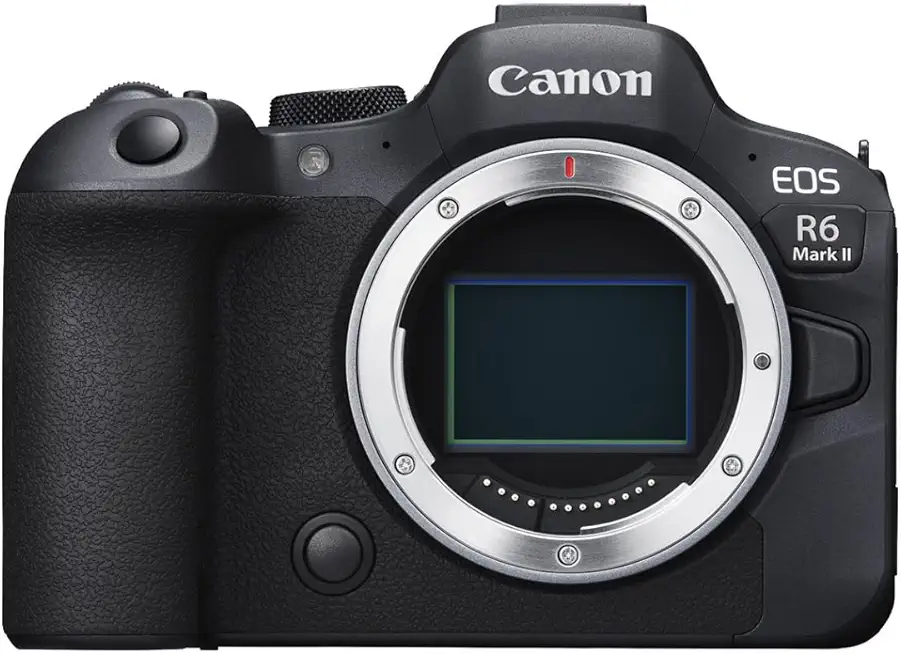
Canon EOS R6 Mark II mirrorless camera body (24.2MP full-frame)
Professional full-frame body offering fast continuous shooting, advanced stabilization, and reliable autofocus for high-speed action and cinematic video capture.
Check PriceThe Canon EOS R6 Mark II Creator Choice is a full-frame hybrid built for creators who want pro-level photo and video without carrying a whole studio. It’s aimed at serious creators seeking premium image quality and advanced video workflows.
Under the hood you get full-frame sensor tech and 6K ProRes RAW video output, which gives you extra latitude in post and exceptionally clean footage straight out of camera. That combination makes this body great for high-end content where color grading and detail retention matter.
Autofocus on this body is flawless in real-world use — excellent eye detection and tracking keep subjects sharp even when you’re moving around. Pair that with top-tier in-body image stabilization and you can reliably get smooth, handheld footage without relying on a gimbal for most shoots.
Low-light performance is another strong suit; the sensor and processing handle dim indoor scenes with minimal compromise, so flattering indoor portraits and video are achievable without excessive noise. The user interface is streamlined for fast operation, which helps when you need to react quickly during a shoot.
Keep in mind the R6 Mark II is larger and heavier than entry-level options, so it can feel cumbersome for long handheld sessions or ultra-compact setups. It’s also better suited to experienced users or pros who will take advantage of the advanced features and higher-end video capabilities.
If you want professional-grade images and robust video tools, and you don’t mind the size or learning curve, this camera is an excellent choice for elevating your content.
- Top-tier autofocus and subject tracking
- In-body image stabilization for smooth handheld shots
- Superb low-light image and video performance
- High-quality 6K ProRes RAW video and strong photo capabilities
- Larger, heavier body
- More complex for absolute beginners
Choosing the Right Camera for OnlyFans
Choosing the right camera starts with how you create. If you do lots of solo videos and livestreams, prioritize fast, reliable eye/face autofocus and a flip or vari-angle screen so you can see framing while shooting. If you shoot stills or higher-resolution portfolios, sensor size and resolution matter more than flashy video specs.
Low-light performance is a practical priority for many creators who work indoors. A camera with a larger sensor or good high-ISO performance will keep noise down and skin tones flattering without needing to blast the room with light. In-body stabilization is a huge convenience if you plan to handhold a lot; otherwise, expect to lean on stabilized lenses or a gimbal.
Think about workflow as much as specs. Ease of use—intuitive menus, touch controls, and reliable battery life—can make the difference between actually using the camera and leaving it on a shelf. Cameras aimed at creators often balance simple controls with capable autofocus, while higher-end bodies give you more quality and complexity if you’re ready to learn.
Budget and expandability should guide your lens choices. Interchangeable-lens systems let you go from flattering portrait lenses to wider setups for creative shots, but they add cost. If portability and simplicity win, a high-quality compact or even your phone, paired with good lighting, will outperform a neglected fancy camera every time.
Practical test: try to rent or borrow a camera and spend a day shooting the exact content you plan to publish. That hands-on hour reveals ergonomics, interface quirks, and whether the autofocus keeps up with your movement. Buy the camera that fits your routine, not just the one with the biggest numbers.
Finally, remember accessories matter. A solid lens for portraits, a reliable tripod, spare batteries, and proper lighting will elevate any camera choice. Invest where it improves your output the most and you’ll see immediate returns in quality and confidence.
Lighting Tips for Better Content
Good lighting is the single easiest upgrade you can make to your content. It reveals detail, smooths skin, and gives your work a consistent, professional look without needing the fanciest camera. Treat lighting as part of your creative kit.
Start with natural light when you can. Position yourself facing a large window with indirect sun for soft, flattering illumination. If the sun is harsh, diffuse it with a sheer curtain or a portable diffuser to avoid blown highlights and hard shadows.
Ring lights are an efficient tool for close-ups and selfies. Place the ring so the camera sits in the center; it gives even light and that desirable catchlight in the eyes. Combine a ring with a weak fill or backlight to avoid the flat, two-dimensional feel.
LED panels are more versatile for full-body shots or mixed-color setups. Use panels with adjustable color temperature so you can match daylight or tungsten and keep skin tones natural. Add softboxes or diffusion panels to tame harshness and create a softer wraparound light.
Learn a simple three-point setup: a key light for shape, a softer fill to reduce contrast, and a rim or backlight for separation. Keep the key a stop or two brighter than the fill; that subtle contrast adds depth without unflattering shadowing. A low-powered backlight can make hair and curves pop off the background.
Reflectors are underrated and cheap. Bounce light into shadowed areas for smoother skin and catchlights when you can’t place another lamp. White works for soft fill while silver adds punch; experiment with distance to control intensity.
Match color temperatures and set a proper white balance in-camera for accurate skin tones. Avoid mixing daylight and warm lamps unless you want a stylized look. Also watch your exposure—protect highlights, lower ISO, and use the histogram rather than the LCD preview.
Finally, treat lighting like wardrobe: test, adjust, and photograph small changes. Keep lights consistent for livestreams with continuous power and mark positions so your setup is repeatable. A little time spent dialing lights pays off in far better, more confident content.
What People Ask Most
What camera is best for OnlyFans content creators?
There is no single best camera; choose one that fits your experience level, shooting style, and budget. Prioritize reliable autofocus, good low-light performance, a user-friendly screen for self-shooting, and overall ease of use.
Can I use a smartphone camera for OnlyFans?
Yes, smartphones can produce excellent content when paired with good lighting and simple editing apps. They are a practical starting point and can be upgraded to a dedicated camera as your needs grow.
Is a DSLR or mirrorless camera better for OnlyFans?
Mirrorless cameras are often preferred for solo creators because they tend to be lighter and offer advanced autofocus and flip screens. DSLRs can still be a solid choice depending on comfort, handling, and lens availability.
Do I need a webcam for live streaming on OnlyFans?
You don’t strictly need a webcam if you stream from a camera or phone that supports streaming, but a dedicated webcam can simplify setup for frequent live sessions. Choose a streaming option that balances convenience with the image quality you want.
What camera settings should I use for OnlyFans photos and videos?
Settings will vary with your desired look, but focus on keeping subjects sharp and skin tones natural. Use reliable autofocus, appropriate exposure, and a frame rate that gives smooth motion for your videos.
What accessories do I need to improve my camera setup for OnlyFans?
Essential accessories include quality lighting, a stable tripod or support, and reliable power solutions like spare batteries. Adding a microphone, extra storage, and suitable lenses will further improve audio and creative options.
How important is lighting when choosing a camera for OnlyFans?
Lighting is extremely important and often impacts perceived quality more than the camera itself. Soft, diffused light improves clarity, flattering skin tones, and overall mood, making content look more professional even with simpler gear.
Conclusion for the Best Camera for OnlyFans
These five cameras were chosen to span beginner to pro needs, balancing ease of use, image and video quality, low-light performance, reliable autofocus, and real-world practicality for solo creators.
Rather than chasing specs, prioritize the body and features you’ll actually use, then pair that camera with consistent lighting and the right accessories to elevate your content.
Spend time experimenting with composition, lighting setups, and simple workflows — steady practice will often improve your results more than incremental gear upgrades.
If you want to deepen your skills, browse more articles on the site for practical tips, comparisons, and setup ideas to help you shoot with confidence.
Have questions or want advice tailored to your setup? Leave a comment below — we usually reply within a few hours.



0 Comments