

Ever tried to edit sun-drenched RAWs on a cramped airplane tray, squinting under cabin lights and wondering if your laptop can reproduce color and last all day?
Travel photographers juggle conflicting needs: accurate displays for faithful edits, light carries for long days, responsive performance, and batteries that won’t die mid-coverage. Choosing between those priorities often feels like a series of compromises where one improvement adds weight or drains runtime.
This guide cuts through the specs clutter to help you choose a travel laptop that balances display fidelity, portability, performance, and battery life. We tested units and gathered photographer feedback across real itineraries, narrowing the field to five practical picks that perform well on the road, and we’ll help you match one to your shooting style and travel workflow.

Apple MacBook Pro (14.2-inch, M4 10-core CPU/10-core GPU, 16GB Unified RAM, 512GB SSD)

Dell XPS 14 9440 (14.5-inch FHD+, Intel Core Ultra 7 155H 16-core, 32GB LPDDR5X, 1TB SSD, GeForce RTX 4050)

Lenovo Yoga Slim 7i 15ILL9 (15.3-inch 2.8K 120Hz, Intel Core Ultra 7 256V, 16GB DDR5, 1TB SSD)
1. Apple MacBook Pro 14-Inch 2026
Apple MacBook Pro (14.2-inch, M4 10-core CPU/10-core GPU, 16GB Unified RAM, 512GB SSD)
Compact professional laptop with blazing M4 performance, crisp 14.2-inch display, unified memory and fast SSD for demanding creative and developer workflows.
Check PriceThe MacBook Pro 14‑inch (2026) is my go‑to when I need a robust, travel‑friendly editing machine that doesn’t compromise on display. Its 120Hz Mini LED panel with peak brightness up to 1000 cd/m² gives you crisp detail and enough punch to judge exposures outdoors.
Color accuracy and high brightness make it easy to edit in varied light without constantly guessing how prints or exports will look. The compact 14″ size and sturdy, lightweight form factor mean it fits into a camera bag alongside my gear without feeling like a burden.
Battery life is a big deal on location, and the MacBook delivers — expect around ~15 hours of web browsing, which translates to a full day of light editing and tethering between charges. Integration with the Apple ecosystem (Apple Watch unlock, iPhone hotspot, iPad second screen) streamlines my workflow when I’m shooting, culling, and sending selects back to clients.
As a working photographer I value subtle things: the responsive UI from the 120Hz display, the reliability of macOS during long editing sessions, and the solid build that survives airport handling. The tradeoffs are real though — the limited port selection means I often carry a small hub for SD cards and external drives.
- Exceptional Mini LED screen quality and brightness
- Long battery life suited to travel
- Solid build and compact size
- Seamless workflow for Apple users
- Limited port selection; may need adapters
- Premium price and macOS learning curve for some users
2. Lenovo Yoga Slim 7 Aura
Lenovo Yoga Slim 7i 15ILL9 (15.3-inch 2.8K 120Hz, Intel Core Ultra 7 256V, 16GB DDR5, 1TB SSD)
Ultra-slim 15.3-inch laptop with 2.8K 120Hz display, Intel Ultra performance, DDR5 memory and roomy SSD for smooth multitasking and on-the-go productivity.
Check PriceI travel light and need a laptop that disappears into my bag while still letting me edit accurately, and the Lenovo Yoga Slim 7 Aura fits that bill. It’s an ultra-portable, thin Windows machine with a highly color-accurate screen and wide gamut coverage that makes matching tones on the road much easier.
Under the hood it runs an Intel Core Ultra 7 258V which handles AI-assisted workflows and keeps thermals low, so the machine stays quiet and cool during long editing sessions. The CPU-integrated graphics are perfectly adequate for raw processing and local retouching, but don’t expect GPU-level acceleration for heavy video jobs.
Battery life is where this laptop sings for travel; reported endurance is up to 22 hours of video playback, which translates to whole days of field work without hunting for outlets. That kind of runtime means you can cull, develop, and deliver many shoots between charges — a huge convenience when flights or remote locations are involved.
The tradeoffs are typical of ultra-thin designs: there are only two USB-C ports, and with one occupied by charging you’ll need a hub or adapter to connect card readers, external drives or displays. If your workflow relies on an SD slot, multiple USB-A accessories or a discrete GPU, this model will feel restrictive.
Overall, the Lenovo Yoga Slim 7 Aura is an excellent choice if you prioritize portability, battery life and color-accurate editing on the move. Choose it when you want quiet, cool performance and long endurance; skip it if you require lots of ports or dedicated GPU power.
- Very slim and lightweight
- Outstanding battery endurance (up to 22 hours video playback)
- Color-accurate display
- Quiet, cool operation
- Very limited ports for peripherals and cards
- No dedicated GPU; not for heavy video/graphics workloads
3. Dell XPS 14
Dell XPS 14 9440 (14.5-inch FHD+, Intel Core Ultra 7 155H 16-core, 32GB LPDDR5X, 1TB SSD, GeForce RTX 4050)
Powerhouse 14.5-inch system with high-core CPU, dedicated RTX 4050 graphics, 32GB memory and fast SSD for intensive content creation and gaming on the move.
Check PriceWhen I travel with the Dell XPS 14 I appreciate a true balance of power and portability. The 3.2K OLED panel with 100% DCI‑P3 gives me rich color and deep blacks that make retouching and color grading much faster and more reliable on the road.
Under the hood it uses modern Intel CPUs and can be configured with an Nvidia RTX 4050 GPU. That means smooth Lightroom brushwork, quicker exports and sensible performance for occasional Photoshop or light video tasks without hauling a desktop replacement.
The chassis is slim with tiny bezels, so it’s compact in a camera bag and pleasant to work on in cramped locations like trains or cafes. Dell also improved the speakers and webcam, which is handy for client reviews and quick remote calls when I’m between shoots.
One real-world tradeoff is battery life. Once you enable GPU acceleration the battery drops noticeably, so I plan edits around available power or carry a compact charger. Also, fully equipped configurations get pricey, so budget-conscious shooters might start with a base model and upgrade storage or RAM later.
For travel photographers who want an accurate, punchy OLED and the option of discrete GPU power, the XPS 14 is a very compelling Windows choice. It’s especially good for those who need better-than-integrated graphics for heavier editing, but still want a lightweight, premium build for frequent travel.
- 3.2K OLED with 100% DCI-P3
- Configurable with Nvidia RTX 4050 GPU
- Modern Intel CPUs for portable performance
- Slim premium build with improved speakers & webcam
- Higher cost for fully capable configurations
- Reduced battery life when GPU-accelerated
4. Lenovo Yoga Book 9i
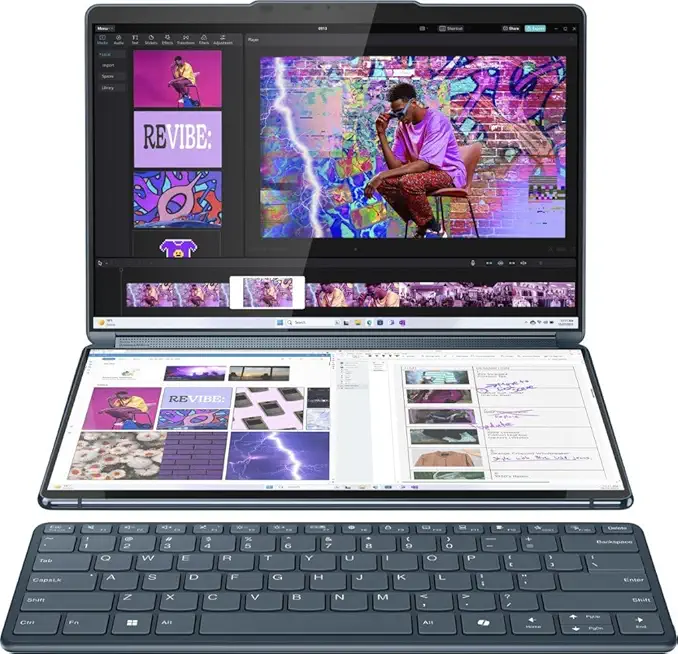
Lenovo Yoga Book 9i (13.3-inch 2.8K dual-screen OLED, Intel Core i7-1355U, 16GB, 1TB SSD)
Innovative dual-screen 13.3-inch OLED device delivering multitasking flexibility, vivid visuals, long battery life and fast storage for creators and productivity-focused users.
Check PriceIf you’re a travel photographer who values multitasking and color accuracy, the Lenovo Yoga Book 9i is a compelling, unconventional choice. It’s a dual‑screen 2‑in‑1 built specifically for creatives who want two work surfaces on the road. The unit ships with two 13.3″ 2.8K displays and DisplayHDR True Black 500, delivering very high color accuracy that makes culling and basic color work far more reliable than typical ultraportables.
In real shoots I’d use one screen for my full‑size image and the other for thumbnails, metadata or reference palettes — it genuinely speeds up selection and comparison when you have limited time between locations. The integrated stylus is a tangible bonus for local retouching: dodging, burning and spot repairs feel precise compared with touch alone, which helps when you can’t set up a full workstation.
Be realistic about the performance trade‑offs. The Yoga Book 9i relies on integrated graphics that are more than capable for RAW editing, retouching and color correction, but they start to strain with heavy batch exports or video work. If your travel kit includes lots of quick client turnarounds for photos, it’ll keep pace; if you’re encoding long 4K edits or processing massive tethered shoots, you’ll notice the limits.
Overall, this is a great fit if portability, multitasking and color fidelity are your priorities on the road. It’s less ideal if your workflow depends on GPU‑accelerated batch processing or video editing. For many travel photographers and hybrid photo/design workflows, the Yoga Book 9i hits a sweet spot between convenience and capability.
- Dual 13.3″ 2.8K displays
- DisplayHDR True Black 500 & very high color accuracy
- Integrated stylus for precise retouching
- Compact, convertible design — great for travel
- Not suited for intensive video editing or heavy batch processing
- Integrated graphics limit demanding workflows
5. Asus ProArt P16

ASUS ProArt P16 (16.0-inch 4K OLED, AMD Ryzen AI 9 HX 370, 32GB LPDDR5X, 1TB SSD, GeForce RTX 4060) + DKZ USB Port Expander
Professional 16-inch 4K OLED workstation with Ryzen AI acceleration, RTX graphics, massive memory and included USB port expander for studio-grade connectivity.
Check PriceThe Asus ProArt P16 is clearly aimed at photographers who put display quality first in a travel-friendly package. Its 4K OLED panel delivers deep blacks, punchy contrast and the kind of color accuracy you want for critical edits on the road.
In real-world use that OLED really helps you judge tonal gradations and saturation without chasing calibration changes. The trade-off is that the OLED isn’t as bright as Mini LED alternatives, so working in very bright outdoor conditions can be harder.
Under the hood the P16 pairs AMD Ryzen AI processors with optional Nvidia RTX-series GPUs, which gives a strong balance of CPU and GPU power for raw conversion, local edits and occasional GPU-accelerated tasks. That combination keeps playback and retouching smooth without turning the chassis into a noise machine.
Build-wise it’s reassuring: a sturdy metal chassis and solid I/O means you won’t be hunting adapters at every café. The richer port selection speeds tethered backups and card-reader workflows, which you’ll appreciate when moving between shoots.
Onboard audio is better-than-average, useful for reviewing multimedia deliverables without hauling a speaker. Do note the cooling is mid-level, so very long batch exports or sustained heavy rendering may see some thermal limits.
Bottom line: if you’re a travel photographer who prioritizes color-accurate, high-resolution editing and reliable ports, the ProArt P16 is mostly a great fit. If you need the brightest outdoor panel or unlimited sustained GPU headroom, weigh those limits against its strengths.
- 4K OLED with strong color reproduction
- Robust AMD/Nvidia performance balance
- Rich ports and solid build quality
- Good onboard audio for multimedia review
- OLED brightness lower than Mini LED competitors
- Mid-level cooling may limit sustained heavy workloads
Key Display Quality Factors
A laptop screen is your digital darkroom, and when you’re editing between flights or on a café terrace the panel has to perform under unpredictable light. If a display misrepresents color or hides shadow detail you’ll end up chasing wrong edits and reworking images later. Pick a screen that shows color and contrast reliably from the moment you open the lid.
Color accuracy and gamut are the foundation. For most travel shooters I aim for wide gamuts — think 100% DCI‑P3 or as close to Adobe RGB as the panel can get if you print. Factory calibration or Pantone validation is a big plus, and carrying a small colorimeter to verify Delta‑E and repost profiles keeps your edits consistent on the road.
Resolution and pixel density decide how easily you can spot sharpening artifacts and noise. Panels around ~254 PPI or true 4K OLEDs reveal fine detail, but Quad‑HD (2560×1600) is a practical baseline that balances clarity with battery and GPU load. Don’t forget UI scaling; very high‑DPI screens can make some apps and menus behave oddly unless they scale properly.
Brightness and anti‑glare treatments determine whether you can edit outdoors or by a bright window. Aim for at least ~400 nits for comfortable indoor work and 600–1,000 nits if you plan to edit in daylight; anti‑reflective or nano‑texture coatings cut distracting reflections. Higher peak brightness helps with HDR previews, but it will also eat battery faster.
Screen size and aspect ratio shape your workflow. A 14–16″ display in 16:10 gives useful vertical space for tool palettes and histograms without adding too much bulk to your bag. Choose 14″ for strict portability and 15–16″ if you want a more comfortable canvas for longer editing sessions.
Finally, look for helpful extras like OLED for deeper blacks and punchier HDR and pen support for fine retouching when you don’t want to lug a tablet. Also make sure your operating system honors full color management and custom ICC profiles so your calibrated settings carry across apps. Balance gamut, brightness and resolution against weight and battery life, then calibrate when you arrive — it makes all the difference in the field.
Portability and Travel Readiness
On the road, portability decides what I can realistically edit. The right travel laptop balances weight, battery and enough power for raw files.
I aim for 14–16 inch machines with a 16:10 aspect — enough workspace without extra bulk. Sub‑1″ profiles and weights around 3–3.5 lb keep editing sessions comfortable; the MacBook Pro 14 is a good example.
Build matters. Aluminum or magnesium alloy bodies survive knocks and bumps far better than plastic, and a snug protective sleeve saves the corners.
Battery life is non‑negotiable on location. Aim for 8–10+ hours in mixed use, but expect variation: the MacBook Pro 14 can reach about 15 hours of light web use, while the Yoga Slim reports up to 22 hours of video playback. OLED panels and discrete GPUs will cut into runtime.
Ports decide speed. Thunderbolt and a built‑in SD reader speed transfers, but ultra‑thin laptops often skimp; the Yoga Slim has only two USB‑C ports and one will usually be your charger, while the Asus ProArt P16 offers a richer I/O set. Pack a compact USB‑C hub and a fast external SSD.
Thermals affect sustained work. Thin machines can throttle under long exports or GPU‑heavy tasks — the Dell XPS 14 burns more battery when its RTX 4050 is pushed. If you do heavy batch processing or video, choose a better‑cooled chassis or save exports for a desktop.
Match the laptop to your workflow. For quick selects and light retouching prioritize weight and battery; for color‑critical work pick extra power and ports. Bring a USB‑C PD charger, a durable sleeve and a straightforward backup plan on an external SSD plus cloud sync.
What People Ask Most
What are the most important specs for a travel photography laptop?
Prioritize a color-accurate display, reliable battery life, and a lightweight, durable build for easy travel. Sufficient RAM, fast storage, and a few useful ports help keep editing smooth on the road.
Which laptops are best for editing photos while traveling?
Choose models that balance display quality, portability, and battery life so you can edit reliably away from home. Professional-grade machines suit color-critical work while ultra-portable options favor convenience and endurance.
Do I need a dedicated GPU for photo editing on the go?
For most photo editing tasks a dedicated GPU is not essential because integrated graphics handle retouching and color work well. A dedicated GPU becomes helpful for heavy batch processing, large exports, or mixed photo and video workflows.
How much RAM and storage do I need for travel photo editing?
Adequate RAM and fast internal storage keep editing responsive and prevent slowdowns when working with large files. Consider adding external storage or backups to manage libraries while traveling.
Is a lightweight laptop with long battery life better for travel photography?
Yes, portability and long battery life make field shooting and on-location editing far more practical and reduce reliance on outlets. Just balance those benefits against the need for a high-quality display and enough performance for your workflow.
What screen size and color accuracy are best for editing photos while traveling?
A moderate screen size with a taller aspect ratio gives useful workspace without extra bulk, and high color accuracy is crucial for reliable edits. Prefer displays with wide gamut coverage and good factory calibration where possible.
Can a tablet or 2-in-1 replace a laptop for travel photography?
Tablets and 2-in-1s can replace a laptop for many photographers, especially when paired with a quality display and stylus for precise retouching. They may be limited for heavy batch processing or workflows that require many ports or desktop-class applications.
Conclusion for Travel Photography Laptops
Choosing a travel photo-editing laptop comes down to balancing display accuracy, portability, battery life, ports and performance, and accepting that every choice involves trade‑offs.
The models discussed favor different priorities — a tight ecosystem with a standout display, ultra‑portability and long battery life, a high‑res Windows OLED option, a dual‑screen multitasking approach, and a 4K‑focused machine for color accuracy and connectivity.
Match your decision to how and where you work: prioritize offline battery life, card and port flexibility, pen input for precise retouching, or extra GPU headroom depending on your typical shoots and editing habits.
If you’d like to keep improving your travel editing skills and gear decisions, read more articles on the site for practical tips, real‑world comparisons and workflow ideas to refine your setup.
Leave a comment with your use case or questions — we usually reply within a few hours and are happy to help you narrow down the best laptop for your travel photography.



0 Comments