

What’s the one upgrade that instantly makes your videos look and feel more professional?
In this ultimate guide to the best lights for content creators, we compare five top options across practical workflows and budget tiers. We also cover lighting techniques and FAQs so you can choose gear and setups that actually work.
You’ll get concise product overviews, real-world feedback from creators, and straightforward pros and cons to help you pick faster. We break down three-point lighting in clear steps you can use on any budget, with practical placement tips. We’ll also explain essential modifiers and offer quick troubleshooting to solve common lighting headaches.
Whether you stream from a cluttered desk, film sit-down tutorials, or run mobile shoots in tight spaces, the right light changes everything and boosts viewer engagement. Soft, accurate light flatters skin tones and reduces unflattering shadows while keeping highlights natural. Background separation and color fidelity make on-screen subjects read as more professional, and they help set a mood.
This guide is written for creators who want practical advice, not confusing jargon, and quick wins you can test tonight. I tested lights in real setups and gathered honest user impressions to keep recommendations grounded so you can trust the advice. Read on to discover the best lights for content creators and simple setups you can try tonight, even if you’re short on time or space.

Neewer BP300 LED Video Panel Light Kit, Bi-Color 2700-6500K, Tripod and Phone Holder
1. Lume Cube Ring Light Pro

Lume Cube Ring Light Pro with Tripod Mount and Carrying Case
Portable professional ring light delivering soft, flattering illumination for creators, with sturdy mounting and a protective case for on the go shoots
Check PriceThe Lume Cube Ring Light Pro is an edge-lit ring with 256 inward-facing LEDs and built-in diffusion that gives an exceptionally soft, even wrap of light that flatters skin tones. With a very high CRI of 96+ and an adjustable color temperature range of 3200K–5600K, it reproduces color faithfully and lets you match ambient light or dial in a look quickly.
Because of the diffusion and inward-facing LED layout, it reduces harsh shadows and creates a natural, cosmetically pleasing effect—ideal for close-up talking-heads, beauty work, and polished social video. Users consistently report that the light quality makes professional results easy to achieve without a complex multi-light setup.
Power flexibility is good: the unit supports both AC and a portable battery option, which lets you move around a bit when you need to, though battery-life specifics aren’t detailed. Controls are user-friendly, so once you’ve set a temperature and intensity you’re generally ready to shoot.
Two practical caveats: it’s larger and less portable than smaller desktop lights, so if you need a tiny on-desk unit it may feel bulky. Also, there’s a modest learning curve to find the ideal positioning and settings—users note that a little experimentation yields much better results.
- Exceptionally soft, flattering illumination with minimal shadows
- Very high CRI (96+) for accurate skin tones and colors
- Wide color temperature range (3200K–5600K) for versatility
- User-friendly controls and dual AC/battery power
- Larger and less portable than desktop solutions
- Learning curve to optimize positioning and settings
2. Logitech Litra Glow
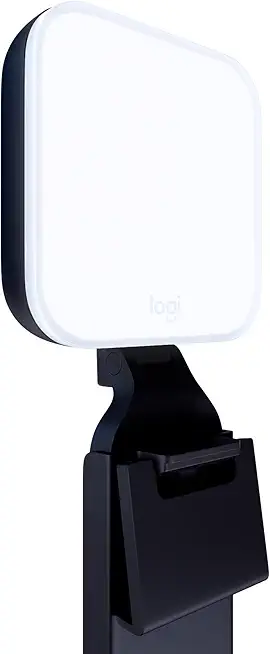
Logitech Litra Glow Premium LED Streaming Light with Adjustable Mount
High quality LED streaming light providing natural skin tones, adjustable angles, and gentle brightness for lengthy live sessions
Check PriceThe Logitech Litra Glow is a compact desktop light designed specifically for streamers, remote workers, and desk-bound creators. As a photographer who often shoots at a desk or streams demonstrations, I appreciate gear that respects limited space without sacrificing quality.
Its frameless diffuser technology eliminates harsh shadows and hotspots, producing a soft, even light that flatters skin tones and reduces eye strain. The monitor-top clip mount saves desk space and keeps your work area tidy, which is crucial when your camera, mic, and other gear compete for real estate.
Setup is refreshingly simple: USB-powered and plug-and-play with an adjustable mount, so you can clip it to a monitor or laptop and tweak the angle quickly. No bulky adapters or batteries means fewer cables and less fuss during long streaming or video-call sessions.
In real-world use the Litra Glow gives soft, even illumination that’s easy on the eyes over extended periods. The secure clip preserves desk tidiness, and the adjustable mount helps dial in optimal angles and framing without chasing reflections or hotspots.
This light is particularly good if you mainly create at a desk, stream, or do video calls and want a neat, reliable key or fill light. It’s less suitable if you need to light larger scenes or want very high output—its brightness is limited compared to larger panels or ring lights.
If you value portability, desk cleanliness, and easy setup, the Litra Glow is a strong, practical choice. If your work requires broader coverage or very bright key lighting, consider augmenting it with a larger panel.
- Compact form factor tailored for desk use
- Soft light with minimal glare and no hotspots
- Convenient monitor clip mount
- USB powered—no bulky adapters or batteries needed
- Not suitable for larger filming setups
- Limited brightness versus larger panels/ring lights
3. Aputure Amaran 60XS

Aputure Amaran COB 60X S LED Video Light, Bowens Mount, Bi-Color 2700-6500K, AC/DC Power, App Control
Powerful bi-color COB fixture with wide 2700–6500K range, Bowens compatibility, AC/DC operation, and app-enabled control for precision lighting
Check PriceThe Aputure Amaran 60XS is a compact COB LED panel that punches well above its size, delivering bright, flattering light with smooth output and high color fidelity. Its silent fan operation makes it an excellent choice for video recording where camera mics are in use. Being portable and lightweight, it’s easy to toss in a bag for location shoots or to tuck into a small studio setup.
In real-world use it’s consistently praised for producing smooth, flattering light that helps prevent harsh shadows, which is exactly what you want for talking-heads, interviews, and product close-ups. The unit feels like an upgrade over older LED panels many creators still use, bringing cleaner color and more even output. Because it’s both compact and silent, it’s especially practical when you need to move quickly between setups or record in quiet environments.
The adjustable output gives you control over intensity without sacrificing the soft quality of the beam, and the high color fidelity ensures skin tones and practical colors look true to life on camera. I find it particularly useful as a key or fill source in tight spaces where a big softbox would be unwieldy. Its light quality pairs well with modest diffusion if you want an even softer, beauty-style look.
There are a couple of caveats: for ultra-soft, cinematic diffusion you may still want an additional softening layer, and some users note the interface can feel slightly less intuitive at first. Overall, if you need a portable, quiet, color-accurate panel that elevates older LED setups, the 60XS is a very solid, versatile tool to add to your kit.
- Bright and soft lighting with adjustable output
- Portable and lightweight design
- Silent operation suitable for video recording
- High CRI for accurate color reproduction
- May require additional diffusion for ultra-soft lighting in some setups
- Interface can feel slightly less intuitive initially
4. Neewer BP300 Bi-Color LED Video Light Panel
Neewer BP300 LED Video Panel Light Kit, Bi-Color 2700-6500K, Tripod and Phone Holder
Compact bi-color LED panel kit includes tripod and phone mount, offering versatile lighting for vlogging, interviews, and mobile production
Check PriceThe Neewer BP300 is a genuinely useful budget-friendly bi-color panel that I often recommend to creators starting out or shooting on the go. Its 2700K–6500K range makes it easy to match ambient tungsten or daylight without reaching for gels, so skin tones stay natural whether you’re indoors or near a window.
Output is respectable for its size — up to 850 Lux at 0.5 m — which is enough to serve as a key or a strong fill for YouTubers, streamers, interviews, and vlogging setups. The built-in diffusion produces a soft, even glow that minimizes harsh shadows and flatters faces in close- to mid-distance shots.
Color fidelity is solid thanks to the CRI 95 rating, so colors render accurately on camera and require less color correction in post. The integrated power and control cables simplify setup and portability; you won’t wrestle with separate adapters when swapping locations or mounting on small rigs.
Where it shows its budget roots is in build feel — some users note a more basic construction compared to premium panels, so handle it with a little care. Also, if you’re lighting a large studio or need an overpowering key light, the BP300’s maximum output may fall short and you’ll want a higher-output panel or multiple units.
Overall, if you need an affordable, lightweight, color-accurate panel for single-subject interviews, streaming, or vlogging, the Neewer BP300 is a practical choice that balances softness, color control, and portability.
- 2700K–6500K color range
- 850 Lux at 0.5 m brightness
- CRI 95 for accurate color
- Compact, lightweight with integrated cables
- Not bright enough for large studio spaces
- Basic build quality vs premium panels
5. Govee RGBIC LED Strip Lights

Govee RGBIC 16.4ft LED Strip Lights App Control Music Sync
Vibrant RGBIC strip delivering dynamic multi-zone colors, app customization, and music-responsive effects to transform any room's atmosphere
Check PriceThe Govee RGBIC LED Strip Lights are a background-first solution that excels at creating mood and personality in video. RGBIC technology lights multiple segments in different colors at once, so you can produce cinematic gradients and dynamic effects behind your subject.
These strips are built for social formats like TikTok and short-form videos where atmosphere matters. They offer a large color gamut and brightness suitable for background illumination, which helps separate your subject and add production value without complex modifiers.
Control comes through the Govee Home app, which gives extensive customization for scenes, color transitions, and sync options. Users also praise the flexible installation options, so you can run strips along shelves, behind monitors, or around sets to shape your frame.
Voice assistant compatibility is a practical touch for hands-free changes during a take or livestream. That said, these lights are ambient tools — not key or fill lights — so plan to pair them with proper front lighting when your subject needs flattering, shadow-free illumination.
Installation and setup can take time, especially if you’re routing long runs or concealing cables. If you want plug-and-play background color with deep customization and don’t mind some setup, these are a strong, cost-effective way to level up your visuals.
In short: choose Govee RGBIC if your priority is immersive, multi-color backgrounds for social and lifestyle content. Avoid them as standalone portrait lighting; they’re designed to complement, not replace, your main light sources.
- RGBIC multi-segment color effects
- Large color gamut and bright background illumination
- Govee Home app with deep customization
- Voice assistant integration
- Not intended as key or fill light
- Installation/setup can be time-consuming
How to Use 3-Point Lighting
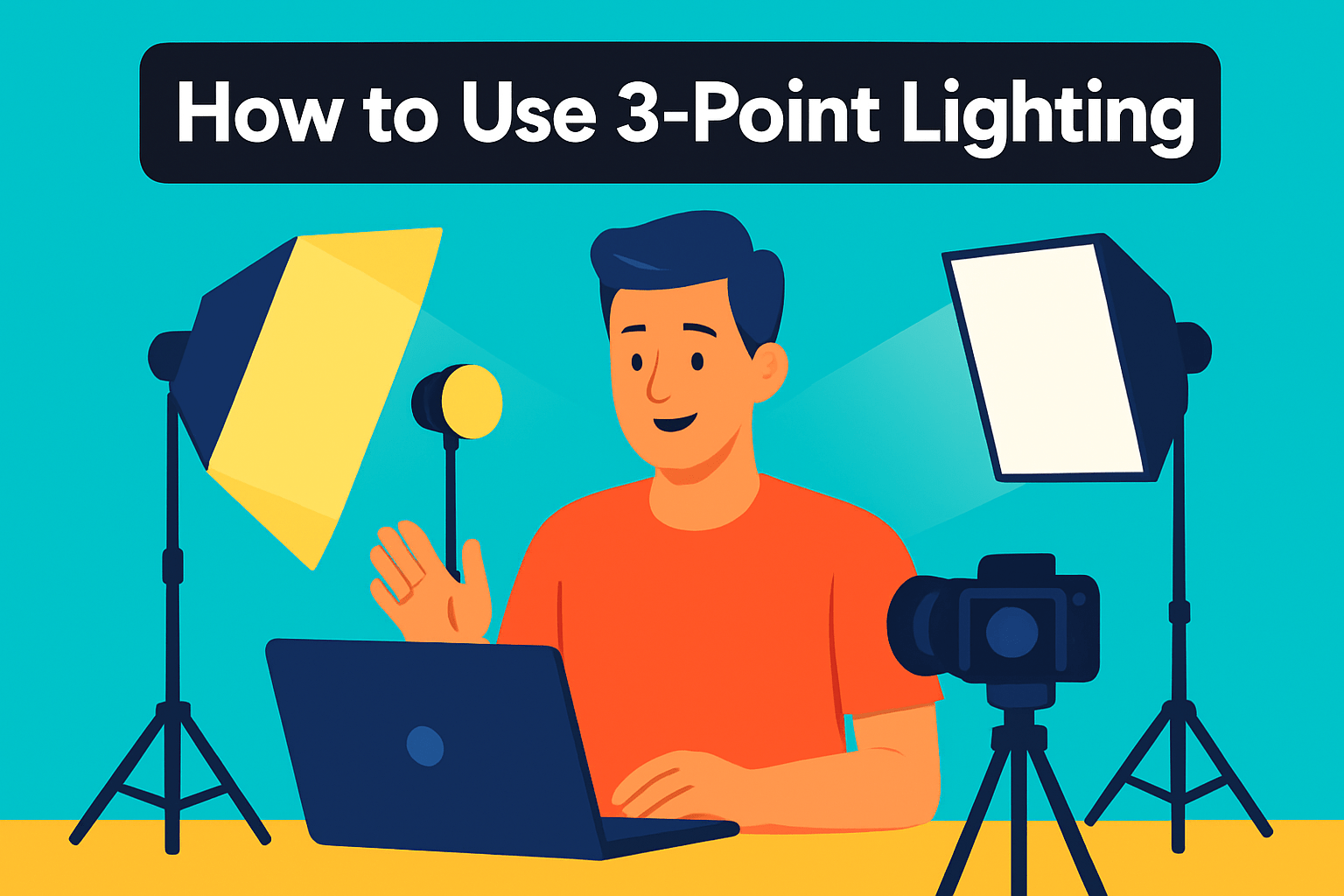
Three-point lighting is the industry standard for creating depth and flattering dimension in video and photography. For content creators, it’s the fastest way to make faces readable and separate the subject from the background.
The key light is your primary source. Place it about 45° from the camera so it sculpts the face; moving it closer softens shadows while moving it back increases contrast. Use it to set exposure—adjust until skin mid-tones look natural on camera.
The fill light sits opposite the key and softens shadows without eliminating them. Aim for roughly half the key’s intensity, or swap in a reflector for a gentler fill. Reflectors are especially handy in tight spaces because they add fill without another fixture.
The backlight, also called a hair or rim light, sits behind and slightly above the subject. It creates an edge glow that separates the subject from the background and can also be used to highlight a backdrop.
Light ratios guide mood: 2:1 key-to-fill reads cinematic while 1.5:1 feels flatter and more newsy. Experiment with angles and distances—small moves change shadow character, so record quick tests and adjust. Don’t lock into one ratio; switch depending on whether you want mood or clarity.
Short on fixtures? Use a window as key, a reflector for fill, and a small LED as a rim light; natural light can be excellent, but watch its changing intensity. In my experience, placing lights slightly above eye level avoids harsh nose and under-eye shadows and keeps catchlights attractive.
Consider adding a fourth light for even backdrop illumination or green-screen work. That small addition helps with clean separation and makes compositing much easier.
Three-point lighting is forgiving and scalable, which is why many creators rely on it. Learn the basic positions, run quick tests, and you’ll get a professional, flexible look for interviews, vlogs, and product shots. With a few quick checks you can reproduce the same look reliably each shoot.
How to Use Light Modifiers
Light modifiers are the photographer’s way of sculpting light — changing its softness, shape and falloff to suit mood and subject. They tame harsh LEDs, add flattering wraps on faces, and create focus with beams or rim highlights. Treat modifiers as part of the creative kit, not just accessories.
Softboxes and umbrellas give broad, flattering light; the bigger the surface, the softer the shadows. Reflectors bounce light back into shadow areas for instant, inexpensive fill. Grids and barn doors tighten the beam to isolate a subject, while snoots and gobos let you paint highlights or pattern interesting shadows.
In practice, match your modifier to the story you want. For beauty or talking-head work I use a large softbox for the key, a white foam-core reflector for fill, and a small grid on a hair light to separate the subject from the background. For product or moody scenes I swap the softbox for a harder modifier or add flags to crank contrast.
Control spill aggressively — unwanted light ruins backgrounds and colors. Barn doors, grids or simple flags let you shield walls and keep reflections off glasses or shiny products. Also remember the basics: moving a modifier closer softens the light and raising it above eye level avoids cross shadows under the nose and eyes.
Don’t underestimate DIY: sheer curtains, tracing paper or diffusion gel act like portable softboxes, and foam-core works beautifully as a reflector. Colored gels or patterned gobos and RGB backlights are great for branding and mood, but always check white balance and skin tones when mixing color sources.
Modifiers let you get professional polish without buying a higher-end light. Start simple, change one element at a time and review test clips. With a few well-chosen modifiers you’ll be able to sculpt light that flatters subjects, accents details and defines your visual style.
What People Ask Most
What kind of lighting do content creators use?
Creators use a mix of soft, diffuse lights for flattering skin tones and colorful ambient lights for mood and background separation. Choices include compact desk lights, ring lights, panels, and LED strips depending on the content and space.
What is the best lighting setup for video content?
The best setup prioritizes even, flattering illumination and separation from the background. A balanced combination of a primary light, a softer fill, and a back or accent light typically produces professional, natural-looking results.
How many lights do I need for content creation?
It depends on your space and the look you want to achieve; many creators start with a simple primary light and add a fill or background accent as needed. Build up or simplify your setup based on test footage and the style of your content.
What color temperature is best for filming content?
Match your lights to the ambient light and the mood you want to convey; neutral daylight-like tones work well for natural skin tones while warmer or cooler tones create different atmospheres. Keep color temperature consistent across your sources to avoid unwanted color casts.
Should content creators use ring lights or softboxes?
Both are useful: ring lights provide even frontal illumination and distinctive catchlights, while softboxes offer broader, more controllable soft lighting. Choose based on framing, the desired look, and how much control you need over shadows.
How do I set up three-point lighting for vlogging?
Use a key light to one side of the camera to define features, add a softer fill on the opposite side to reduce harsh shadows, and place a back or rim light behind the subject to separate them from the background. Adjust angles and distances while testing until the balance looks natural.
What lighting is best for live streaming and YouTube videos?
Consistent, flicker-free lights with soft diffusion keep on-camera appearance natural and comfortable during long sessions. Complement key lighting with subtle background or accent lights to create depth and visual interest.
Conclusion for Best Lights for Content Creators
This roundup and the practical how-to tips give a clear, usable starting point for choosing lights and shaping your look across streaming, vlogging, and interview setups.
We covered five recommended lights alongside straightforward 3‑point lighting guidance and modifier ideas so you can control contrast, separation, and mood without guessing.
Hands-on testing—adjusting distances, angles, and modifiers—will quickly reveal what fits your content and space best, so don’t be afraid to experiment.
If you want to keep improving your lighting and production skills, read more articles on our site for tips, workflows, and inspiration tailored to creators at every level.
Have questions or want feedback on your setup? Leave a comment and we usually reply within a few hours.




0 Comments