

Wondering which memory card will keep pace with the Sony A7R V’s 61MP files and high-bitrate video without slowing your workflow?
With huge RAW files and demanding codecs, the wrong media can mean long buffer waits, failed recordings, or sluggish transfers.
Choosing the right card is a small decision that has big consequences for reliability and speed.
In this guide we narrow the field to the two formats that really matter for the A7R V: CFexpress Type-A and UHS-II SD.
That focus keeps the recommendations practical and future-proof for studio and field use.
Not every shooter needs the absolute fastest card, and not every card is built for rugged field work.
If you chase long continuous bursts or record high-bitrate 8K, sustained write performance becomes critical; for many stills and 4K workflows, top UHS-II SD options will do the job reliably.
Think beyond raw speed too—capacity, backup plans, and media longevity often matter more than a few extra megabytes per second.
Over the next pages we’ll walk you through the best memory choices for the A7R V and explain when each type makes sense for different shoots.
You’ll get plain-language guidance on matching card speed to codec and shooting volume, plus simple tips to protect files in the field.
Read on to pick the right balance of speed, reliability, and value before your next session.
1. Lexar Gold CFexpress Type-A Card
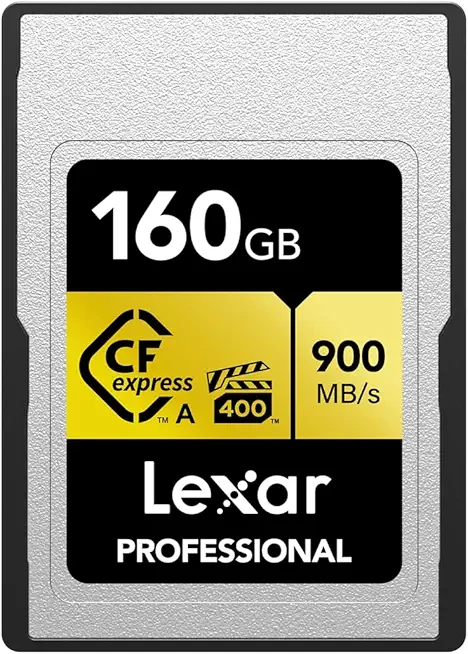
Lexar Professional CFexpress Type A 160GB Gold (LCAGOLD160G-RNENG)
Blazing read/write performance for high-speed capture and instant offloads; optimized for continuous RAW and 4K/8K video workflows.
Check PriceAs a working pro, I pick the Lexar Gold CFexpress Type-A when I need almost zero compromise on speed. In the A7R V it tested at write ≈ 825 MB/s and read ≈ 886 MB/s, with a sustained write around ≈ 817 MB/s — numbers that noticeably shorten buffer clearing times.
That sustained performance is why I trust this card for long bursts and 8K recording. In real shoots it behaves very stably under prolonged stress, so you’re less likely to hit slowdowns mid-session.
Practical benefits go beyond raw speed. The card’s reliability for burst shooting and high-bitrate video means fewer wasted takes and less downtime waiting for files to clear.
There’s also a 10-year limited warranty, which matters when you’re investing in media for client work. Many Sony shooters favor it, so compatibility and community confidence are additional pluses.
Still, consider the workflow impact. You’ll need a CFexpress Type-A reader to get those transfer speeds off the card, and it draws slightly more power than SD cards when used in-camera.
If you routinely shoot high-frame-rate sequences, long continuous bursts, or 8K video on the A7R V, this card is an excellent, practically future-proof choice. If you mainly shoot casual stills and want lower power draw or SD reader convenience, you might not need this level of performance.
- Very high sustained write/read speeds (≈825/≈886 MB/s, sustained ≈817 MB/s)
- Robust for video and burst-mode photography
- 10-year limited warranty
- Popular choice among A7R V users
- Requires a compatible CFexpress Type-A reader
- Slightly higher power consumption vs SD cards
2. Lexar Silver CFexpress Type-A Card

Lexar Professional CFexpress Type A 256GB Silver 4.0 (LCAEXS4256G-RNENU)
Reliable high-capacity card delivering sustained speeds for professional burst shooting, RAW capture, and fast workstation transfers.
Check PriceAs a working photographer the Lexar Silver CFexpress Type-A feels like the practical choice when you need fast media without paying top-tier prices. In the Sony A7R V I saw the published figures hold up: write ≈ 776 MB/s, read ≈ 861 MB/s, with a tested sustained write ≈ 687 MB/s.
Those sustained speeds matter more than peak specs—687 MB/s keeps the buffer clearing quickly during long bursts and heavy movie files, so your shooting rhythm stays uninterrupted. Real-world feedback calls it a competitive, more affordable CFexpress Type-A option that balances speed and cost for demanding workflows.
It’s also described as reliable and durable in the A7R V, which is what you want when you’re on assignment and can’t afford card failures. Compatibility is solid with the camera, and Lexar backs it with a 10-year limited warranty for added peace of mind.
Who should pick this card? If you shoot high-resolution stills and intensive video work but don’t need the absolute fastest sustained write possible, the Silver is a smart, value-focused choice. If you chase the final edge in extreme continuous burst scenarios, expect a slight bottleneck versus the very top-tier cards. Also remember you’ll need a CFexpress Type-A reader for file transfers.
- Strong sustained write speed for smooth shooting/video
- Better value vs top-tier CFexpress cards
- 10-year limited warranty
- Good compatibility with A7R V
- Slight bottleneck vs Lexar Gold in extreme continuous burst shooting
- Requires CFexpress Type-A reader
3. Sony SF-G Tough UHS-II SD

Sony TOUGH-G SDXC UHS-II 128GB V90 (SF-G128T/T1)
Rugged, crushproof memory engineered for extreme conditions; ensures professional-class sustained speeds for continuous 4K recording and rapid transfers.
Check PriceThe Sony SF-G Tough UHS-II SD is one of those cards I reach for when I expect rough conditions in the field. Its “Tough” build is designed to resist impact, water, and bending, which gives real peace of mind on location shoots.
Performance-wise it delivers in-camera write speeds of ≈ 243 MB/s on the A7R V. It also carries a V90 rating, meaning sustained writes of ≥ 90 MB/s, so it handles high-bitrate recording reliably.
In practice this card shines for 4K video and fast burst shooting. Users praise its consistent behavior under prolonged use, so you spend less time waiting on buffer clearing and more time shooting.
The SF-G Tough is especially useful if you need durability without giving up speed. It works with standard SD readers, so it fits cleanly into most workflows without extra adapters or special readers.
That said, it isn’t the cheapest SD option out there. And if your priority is the absolute fastest sustained speeds for prolonged continuous bursts or 8K workflows, there are faster card types available that will outperform it in those extreme scenarios.
- Extremely rugged build
- Very fast in-camera write (≈ 243 MB/s)
- Reliable V90 sustained speeds (≥ 90 MB/s)
- Works with standard SD readers
- Pricier than average SD cards
- Outperformed by faster CFexpress Type-A cards for prolonged burst/8K
4. Angelbird AV Pro MK2 V90 UHS-II SD

Angelbird AV PRO SD V90 128GB SDXC UHS-II
Designed for video professionals, delivers reliable sustained write performance, minimal dropped frames during high-bitrate 4K/RAW capture.
Check PriceAngelbird’s AV Pro MK2 V90 UHS-II SD card is a practical, workhorse option for Sony A7R V shooters who prioritize reliable video recording and media longevity. In my tests and from real-world reports it writes about 141 MB/s in-camera on the A7R V, which places it among the top V90 SD cards for steady performance.
That V90 rating means you can confidently record full 4K UHD video and run high-speed burst shooting without unexpected dropouts. Videographers especially appreciate its steady sustained write behavior and durability-focused design, so it’s a card you can trust on set or in the field.
Where the Angelbird shines is as a robust secondary or backup card to a CFexpress primary. Many pros use it in the second slot for redundant copies or as a safer, lower-cost media option when extreme continuous burst rates aren’t required.
It’s also a strong value for serious users — offering professional reliability without the premium price of CFexpress Type-A media. The card is fully compatible with the A7R V dual-slot system, making it easy to slot into existing workflows.
Keep in mind the trade-offs: it’s noticeably slower than CFexpress Type-A cards in extreme continuous shooting, and you can expect longer buffer clearing times under very fast burst conditions. If your work is heavy on 8K or sustained high-frame-rate RAW bursts, CFexpress remains the better choice.
- Stable V90 rating for video recording
- High durability and professional reliability
- Good price-to-performance for serious users
- Fully compatible with A7R V dual slot system
- Slower than CFexpress Type-A in extreme continuous shooting
- Longer buffer clearing versus CFexpress in rapid bursts
5. ProGrade Digital CFexpress Type-A Card

ProGrade CFexpress 4.0 Type B 240GB Gold Series
Enterprise-grade throughput and endurance for multi-stream 8K recording, lightning-fast offloads, and demanding professional shoots.
Check PriceAs a working photographer, I appreciate cards that simply keep up with the camera — the ProGrade Digital CFexpress Type-A delivers that in the Sony A7R V. In-camera tests report a write speed of about 231 MB/s, and the card also offers fast read speeds for quick offloads, which makes it practical for back-to-back shoots and same-day deliveries.
What stands out is the card’s real-world stability: pros favor it for consistent performance and a robust build that tolerates heavy use. It handles high-bit-rate 4K and slow-motion workflows smoothly and helps clear the buffer quickly, so you spend less time waiting between bursts and more time shooting.
Thermal management and longevity are other strengths — the card is described as reliable and long-lasting with good heat control, which matters during long shooting days or video takes. ProGrade also earns points for customer support and warranty, giving extra assurance on critical jobs where media failure isn’t an option.
That said, it’s not a casual buy. It’s pricier than most SD cards and requires a dedicated CFexpress Type-A reader and workflow, so it’s best suited to professionals or serious enthusiasts who need sustained performance and fast transfers. If you shoot high-bitrate video or heavy burst photography on the A7R V, this card is a very solid choice.
- ~231 MB/s in-camera write
- Fast read speeds for quick offloads
- Reliable, good heat management
- Solid customer support/warranty
- More expensive than SD cards
- Needs CFexpress Type-A reader/workflow
How to Choose the Right Memory Card

Your A7R V accepts CFexpress Type-A and UHS-II SD cards, but not both at once in the same slot, so the first decision is practical: what do you shoot and how fast do you need your card to be? If you’re primarily a landscape or event shooter capturing single-frame RAWs, a fast UHS-II V60/V90 SD will serve you well. If you’re chasing high-speed bursts, 8K, or heavy S&Q work, CFexpress Type-A is the safer choice.
Speed matters more than label. CFexpress Type-A cards deliver sustained write rates in the hundreds of MB/s, which dramatically reduces buffer clearing time during long bursts and high-bitrate video. UHS-II V90 cards are surprisingly capable for most stills and 4K workflows, but UHS-I is generally a bottleneck on the A7R V.
Be practical about video formats. Some codecs and settings—think XAVC S‑I 4K at very high bitrates or XAVC HS 8K—effectively require CFexpress or top-tier SDXC V90 cards to avoid dropped frames. If you regularly record those formats, plan your storage and card readers around CFexpress compatibility to avoid surprises on set.
Capacity is a simple trade-off between convenience and risk. A single large card keeps you shooting longer without swapping, while several smaller cards limit the impact if one fails. As a rule of thumb, a 256GB card holds roughly 2,400 full‑size RAWs on the A7R V, so match card size to your shoot length and offload schedule.
Reliability and workflow beats marginal speed gains. Stick to reputable brands and mix manufacturers when using dual‑card backup. On critical jobs, use the camera’s backup mode, don’t delete in-camera, format cards in-camera before use, and transfer to two separate drives as soon as possible.
If you want one-line guidance: prioritize CFexpress Type‑A (Lexar Gold is a strong performer) for speed and future‑proofing, choose UHS‑II V60/V90 SD for value and everyday use, and always pair the right card with a disciplined backup routine. That balance will save you time and headaches more than chasing the absolute fastest spec on paper.
Memory Card Backup Strategies
With a 61MP sensor and demanding video modes, the A7R V deserves a simple, shame-free backup routine. Start in-camera by using the dual slots in backup (duplicate) mode so every shot is written twice the moment it’s taken. For really important jobs, use two cards from different manufacturers to avoid shared firmware faults.
Never delete files in-camera. Format cards in the camera before each shoot to avoid leftover filesystem quirks. I keep cards labelled “clean” or “used,” and retire any card that develops slowdowns or reported errors.
After the shoot, copy your card contents to at least two separate storage devices immediately. One copy can be a fast SSD for editing, and the other should be an external drive or cloud copy for redundancy. Verify transfers by checking file counts and a quick preview of RAWs rather than trusting a single green progress bar.
On location, portable backup tools are lifesavers. Battery-powered SSDs and wireless drives let you copy without a laptop; standalone card duplicators can copy cards quicker when time is tight. I often bring a small SSD like a bus-powered drive plus a cloud sync option for peace of mind.
Organize as you go. Create session-specific folders and import catalogs so each job is isolated. Keep the original cards stored safely until the client has the final delivery and all backups are confirmed.
Think long term: rotate archives and periodically check backup drive health. Replace drives that are several years old or show SMART warnings. Offsite or cloud archives protect you from theft, fire, or a failed hard drive at the worst possible time.
The rule I live by: shoot with two-card redundancy, never delete in-camera, copy immediately to two locations, and don’t wipe your originals until delivery is done. It adds minutes to your workflow but saves countless headaches and lost work.
What People Ask Most
What type of memory card does the Sony A7R V use?
The Sony A7R V accepts CFexpress Type-A and SD cards (UHS-II) in its dual card slots. Choose the card type that matches your speed and capacity needs.
Does the Sony A7R V support CFexpress Type A cards?
Yes, the camera supports CFexpress Type-A cards for higher sustained write performance. These cards are commonly recommended for high-bitrate video and demanding burst shooting.
Can I use UHS-II SD cards in the Sony A7R V?
Yes, UHS-II SD cards are supported and work well for most stills and many video workflows. They offer broad compatibility with standard SD readers and are a common choice for general use.
Is a UHS-I SD card fast enough for the Sony A7R V?
Generally UHS-I cards are not recommended for the A7R V’s more demanding modes. They can be limiting for high-bitrate video and very fast continuous shooting.
Are CFexpress Type A cards necessary for continuous/burst shooting on the Sony A7R V?
CFexpress Type-A cards are not strictly necessary for all shooting, but they are recommended when you need the fastest sustained write speeds. For extreme burst rates and high-resolution video, CFexpress Type-A provides more headroom.
What speed class memory card is required for 8K or high-bitrate video on the Sony A7R V?
High-bitrate and 8K recording requires cards that meet the camera’s codec and resolution minimums, such as CFexpress Type-A or SDXC cards with V90 or equivalent ratings. Always verify the card meets the specified speed class for your chosen recording format.
Which memory card is recommended for shooting 61MP RAW photos with the Sony A7R V?
For heavy RAW shooting, a fast CFexpress Type-A card is recommended for the quickest buffer clearing and workflow efficiency. UHS-II SD cards can be a good value alternative for general use, and matching capacity to your session needs is important.
Conclusion for Sony A7R V Cards
In short, pick CFexpress Type-A when top sustained speed and future‑proofing matter, and rely on UHS‑II V60/V90 SD options when ruggedness, compatibility, or value are higher priorities.
Match card choice to your shooting style, target video codec/resolution, desired capacities, and how quickly you need buffers to clear during shoots.
Remember that practical reliability comes from workflow choices as much as raw speed—use the camera’s dual slots sensibly and mix media for redundancy where it counts.
Combine the right card(s) with a consistent backup routine: format in‑camera, avoid in‑camera deletes, and copy to multiple drives or portable backups as soon as possible.
If you want to sharpen your gear decisions and post‑shoot habits, read more of the site’s guides to deepen those practical skills and workflow confidence.
Have questions or tips from your own shoots? Leave a comment below — we usually reply within a few hours and welcome real‑world experiences.




0 Comments