
Ever wish you could spot a hidden colony of rodents or termites without tearing open walls? Thermal cameras do just that by revealing subtle heat patterns our eyes cannot see.
They turn mysterious noises and creaks into visible evidence, making inspections faster and far less invasive. In this guide I compare five top thermal cameras suited for pest control and provide practical buying guidance.
I tested them in real-world inspections to evaluate detection, ergonomics, battery life, and reporting workflow. The goal is to help you pick a tool that saves time, reduces guesswork, and improves treatment accuracy.
You’ll find candid pros and cons drawn from field use, not marketing copy. Expect clear advice on sensitivity, image clarity, portability, and durability — the traits that matter most on a job site and under tight deadlines.
I also focus on how each camera handles documentation and client-ready images. Whether you’re a homeowner checking a suspicious attic or a pro running routine inspections, this primer cuts through the jargon.
By the end you’ll understand which features justify a higher price and which offer the best value for common pest problems. Ready to see heat where the pests hide and learn which camera earns its keep?

HF96 thermal camera 240x240 super resolution (96x96 IR) 25Hz -4°F to 1022°F 11h runtime

Ferret Thermal wireless imaging camera 640x480 TISR (160x120 IR) Wi-Fi rechargeable rod mount
1. FLIR Exx Series (E54/E76/E86/E96)

FLIR E54 thermal imaging camera 24° lens 320x240 -20°C to 650°C
Professional-grade thermal inspections with 320x240 resolution and 24° optics, capturing temperatures from −20°C to 650°C for accurate diagnostics.
Check PriceThe FLIR Exx Series (E54/E76/E86/E96) is a professional-grade thermal camera line built for pest controllers who need clarity and durability in the field. With resolutions from 320×240 (E54) up to 640×480 (E96), these units reveal subtle temperature differences that help pinpoint termite nests, moisture anomalies, and hidden colonies before damage becomes visible.
As a photographer I appreciate how FLIR’s MSX merges visible and thermal images, producing overlays that make reports and documentation far more convincing to clients. The MSX output sharpens edges and context, so heat patterns aren’t just blobs — they sit within a clear visual frame you can present.
Field work demands rugged gear, and the Exx cameras deliver with an IP54 dust/moisture rating and a build that stands up to roof and wall inspections. They’re heavier and larger than entry-level models, but that heft comes with a purposeful, durable chassis that survives frequent use.
For professionals who inspect regularly, the Exx line is mostly worth the investment: exceptional thermal resolution, reliable performance across varied conditions, and MSX-enhanced images that streamline diagnosis and reporting. If you’re a casual or infrequent user, the higher cost and size might outweigh the benefits.
In short, choose an Exx model if you need top-tier image detail, ruggedness, and professional reporting capabilities; skip it if you only need occasional spot checks and want something lighter and cheaper.
- Exceptional thermal resolution (320×240 to 640×480)
- Reliable in varied environmental conditions (IP54)
- MSX image enhancement for clear visual-thermal overlap
- Rugged build for roof and wall inspections
- Higher cost for infrequent/casual users
- Larger and heavier than entry-level models
2. FLIR Ex Series (E5/E6/E8 Pro)
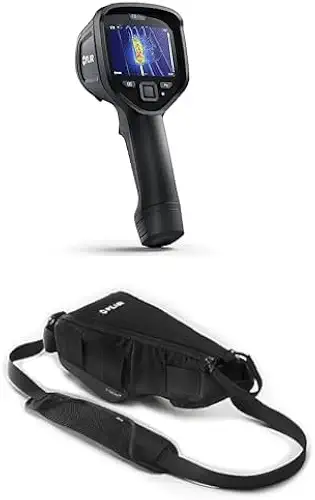
FLIR E8 Pro thermal imaging camera with Wi-Fi and pouch
Portable Wi‑Fi enabled inspector with high-sensitivity thermal imaging, onboard reporting, intuitive controls, includes protective pouch for field-ready convenience.
Check PriceThe FLIR Ex Series (E5 Pro, E6 Pro, E8 Pro) is a practical, workhorse thermal camera line that balances cost and capability for small pest-control businesses and part-time technicians. Resolution ranges from 160×120 (E5 Pro) up to 320×240 (E8 Pro), giving you enough pixel detail to find most common infestations without paying for premium models.
As a photographer who relies on clear contrast and reliable sensors, I appreciate how these units deliver consistent FLIR reliability in the field. They’re strong value tools: effective for locating nests, moisture intrusion, and structural pest activity, and they do so without the premium price tag.
In real inspections the Ex Series performs well for the majority of tasks you’ll face—spotting warm rodent nests, mud tubes from termites, or wet areas behind wall surfaces. The interface is user-friendly and built to handle outdoor inspections, so you’ll spend less time fumbling with settings and more time framing useful images for reports.
Keep in mind the trade-offs: while the resolution is sufficient for most jobs, it’s not as sensitive or detailed as higher-end Exx models when hunting very subtle anomalies. If you need the finest diagnostic clarity for early-stage infestations, the Ex Series may feel limiting; but for most pros starting out or running routine surveys, it’s a dependable, cost-effective choice.
- Good resolution (160×120 to 320×240)
- User-friendly interface
- Durable for outdoor inspections
- Cost-effective for starting pros
- Less sensitive and lower resolution than premium models
- Smaller screen and less clarity for detailed diagnostics
3. Ferret Thermal Wireless Inspection Camera
Ferret Thermal wireless imaging camera 640x480 TISR (160x120 IR) Wi-Fi rechargeable rod mount
Wireless rod-mounted inspection camera pairing crystal-clear 640x480 visual with 160x120 thermal, Wi‑Fi streaming and rechargeable battery for hard-to-reach diagnostics.
Check PriceThe Ferret Thermal Wireless Inspection Camera is a tool I reach for when access is the limiting factor in a shoot—only here it’s an inspection, not a photo. It’s a wireless, rod-attachable camera from Ferret Tools that pairs a FLIR Lepton thermal sensor with a visible camera and bright LEDs, so you get both heat contrast and context in tight spaces.
What sold me on it in the field was how it extends reach: mounted to rods or the company’s Ferret Sticks it slips into attics, crawl spaces, and under floors where handheld imagers can’t go. That rod-mounted access reduces ladder work and risky climbs, which makes inspections faster and safer for a solo operator.
Image-wise, the dual-camera setup is practical rather than flashy—thermal highlights give you hotspots while the visible camera and LEDs show surrounding detail for orientation and reporting. The system streams to a smartphone via an app, which keeps capture, annotation, and sharing straightforward when documenting nests, warm voids, or moisture-related anomalies.
There are trade-offs to accept: because it relies on a smartphone for display and capture, overall session length can be limited by phone and accessory battery life. You may also run into range or wireless connection hiccups in complex structures, but if your priority is getting a thermal look into confined cavities without tearing walls, this Ferret solution is a strong, purpose-built choice.
- Rod-attachable wireless reach
- Dual thermal + visible cameras with bright LEDs
- Compact, lightweight with FLIR Lepton sensor
- App capture for easy documentation
- Depends on smartphone — drains battery
- Wireless range/connection can be unreliable
4. FLIR C5 Compact Thermal Camera

FLIR C5 compact thermal imaging camera with Wi-Fi
Pocket-sized thermal scanner with Wi‑Fi sharing, intuitive interface and onboard reporting—ideal for quick building, electrical and HVAC inspections.
Check PriceThe FLIR C5 is a compact, pocketable thermal camera built for homeowners, landlords, and mobile technicians who need fast, actionable inspections. It uses a 160×120 thermal sensor with MSX image enhancement, so you get a clearer thermal overlay that makes hotspots and moisture stains easier to interpret in the field.
Its Wi‑Fi and cloud storage make sharing images and building quick reports painless — handy when you’re documenting entry points or moisture for clients. The touchscreen interface speeds up capture and review on-site, and the IP54 durability rating means it stands up to routine outdoor use.
In practice I find the C5 excels at spot checks: doors, window frames, small patches of ceiling, and plumbing runs where you suspect leaks or nests. The MSX overlay gives visual context that helps non-technical clients understand what you’ve found. For fast triage and documenting obvious anomalies, it’s a real time-saver.
However, the 160×120 resolution does limit how finely you can resolve subtle heat signatures. If you’re chasing faint, early-stage infestations or need extremely detailed diagnostics, a higher-resolution imager will pick up more nuance. Also, some users report the screen is on the small side, which can make detailed on-site interpretation a bit fiddly.
- Very portable for quick checks
- 160×120 resolution with MSX
- Wi‑Fi and cloud storage for easy sharing
- IP54-rated durability and touchscreen
- Lower resolution limits subtle heat-signature detection
- Small screen can hinder detailed on-site analysis
5. Seek Thermal RevealPro
HF96 thermal camera 240x240 super resolution (96x96 IR) 25Hz -4°F to 1022°F 11h runtime
Fast 25Hz thermal scanning with enhanced 240x240 super resolution, wide −4°F to 1022°F range and long 11-hour battery life for continuous inspections.
Check PriceSeek Thermal RevealPro is a rugged, user-friendly thermal camera built for fast field inspections. It combines a built-in display with a bright flashlight, which makes it straightforward to use in dark attics, crawl spaces, and wall voids.
As a photographer who often reads light and shadow, I value the RevealPro’s bright screen and flashlight because they reveal context around thermal hotspots. That combination helps you quickly spot pest nests, air leaks, or electrical hotspots without juggling a separate torch or tablet.
The unit’s long-lasting battery and rugged construction mean it stands up to regular site work. For routine pest-control rounds, that durability reduces downtime and keeps inspections moving.
Keep in mind the camera offers moderate resolution. It’s excellent for quick scans and obvious heat signatures, but it may not capture very fine thermal variations the way higher-resolution imagers do.
Controls are intuitive and the on-board display is clear and large enough for on-the-go decisions. If you prefer simple, reliable gear that gets you answers fast, the RevealPro is a solid choice.
In short: choose the RevealPro for durability, ease of use, and practical on-site features like a flashlight and long battery life. If your work requires detecting the subtlest thermal differences, consider a higher-resolution tool for follow-up diagnostics.
- Durable and portable
- Long-lasting battery
- Integrated bright flashlight
- Intuitive controls with a large, clear screen
- Resolution could be higher for fine thermal variations
- Battery life may limit extended use in some scenarios
Detecting Pests With Thermal Imaging
I treat thermal work much like low‑light photography: you’re reading contrast more than detail. Pests and nests show up as subtle hot or cold patches against building materials, so look for irregular patterns — a warm blotch behind drywall, a cool streak where moisture collects, or a cluster of small heat signatures in an attic corner.
Time your scans when temperature differences are greatest. I prefer early morning or after sunset when interior heat or metabolic warmth stands out against cooling surfaces. In bright sun the signals can wash out, so move to shaded façades or wait for more even ambient temperatures.
Remember that thermal cameras detect surface temperature, not objects through walls. Think of them as detectors of consequences: termite mud tubes, rodent nests, social insect clusters, and moisture pockets all change surface heat. A hotspot is a clue, not a diagnosis — it points you where to look more closely.
Use image fusion or palette changes like you would adjust contrast in a photo. Switching palettes and overlaying visible-light detail helps separate plumbing heat, electrical sources, and living activity. A steady hand, tripod, or rod-mounted camera for cavities improves clarity when you’re trying to resolve small nests or entry points.
Always confirm thermal findings with invasive or proximate tools. Moisture meters, borescopes, and simple physical checks will tell you whether that thermal anomaly is pests, a leak, or insulation loss. I also recommend regular thermal checks to establish a baseline; repeat images make it easy to spot new activity and to measure whether treatments are working.
Choosing a Thermal Camera for Pest Control
Choosing the right thermal camera for pest work is less about chasing specs and more about matching the tool to how you inspect. If you’re a contractor doing frequent, detailed surveys you’ll want a low NETD (under ~50 mK) and higher resolution—think 320×240 or above—so small temperature differences and fine patterns from nests or moisture show up clearly. For occasional checks, a compact 160×120 unit with MSX or image fusion can be quicker and cheaper while still useful.
Think about access as much as image quality. Handheld imagers with wide fields of view are great for scanning rooms and attics, while rod-attachable wireless heads are indispensable for crawl spaces and voids. Battery life, wireless range, and whether the system leans on your phone are practical limits that often decide a purchase more than raw pixels do.
Features that photographers appreciate also matter for pest work. Fusion modes or MSX that overlay visible detail onto thermal data instantly make your photos more interpretable for clients. Palettes, digital zoom and a clear, reasonably large screen help you frame hotspots and document evidence for reports. If you deliver images, Wi‑Fi/cloud upload and consistent metadata (distance, ambient temps) save hours later.
Durability and ergonomics are underrated. IP54-style protection, a grippy body, and long battery life keep inspections moving outdoors and in messy attics. Consider weight and balance—heavier premium units give better detail but tire you on long jobs.
Finally, pair the camera with confirmation tools: a moisture meter, borescope, or simple probe gives you the proof thermal alone can’t. Choose the class that fits your inspection frequency, access needs, and report expectations; the right blend of sensitivity, resolution, and form factor will make your thermal work faster, more accurate, and more persuasive.
What People Ask Most
What is the best thermal camera for pest control?
There is no single best camera; choice depends on inspection frequency, access needs, and the level of detail required. Higher-resolution, more sensitive models suit professional work, while compact or rod‑attachable systems are better for spot checks and confined spaces.
How do thermal cameras help with pest control?
They detect infrared radiation and show surface temperature differences, revealing hotspots, nests, moisture, and secondary signs of pest activity. This non-invasive view helps locate problems that aren’t yet visible to the eye.
Can thermal imaging detect rodents in walls and ceilings?
Yes, thermal imaging can reveal warm rodent nests and activity as surface temperature anomalies in walls and ceilings. It cannot see through solid materials, so thermal findings should be confirmed with close-up inspection tools.
Are thermal cameras effective for finding termite infestations?
Thermal cameras can highlight heat and moisture patterns associated with termite activity, helping to locate infestations earlier. Results are most reliable when combined with confirmatory methods like moisture meters or borescopes.
What thermal resolution and sensitivity are needed for pest control applications?
Higher thermal resolution provides finer detail and lower NETD (better sensitivity) helps reveal subtle temperature differences; the outline notes under 50 mK as an ideal sensitivity and higher pixel counts for finer detail. Choose resolution and sensitivity based on how subtle the anomalies you need to detect are.
What features should I look for in a thermal camera for pest control?
Seek good sensitivity and resolution, an appropriate field of view, portability or rod compatibility for tight access, image enhancement options like fusion or palettes, durable construction, and easy reporting or integration. User-friendly controls and ruggedness are valuable for frequent field use.
Can thermal cameras detect bed bugs or insect nests?
Thermal cameras can detect clusters of warm insects or nests that create noticeable temperature contrasts, so some insect nests are detectable. Very small or well-insulated infestations may be difficult to spot and often require close inspection to confirm.
Conclusion on Thermal Cameras for Pest Control
Choosing the right thermal camera comes down to matching inspection frequency, access needs, and the level of detail you must reliably detect.
For routine fieldwork, mid- to high‑resolution handhelds deliver the fine detail pros need, while compact models and wireless rod systems make tight spaces and quick spot checks far easier and safer.
Prioritize sensitivity, resolution, portability, and ruggedness, and look for systems that play well with moisture meters or borescopes so thermal findings can be confirmed non‑invasively.
If you want to sharpen your inspection workflow and diagnostic skills, read more articles on the site to deepen your understanding of techniques and gear selection.
Please leave a comment with questions or your own experiences—we usually reply within a few hours and are happy to help you pick the right approach for your next inspection.





0 Comments