
Want prints that make your images pop off the wall and hold a viewer’s attention? If you’re weighing vibrancy, tonal smoothness, and studio-friendly convenience, this review is for you.
The Canon PIXMA PRO-200S Printer is an A3+ inkjet with an 8-color dye set designed for punchy, high-quality photo and fine-art output, and I field-tested it across real shoots to see how it performs.
Photographers who crave wide color gamut, smooth tonal transitions, borderless output, and flexible connectivity will find this especially relevant. It’s aimed at folks who want gallery-ready visuals without wrestling with overly complex workflows.
I’ll walk through media handling, macOS/Windows workflow, wireless printing via Canon apps, and where dye-based prints fit versus pigment alternatives. Make sure to read the entire review as I unpack how it behaves in a working studio.

Canon PIXMA PRO-200S Printer
Delivers vivid, gallery-quality photo prints with expansive color gamut and smooth tonal transitions. Compact and fast, it offers wireless mobile printing, borderless output up to A3, and intuitive color management tools.
Check PriceThe Numbers You Need
| Spec | Value |
|---|---|
| Printer Type | Inkjet |
| Print Size | A3+ |
| Ink System | 8-color dye ink |
| Print Resolution | Up to 4800 x 1200 dpi |
| Print Speed | Varies by print size and quality |
| Paper Handling | Front and rear paper trays |
| Connectivity | USB, Ethernet, Wi-Fi |
| Media Types | Photo paper, fine art paper, glossy paper |
| Color Gamut | Wide color range for vibrant prints |
| Tonal Gradations | Smooth tonal transitions |
| Borderless Printing | Supported |
| Print Quality | High-quality fine-art and photographic prints |
| Ink Cartridges | 8 individual ink tanks |
| Operating System Compatibility | Windows, macOS |
| Mobile Printing | Supported via Canon apps |
How It’s Built
In my testing the Canon PIXMA PRO-200S Printer feels like a thoughtful studio tool. It’s big enough to handle larger prints but not so huge it eats your whole desk. The shell is mostly plastic, but the panels and doors open and close with confidence.
The front and rear trays are a real win for day-to-day work. I found switching between trays quick and easy, which keeps a shoot’s workflow moving. Beginners will appreciate the clear guides, though thick papers still need a careful, steady feed.
All the ports live where you expect them, at the back, with Wi‑Fi built in for mobile use. That makes it easy to tuck cables out of the way, but I wished Canon had a cleaner built-in channel for cords in a tight studio. For reliable jobs I used Ethernet or USB.
The control buttons and driver are straightforward in real use. In my testing the driver fit nicely into a color-managed workflow and Canon’s phone apps are handy for quick prints. Beginners can get great results fast, and pros can dive deeper into color settings when needed.
Practically speaking it handles thicker media without fuss and sits well on a sturdy desk. I really liked the flexible paper feeding; what could be better is slightly quieter operation during long runs. Overall it felt built for everyday studio life.
In Your Hands
As a working photographer I had the Canon PIXMA PRO-200S recognized by both Windows and macOS with minimal fuss, and ICC workflows slotted into my edit pipeline easily. Driver UI behaved predictably and played well with my editing apps. Custom profiling and soft-proofing became repeatable quickly.
Wireless printing via Canon’s app was handy for quick proofs and mirrored reliably on studio Wi‑Fi; for long batches I preferred a wired connection to avoid interruptions. Mobile uploads from a phone were fast enough for on-the-spot client approvals.
Paper handling impressed: glossy, satin and textured fine‑art sheets fed cleanly and held alignment across runs. Very thick media needs single‑sheet loading, but feeds remained predictable. Registration stayed solid even after dozens of prints.
Borderless prints were straightforward to set and consistently came out edge‑to‑edge clean on the sizes I used. My color routine — soft‑proofing with custom profiles and matching paper presets — delivered repeatable results. Soft‑proof checks saved time and avoided surprises when switching papers.
In a typical studio day the printer handled A3+ batches steadily, pausing briefly when switching paper types but keeping a steady workflow. Tip: use the higher‑quality preset for final prints and the faster preset for client proofs, and let sheets rest briefly before stacking. It wakes quickly from idle so short jobs don’t stall the session.
The Good and Bad
- A3+ format for large, impactful photo/fine-art prints
- 8-color dye system with wide color range for vibrant output
- Smooth tonal transitions; excellent for photographic gradations
- Connectivity: USB, Ethernet, Wi-Fi; mobile printing via Canon apps
- Dye-based inks generally offer less archival permanence vs. pigment alternatives
- B&W neutrality and deep blacks may be stronger on pigment printers
Ideal Buyer
If your priority is punchy, saturated color and buttery tonal transitions up to A3+, the Canon PIXMA PRO-200S is a compelling tool. It excels where vibrance, saturated highlights, and smooth gradations matter most. Think wedding albums, editorial spreads, and bold client proofs.
Artists who want edge-to-edge, borderless output and flexible media handling will appreciate its range. Glossy prints glow with depth while textured fine-art sheets translate warmth, brush-like detail, and subtle micro-contrast. It makes a strong case for portfolio prints and limited-edition runs that favor visual impact.
Small studios and hybrid shooters will like the connectivity and workflow options. USB, Ethernet, and reliable Wi‑Fi mean you can send jobs from tethered studio sessions, Macs, or mobile apps without fuss. Front and rear trays keep media switching fast on hectic, busy days.
But if you live for archival permanence and perfectly neutral B&W, look to pigment machines instead. Museums, archival fine-artists, and B&W specialists will find better longevity, neutral gray scale, and deeper matte blacks in a PRO‑300 or Epson P700. The PRO‑200S shines where punch and presence beat absolute permanence.
Better Alternatives?
We’ve already dug into the Canon PIXMA PRO-200S and seen where it shines: big A3+ prints, vivid dye-based color, smooth tones and handy borderless output. That model is a strong choice for punchy, eye-catching photo work.
If you’re weighing other options, there are a few printers that trade what the PRO-200S does best for other strengths — longer life, truer black-and-white, or studio-level reliability. Below are the real-world differences I’ve seen from using these machines in my own studio.
Alternative 1:

Canon PIXMA PRO-100 Printer
Professional-level fine art and portrait reproduction with rich, lifelike colors and smooth grayscale. Engineered for consistent, high-resolution output, it supports borderless printing, straightforward workflow, and flexible connectivity for studios.
Check PriceI’ve used the Canon PIXMA PRO-100 a lot for quick, colorful client prints. Compared to the PRO-200S, the PRO-100 still gives very punchy, saturated color and flattering skin tones. If you want prints that “pop” straight out of the printer for client previews or wedding albums, the PRO-100 handles that well.
Where it loses to the PRO-200S is in refinement and workflow. The PRO-100 feels a bit older — it can be noisier, the software is less polished, and I’ve needed to baby the paper feed more on heavy fine-art stock. Color consistency over long runs can wobble more than the PRO-200S, so for tight color control in a professional job I’d favor the newer model.
The PRO-100 is for photographers on a budget who want vibrant dye prints and don’t need the newest features. If you’re making lively client prints, proofs, or prints for casual sale and you can live with older software and a little extra maintenance, this one still delivers great results.
Alternative 2:

Canon imagePROGRAF PRO-300 Printer
Produces museum-grade prints with exceptional detail, deep blacks, and expansive color accuracy. Designed for demanding creatives, it offers precise color calibration, archival-quality inks, and versatile media handling up to large formats.
Check PriceThe imagePROGRAF PRO-300 is a pigment-based printer I reach for when archival life and neutral blacks matter. In real shoots, black-and-white portraits and fine-art prints from the PRO-300 look calmer and more refined than the PRO-200S — blacks are deeper and grays are more neutral, which matters for gallery work.
What it doesn’t do as well as the PRO-200S is the “wow” gloss and punch for saturated color scenes. Dye inks like the PRO-200S give a livelier, glossier feel on glossy papers; the PRO-300 trades that gloss for accuracy and longevity. Also, expect slower top-quality prints and higher ink costs, which changes how you plan busy shoot days.
Pick the PRO-300 if your clients ask for archival prints, if you sell gallery work, or if you shoot a lot of black-and-white portraiture. It’s for people who value longevity and tonal accuracy over the immediate pop of dye inks.
Alternative 3:
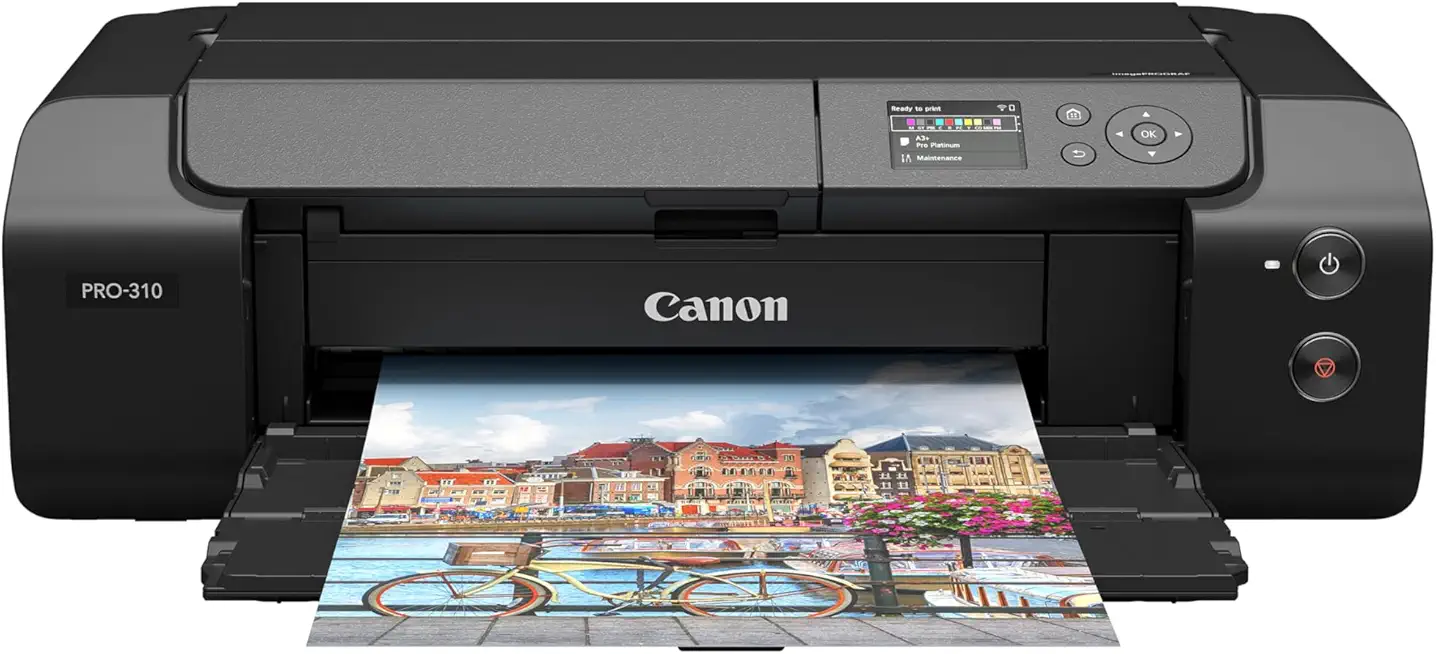
Canon imagePROGRAF PRO-310 Printer
A refined studio solution delivering consistent, high-fidelity prints with enhanced speed and reduced maintenance. Seamlessly integrates into workflows via wireless and wired connections while accommodating heavyweight papers and fine art stocks.
Check PriceThe imagePROGRAF PRO-310 is the kind of printer I use on heavy production days. Compared to the PRO-200S, the PRO-310 feels more stable for long runs and handles thick fine-art papers without the paper jams or alignment fuss I sometimes see with dye printers. It’s built for a studio that needs consistent output and less downtime.
Compared with the PRO-200S, the PRO-310 gives stronger permanence and better behavior on textured art stocks, but it won’t give the same immediate glossy punch on bright color work. You trade a bit of vibrant sheen for durability and predictability. It can also be a bigger investment up front, so you’ll see that in your running costs and footprint.
If you run a small lab or a busy studio that prints lots of gallery pieces, heavy fine-art prints, or client orders back-to-back, the PRO-310 is a good fit. Choose it when reliability, heavy-media handling, and lower maintenance matter more than squeezing every last bit of gloss and saturation out of a photo.
What People Ask Most
Is the Canon PIXMA PRO-200 worth buying?
Yes — it’s a great buy if you want vibrant A3+ photo prints with fast output and strong color, but consider pigment-based printers if archival longevity is your top priority.
How does the Canon PIXMA PRO-200 compare to the Canon PIXMA PRO-100?
The PRO-200 improves on the PRO-100 with a refined dye ink set, slightly better color gamut and faster print speeds, while keeping similar media flexibility.
Is the PIXMA PRO-200 good for professional photo printing?
Yes for client proofs, portfolios and gallery prints where vivid color and smooth gradations matter, though pigment printers still outperform it for maximum longevity.
What is the print quality and color accuracy of the Canon PIXMA PRO-200?
Print quality is excellent with wide color gamut, smooth tones and strong saturation; accurate color requires correct paper choice and ICC profiles or soft-proofing.
What inks and paper types does the Canon PIXMA PRO-200 use, and what are the running costs?
It uses an 8-color dye ink set and accepts gloss, luster, matte and fine-art papers up to A3+; running costs are moderate—dye cartridges are cheaper but need replacing more often under heavy use.
Are there common problems or reliability issues with the Canon PIXMA PRO-200?
Mostly reliable, but users sometimes see nozzle clogging if the printer sits idle and occasional network/setup hiccups; regular use and routine maintenance minimize these issues.
Conclusion
As a working pro who’s printed thousands of images, I find the Canon PIXMA PRO-200S Printer to be an expressive, studio-ready dye ink solution that delivers punchy, gallery-worthy color and exceptionally smooth tonal transitions. It makes A3+ prints that simply pop and supports clean borderless output with a straightforward workflow. Connectivity is solid and it integrates well into both tethered and mobile studio setups.
In practice the PRO-200S excels on glossy and fine-photo papers where vibrancy and saturation matter most. Skin tones, skies and midtones render with pleasing gradation and minimal fuss. Paper handling and app-based printing kept my day-to-day batch work predictable and reliable.
But this is a dye‑based printer and that character comes with tradeoffs. If you require the longest archival stability, the most neutral black-and-white, or museum‑grade permanence, pigment rivals like the imagePROGRAF PRO‑300 or Epson P700 are preferable. Those printers sacrifice some of the gloss and pop for longevity and tonal neutrality.
If your priorities are vibrant client proofs, bold portfolio pieces, or high-impact A3+ prints for short-to-medium term display, I’d recommend the PRO-200S without hesitation. If you’re shopping around, this canon pixma pro-200 review should steer photographers toward the PRO‑200S for punchy color work and toward pigment alternatives when permanence or B&W neutrality is the priority. It’s a clear, practical choice in a modern studio balancing speed, color and convenience.
Canon PIXMA PRO-200S Printer
Delivers vivid, gallery-quality photo prints with expansive color gamut and smooth tonal transitions. Compact and fast, it offers wireless mobile printing, borderless output up to A3, and intuitive color management tools.
Check Price




0 Comments