
Ready to make your livestreams look and feel like a polished production instead of a blurry webcam feed? Choosing the right camera can feel overwhelming with marketing claims, confusing specs, and endless accessory options. This guide strips away hype with hands-on testing, real-user feedback, and practical takes on how gear performs in real streams.
We surveyed five standout webcams and digital cameras favored by creators and professionals in 2026. Rather than regurgitating spec sheets, we judged each option on stability, image quality, and everyday usability during live broadcasts. You’ll get clear pros and cons, setup warnings, and the kind of tips that actually matter on air.
Whether you crave plug-and-play simplicity or cinematic control, the right choice depends on your workflow and content goals. We focus on real-world concerns like autofocus behavior, low-light performance, heat and reliability during long sessions, and how easy a camera is to integrate. Those practical differences will change your viewer experience far more than headline specs ever will.
We also call out common pitfalls and quick fixes so you can avoid frustrating problems mid‑stream. From camera placement to ease of software control, these hands-on observations are meant to save you time and money. Flip the page and find the pick that matches your style, budget, and technical comfort level.

Panasonic LUMIX GH7 (DC-GH7BODY) Micro Four Thirds Mirrorless Camera Body
1. Elgato Facecam MK.2

Elgato Facecam MK.2 Webcam
Professional-grade USB webcam delivering crisp full HD video, studio-grade optics, and plug-and-play performance for streaming, content creation, and video calls.
Check PriceElgato Facecam MK.2 is a top-tier webcam for streaming that delivers superb 1080p picture quality and a sharp, clean image that photographers and content creators will appreciate. Its reliable autofocus and consistent, natural color reproduction make it a trustworthy choice for live broadcasts where you need to look good without constant tweaking.
The MK.2 sports a smaller, less intrusive form factor with an improved mount and clipping system over its predecessor, so it sits neatly on monitors or tripods and stays put during long sessions. That compact design is ideal for desktop streamers, gamers, and corporate presenters who want a professional-looking feed without a bulky setup.
One standout is the built-in HDR, which noticeably improves performance in challenging or high-contrast lighting, preserving detail in highlights and shadows. Keep in mind HDR also disables some fine-tuning camera settings, so if you’re a controls-first photographer who likes to micromanage exposure and color, that limitation can matter.
Elgato’s Camera Hub software rounds out the package with accessible controls and presets, giving you practical adjustments for a polished output. Note there’s no built-in microphone, so pair the Facecam MK.2 with an external mic for broadcast-quality audio; overall it’s a mostly plug-and-play, high-quality solution for streamers who prioritize clean video and ease of use.
- Excellent image quality; HDR enhances dynamic lighting
- Compact, less intrusive design with improved mounting
- Consistent, natural color reproduction
- Quality software support (Elgato Camera Hub)
- HDR mode disables some fine-tuning settings
- No built-in microphone; external mic required
2. Logitech C922 Pro

Logitech C922x HD Pro Webcam
Compact high-definition camera optimized for live streaming and conferencing with smooth frame rates, automatic light correction, and built-in stereo microphones.
Check PriceThe Logitech C922 Pro is a reliable choice for beginners and intermediate streamers. It delivers sharp 1080p at 30fps or smooth 720p at 60fps, covering most desktop and casual streaming needs.
Its dependable autofocus keeps faces locked and in focus, which is invaluable when you move or gesture on camera. Background removal and plug-and-play simplicity make setup fast — no green screen or fiddly drivers required.
Image quality is decent for typical streaming environments, so with basic lighting you’ll get clean, usable footage without constant tweaking. That makes the C922 Pro a practical pick for talk shows, tutorials, and webcam-first streams where clarity and ease matter more than cinema-grade motion.
Choose 720p/60fps when you want smoother motion for gameplay or fast on-screen movement. Opt for 1080p/30fps if you prioritize detail in talking-head shots or face-cam overlays.
Do plan to add an external microphone; the built-in mic is mediocre and won’t meet viewers’ expectations for clear audio. Also, keep in mind higher-resolution frame rates are lower than on some newer models, so it’s not ideal if you require 1080p60 capture.
Overall, as a photographer stepping into livestreaming, the C922 Pro gives you straightforward, dependable performance that gets you on air quickly. Pair it with decent lighting and an external mic, and you’ll have a compact, effective streaming setup.
- Sharp 1080p/30fps or smooth 720p/60fps video
- Reliable autofocus praised by users
- Background removal for streams without green screens
- Easy plug-and-play setup for beginners
- Mediocre built-in microphone; users often add external mics
- Lower frame rates at higher resolution vs newer models
3. Sony α6700 Mirrorless Camera
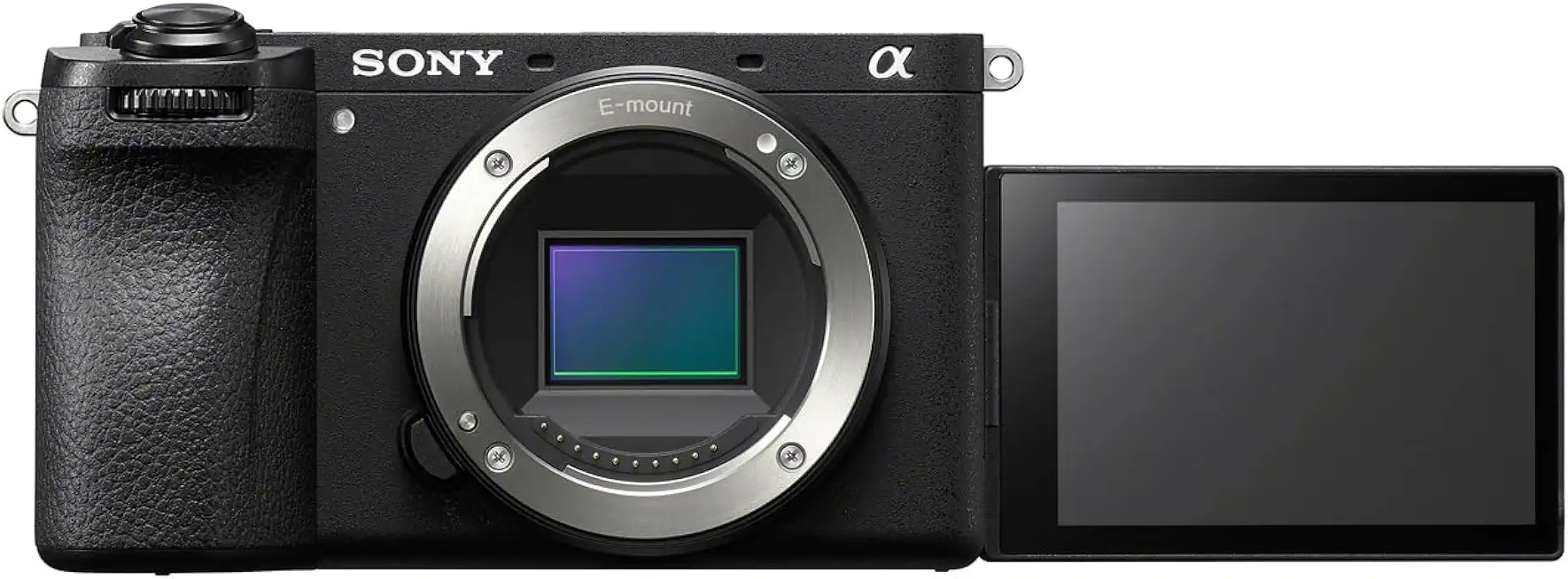
Sony Alpha 6700 APS-C 26MP Interchangeable-Lens Camera
Advanced mirrorless body offering 26MP APS-C image quality, lightning-fast autofocus, 4K video, and versatile lens compatibility for hybrid photographers.
Check PriceAs a compact mirrorless built for creators, the Sony α6700 is a strong pick for streamers who want pro-level image quality rather than a simple webcam. It’s designed to work with a capture card or USB adapter, so expect a slightly more involved setup but a much cleaner feed once connected.
The 26 MP APS-C sensor delivers crisp detail and better low‑light performance than typical webcams. Pair that with 4K at 120fps and internal 10‑bit 4:2:2 recording and you’ve got footage that holds up for live streams and repurposing — slow motion and color grading look noticeably richer.
Autofocus on the α6700 is outstanding — fast and accurate for moving subjects — which makes it excellent for solo streamers who pace around a desk or demonstrate products. In‑body image stabilization adds another level of polish, keeping live video smooth if you move or if the camera is handheld.
What I like most as a photographer is the modular design: it supports hybrid photo/video workflows and lets you expand the rig over time. That flexibility means it can grow with your channel, handling everything from polished streams to high‑quality recorded content.
There are tradeoffs, though. The outline notes it has no viewfinder, which can make framing tricky for newer users learning to compose without an EVF. It’s also more complex and bulkier than webcams and will require a capture card or USB adapter and a bit of setup patience.
- 26 MP APS-C sensor
- 4K at 120fps
- In‑body image stabilization
- Best‑in‑class autofocus
- No viewfinder — tricky framing
- Bulkier/setup required; needs capture card or USB adapter
4. Panasonic Lumix GH7 Micro Four Thirds Camera
Panasonic LUMIX GH7 (DC-GH7BODY) Micro Four Thirds Mirrorless Camera Body
Professional Micro Four Thirds body with robust stabilization, cinematic video tools, high-speed shooting, and durable weather-sealed construction for demanding creators.
Check PriceAs a working photographer who streams, I appreciate the Panasonic LUMIX GH7 as a true powerhouse for high-end live production. It brings ProRes RAW and 5.8K recording into a compact Micro Four Thirds body, which translates to incredibly flexible, broadcast-quality footage for streaming and recorded content.
The GH7’s built-in fan and in-body stabilization make it unusually well-suited to long sessions and handheld shots. Multiple ports and support for professional codecs mean you can integrate it into complex setups with external recorders and mixers without sacrificing quality.
The fully articulating screen is a small detail that makes a big difference for solo creators; you can frame and monitor yourself easily while adjusting exposure or focus. In practice the camera behaves like a studio tool rather than a consumer webcam — you get precise control, cleaner logs, and better color grading options after the fact.
That said, this isn’t a plug-and-play webcam replacement. It’s larger and heavier than typical webcams and assumes you know how to route HDMI, use capture devices, and manage codecs. Casual streamers who want simplicity will likely find it overkill.
If you want pro-grade streams, multi-hour reliability, and the ability to record high-resolution masters while you broadcast, the GH7 is a smart investment. If you need something instant and minimal fuss, look elsewhere. For anyone comfortable with capture cards and a bit of technical setup, this camera will elevate your stream noticeably.
- Advanced video features for high-end streaming and recording
- Built-in cooling fan reduces overheating during long streams
- Fully articulating screen aids framing and monitoring
- Supports professional codecs and external recording
- Larger and heavier than typical webcams; less plug-and-play
- Overkill for casual streamers seeking simplicity
5. Insta360 Link 2C 4K Webcam

Insta360 Link 2C 4K Webcam
Ultra-high-resolution 4K webcam featuring intelligent tracking, background replacement, and versatile mounting for exceptional remote meetings and creative livestreams.
Check PriceThe Insta360 Link 2C is a balanced 4K webcam that feels made for modern streamers who want a step up in resolution without a complex setup. As a photographer I appreciate how it delivers sharp, clean image quality that holds up across diverse lighting environments.
Its internal privacy shutter and magnetic monitor mount make it practical for desktop setups and quick repositioning. That magnetic mount is especially handy when you need to move the camera between monitors or stow it away between sessions.
Image-wise the Link 2C records 4K at 30fps, producing detailed footage that lets you crop or zoom slightly in software without losing too much clarity. The result is a polished, low-fuss look that translates well on streams and video calls.
The bundled software offers controls and generally keeps things simple, which is great if you don’t want to fuss with deep camera settings. Having said that, some users do find the software less intuitive than competitors, so expect a small learning curve if you like granular control.
One real limitation is that the camera records in portrait mode and is not easily physically rotated, which can restrict framing flexibility. If you frequently need to switch to vertical formats or reposition the sensor mechanically, this could feel limiting.
Overall, the Link 2C is a solid choice for streamers who want high-resolution, reliable performance with practical mounting and privacy features, while being aware of its rotation and software quirks.
- 4K video capture at 30fps
- Internal privacy shutter
- Magnetic monitor mount
- Good performance in varied lighting
- Not easily physically rotated; portrait-mode recording
- Software can feel less intuitive
How to Choose the Right Streaming Camera
Start by matching the camera to what you actually stream. If you sit at a desk and want simplicity, a high-quality webcam gives fast setup and reliable autofocus. If you’re creating cinematic shots, multi-camera layouts, or want a shallow background, a mirrorless or DSLR will serve you better—but remember those usually need a capture card or USB adapter to feed your computer.
Sensor size matters more than megapixels. Bigger sensors like APS-C or full-frame handle low light better, give richer dynamic range, and produce pleasing background blur. Smaller sensors are perfectly fine if you control your lighting and need a compact, lightweight solution.
Think about resolution and frame rate as a trade-off. 1080p at 60fps is the sweet spot for smooth, watchable streams. 4K is useful for future-proofing and for cropping or reframing in real time, but it demands more bandwidth and a more powerful computer.
Autofocus and stabilization are workflow savers. Fast face and eye-detection keep you sharp without babysitting the camera, and in-body or lens stabilization helps if you move around. For solo streamers, reliable AF is more valuable than a handful of extra features.
Never underestimate audio. Built-in mics are convenient but rarely broadcast-ready. Prioritize a camera with an external mic input or plan for a dedicated USB/XLR mic. Some modern webcams offer decent built-in arrays, which can be a good interim choice.
Consider connectivity and usability. USB webcams are plug-and-play and ideal for beginners. Mirrorless bodies offer better image quality but require power solutions, HDMI capture, and attention to heat during long sessions. A flip screen or remote-control app makes framing and monitoring painless.
Finally, weigh special features against complexity. Flip screens, vertical-mode support, and AI tracking can save editing time, but add cost. My practical rule: test a setup in your actual streaming space—lighting, background, and computer performance will reveal what camera truly fits your workflow.
Essential Accessories for Streaming
Great video starts with the camera, but what separates a good stream from a great one are the accessories. Invest in the right tools early and you’ll save time and frustration. Think of them as the supporting cast that makes your on-camera work shine.
If you’re using a mirrorless or DSLR, a capture card is non-negotiable. It gives you a clean, low-latency HDMI feed into OBS or Streamlabs and often supports pass-through so you can monitor without extra lag. Use a reliable, well-shielded HDMI cable and test the card with your camera to confirm settings like clean HDMI output and resolution/frame rate match your stream.
Audio matters more than most people expect. Built-in mics are convenient but thin; choose a USB condenser for simplicity or an XLR shotgun with an audio interface for broadcast-quality sound. Place the mic close to the mouth and out of frame, and use a pop filter or windscreen to reduce plosives.
Light shapes everything. A small softbox or LED panel with adjustable color temperature gives flattering, even skin tones, while a single ring light works for tight headshots. If you move on camera, add a subtle backlight to separate yourself from the background and keep shadows soft with diffusion.
Mounting and monitoring are practical but critical. A sturdy tripod or desk arm keeps your framing consistent and prevents accidental bumps. Add a field monitor or use your camera’s articulating screen to check focus and composition in real time, especially with shallow depth of field on larger sensors.
Don’t skimp on cables, power, and backgrounds. Use high-quality HDMI and USB cables, and plan for continuous power with AC adapters or battery grips for long sessions. A simple neutral backdrop or a green screen expands branding options and makes overlays look professional.
Finally, learn your streaming software and consider NDI or RTMP encoders for multi-camera setups. Keep gear protected in a padded case and you’ll be ready to scale your setup without losing the look you worked to create.
What People Ask Most
What features should I look for in a digital camera for streaming?
Look for reliable autofocus, good low-light performance, and a clean way to get video into your computer such as HDMI or USB connectivity. External mic input and easy controls make setup and audio management simpler.
Can DSLR or mirrorless cameras be used for live streaming?
Yes, they can be used for live streaming and often provide superior image quality and interchangeable lenses. They usually need a way to feed video to your computer such as a capture card or compatible USB adapter.
How do I connect a digital camera to my computer for streaming?
Most cameras connect via their video output into a capture device or through a manufacturer USB streaming mode if supported. After connecting, select that input in your streaming software to use the camera as a video source.
Do I need a capture card to use a digital camera for streaming?
Many mirrorless and DSLR cameras require a capture card to convert their video output into a streamable computer input, while some models offer direct USB streaming. Check your camera’s output options to determine whether an external capture device is necessary.
Do webcams or digital cameras produce better video quality for streaming?
Digital cameras generally offer larger sensors and more flexible optics, which can yield better image quality and depth of field. Webcams are simpler to set up and often more convenient for casual or desktop streaming.
What camera settings (resolution, frame rate, autofocus) are best for live streaming?
Use settings that balance smooth motion and your available upload capacity, enable reliable autofocus, and set exposure for consistent lighting. Test your configuration with your streaming platform and adjust based on your internet and lighting conditions.
Do digital cameras overheat or have recording time limits during long streaming sessions?
Some cameras can experience overheating or thermal limits during extended use, especially in demanding modes. Choose a model with good thermal management, use external power when possible, and monitor temperatures during long streams.
Conclusion for Best Digital Camera for Streaming
Choosing the right camera for streaming comes down to matching your content style, technical setup, and creative goals rather than chasing the highest specs. The roundup focused on real-world performance and user needs to help you pick gear that fits how you work and what you want to create.
Remember that accessories — a capture card for camera feeds, a reliable external mic, good lighting, and stable mounts — often make a bigger difference to perceived quality than swapping camera bodies. Optimizing those elements will get you closer to a polished stream faster than upgrading alone.
Think through your workflow, budget, and whether you need portability, advanced video features, or simple plug-and-play convenience when settling on a camera. Small trade-offs in complexity or size can pay off in consistently better live shows.
If you want to sharpen your streaming skills, explore more of our site for practical tips, setup guides, and gear comparisons to help you grow confidently. Our articles are designed to be actionable and accessible whether you’re just starting or refining a professional setup.
Please leave a comment with your questions or setup details — we usually reply within a few hours and are happy to help you fine-tune your choice.


0 Comments