
Searching for the best printer for pigment inks to produce gallery-ready prints that actually stand the test of time? Pigment inks promise archival stability, rock-solid blacks, and resistance to water, fingerprints, and fading, but choosing the right press means weighing color fidelity, media handling, driver and color-management support, and ongoing costs.
This guide distills lab data, expert reviews, and hands-on user feedback—sourced from 2026 references and recent print tests—to spotlight five top pigment-ink printers. We walk through clear product highlights and the pros and cons that matter to photographers and artists. You’ll also get a detailed print-quality evaluation, practical cost-saving tips, workflow hints, and a concise FAQ to address common longevity and setup questions.
Whether you’re a professional chasing museum-grade permanence, a studio printing limited editions, or a hobbyist wanting truer blacks, this guide narrows the field and helps you weigh size, speed, and media versatility. Expect advice that focuses on measurable performance, repeatable color, and real-world usability rather than marketing hype.
Selections were judged for color accuracy, longevity, media versatility, reliability, and total cost of ownership under everyday production conditions. Read on for tested recommendations, maintenance tips, and actionable guidance to help you choose the best pigment-ink printer for archival quality, vivid color, or budget-minded production.
1. Canon imagePROGRAF PRO-310 Overview
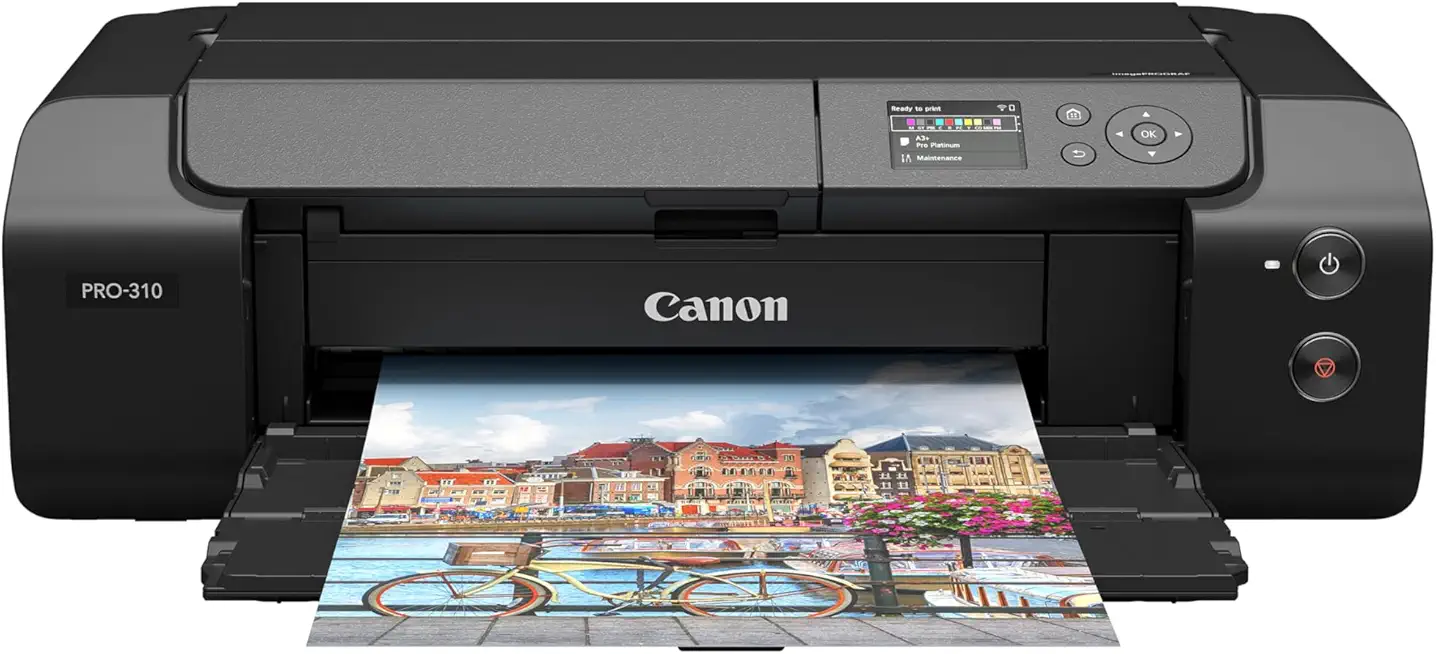
Canon imagePROGRAF PRO-310 13-inch Photo Printer (9-color pigment)
Professional nine-color pigment printing delivers exceptional color accuracy, deep blacks, and archival quality for photographers and artists seeking gallery-standard 13-inch prints.
Check PriceThe Canon imagePROGRAF PRO-310 is a studio-focused desktop printer built around a 10 LUCIA PRO II pigment ink set and Canon’s Chroma Optimizer. As a photographer, I appreciate that combination because the Chroma Optimizer improves scratch resistance and reduces bronzing, giving prints that look consistent under different lighting and handling.
It delivers borderless prints up to 13″ x 19″ (A3+) and can handle media up to 380gsm, so heavyweight fine-art papers and archival stock are no problem. Image quality is outstanding for fine art and professional photography, with ultra-detailed results and smooth color transitions that beat the older PRO-300 in black density and color uniformity.
The PRO-310’s compact footprint makes it easy to fit into a small studio or home workspace without sacrificing professional-grade output. That said, it is very slow compared to lab or production printers, so expect long print times if you’re producing large runs or quick turnarounds.
Be aware of operating costs: the PRO-310 has higher ink consumption and replacement cost than some competitors, so it suits photographers and artists who prioritize archival quality and color accuracy over speed and low running costs. If your workflow is centered on gallery prints, limited editions, or client proofing where quality matters most, this is an excellent choice. If you need high throughput or roll-feed capability, look elsewhere.
- Exceptional ultra-detailed image quality and smooth color transitions
- Durable pigment inks with excellent light and scratch resistance
- Compact for a professional-grade printer
- Improved black density and color uniformity via Chroma Optimizer
- Slow print speed
- High ink usage and refill cost
2. Epson SureColor P700 Overview

Epson SureColor P700 13-inch Printer
Compact fine-art printer produces stunning detail and wide color gamut for museum-quality 13-inch photographic and fine art prints with smooth gradations.
Check PriceAs a working photographer, the Epson SureColor P700 has become my go-to for vibrant, gallery-ready prints that don’t need a production line. It uses UltraChrome HD pigment inks in a 9-color plus matte black layout and includes a gloss optimizer, which together deliver striking vibrancy and excellent depth on glossy stocks.
The P700 supports media up to 13″ x 44″ and thicknesses to 1.5mm, so it’s genuinely useful for panoramic and long-format work thanks to practical roll-paper support. That roll capability makes it easy to print panoramic landscapes or long runs without stitching or seams.
Out of the box the color gamut is wide and punchy, though it can be slightly less color-accurate until you manually calibrate profiles. Once you’ve completed the initial setup and profiling, the printer becomes more ink-efficient in real use, but be aware the initial ink priming consumes a large portion of the starter ink.
Cartridges are expensive, which affects long-term operating costs—so this is best for photographers who prioritize vibrant, large-format prints and are prepared to invest in consumables. The gloss optimizer is a real plus for glossy media; it improves surface uniformity and perceived depth in highlights and blacks, making prints look more professional on display.
- UltraChrome HD: vibrant, wide gamut color
- Roll-paper support up to 13″ x 44″
- Better ink efficiency after setup
- Gloss optimizer improves surface uniformity
- Initial ink priming wastes significant ink
- High cartridge prices raise operating costs
3. Canon PIXMA PRO-300 Overview

Canon imagePROGRAF PRO-300 13x19 Photo Printer
High-resolution 13x19 output with rich tonal range, precise detail, and long-lasting inks ideal for professional photo and exhibition prints.
Check PriceAs a photographer who prints my own work, the Canon PIXMA PRO-300 stands out for its 12-color, 100% pigment ink system that delivers notably rich blacks and very smooth gradient transitions. The pigment set gives gallery-quality, archival-looking prints up to 13″ x 19″ (A3+) on glossy, luster, and metallic papers, which is exactly the size and media I use for fine-art editions and client proofs.
The PRO-300 is compact enough for a desktop studio, so it fits comfortably in small workspaces without feeling like a compromise on image quality. In practice it rivals larger, more expensive printers by producing consistent, high-quality output that photographers and artists consistently praise.
If your workflow prioritizes color fidelity on heavier fine-art stock, this printer handles thicker papers very well and keeps ink laydown looking controlled and detailed. That said, it is on the slower side, so it’s best suited to low- to medium-volume production where print quality is more important than speed.
One limitation to be aware of is the lack of roll-feed or continuous media support, so large panoramic runs or banner work aren’t possible without switching to a different model. For photographers and artists who need A3+ archival pigment prints from a compact, reliable desktop unit, the PRO-300 is a strong, practical choice.
- 12-color 100% pigment ink — rich blacks
- Gallery-quality up to 13″ x 19″ (A3+)
- Handles heavier fine-art papers well
- Compact desktop footprint, consistent output
- Slower print speeds
- No roll-feed/continuous media
4. Epson EcoTank ET-8550/L8180 Overview

Epson EcoTank Photo ET-8550 All-in-One Supertank Wide-format Printer
Refillable supertank all-in-one delivers low-cost, wide-format photo printing with wireless connectivity, scanning, and vivid, lab-quality color.
Check PriceAs a working photographer who also handles client print runs, the Epson EcoTank ET-8550 (L8180 in some markets) feels like a practical studio workhorse. It uses a hybrid ink system with a pigment black and dye-based color inks, so your blacks are smudge-resistant while colors stay vibrant.
The refillable ink tanks are a standout. They dramatically reduce running costs compared with cartridge systems, which matters when you print proofs or client batches frequently.
Print speed is decent, so it keeps up with small business workflows without constant bottlenecks. I found it reliable in routine use for photos, marketing materials, labels, and light art prints.
Where it falls short is archival permanence. The dye-based color inks don’t offer the same longevity as a full pigment set, so I wouldn’t use this for museum-grade fine art or portfolios destined for long-term archival display.
For photographers who need versatility and low operating cost, it’s an excellent compromise. It’s particularly good for small businesses and home offices that require durable black text and vibrant photo prints without high ink bills.
If your priority is absolute pigment-based color permanence and gallery-quality archival prints, consider a true pigment-only solution. But if you want dependable output, low ink cost, and the flexibility to produce both documents and attractive photos, the ET-8550/L8180 is a smart, cost-effective choice.
- Very low ink cost due to refillable tanks
- Durable pigment black with vibrant dye colors
- Suitable for small business or home office photo needs
- Reliable performance and decent speeds
- Dye-based color inks offer less archival permanence than pure pigment systems
- Not designed for archival fine art; better suited to everyday photo/document prints
5. Epson SureColor P7570 Overview
Epson SureColor P700 13-inch Printer
Advanced media handling with precise droplet control for smooth gradients, deep blacks, and impressive color fidelity on 13-inch fine-art papers.
Check PriceAs a studio photographer who prints large fine-art editions, the Epson SureColor P7570 feels purpose-built. It’s a 24″ professional printer using the UltraChrome PRO12 pigment ink set and prints at 2400 x 1200 dpi, which delivers the kind of sharpness and color precision you need for gallery work and high-end client commissions.
The UltraChrome PRO12 inks give excellent archival stability and rich tonal gradations, so blacks and neutrals hold detail without looking muddy. At 2400 x 1200 dpi the micro-detail in shadows and highlight transitions is noticeably clean, making this printer ideal for photographers focused on fidelity and longevity.
Workflow-wise, Epson added practical studio features: an automatic rotary media cutter, borderless printing, and a responsive touchscreen interface that speed up production and reduce manual trimming. The P7570 also supports flat media feed — I’ve used prepared aluminum sheets and other rigid substrates with great creative results that you can’t get on regular desktop printers.
Do note the practical caveats. Some users report paper feed issues with non-Epson media, so if you rely on third-party fine-art papers expect to spend time testing and adjusting feeds to avoid jams. Also, it has a larger footprint and requires a bit more maintenance than desktop models, so it’s best suited to a dedicated studio environment rather than a small home office.
Overall, if you’re a professional artist or photographer needing large-format archival pigment prints and versatile media handling (including flat media), the P7570 is mostly a very good match — just plan for maintenance and media testing.
- 24″ large print width
- UltraChrome PRO12 pigment ink set
- 2400 x 1200 dpi sharpness
- Flat-media support + automatic cutter & touchscreen
- Paper feed issues with third-party papers (jams)
- Large footprint; greater maintenance
Evaluating Pigment Ink Print Quality
As a working photographer I treat print evaluation like proofreading a final story: it must read right at first glance and hold up over time. Technical specs matter, but what you see on paper — accurate color, deep neutral blacks and crisp detail — is the real test.
Start by checking color gamut and optical density. If you have access to a spectrophotometer or densitometer use it to measure gamut volume and maximum black density; if not, compare target images with known references. Look for smooth gradients and neutral shadow detail rather than abrupt shifts or crushed blacks.
How ink interacts with the paper changes everything. Coated papers, especially silica-coated stock, limit penetration and lateral spread so fine lines stay sharp and colors remain punchy. On uncoated or textured media you’ll see more dot gain and softer edges, so match substrate to the level of detail you need.
Edge definition and droplet spreading are easy to judge visually. Print high-frequency patterns and fine text to reveal feathering or haloing. If small details bloom or edges soften, switch to a different paper or adjust printer profiles to reduce droplet volume.
Durability is non-negotiable for archival work. Run simple water and smudge tests and, when possible, consult accelerated lightfastness data. These quick checks reveal whether a print will survive handling and display without unexpected fading or smearing.
Don’t forget the ink itself: viscosity, surface tension and particle size affect jetting and clogging. A stable dispersion means fewer nozzle problems and more consistent droplet formation — both vital for reliable, repeatable output.
Finally, combine instruments and the eye. Produce a small test suite — gamut patches, gray ramps, high-frequency detail and a gloss/bronze check — and create ICC profiles for each media. Keep notes on settings, so you can reproduce excellent results without guesswork next time.
Cost-Saving Tips for Pigment Inks
When I plan a print run I treat it like a lighting setup: take time up front and you save a lot later. Soft-proofing in Lightroom or Photoshop with the correct ICC profile prevents endless reprints. I also print small test strips to check color and density before committing to a full sheet.
Use draft or economy modes for proofs and only switch to high-quality when you know settings and paper are right. Reducing resolution slightly for large pieces that will be viewed at a distance can cut ink usage without noticeable loss. For test prints, crop to the most critical area rather than wasting a full sheet.
Paper choice matters more than most photographers realize. Coated and optimized fine-art papers keep pigment on the surface, so you need less ink to reach the same visual density. Heavier, high-coverage papers can also reduce dot gain, improving detail while saving ink in the long run.
Maintenance is a cost-saving habit. Regular light nozzle checks and scheduled, targeted head cleans prevent clogged nozzles that eat ink and time. Run periodic maintenance and replace parts before they fail; a little preventative care avoids waste and surprise reprints.
If operating costs are a top concern, consider printers with refillable tanks or hybrid systems for non-critical color work. Refillable systems dramatically lower per-milliliter cost and are great for test prints and high-volume runs. For gallery or archival prints I still prefer full pigment cartridges, but I use tanks for proofs and everyday jobs.
Finally, train anyone who touches the printer. Small errors—wrong paper feed, incorrect profile, or stray marks—become repeat jobs. Establish a simple checklist: profile loaded, paper selected, economy mode off for final prints. That discipline reduces wasted ink and keeps your prints consistent and profitable.
What People Ask Most
What is the best printer for pigment inks?
The best choice depends on your priorities such as image quality, media size, and operating cost. Choose a model that balances those needs for your workflow.
Which printers use pigment-based inks for photo and fine art printing?
Many professional and prosumer inkjet models from major manufacturers use pigment inks for photographic and fine art output. Look for dedicated pigment ink series in a printer’s specifications.
Are pigment inks better than dye inks for longevity and color stability?
Pigment inks are generally preferred for longevity and resistance to fading and smudging, making them a common choice for archival prints. Dye inks can offer vibrant color but typically have shorter permanence.
Can I use pigment inks for printing on glossy photo paper?
Yes, pigment inks can be used on glossy photo papers when the media and printer are compatible. Using papers and surface treatments designed for pigment inks helps achieve better gloss and surface uniformity.
Which Epson printers use pigment inks and are good for photos?
Epson’s professional SureColor line includes models designed for pigment-based photographic and fine art printing. Some Epson models also use hybrid systems with pigment blacks and dye colors for mixed workflows.
How do pigment inks affect print quality and archival life?
Pigment inks typically improve edge definition, black density, and resistance to water and fading, which enhances archival life. Final results also depend on the chosen substrate and printing process.
What features should I look for in a printer for pigment inks?
Look for a printer with a true pigment ink set, good media handling, and reliable maintenance features to minimize waste and downtime. Support for the paper types you use and onboard color management tools is also important.
Conclusion for Best Pigment Ink Printers
This guide distilled expert reviews and real-world feedback into a concise set of pigment-ink printer options that cover desktop fine-art, roll/long-format, low-cost hybrid, and large-format professional needs.
Use the product highlights, pros and cons, and ideal-buyer notes here to match a printer to your priorities—whether that’s ultimate image quality, media size, operating cost, or workflow versatility.
Keep in mind that test prints, regular maintenance, and thoughtful media selection will do more for long-term results than any single spec on paper.
If you want to improve your printing and photographic skills, please explore more articles on the site for practical tips and deeper guidance.
Have a question or need help choosing the right printer for your work? Leave a comment below and we usually reply within a few hours.





0 Comments