
Ever tried to film minute details only to end up with shaky, unwatchable footage?
Close-up video looks simple until every tiny tremor and missed focus ruins a take.
Choosing the best camera for close-up video is about more than resolution and marketing copy.
It comes down to stabilization, autofocus behavior, lens choices, sensor size and how the whole system feels in your hands.
In this guide we’ve selected five standout cameras that handle tight, detailed video work based on hands-on use and real-world feedback.
We judged each on how it performs handheld, its close-focus capabilities, color and grading flexibility, and everyday usability so you can pick what fits your workflow.
You’ll get a clear headline for each model, who it’s ideal for, and honest pros and cons gathered from users and field tests.
We also cover practical stabilization techniques and autofocus tips to help you get sharp, smooth close-ups without endless reshoots.
Whether you’re a product shooter, vlogger, or aspiring macro filmmaker, this guide aims to match tools to creative needs rather than forcing one-size-fits-all answers.
Read on to find the best camera for close-up video that fits your budget, shooting style, and desire for cinematic detail.
We distilled technical trade-offs and user experience into actionable recommendations so you can stop guessing and start shooting better close-ups.
Consider this your fast route to clearer, steadier, and more cinematic tight shots.
1. Panasonic Lumix GH5 and GH5 II

Panasonic LUMIX GH5M2 (DC-GH5M2) Micro Four Thirds mirrorless camera
Robust mirrorless powerhouse delivering cinematic 4K video, advanced image stabilization, and professional controls for demanding creators.
Check PriceThe Panasonic Lumix GH5 (and GH5 II) is a photographer’s and videographer’s workhorse for close-up video. It pairs a Micro Four Thirds sensor with excellent in-body image stabilization (IBIS), which makes handheld macro and tight close-up shooting surprisingly steady.
It records 10-bit 4:2:2 internally and can shoot up to 60fps in 4K, so you get lots of latitude for color grading and slow‑motion close-ups without external recorders. The open-gate video mode uses more of the sensor, reducing crop and giving a wider field of view for compositional flexibility when you’re close to your subject.
The fully articulating touchscreen is a practical boon for low and high-angle close-ups and for framing tight product or detail shots. Autofocus is solid, but many pros still prefer to pull or lock focus manually for critical macro work, so be ready to use focus peaking and magnified view when precision matters.
Real users love the GH5 for run‑and‑gun setups—IBIS often eliminates the need for a gimbal and lets you move quickly between shots. If you’re a semi‑pro videographer, vlogger, or content creator who values stabilization and robust internal video tools without stepping up to full‑frame, the GH5 family is a very practical choice.
- Exceptional IBIS for handheld close-ups
- 10-bit 4:2:2 internal video for grading
- Open-gate mode minimizes crop for wider close-ups
- Fully articulating touchscreen and robust video controls
- Autofocus can be inconsistent for close-up work
- Micro Four Thirds sensor gives less natural background blur than full-frame
2. Sony Alpha A7 IV
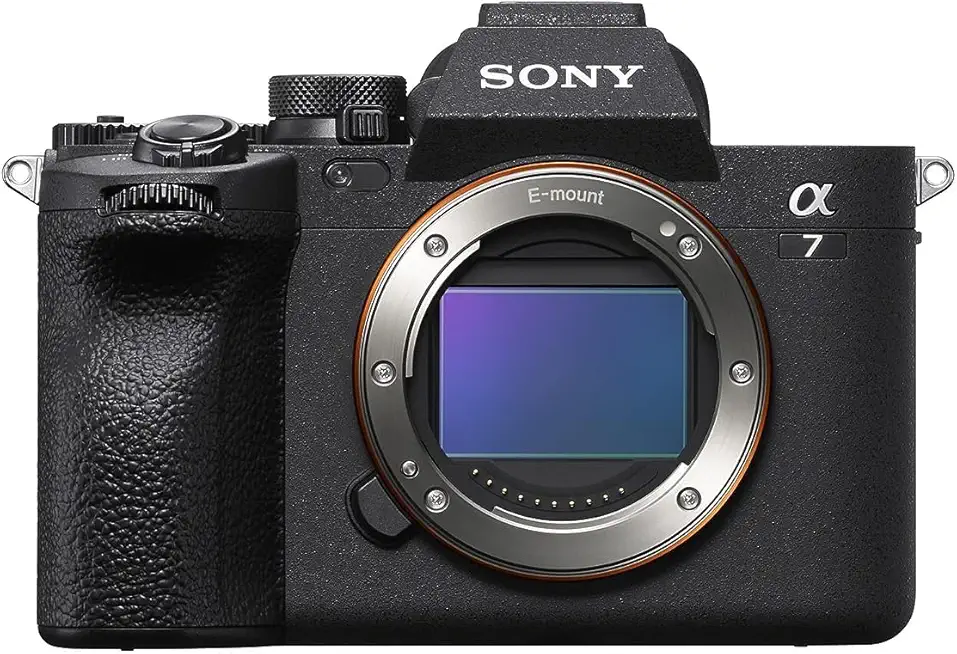
Sony Alpha 7 IV (A7 IV) full-frame mirrorless camera
Versatile full-frame hybrid with high-resolution stills, exceptional autofocus, and cinematic 4K video for creators and professionals.
Check PriceThe Sony Alpha A7 IV is a full‑frame workhorse built around a 33MP sensor that delivers low noise and excellent detail — exactly what close‑up video needs. It records 4K at 60fps internally in 10‑bit 4:2:2, giving you plenty of latitude for color grading without hitting external recorders.
Autofocus is a standout: advanced real‑time AF including Eye AF for video makes close‑up tracking feel “rock‑solid” in real shoots. Pair that with Sony’s color science and the natural full‑frame bokeh, and the A7 IV really helps close‑up storytelling pop with subject separation and dynamic range.
There are tradeoffs to be aware of: the 4K 60fps mode incurs a crop of about 1.2x, which can limit your framing for wider close‑up compositions. IBIS is good, especially when you use stabilized lenses, but it’s not quite as forgiving handheld as the very best in‑body stabilizers, so plan your support for very tight macro moves.
As a photographer who shoots product and detail work, I find the A7 IV is terrific for creators who need hybrid photo/video performance, top‑tier autofocus, and cinematic image quality. If your priority is absolute run‑and‑gun handheld steadiness at the closest possible distances you may need a tripod, gimbal, or a stabilized macro lens to get the smoothest results.
- Outstanding autofocus performance
- Crisp, detailed 4K 60fps with natural full‑frame bokeh
- Excellent color science for cinematic close‑ups
- Wide availability of stabilized macro‑capable lenses
- 4K 60fps mode crops by about 1.2x
- IBIS slightly less effective handheld compared to Panasonic’s top stabilization
3. Fujifilm X100VI Camera

Fujifilm X100VI compact camera
Elegant compact offering a fixed high-quality lens, tactile controls and classic film simulations for effortless street and travel photography.
Check PriceThe Fujifilm X100VI is a wonderfully compact choice if you want a camera that feels deliberate in your hands and excels at close-up video. It sports an APS‑C X‑Trans CMOS sensor paired with a fixed 35mm‑equivalent f/2 prime, and it can focus down to roughly 10 cm — ideal for tight, intimate framing without awkwardly moving the camera closer.
In practice the prime lens is impressively sharp up close, rendering subjects with clean detail and a pleasing, smooth bokeh that separates your subject from the background. Fujifilm’s Film Simulation color profiles give you beautiful in-camera color and texture, so many clips already look finished straight off the card.
Tactile controls and a retro-styled body make it easy to grab and shoot, which is why I reach for it on street and documentary jobs where quick, creative close-ups matter. Subject-recognition autofocus with tracking is reliable for handheld work, so you can stay mobile and still keep tight subjects locked and steady.
Where it trips up is flexibility. The fixed lens means you must move for framing changes, and there’s no zoom to cheat a shot. The smaller, fixed setup also limits external lens options if you later want to expand your toolkit.
If you prioritize a small, capable camera that gives great close-up detail, signature Fujifilm colors, and a tactile shooting experience, the X100VI is a strong pick. If you need zoom flexibility or interchangeable lenses, it may feel restrictive.
- Sharp close-ups with smooth bokeh
- Close focus to ≈10 cm
- Film Simulation color profiles
- Compact, tactile retro body
- Fixed lens — no zoom flexibility
- Smaller sensor and fixed prime limit lens options
4. Canon PowerShot V1

Canon PowerShot V1
Portable pocket camera with user-friendly controls, fast autofocus and vibrant images ideal for everyday moments and casual content creation.
Check PriceAs a video-first compact, the Canon PowerShot V1 stands out with a larger 1.4‑inch type sensor and a design clearly aimed at creators. The vari-angle touchscreen and video-focused layout make framing and monitoring close-up shots straightforward on the fly.
Video specs are useful for close-up work: full-width 4K 30fps for wide-angle close-up framing, and 4K 60fps when you need higher frame rates (though that mode is cropped). The 16–50mm equivalent wide-angle zoom gives flexibility, especially for environmental close-ups and vlogging where context matters.
Stabilization is handled by a mix of optical and digital systems, which generally smooth handheld footage and pair well with the camera’s compact form. There’s also a built-in ND filter, which is a practical tool for maintaining shallow depth and clean exposure in bright conditions while working close to subjects.
Real-world feedback shows the camera delivers detailed, smooth 4K close-ups thanks to the larger sensor and video features. However, the ultra-wide zoom can limit traditional tight macro framing, so if you need very close, narrow shots you might feel constrained. Some users also report digital stabilization artifacts in certain situations, so test movement-heavy sequences before committing to a shoot.
All told, the PowerShot V1 is mostly a great pick for serious vloggers and video creators who want a compact, versatile camcorder that handles close-up 4K well—especially wide-angle close-ups—while accepting a few trade-offs for very tight macro work.
- Larger 1.4‑inch sensor improves close-up image quality and detail
- Built-in ND filter aids precise exposure control for macro filming
- Effective combination of optical and electronic stabilization
- Full-width 4K 30fps offers wide-angle close-up framing
- Wide zoom range may be limiting for some close-up photo needs
- Digital stabilization can introduce unnatural motion artifacts
5. Sony ZV-E10 Camera

Sony ZV-E10 (ZVE10KB) APS-C mirrorless camera kit
Designed for creators, this compact interchangeable-lens kit offers superior autofocus, clear audio options and lightweight handling for confident vlogging.
Check PriceThe Sony ZV-E10 is a tiny workhorse for close-up video, and as a photographer I find its strengths make it a very practical choice for creators who want sharp, detailed footage without hauling a full kit. It uses an APS‑C sensor (same as Sony FX30), so you get good detail and low noise at near distances while keeping the body lightweight for handheld and vlogging setups.
Autofocus is a standout — real-time Eye AF and strong subject tracking mean you can focus on composition and movement, not constant focus pulls. The flip-out screen helps with tight framing and self-shooting, and the interchangeable-lens system gives you real options for macro focal lengths when you need tight close-ups.
For color and grading, 10‑bit color and S‑Log3 are big positives. They let you push shots in post for a cinematic look, which is rare in cameras at this price/size. Keep in mind the 4K modes: it records 4K at 24/30fps natively, and 4K 60fps is available but with a slight crop — so your framing changes a bit if you want higher frame rates.
The main trade-off is stabilization. The ZV-E10 offers only digital stabilization, which can limit smooth handheld close-up moves; you’ll want a tripod, brace, or gimbal for serious macro tracking. Overall, for beginners to intermediate videographers and vloggers who value reliable AF, lens flexibility, and grading tools, the ZV-E10 is a very compelling, mostly positive choice.
- Extremely reliable autofocus (Real-time Eye AF)
- APS‑C sensor — detailed, low-noise footage
- Interchangeable lenses for tight close-ups
- 10‑bit color and S‑Log3 for grading
- Only digital stabilization — not ideal for handheld macro
- 4K 60fps has a slight crop, reducing field of view
Stabilization Techniques for Close-Up Video
Close-up video magnifies every twitch. Tiny hand movements become obvious blur or loss of focus, so stabilization isn’t optional — it’s central to getting usable footage. Think in millimeters: what feels steady at arm’s length often isn’t when you’re filling the frame.
Start with your body. Bring the camera close to your chest, tuck your elbows in, and breathe with your hands. A snug strap gives you a third contact point and surprisingly steadies long takes.
When you can brace, do it. Plant elbows on a table or rest the camera on your knee while seated, and learn the simple “elbow plant” and subtle knee-bend that reduce micro-bounce. These small supports often beat fancy tools for static close-ups.
For movement, walk like a ninja: heel-to-toe steps, knees soft, and move through the legs and core rather than bouncing from the shoulders. Gimbals smooth rotational jitter beautifully but can struggle with tiny lateral shifts at macro distances, so consider mounting a gimbal on a tripod or combining it with a slider for precision moves. Electronic stabilization helps, but remember it crops the image and can introduce artifacts.
Finally, plan for post. Shoot a touch wider and at a higher frame rate when possible so stabilizers and reframing tools have room to work. For the tightest macro work, a solid tripod and a fluid head or a simple towel slider will give you the repeatable, rock‑steady motion that makes close-up video look professional.
Autofocus Tips for Close-Up Video
Autofocus is both a blessing and a headache for close-up video. When you’re working within millimeters of your subject, the AF system is being asked to make tiny, high-stakes decisions. Accept up front that you’ll toggle between AF and manual depending on the shot.
Start with continuous AF (AF‑C/Servo) and enable focus peaking if your camera offers it. AF‑C will follow slow, planned movements, while peaking gives visual confirmation of the sharpest edges so you can override the system before a clip is ruined.
Minimize movement. Tiny shifts in camera or subject will trigger hunting, so plan motions along the focal plane and move smoothly. Use a tripod, a shoulder brace, or plant elbows against a surface to keep the AF from chasing noise created by your own hands.
If autofocus struggles, switch to manual without shame. Magnified live view plus focus peaking is one of the most reliable ways to nail tack‑sharp close-ups. For repeatable shots, pre‑focus at the correct distance and then lock focus or mark the focus ring with tape.
Pick lenses with fast, quiet motors — linear or voice‑coil types — to reduce hunting and audible focus noise during recording. For static subjects, lock focus entirely; for planned focus pulls, use a follow‑focus or a controlled wheel to move between two marked points rather than relying on AF to interpolate.
When tracking a moving subject, choose a small AF area or single-point tracking and use back‑button focus so you can start and stop tracking predictably. Finally, for complex close-up sequences consider focus stacking or incremental pulls in controlled setups where you can repeat the movement exactly.
These techniques turn autofocus from an occasional annoyer into a practical tool. Mix AF‑C with manual finesse and you’ll get crisp, cinematic close‑ups far more often than by trusting autofocus alone.
What People Ask Most
What is the best camera for close-up and macro video?
There is no single best camera; the right choice depends on whether you prioritize stabilization, autofocus, sensor size, or lens options. Pick a body that pairs well with close‑focusing lenses and the shooting techniques you plan to use.
Which camera is best for shooting close-up product videos?
Cameras that deliver sharp detail, reliable stabilization, and flexible framing tend to work best for product work. Interchangeable‑lens systems with good macro lenses or compact cameras with strong close‑focus performance are common choices.
What camera features are most important for close-up video?
Stabilization, accurate autofocus or good manual‑focus aids, and lenses that allow short focusing distances are key features. Helpful additions include articulating screens and internal video tools that simplify composition and workflow.
Can mirrorless cameras shoot better close-up video than DSLRs?
Mirrorless bodies often offer advantages like real‑time focusing aids and more compact handling that make close‑up work easier. DSLRs can still produce excellent results, so the decision should be based on specific features and lenses rather than format alone.
Which cameras offer the best autofocus for close-up video?
Models with proven continuous AF and reliable subject tracking are generally the most consistent for close‑up work. Always test AF performance with the specific lens and subject distance you plan to use, as close ranges can challenge any system.
What camera is best for close-up video for YouTube and vlogging?
For vlogging, prioritize a camera with dependable autofocus, good stabilization, a flip‑out screen, and lens flexibility or a useful fixed lens. Lightweight, video‑focused systems often provide the best balance for handheld, run‑and‑gun close‑up shooting.
How do I get sharp, detailed close-up video with my camera?
Combine steady support or stabilization with careful focus control using focus peaking or magnified live view, and ensure clean, even lighting to reveal fine detail. Plan movements along the focal plane and lock focus for static subjects to avoid hunting during takes.
Conclusion for Best Close-Up Video Cameras
Choosing the right camera for close‑up video is about balancing stabilization, autofocus, sensor size and bokeh, lens flexibility, and internal recording options—each model in this roundup favors different priorities.
Pick by what matters most to your workflow: IBIS and run‑and‑gun stability, a full‑frame look with top AF, a compact fixed‑lens with signature color, a video‑centric compact with handy exposure tools, or interchangeable‑lens flexibility with reliable AF.
Whichever body you choose, pair it with the stabilization and autofocus techniques discussed above—stable body positioning, bracing, thoughtful walking, gimbals or tripods, and using AF‑C or manual focus with peaking will make the biggest practical difference.
Practice the suggested workflows, shoot slightly wider when planning stabilization or post‑stabilization, and experiment with frame rates and grading to get the sharp, cinematic close‑ups you want.
If you want to keep improving your close‑up video skills, read more articles on the site to explore techniques, comparisons, and hands‑on tips tailored to your needs.
Have a question or want to share your setup? Leave a comment below and we usually reply within a few hours.



0 Comments