
Looking for the best instant camera for kids that’s sturdy, simple to use, and actually sparks creativity?
The right kid-friendly camera can turn ordinary afternoons into storytelling sessions and instant keepsakes.
It should be tough, safe, and easy enough for small hands to operate without parental rescue.
This article compares five kid-focused cameras across a variety of styles, including instant-print hybrids, thermal printers, and digital toy cameras.
We evaluate how they perform in real play scenarios.
And we weigh durability, ease of use, print costs, and which extras actually matter to kids.
Safety matters here as much as fun.
We’ll cover materials, battery options, and print technologies so you can avoid hidden hazards and ongoing expenses.
We also look at ergonomics and simple controls that help kids shoot more and struggle less.
The buying guide breaks down which camera types suit toddlers, preschoolers, and older children.
You’ll get practical advice on size, grip, battery life, and whether previewing images before printing is a must.
And we explain the trade-offs between novelty features and long-term usefulness.
Flip to the FAQ if you’re curious about film versus digital prints, age recommendations, or simple maintenance tips.
By the end you’ll be ready to pick a camera that gets used, loved, and stuffed with memories.
1. Fujifilm Instax Mini LiPlay

Fujifilm INSTAX Mini LiPlay Hybrid Instant Camera
Capture high-quality photos, edit with fun filters, and print instant credit-card-sized memories on the spot.
Check PriceAs a photographer who often shoots with both digital and instant formats, the Fujifilm Instax Mini LiPlay feels like a clever hybrid for kids and families. It pairs a 5 MP sensor with a credit-card-sized printer and an LCD preview screen, so kids can see shots before committing to a print. This preview-before-printing is a practical feature that cuts down on wasted film and teaches basic composition without the cost of blind prints.
The LiPlay also offers Bluetooth smartphone printing and a companion app that adds frames and filters, which makes it fun and flexible for creative play. Three customizable shortcut buttons simplify operation for younger hands, while USB-C charging avoids the hassles of disposable batteries. At 5 MP, image detail is adequate for the small Instax prints most users want.
One standout novelty is Sound Mode, which prints a 10-second audio clip as a QR code on the photo. It’s a delightful way to capture a moment’s atmosphere, though the workflow requires cloud upload and scanning to hear the audio, so it’s not as instant as the camera itself. Still, kids enjoy the idea of “talking photos.”
Be realistic about limitations: Instax-style prints favor bold, punchy color but lack fine detail and struggle in low light. Autofocus is somewhat slow, uses a single AF point, and there’s no zoom—so fast action or distant subjects can be challenging. For everyday family snapshots, creative play, and scrapbooking, the LiPlay is mostly a strong, kid-friendly choice that balances instant gratification with modern conveniences.
- Preview images before printing
- Fun filters, frames, and Sound Mode
- Compact and lightweight; USB-C charging
- Can print from smartphone via Bluetooth
- Audio QR code printing not very instant or intuitive
- Limited low-light performance and slow autofocus
2. Kidamento Model K – Zippy the Sloth

Kidamento Kids Digital Camera Model K Zippy the Sloth with 32GB memory card
Durable, kid-friendly shooter with large memory, easy controls, and playful design for hours of creative photography.
Check PriceThe Kidamento Model K — Zippy the Sloth is a kid-focused digital camera with an 18 MP sensor and a touchscreen interface. It’s built around a simple one-button operation and a lightweight, durable body designed for rough handling.
As a photographer, I appreciate that the 18 MP sensor delivers detailed photos that let kids experiment with composition and cropping without immediately losing detail. The touchscreen is praised as intuitive for young users, so children can learn basic menus and playback quickly.
The one-button design keeps shooting instinctive, reducing frustration and wasted moments. Its durable, lightweight construction makes it a reliable everyday camera for active kids who drop or toss devices around.
The main trade-off is that this is a digital-only camera — there’s no instant-print capability. If you want the tactile instant-camera experience with physical prints, this won’t satisfy that expectation. But for families who want a straightforward, high-quality digital shooter that’s easy for kids to use, Zippy the Sloth hits the mark.
- Touchscreen makes it kid-friendly
- High resolution (18 MP) for detailed photos
- Durable, lightweight design
- Intuitive one-button operation
- No instant print option
- Lacks traditional instant-camera fun elements
3. Phomemo K22/K23 Thermal Instant Cameras

Phomemo Printer K23
Portable thermal printer for crisp labels, receipts, and stickers, with wireless connectivity and fast battery-powered convenience.
Check PriceThe Phomemo K22/K23 is built specifically for ages 3–8, and that focus shows in every detail. It uses thermal printing, so there’s no ink to worry about and prints are ready almost instantly—perfect for short attention spans.
Physically it’s compact and shockproof, with safe materials and intuitive controls that survive the inevitable drops and rough handling of little hands. As a photographer I appreciate how low running costs keep the creative play rolling—paper runs are about $0.05/print, so parents won’t wince at every snapshot.
Image-wise these are monochrome, black-and-white prints meant for play rather than fine-art results. The output is simple and charming, great for kids’ scrapbooks, stickers, and hands-on projects, but don’t expect rich tones or fine detail.
There’s basic app support that offers templates and limited editing, which helps kids add a playful frame or caption before printing. Still, the camera itself is easy to operate with very few buttons, so younger children can use it independently.
If you want a durable, low-cost instant camera that encourages kids to explore composition and storytelling, the Phomemo is hard to beat. If your goal is high-fidelity photos or full-color keepsakes, look elsewhere; this is designed for fun and learning first.
- Affordable, low-cost thermal printing
- Durable and kid-safe (shockproof, BPA-free)
- Easy for very young kids to operate
- No ink cartridges required
- Only black-and-white prints
- Limited app features and editing
4. HelloBaby Instant Print Cat Camera

HelloBaby Instant Print Kids Camera with 16GB SD card and 2 paper rolls
Child-safe instant camera that prints photos immediately; includes ample storage and extra paper for endless play.
Check PriceThe HelloBaby Instant Print Cat Camera is an unabashedly playful, toy-like instant camera shaped like a cat. It produces grayscale thermal prints on 3.5 × 2 inch paper and includes a 3.2-inch LCD screen so kids can preview shots before printing. The unit also packs entertainment extras — a built-in MP3 player, a light-up nose, and a rechargeable battery — that make it feel more like a gadget than a simple camera.
From a photographer’s perspective the trade-offs are clear. The camera leans heavily into novelty: prints are low-resolution monochrome thermal images and overall image and print quality are poor. Filter and digital zoom options exist, but they’re limited and generally ineffective, so don’t expect fine control or sharp results.
If you’re buying for a young child who wants instant physical photos and a cute toy, this hits the mark. The 3.2-inch preview screen reduces wasted prints, and the instant thermal printing is fun and immediate. The rechargeable battery is a practical touch for parents who prefer to avoid constant AA changes.
However, if you want photos with good detail, color, or clean prints without branding, this isn’t the camera for you. Prints include a non-removable watermark and are best viewed as keepsake stickers or craft material rather than archival snapshots. In short: great for novelty and entertainment; not for photo-quality work.
- Cute, playful cat design
- Instant thermal printing on 3.5 × 2 inch paper
- 3.2-inch LCD preview screen
- Built-in MP3 player and light-up nose
- Poor image and print quality
- Non-removable watermark on prints
5. VTech KidiZoom Duo FX
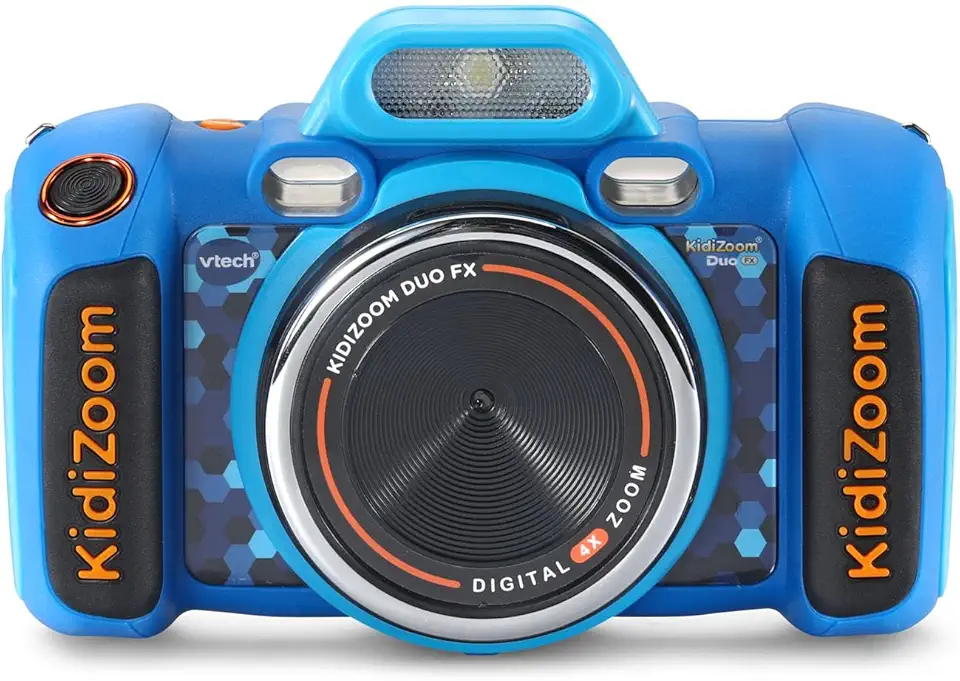
VTech KidiZoom Duo Camera FX
Dual-lens kids camera with video, playful effects, and durable design for creative play and learning.
Check PriceAs a photographer, I appreciate gear that survives real-world handling, and the VTech KidiZoom Duo FX is built with that in mind. It’s a rugged digital camera designed for ages 3–8 with drop resistance and kid-sized grips, so little hands can hold it confidently.
The Duo FX captures photos and video with a 2 MP sensor and offers multiple photo effects. Image quality is low-resolution and can look grainy, but that’s expected for very young users and still fine for play and casual snapshots.
One of its practical strengths is dual lenses (front and back), which makes selfies and regular shots effortless for kids. It also includes a voice recorder and four built-in games; these extras keep children engaged but can sometimes distract from taking pictures.
Operation is simple thanks to a kid-friendly interface and big controls. Parents often praise the tough construction and intuitive layout, which reduce frustration and extend the camera’s life under rough play.
Battery-wise, it runs on 4 AA batteries, so there’s no rechargeable option built in; that’s convenient for quick swaps but means ongoing battery cost and waste. Overall, the KidiZoom Duo FX works best as a fun, durable toy camera rather than a first “real” camera if you care about image quality.
- Durable, drop-resistant build
- Dual lenses for selfies and regular shots
- Includes four built-in games and voice recorder
- Kid-sized grips and simple interface
- Low-resolution, grainy 2 MP images
- Requires 4 AA batteries; no rechargeable option
Safety Considerations for Kids’ Instant Cameras
When kids are learning to look through a viewfinder, safety has to sit alongside fun. Choose cameras with rugged shells, rubberized edges, and built-in lens covers so an excited drop won’t crack the optics or leave sharp fragments behind.
Shock-absorbing designs and simple mechanical protections reduce repair bills and the risk of injury. Cameras with large, recessed buttons and shutter locks prevent accidental prints and keep little fingers from forcing moving parts.
Print technology matters as much as build quality. Thermal paper—common in kid-focused instant devices—can contain BPA or BPS, chemicals parents may prefer to avoid; look for vendors who specify BPA/BPS-free thermal paper or consider ZINK-style printers that produce color prints without inks or those hybrid models that preview on-screen before printing to cut down on paper handling.
Battery systems are another safety checkpoint. For toddlers, avoid models that require multiple disposable AAs; prefer rechargeable batteries or cameras with secure, screw-fastened battery compartments to prevent access to cells and choking hazards.
Ergonomics are often underrated. Pick a camera sized for small hands, with thick grips and rounded corners so kids can hold it steady without strain. Also inspect for small detachable pieces and decorative add-ons that could become choking risks.
Supervision and simple rules go a long way. Teach kids to use wrist or neck straps, store prints and paper away from mouths, and clean the camera with a soft cloth rather than liquids. Regularly check consumables and replace any paper labeled with unwanted chemicals.
As a photographer, I’ve learned that durability paired with sensible chemistry and secure power choices keeps both images and children safe. With a few smart checks, an instant camera can be a wonderful, low-risk introduction to seeing the world through a lens.
Choosing the Right Kids’ Instant Camera
Choosing the right instant camera for a child comes down to matching the gadget to their age, energy level and what you want the camera to do. Think less about specs and more about habits: will this be a rugged toy that survives sandy beaches and backyard drops, or a creative tool for scrapbooks and school projects? Decide whether you want honest play value (big buttons, fast prints) or a slightly more refined experience (preview screens, better image quality) that teaches composition and care.
Age matters. For toddlers (3–6) prioritize ultra-durable, lightweight designs with very simple controls and secure battery compartments. For older kids (7–11) look for better sensors, a selfie lens or filters, and expandable storage so they can experiment with framing and editing without running out of space.
Print technology is often overlooked but crucial. Color instant prints are lovely for keepsakes, while thermal or monochrome printing keeps running costs down — some thermal systems can be as little as a few cents per print. Prefer print options marketed as ZINK or BPA/BPS-free thermal paper to reduce exposure to potentially harmful chemicals.
Ergonomics and battery life make a big difference in real-world use. Cameras with thick grips, large shutter buttons and no tiny detachable parts are easier for small hands. Rechargeable solutions (USB-C) are more convenient and safer than multiple disposable AAs, especially for younger users.
Finally, look for practical features: a preview screen or simple digital zoom to avoid wasted prints, a shutter lock to prevent accidental exposures, and microSD support for long-term storage. Teach kids to hold the camera steady, look for simple light, and frame a subject close-up — those small lessons will make even low-resolution prints feel magical.
What People Ask Most
What is the best instant camera for kids?
The best camera depends on the child’s age and what you want from the experience, such as instant prints versus digital-only photos. Choose a model that balances durability, ease of use, and the kind of print technology or features your child will enjoy.
What age is appropriate for a child to use an instant camera?
Very young children benefit from simple, highly durable models with minimal features, while older children can handle cameras with better photo quality and extra functions. Match the camera complexity to the child’s coordination and interest level for the best experience.
Which instant cameras are easiest for kids to use?
Cameras with large buttons, one-button shooting, touchscreen menus, or preview screens are generally the easiest for kids to operate. Intuitive controls and clear ergonomics make learning faster and reduce frustration.
Do instant cameras for kids use real film or digital printing?
Both options exist: some models use instant film or hybrid systems, while others use thermal or digital printing methods. Thermal printing is inkless and often produces simple monochrome prints, whereas hybrid systems offer color instant prints or smartphone printing options.
What features should I look for in an instant camera for kids?
Look for rugged construction, simple controls, and safety-minded features like secure battery compartments and non-toxic materials. Useful extras include a preview screen, easy printing workflow, and support for expandable storage if the camera is digital.
Are instant cameras durable enough for kids?
Many kid-focused cameras are built to be shockproof and have rubberized edges or sturdy housings to withstand drops and rough handling. Still, novelty or toy-like models may be less durable, so check construction and protective features before buying.
Are instant cameras safe for children to use?
Safety depends on materials and design; choose models made from non-toxic materials and consider thermal prints labeled BPA- and BPS-free to reduce chemical concerns. Also prefer secure battery compartments and avoid units with small detachable parts for young children.
Conclusion for Best Instant Camera for Kids
This roundup distills five kid-friendly cameras into clear tradeoffs—instant-print versus digital, color versus monochrome printing, ruggedness, battery style, ease of use, and playful extras—so you can choose what matters most for your child.
Refer back to the model overviews, pros and cons, safety notes, and age-based buying tips to match a camera to your child’s hands, habits, and safety needs.
Keeping print technology and durability in mind will help you balance lasting fun with safe, affordable running costs and simple operation.
Want to improve your skills or learn more practical tips for using and caring for kids’ cameras? Read more articles on our site to pick up ideas and step-by-step advice.
Have a question or need a personalized recommendation? Leave a comment below—we usually reply within a few hours.




0 Comments